Waveboxapp: [Feature Request] Allow BrowserWindow to be splitted into more views
- Wavebox Version: 4.3.0
- Operating System & Version: Windows 10, 1803, 17134.320
This is quite personal feature, which maybe noone will ever use or implement, but let me introduce my workflow a bit 😃.
I am using third monitor setup (as seen bellow in awesome ASCII art 😍).
Main wider monitor for some work to do, Secondary for videos, browser, debugging, etc. And third is something like "status" monitor.
Now I usually have there Wavebox mini window on top, few stacked browser windows (github notifications; list and status of all travis and appveyor pipelines; realtime localhosts logs, consoles, ...); current song, something what need to be checked over time without much clicking.
Would be awesome if I could switched all these windows for one fullscreened Wavebox instance.
If it's out of scope / not possible or not on roadmap, I will search for other solution.
         ┌───────┐
         │ THIRD │
         └───────┘
┌─────┐┌────────────┐
│ SEC ││    MAIN    │
└─────┘└────────────┘
Normally looks like this, but more browser windows and enterprised appveyor account.

Also little off-topic:
Is there any way how to clear all notification in Wavebox mini and force it to stay always on top? 🤔
 Ash258
All 5 comments
Regarding wavebox mini....you can push it out as its own window. If you check the buttons on the lower left of the window you have open you will see a option that says "Open As Window" and that will place the wavebox mini bar as a window instead.
 nmat
on 18 Oct 2018
nmat
on 18 Oct 2018
Sure it can. As seen in screenshot (Separare window with title). But no option to force it to stay always on top.
Ash258
on 18 Oct 2018
The split screen is something we've talked about a few times and there is definitely a use case for it. In terms of technical difficulty, there aren't any hard blockers - just some logic change our end to handle having two tabs open side-by-side. As for actually implementing it, we haven't really made any legway on it yet.
Wavebox Mini, not at the moment. I'll see if I can squeeze it into the next beta cycle :)
 Thomas101
on 19 Oct 2018
Thomas101
on 19 Oct 2018
Tested on windows 10 and mac os mojave to undock wavebox mini and keep on top which works.
Also tested to clear notifications and that works on both also. Important to note that it does not clear notifications in windows activity bar or mac os notification main panels.
nmat
on 20 Oct 2018
Just a couple of updates on this one. There's a couple of additions to to the beta channel of Wavebox in version 4.4.2. If you want to give it a try there are some instructions on how to use the beta channel here.
In the mini-menu, right click on any of the notifications to clear the entire notification list...
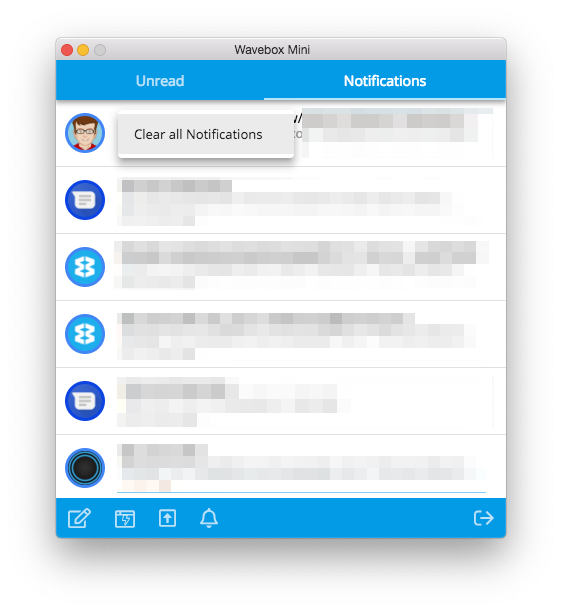
Right click on the
Dock to traybutton when in windowed mode to keep on top
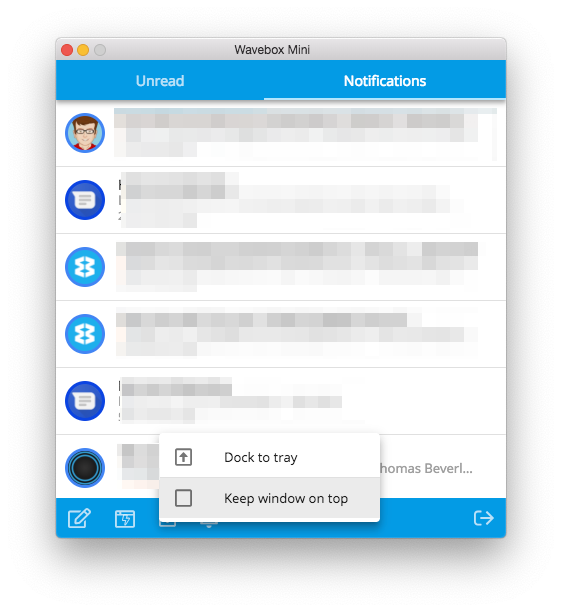
I'll keep this issue up to date as per the split view etc
Thomas101
on 23 Nov 2018
Related issues
 cdeutsch
·
3Comments
cdeutsch
·
3Comments
 dep
·
4Comments
dep
·
4Comments
 tnaseem
·
4Comments
tnaseem
·
4Comments
 phcyso
·
4Comments
phcyso
·
4Comments
 lots0logs
·
3Comments
lots0logs
·
3Comments
Most helpful comment
The split screen is something we've talked about a few times and there is definitely a use case for it. In terms of technical difficulty, there aren't any hard blockers - just some logic change our end to handle having two tabs open side-by-side. As for actually implementing it, we haven't really made any legway on it yet.
Wavebox Mini, not at the moment. I'll see if I can squeeze it into the next beta cycle :)