Waveboxapp: [Feature Request]: Combine Account URL and Service URL open with preferences
- Wavebox Version: 3.4.1beta
Is your feature request related to a problem? Please describe.
At the moment it can be a bit confusing how to open links inside wavebox. Not everyone knows the diffrence between account profile and service. Or if one of the other opens link in a new window or running tab.
Describe the solution you'd like
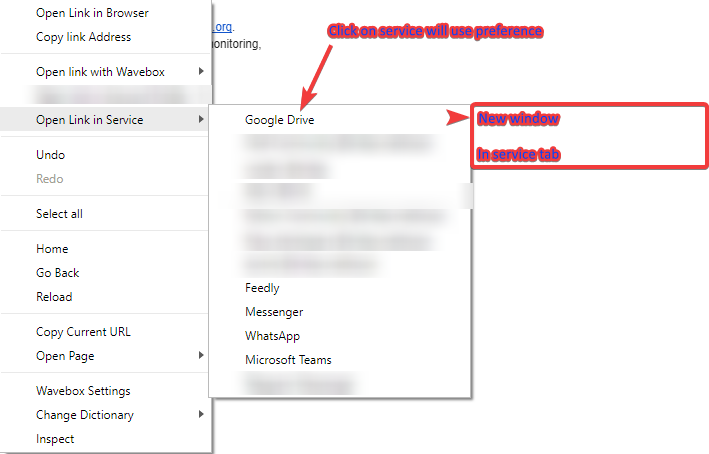
Preferences (open link in service):
Standard - Service Tab/Service New Window
On standard install the service link opens in window by default using credentials
On context menu:
Open in Service -> [service] -> Service Tab/New Window
(On [service] click follow preferences)
Additional info
Above is to cover both new window and current running service tab open preferences. On right click you can chose how to open the link but also be able to set standard setting for handling the link.
 nmat
nmat
All 13 comments
Hey, I Just want to check that I'm following you correctly on this one...
Open link in Wavebox
Leave this the same

Open link in service
Remove this
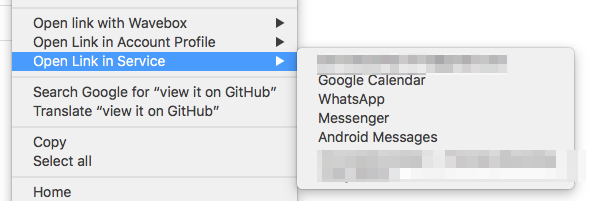
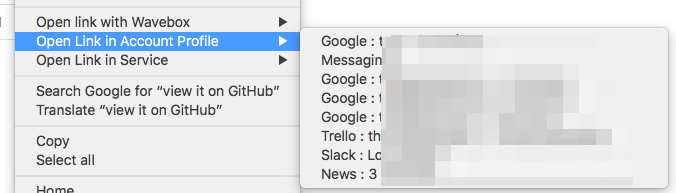
Open link in account profile
By default, keep the current behaviour. Have a setting that makes it do whatOpen link in servicecurrently does?
 Thomas101
on 15 Oct 2018
Thomas101
on 15 Oct 2018
Yes exactly. But have the option to open in new window or in service tab.
nmat
on 15 Oct 2018
How customizable would you need the setting? E.g...
- One Setting for the whole app
- A different Setting for each account (same way as new windows work now with default browser/wb)
- A different Setting for each service
- Something else? Url pattern matching?
Thomas101
on 15 Oct 2018
IMO the default setting should be a global behaviour.
So I would say whole app. But in the context menu have option to choose if you want to override that default behaviour.
nmat
on 15 Oct 2018
Is it that when clicking on a link you want it to automatically open up in an open service? For example...
You have two accounts, Gmail and Github. In an email you left-click on a link to https://github.com/wavebox/waveboxapp, it should switch to the github service and load the url?
Thomas101
on 15 Oct 2018
the functionality that is there now is good.
However its just the general Right click -> [confusing 2 menu options] that is keeping me at a loss for a bit. Since those "could" be combined in the way to say that you in the context menu open it in the tab or using the account profile (new window vs tab for service)
Example:
- Zendesk: Right click on the link, go to context menu open in account -> Account -> Current running service/new window with the account details
nmat
on 15 Oct 2018
Does this image make sense? (since it might be hard to read when hitting Ctrl or something to show the menu to overwrite the option in preferences)
nmat
on 16 Oct 2018
In the below gif you will see that I use total commander to show the first right click menu to get "standard" settings from right click menu.
On second right click I hold Alt+Shift then right click to show "more options" you can see then that Open in powershell etc is shown. That was the first idea I had for the service menu on holding Ctrl+Mouse over Google Drive for example to override the preference that is global.
In chrome for example I think you can use middle mouse button and it is hidden to open link in new tab. But like I also said I am open to ideas to make the menu easier to understand. :)

nmat
on 16 Oct 2018
Thanks, that's a lot clearer now. I'll have a look and see what we can do!
Thomas101
on 16 Oct 2018
Long term, I think the shift option for extra tools is the best way to go here. There's some investigation work we need to do around listening for keyboard events as the popout menu itself doesn't emit keyboard events but does gobble them up. This is probably a PR upstream on electron or chromium and could even depend on platform support.
The way it works at the moment makes it confusing. The difference between Account Profile and Service just isn't clear enough - even I can't remember the difference at a quick glance! We spoke at some length about how to name them and couldn't come up with anything that instantly stuck out. Because of this I'm not overly keen on pushing this out to stable in its current encarnacion.
What I've done, is change the way it works slightly to hopefully make it a little less confusing and then put the functionality under an advanced & experimental flag until we can hopefully get shift working...

The two menus are now collapsed into the main Open in Account Profile menu but with a sub-menu spanning out. It makes a little bit more long-winded and menu-y to get down to the end, but hopefully the clarity it gives makes up for this. You can also open up in sleeping accounts which wasn't available before (it will wake the account and load the url).
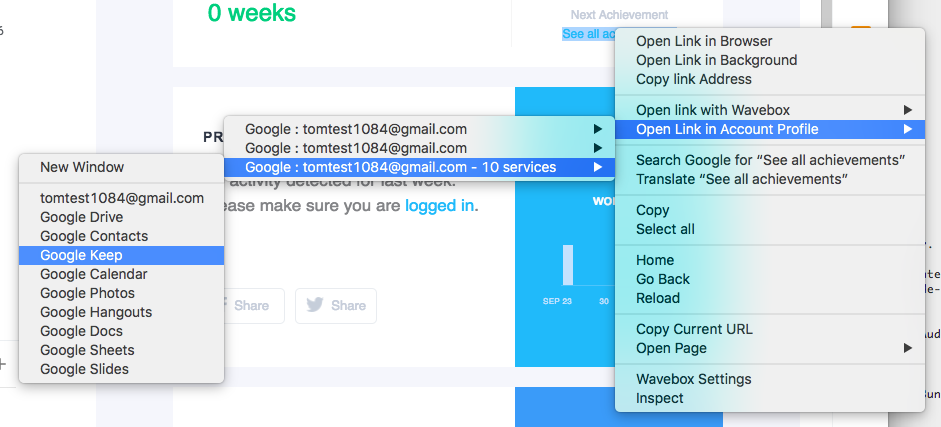
I'm hoping this gives us a good stop-gap until we can get shift or something else working :-)
Thomas101
on 17 Oct 2018
This is actually really good! Love it! Will definitely try it out more on beta release but tested just quickly here.
Also I agree its hard to know what is what when it comes to the naming. To share how I think or look at the accounts is that:
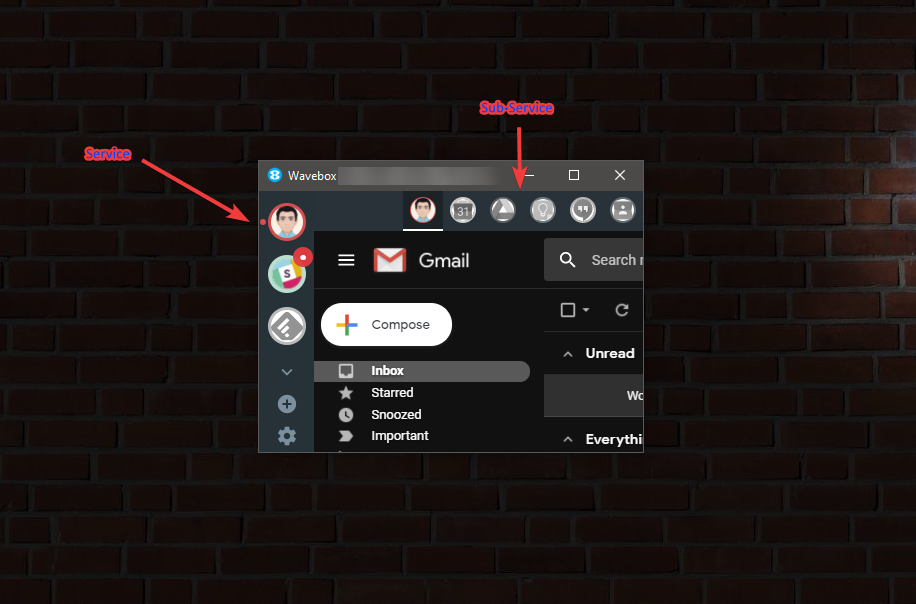
The registered account I also see still as "Wavebox Account" since its the "Registered Account". This is only my 2 cents. However I agree to 100% with what you are saying. It is less cluttered now and makes a bit more sense for the "view" of how wavebox is showing the services/accounts right now.
And I believe that you have better ideas then me. :)
nmat
on 17 Oct 2018
I've pushed the change out to stable - but will keep this issue open as there's more work we can do here! Thanks
Thomas101
on 18 Oct 2018
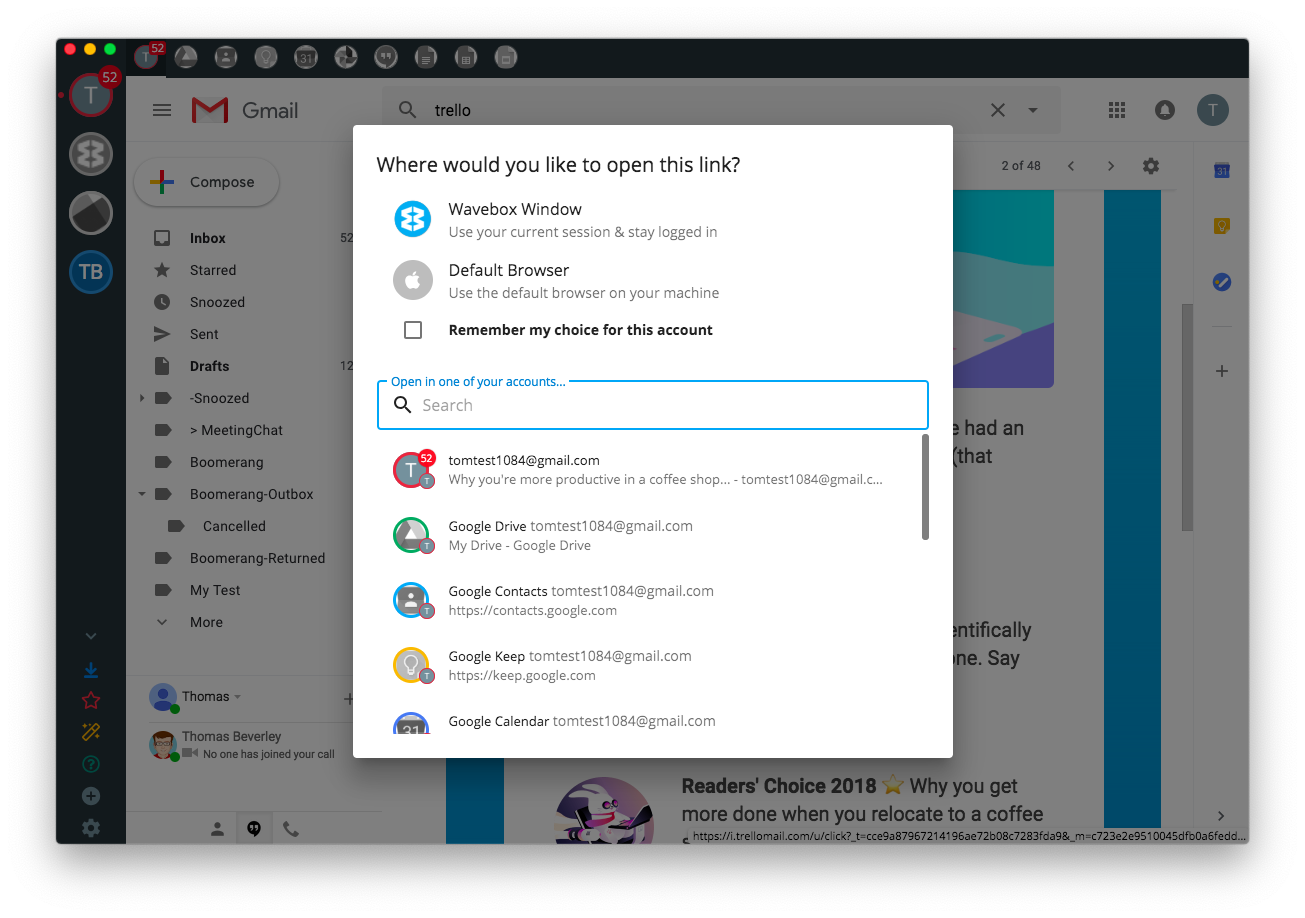
@nmat have you tried the new window options? If you head to Settings > Links you can pick to configure Shift + Click / Cmd + Click / Ctrl +Click to ask what to do when clicking a link...
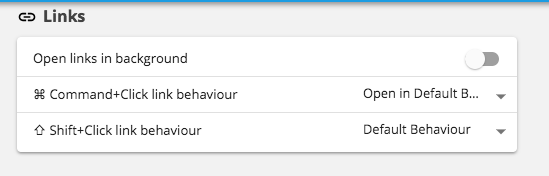
That will bring up a chooser which allows you to pick where you want a window opened :)
Thomas101
on 23 Jan 2019
Related issues
 cdeutsch
·
3Comments
cdeutsch
·
3Comments
 dctucker
·
4Comments
dctucker
·
4Comments
 Ash258
·
3Comments
Ash258
·
3Comments
 atrasatti
·
3Comments
atrasatti
·
3Comments
 phileasb
·
3Comments
phileasb
·
3Comments