Waveboxapp: Wavebox freezes on ubuntu when resolution changes.
- Wavebox Version: [e.g. 3.0.0]
3.14.6 - Operating System & Version: [e.g. Windows 10, Mac OSX 10.3.4, Ubuntu 17.10]
ubuntu 18.04 - (Linux only) Install method: [e.g. Debian installer, Snap Package, Tar, Apt-Repo, etc...]
snap - Account type (if applicable): [e.g. Gmail, Office 365, Trello, etc...]
all
Expected & actual behavior
I have a dell precision with a 4k display. Because ubuntu doesn't let you use different scaling on my external 4k monitors, I keep the laptop display on 1080p. This doesn't happen until I log in- the resolution on the lock screen is still 4k.
Any time the resolution changes, if wavebox is open, it freezes. I can still move the window around, minimize it etc... but I cannot click or interact with anything in the window. The only way out is to use the blue tray icon to close the app and restart.
Steps to reproduce
It happens to me 100% of the time when changing the resolution on the monitor that wavebox is on.
 pbecotte
All 10 comments
Hello, If possible can you do 2 tests?
- Turn off hardware or other advanced options in wavebox and see if any of them helps with the freezing?
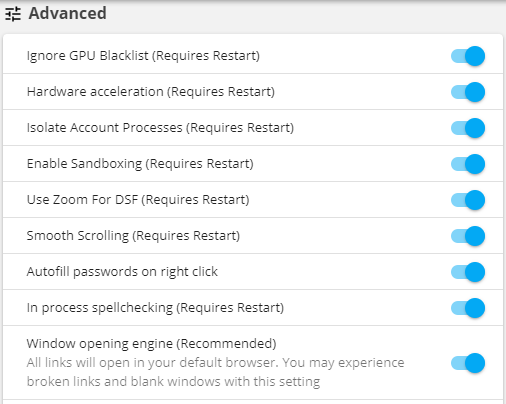
- Can you test to see if the .deb package does the same type of effect?
NOTE: Above image is from GIT and so it might look different then from what you have in stable.
 nmat
on 3 Aug 2018
nmat
on 3 Aug 2018
Good call. Disabled hardware acceleration, issue went away. (Isolate Account Processes was also disabled by default).
I then installed the .deb, and replicated the behavior. Same thing though, disabling hardware acceleration gets it to work properly.
pbecotte
on 3 Aug 2018
Do you know which GPU you have in your machine? I wonder if it's down to some incompatibility with that :-/
 Thomas101
on 8 Aug 2018
Thomas101
on 8 Aug 2018
Dell Precision 5520
VGA: Intel Corporation HD Graphics P630 (rev 04)
3D: NVIDIA Corporation GM107GLM [Quadro M1200 Mobile]
(I had expected the nvidia one to come up for both- don't know if this means I misconfigured something!)
pbecotte
on 8 Aug 2018
Thanks, I'll have a look to see if I can reproduce. We're working on bringing the beta channel of Wavebox to stable at the moment and this has a newer chromium version. There could be some fixes in there too for graphics related issues
Thomas101
on 10 Aug 2018
@pbecotte we've just released a new version (v4.0.0) of Wavebox with a new version of Chromium that will hopefully fix this. It would be good to know if it has fixed it for you. Thanks
Thomas101
on 10 Sep 2018
No, it actually was a bit worse (it was harder to kill it when it happened). Of course, it seems to run pretty well without the hardware acceleration...
pbecotte
on 12 Sep 2018
Okay thanks! Good to know that HW acceleration fixes it in the meantime.
I'll pop the electron-3 label on this for now, there's quite a big version jump in terms of Chromium for that one and it should have better compatability.
Thomas101
on 13 Sep 2018
Hi, I was just wondering if you've had a chance to try this with Version 4.5.0? It has an updated version of Chromium and we're hoping that this has fixed this issue. Thanks
Thomas101
on 5 Dec 2018
Gave this a shot and it appears to have resolved the issue. Nice! Will close this for now and come back if I see anything else related to this issue.
pbecotte
on 5 Dec 2018
Related issues
 lots0logs
·
3Comments
lots0logs
·
3Comments
 dzg
·
4Comments
dzg
·
4Comments
 CheechGe
·
4Comments
CheechGe
·
4Comments
 dctucker
·
4Comments
dctucker
·
4Comments
 tnaseem
·
4Comments
tnaseem
·
4Comments
Most helpful comment
Gave this a shot and it appears to have resolved the issue. Nice! Will close this for now and come back if I see anything else related to this issue.