Waveboxapp: Folders in Menu Sidebar
Wavebox Version: [e.g. 3.0.0]
3.14.8betaOperating System & Version: [e.g. Windows 10, Mac OSX 10.3.4, Ubuntu 17.10]
Windows10
Is your feature request related to a problem? Please describe.
Some information about what the problem is.
Not a problem yet. Hoeever, I am rapidly running out of space on the sidebar menu and although there is probably someway that this will be handled I can perceive some work-ability issues will arise.
Is your feature request related to an account type?
For example, a Gmail account or Trello account.
No
Describe the solution you'd like
Information about what you want to happen or like to see.
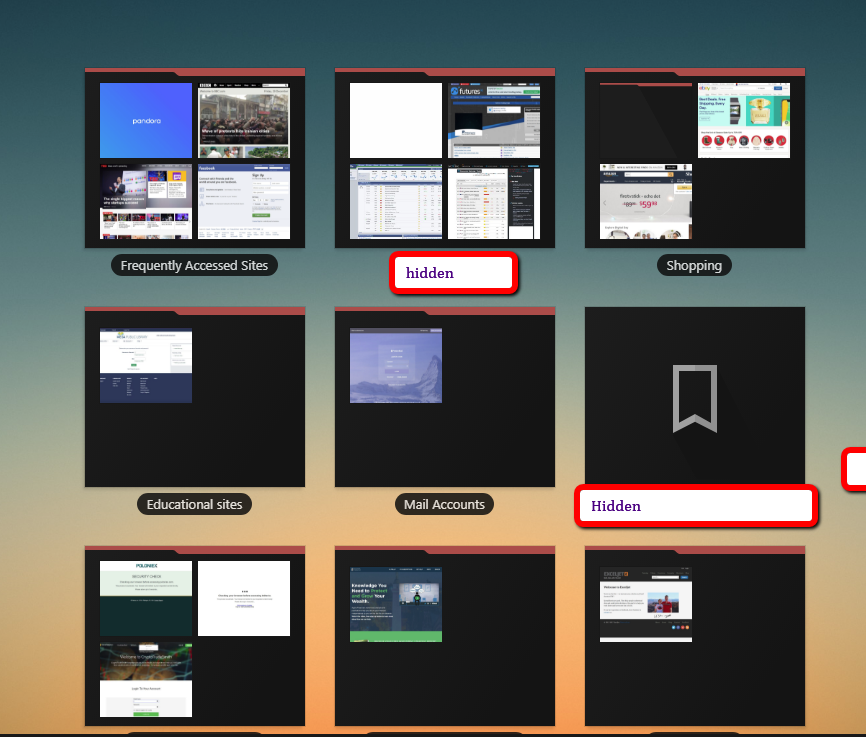
I would like the see the capability to put folders into the side bar where the actual application/websites could be added. These folders shall have several features as follows:
- the user shall be able to name and or rename the folders as desired.
- the folders shall have user selected colors
- the folders shall coexist with regular application icons on the sidebar
- the folders shall be capable of being re-ordered on the sidebar
- the folder entries shall be able to be moved/copied to other folders or directly to the sidebar
- entries in the side bar shall be able to moved/copied to folders
- the folder entries shall be edited (ie. to correct typos on website entries, ...) . this should be a feature on the regular sidebar too.
- folders shall be able to have subfolders
- navigation between folders or back to the sidebar shall be available
- a standard Folder Icon shall be used
Additional info
Any other information or screenshots that might help us.
for an example of this review the Speed dial add-ons (available in Vivaldi, and other browsers)
SSs can be provided if desired.
 CheechGe
All 17 comments
In the coming release of wavebox there is a possibility to add a service inside a service. You can read more about it here: https://github.com/wavebox/waveboxapp/releases/tag/v3.14.8
Is this the kind of option you are looking for?
 nmat
on 26 Jul 2018
nmat
on 26 Jul 2018
The beta channel does have quite a few new tools for arranging accounts and helping to handle lots of accounts. There's a blog post in the works for this, but just as an overview...
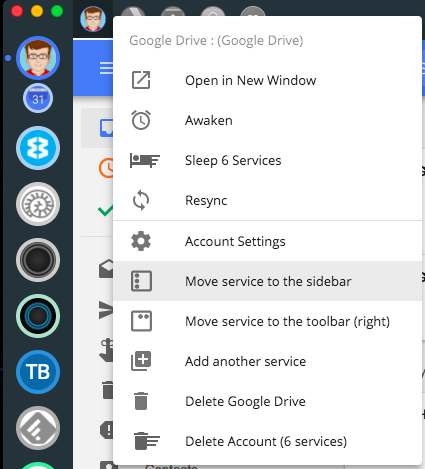
As @nmat said you can add services within other services via the right-click menu. Once added, if you head into the account settings each service and also the top-level account have the option of changing icons, names and colors.
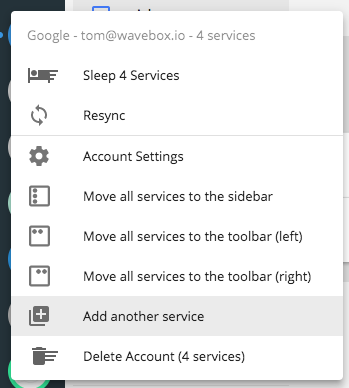
For organizing services within an account there's options to move individual services to the sidebar or toolbar, also via the right-click menu. Here I've got Calendar in the sidebar and all the others along the toolbar.
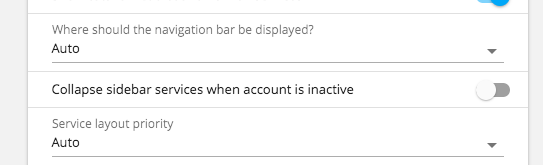
If you have one account with lots of items in the sidebar, there's the option to collapse the sidebar services when it's not in use - also under account settings. This means there will just the single top level account entry in the sidebar...
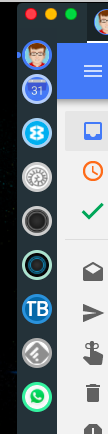
And finally if you've got lots in the sidebar you can change the size of it in the general settings under the UI section. Compact or tiny, will give you a more condensed look and help to keep things organized

An example of tiny mode
Do these help?
 Thomas101
on 26 Jul 2018
Thomas101
on 26 Jul 2018
Hi Thomas
I think I will need to digest that a bit more but from first glance I think it will accomplish what I was requesting. I have to get used to the different terminology here because it wasn't clear (to me) what the differences were between a service and an account.
To see if I understand this correctly I can have an account for say MIcrosoft and then have Word, Excel, PP, etc listed under the MS account? Using the same process but with websites can I create an account for News and then put individual News sites as a service under the News Account? Essentially that is how I organize websites using the browser add-on.
Will the blog post contain more step by step detail on how to use set this up the way you described as it is a bit confusing to a WB newbe? I was anxious to use the software so I just installed everything as a new account. Even though I saw the various items on the context menu for services I had no idea what they were for or how to use them. Anyway, in any event, I will look into this deeper.
CheechGe
on 26 Jul 2018
closed by mistake, reopened until I can see if playing around with the services satisfies the request.
CheechGe
on 26 Jul 2018
I did some testing with adding services to an account and understand it a bit more. This seems to work well for real cloud services however for websites it isn't quite the same as my request, at least from what I can determine so far, and if what is stated below please correct me.
- if an account is created from a weblink an entry is made on the sidebar. Other weblinks can then be added to the the account. Clicking on the sidebar entry will bring up the page associated to the account and whatever services were connected to the account will appear on the top menu bar in addition to the one associated to the account. Clicking on one of the service associated icons will cause that site to appear. One can switch back an forth by just clicking on the desired icon, which is nice.
Using the folder analogy, a folder would just be a container for web links and would not bring up any web page when clicked but would just populate the menu with the services connected to it. In other words going back to WB the account would just be a container for weblinks and would not have any web site associated to it and would simply populate the menu with the services defined to it.
One thing I noticed which may be a bug, if the same account icon was clicked again it resulted in the same service icon being populated in the menu bar (note that I only had one additional service defined for the account). But, clicking on these 2 service icons produced different results, sometimes. This may have occurred because of the way I set up the services and will need to be tested some more.
Overall this may work although my preference would be to have the Account simply be a container for the weblink services and populate the menu with the connected services rather than connect to a defined web site.
My next observation may be a little more difficult to resolve. I have not tested how this would work at this time so the comments below are based upon my understanding of the documentation on how to setup services
- According to the documentation services that are connected to an account must have the same logon credentials. The sites I tested with did not require a logon so they worked fine. However, sites that do require a logon, at least in my case, rarely if ever have the same logon credentials. Furthermore, if WB does put in the support for Lastpass it seems that in order to group websites under an account that this restriction would need to be handled differently.
All-in-all I believe that this mechanism could satisfy my enhancement request if some modifications could be made to handle things differently (optional of course).
I need to do more testing especially on the aforementioned "problem" with the inconsistencies when a menu icon is clicked. The results will be posted in this thread rather than start another issue.
CheechGe
on 26 Jul 2018
Not sure why the issue keeps getting closed as I am not doing it intentionally.
I see why that is happening. I was assuming that the "Close and Comment" button meant enter the comment and close the page and enter the comment and close the issue.
Can those buttons be reversed?
CheechGe
on 26 Jul 2018
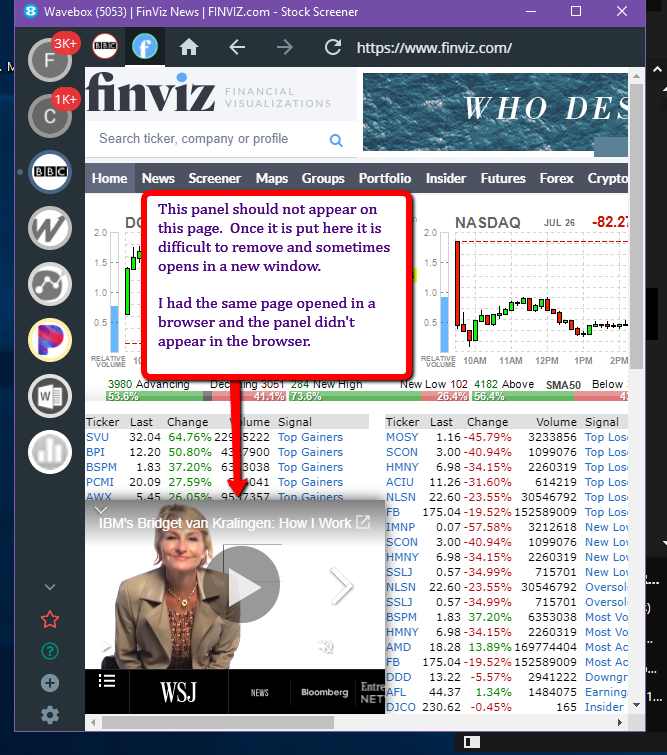
Initially I though that the panel showing up in the SS below was because something wasn't working correctly as that panel did not show up in my browser window that was opened to the same site.
What I believe caused the difference was that the browser has an adblocker add-on installed. Given the problem I had attempting to remove the ad panel from the WB site makes using sites that have ads in them (most of the news sites) are not suitable for WB, at least until such time that either a WB adblocker add-on becomes available or the ones installed in the browser can be made to work.
CheechGe
on 26 Jul 2018
Hmmmm are you trying to make wavebox being your browser so to speak? Instead of using for example chrome or other browsers? is that the initial thought?
nmat
on 26 Jul 2018
Yes, in certain cases I am putting frequently used sites in WB because
they get consolidated and managed in one place and are much easier to
use..I do not use WB when I am navigating or searching the web.
Isn't that part of what WB also does, or, is it only for websites that
have applications that are strictly cloud based? Am I misunderstanding the
what adding a website to WB means?
On Thu, Jul 26, 2018 at 5:32 PM nmat notifications@github.com wrote:
Hmmmm are you trying to make wavebox being your browser so to speak?
Instead of using for example chrome or other browsers?—
You are receiving this because you modified the open/close state.
Reply to this email directly, view it on GitHub
https://github.com/wavebox/waveboxapp/issues/740#issuecomment-408241806,
or mute the thread
https://github.com/notifications/unsubscribe-auth/ADfAB96EZ05Wy_lwwdH1fbPjOOchykopks5uKjWGgaJpZM4Vgf11
.
CheechGe
on 26 Jul 2018
I'll try and answer what I can out of this...
- Folders We don't have the ability to have accounts as a container at the moment, but we are still toying around with the UI a bit. One of the things we've spoken about is exposing the services in the account popover. With the current version, you could achieve something similar by pinning all the services to the sidebar - although this would swallow up a whole lot of room in the sidebar.
Sharing credentials this only really applies to accounts of the same type. For example when adding two slack accounts. Each of the accounts down the sidebar work like their own incognito window. Each with its own set of login details, cookies and so-forth. This gives Wavebox some great leverage when adding multiple Gmail accounts for example because you never end up logged into another account by accident.
If you add Gmail, Slack and WhatsApp into the same account everything should just work fine just as it does in the browser. On the otherhand if you add two WhatsApps into the same account because WhatsApp doesn't support multi-login you're going to be signed into the same account.
Wavebox 3.14.9beta which shipped on Wednesday has an option to sandbox a single account further if you come up against this, but from what you've described I don't think it will be a problem for you.
- LastPass We're hoping to add LastPass support during this beta cycle or the next. You can track progress of this here https://github.com/wavebox/waveboxapp/issues/728. In the meantime we do have some basic autofill tools that help when remembering passwords. More info
- Ad-blocking isn't something we're able to support right now, but we're keeping an eye on the tech stack to see if it's something we can add later
- Menu bug can you give a little more explanation on this one and maybe some steps to reproduce?
Thomas101
on 30 Jul 2018
OK, let me see if I can address your comments:
What I was suggesting here is that something like an account be added that was a container for other services, in my example it was a folder. Using Wavebox's terminology that this pseudo-account would be a container that would contain services. Clicking on the pseudo-account would cause a context menu to be displayed with the services set up in it, similar to what is placed in the menu bar when a real account is setup with multiple services. This might be one way of accomplishing the "folder" request.
I misunderstood that the accounts were of the same type.
Great.
Hopefully something will appear as these are a real problem with adding "just websites", especially news sites
5.I have not been able to recreate this problem. What had happened was the menu bar had 2 of the exact same icons. It is possible that I added a service twice while attempting to understand what services were as part of an account. Assuming this was the case one might ask why Wavebox should or if rt should allow the same site (where the URLs are exactly the same) to be added multiple times.
CheechGe
on 13 Aug 2018
@CheechGe Can you please update to latest beta to see if it would cover what you are asking for above? IMO the sandboxing really should cover the part of "folders" as you mention.
Regarding the custom websites, IMO I think that a request to have the extension support for ad blocker in that case would be suggested. So it could go into the ticket for suggested extensions that wavebox might be able to support.
(unfortunately, I am not sure how adblocker would be able to be implemented or if there is questions regarding the process of having the support for it in applications like wavebox and I guess this is the reason why there needs to be investigation on the support factor for a extension like that.)
Extension github issue number: https://github.com/wavebox/waveboxapp/issues/138
nmat
on 18 Aug 2018
I had already installed the latest beta release, will test this again and report back.
Concerning the ad-blocker, I had already put in a request for an ad-blocker support and Thomas did respond. Apparently there are some issues with being able to do so. There are a bunch of them around so even making a selection of which one to support might be a bit of a challenge.
CheechGe
on 18 Aug 2018
@CheechGe do the new layout options give you enough tooling to arrange accounts? Thanks
Thomas101
on 10 Sep 2018
Hello:
I will do do some more testing with web sites that I logon to using LP and
see how that works with the latest update. It was a bit cumbersome the
last time I tried it so I remove the other accounts Thanks
On Mon, Sep 10, 2018 at 6:33 AM Thomas Beverley notifications@github.com
wrote:
@CheechGe https://github.com/CheechGe do the new layout options give
you enough tooling to arrange accounts? Thanks—
You are receiving this because you were mentioned.
Reply to this email directly, view it on GitHub
https://github.com/wavebox/waveboxapp/issues/740#issuecomment-419866961,
or mute the thread
https://github.com/notifications/unsubscribe-auth/ADfABzcS7SyFeYgB0GQw7UxblqWxHyPoks5uZkAAgaJpZM4Vgf11
.
CheechGe
on 10 Sep 2018
hello,
Was wondering about news about this? Can it be closed?
nmat
on 3 Dec 2018
Hello:
Yes, it can be closed.
On Mon, Dec 3, 2018 at 8:17 AM nmat notifications@github.com wrote:
hello,
Was wondering about news about this? Can it be closed?
—
You are receiving this because you were mentioned.
Reply to this email directly, view it on GitHub
https://github.com/wavebox/waveboxapp/issues/740#issuecomment-443706436,
or mute the thread
https://github.com/notifications/unsubscribe-auth/ADfAB8MQULJDsNhw9ebrMUD8MLMwdp6Oks5u1SRZgaJpZM4Vgf11
.
CheechGe
on 4 Dec 2018
Related issues
 tnaseem
·
4Comments
tnaseem
·
4Comments
 mgresko
·
4Comments
mgresko
·
4Comments
 MichaelTunnell
·
3Comments
Thomas101
·
3Comments
MichaelTunnell
·
3Comments
Thomas101
·
3Comments
 dzg
·
4Comments
dzg
·
4Comments
Most helpful comment
Hello:
Yes, it can be closed.
On Mon, Dec 3, 2018 at 8:17 AM nmat notifications@github.com wrote: