Waveboxapp: Google Inbox: clicking links does nothing.
3.6.3beta on Windows 10
Clicking links in Google Inbox does nothing. Worked fine in 3.6.2. Looks like something broke in this version.
 GollyJer
All 21 comments
@GollyJer do you use normal gmail inbox also? If you have the same problem there?
Can you explain also if its inside the mail or where the links does not work exactly?
 nmat
on 7 Dec 2017
nmat
on 7 Dec 2017
Tested a little more and it's super weird.
Everything works as expected in a browser (I use firefox), so it isn't Inbox that has the problem.
Here's the weird part. Some links work in Wavebox and some don't. I honestly can't see a pattern.
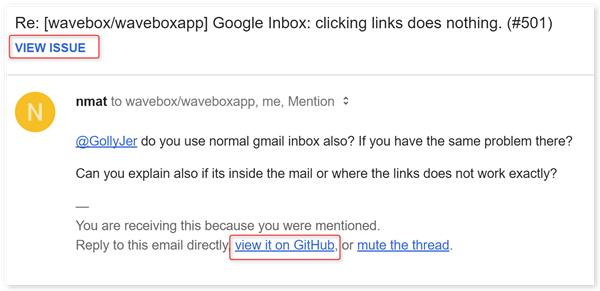
As an example all links in github notifications have no affect when clicked.
I click the ones circled in red and nothing happens.
GollyJer
on 7 Dec 2017
I am able to right click and select open link in browser.
GollyJer
on 7 Dec 2017
If possible could you test to do the same using a chrome browser as default?
Also can you test to see what happens if you go to: Preferences -> Accounts -> Advanced and under "Open new windows in which Browser" select the wavebox browser there.
These are 2 different tests to try to see if there is a some kind of link where there could be issues open links in chrome, firefox or wavebox browser.
It would help to minimize the area of error searching.
nmat
on 8 Dec 2017
There's been a lot of churn around this part of the codebase between 3.6.2 and 3.6.3 which is why you could be seeing this problem. Interestingly though, I can't seem to reproduce it. Both the "View Issue" and "view it on GitHub" links seem to work fine my end.
Would you be able to check a couple of things for me? It might help debug...
- Open settings and in the bottom right you should see "Version" and also "Wire Config Version". Is the wire config version 1.0.0?
- If you right click on the account in the left and then pick inspect, the titlebar should read "Developer Tools - https://inbox.google.com/" or similar. What's the url you see?
- Do you have any extensions enabled? If so which ones?
- Probably wont, but does restarting the app make a difference?
 Thomas101
on 8 Dec 2017
Thomas101
on 8 Dec 2017
Turning off Extensions fixed the issue.
The only extension I have installed is MixMax.
GollyJer
on 8 Dec 2017
Thanks, a fix should be out in the next beta today/tomorrow
Thomas101
on 11 Dec 2017
I have been noticing the same behavior, with the aforementioned GitHub links, on Ubuntu 17.10, running the 3.6.3beta. I do have a few extensions loaded: Gmelius, Dropbox, Grammarly. I haven't tried disabling them, but, if you think it would help, I can give it a go.
 thanosgatos
on 12 Dec 2017
thanosgatos
on 12 Dec 2017
@thanosgatos if possible when 3.6.4beta is out can you please test it there and get back to this ticket?
nmat
on 12 Dec 2017
@nmat will do! BTW, right-click and open in browser does work, as @GollyJer has already mentioned.
thanosgatos
on 12 Dec 2017
Hi, we’ve just released this to the beta channel of Wavebox in version 3.6.4. If you want to give it a try there are some instructions on how to use the beta channel here. Thanks
Thomas101
on 12 Dec 2017
I confirm that in version 3.6.4beta both the "open in GitHub" option in the inbox and the "view issue" option work properly.
thanosgatos
on 12 Dec 2017
Confirmed.
Thanks!!
GollyJer
on 13 Dec 2017
I'm on 3.6.5 and I can't open any link.
 DAddYE
on 14 Dec 2017
DAddYE
on 14 Dec 2017
@DAddYE would be great to have a bit more info...
- Which account type is this with (Inbox?)
- Which OS & version are you using? If linux, which install method did you use?
- Do you have any extensions installed?
- Does clicking on the Knowledge Base link in Settings>Support do anything?
Thomas101
on 15 Dec 2017
@Thomas101 sorry here more info:
- I'm a payed customer, and the issue is with inbox, slack and pretty much every account
- I'm on 10.13.2 (17C88)
- I don't have any extension
- It doesn't do anything
Let me know if you need more info
DAddYE
on 15 Dec 2017
Ok issue solved, the problem is with the upgrade of Sierra. To restore the previous behavior you should:
- Close completely Chrome
- Open Safari
- Set it as default browser
- Open Chrome and set as default browser
DAddYE
on 15 Dec 2017
I'm facing a similar issue where links are not opening for me via the WaveBox app. This is happening for me on the normal Gmail inbox screen. This seems to be happening since 2 days back approx but I am not sure what changed. Now, whenever I click on a link, a new browser window opens up with a new tab, but the link does not open (expected behavior is that link should open in a tew tab in an existing window). I've been resorting to copying the link from Wavebox and pasting it in my browser because of this.
Additional setting detail: Open links in background is enabled.
OS: MacOS High Sierra v10.3.1
Wavebox version: 3.6.0
Default browser: Chrome v62.0.3202.94 (Official Build) (64-bit)
Update: I tried what @DAddYE mentioned and that actually worked! Thanks so much!
 architchandra
on 16 Dec 2017
architchandra
on 16 Dec 2017
In general I think that the commit done by @Thomas101 has fixed the part of open links with extensions and the link of: https://wavebox.io/kb/high-sierra-chrome-links
should answer most of these issues faced right?
I general the issue I believe can be closed. If anything then maybe add the steps from @DAddYE to the knowledgebase?
nmat
on 16 Dec 2017
The https://github.com/wavebox/waveboxapp/commit/79b0ff9e2e4052259a26a96c6e165f522f37261c commit fixes and issue whereby having mixmax installed would cause the links not to open.
The issue seen by @DAddYE and @architchandra is a different issue with either chrome or High Sierra whereby Chrome just fails to open links for some reason. There's some more info on it here and it seems to be affecting lots of apps & configurations. The KB article that @nmat linked seems to resolve the issue for most people though
Thomas101
on 18 Dec 2017
Hi, this has just been released in the latest version of Wavebox (3.7.0). You can get the update by using the Application/File menu and clicking Check for Update or by downloading the latest version from our download page. Thanks!
Thomas101
on 18 Dec 2017
Related issues
 dctucker
·
4Comments
dctucker
·
4Comments
 cdeutsch
·
3Comments
cdeutsch
·
3Comments
 Ash258
·
3Comments
Ash258
·
3Comments
 Tahini-123
·
4Comments
Tahini-123
·
4Comments
 phcyso
·
4Comments
phcyso
·
4Comments
Most helpful comment
I confirm that in version 3.6.4beta both the "open in GitHub" option in the inbox and the "view issue" option work properly.