Waveboxapp: Google Inbox notifications inaccurate - calendar invitation related
Wavebox consistently shows notification counts for my Google Inbox accounts despite emails being cleared:
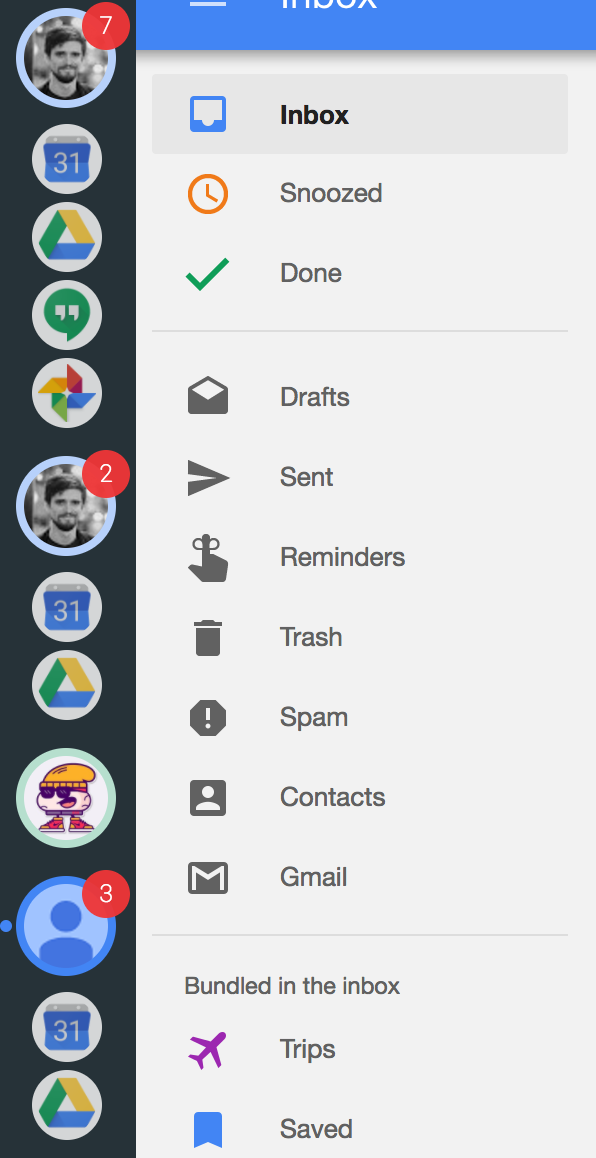
Further inspection suggests these are related to calendar invites, ticket confirmations and other 'non-regular' emails:

Clicking through to these items from the menu bar leads nowhere. Within inbox in Opera there are no outstanding notifications I can see in order to remove these counts.
- Wavebox 3.1.8
- Mac OSX 10.12.4
 egodance
All 6 comments
Hi, we've also been tracking this at #217. We've looked into the issue and the Gmail api doesn't provide enough information for us to pull these out separately.
In general emails from Google Calendar come from [email protected] and have the category updates, but some Google Calendar emails get bundled in the inbox and other do not. For example if you have daily digest emails enabled, these do not get bundled where as notifications & invitations such as the ones in your screenshot do.
Given the limitations of what Google provide us with down the API, I think there's a couple of options to investigate, but I don't think there's a 100% solution at the moment. One of those is being able to make notifications from calendar never appear, or always appear (as they do now). We are looking at adding support for turning notifications on/off for specific bundles (#156) if we add this in and add Google Calendar as an option do you think that might work for you?
 Thomas101
on 22 Jun 2017
Thomas101
on 22 Jun 2017
Ah I see. I guess the issue really is that Inbox as an interface doesn't really have 'unread' emails as a thing. I was able to go into the Gmail interface and find these to mark as read. I wonder if there's someway you could essentially do the same thing but in the background, i.e. pull all unread messages via Gmail and mark as read, and then have that action as an option in the menu bar? I don't know what I'm talking about so may not be possible!
I think the problem with disabling the notifications for specific bundles is that I do want to see them in the first place, I just want to be able to zero my inbox, but I suppose that added flexibility would still be a nice feature.
In case it helps, the other erroneous notifications were related to an eticket and an email about unread hangout messages.
egodance
on 22 Jun 2017
I guess the issue really is that Inbox as an interface doesn't really have 'unread' emails as a thing
I know what you mean. It's a bit annoying as it's really useful!
We can mark messages as read - there's a little bit of work to do our side to re-authenticate accounts with the correct permissions (as we don't request write access at the moment).
It may be a little late now, but if you had marked the email as done did this remove it?
Thomas101
on 22 Jun 2017
That's OK, I have new examples in my inbox! They do disappear when marked as 'done' but I don't often do this, as inbox let's you just click 'yes' in a quick link. Also the original ones causing an issue were hidden away in the past.
What would've worked for me is if clicking on the email via the menu bar went to the email and I wonder if this could be achieved by triggering a search query. I've just realised that what it actually does is show you a kind of dummy email, and if you click into that you can then see the actual email itself under 'related items', which is still bolded as if unread, despite the dummy one appearing read... hope that makes sense - e.g.
Fake email

Actual email

Searching for the email shows the actual email itself also so if you could make it search then the user would be able to click into the actual email themselves and therefore it would get marked as read... but maybe you need authentication to search also ¯_(ツ)_/¯
I realise I'm probably explaining a bunch of stuff you already know but just trying to be clear! Hope it helps. Love the product overall, exactly what I've been after for a while.
egodance
on 22 Jun 2017
No no, it's helpful to have! Perhaps the other thing to do here, is capture the YES/MAYBE/NO response and see if we can mark the message as read automagically.
Thomas101
on 23 Jun 2017
The root of this problem was that the Google API didn't provide enough information to filter out the calendar invitations in the count. As Google is closing Google Inbox in March of this year this isn't something we're going to be able to provide support for.
That said, we're continuing to improve our support with the new Gmail and will be providing some easy steps to migrate from Inbox to Gmail before Google close Google Inbox for good, so if you're still using Google Inbox keep an eye out for a notification in an upcoming upgrade. Thanks.
Thomas101
on 23 Jan 2019
Related issues
 MichaelTunnell
·
4Comments
MichaelTunnell
·
4Comments
 phileasb
·
3Comments
phileasb
·
3Comments
 bashfulrobot
·
4Comments
Thomas101
·
3Comments
bashfulrobot
·
4Comments
Thomas101
·
3Comments
 Ash258
·
3Comments
Ash258
·
3Comments
Most helpful comment
No no, it's helpful to have! Perhaps the other thing to do here, is capture the YES/MAYBE/NO response and see if we can mark the message as read automagically.