Walletwasabi: v1.1.12rc - Recover Wallet, minimum gap limit box field disappear
General Description
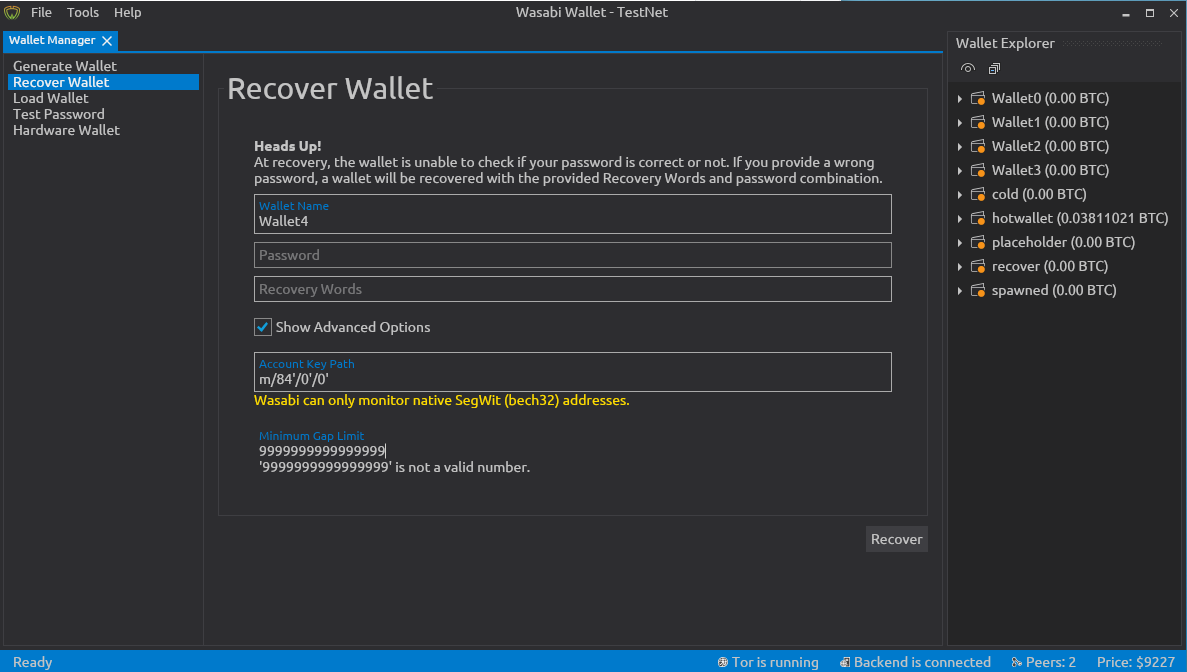
If we insert an invalid value in the minimum gap limit field, the box around the field disappears. To have it back it's not enough to fix the inserted value, we have to change screen (like go to Load Wallet) and come back.
In some cases, the box around will instead come back when you fix the error (e.g. type 3e and then delete the e, the box will reappear).
How To Reproduce?
- Open Wasabi
- Reach the Recover Wallet screen
- Insert too long number in the
Minimum Gap Limitfield. - See the box disappear.
Screenshots
Note
Version 1.1.11.1 handle this correctly, the field is highlighted in yellow and a correct error message appears.
Operating System
Whonix Workstation 15.0.1.3.4
Wasabi Version
Release Candidate for 1.1.12 (#3782)
Deb package
 PulpCattel
All 5 comments
That's an issue, it looks strange - low prio. Fix after the release.
1 point!
 molnard
on 14 Jul 2020
molnard
on 14 Jul 2020
This was reported in #2610 and was fixed by #2667 then it was reintroduced by https://github.com/zkSNACKs/WalletWasabi/commit/3f87d20f4cdd916cef3b9a3e7e9e0a9e0e6af66c#diff-ac677b2018688e0543b1e4c97549229f
 yahiheb
on 14 Jul 2020
yahiheb
on 14 Jul 2020
@danwalmsley Can you take a look at this one?
yahiheb
on 17 Jul 2020
@yahiheb
This is fixed and can be closed right? Or did you leave it open for a reason?
PulpCattel
on 24 Jul 2020
Yes this is fixed now.
yahiheb
on 24 Jul 2020
Related issues
yahiheb
·
3Comments
 MaxHillebrand
·
3Comments
MaxHillebrand
·
3Comments
MaxHillebrand
·
3Comments
yahiheb
·
3Comments
MaxHillebrand
·
3Comments
MaxHillebrand
·
3Comments
MaxHillebrand
·
3Comments
yahiheb
·
3Comments