Walletwasabi: Trezor 2.3 firmware is not working with Wasabi
I did not change anything on my computer that Wasabi is used. On today Satoshi Labs released the 2.3 Trezor t firmware. After update Wasabi 1.1.10 and 1.1.11 do not let connection to the trezor. Error message is
2020-04-16 01:48:13 ERROR ConnectHardwareWalletViewModel (362) System.InvalidOperationException: Hardware wallet did not provide fingerprint."
The file included has the full chunk from the log on this error.
 lee-chiffre
All 23 comments
`2020-04-16 01:47:56 INFO Global (311) Start synchronizing filters...
2020-04-16 01:48:10 INFO ConnectHardwareWalletViewModel (326) Hardware wallet was not used previously on this computer. Creating a new wallet file.
2020-04-16 01:48:13 ERROR ConnectHardwareWalletViewModel (362) System.InvalidOperationException: Hardware wallet did not provide fingerprint.
at WalletWasabi.Gui.Tabs.WalletManager.HardwareWallets.ConnectHardwareWalletViewModel.LoadKeyManagerAsync()
lee-chiffre
on 16 Apr 2020
The trezor works fine with an altcoin wallet. I do not think it is a trezor issue. Is anybody can confirm the same thing with incompatible of the new trezor firmware with Wasabi?
lee-chiffre
on 16 Apr 2020
Passphrase protection is enabled.
trezorctl get-features
showed
passphrase_always_on_device: False,
passphrase_protection: True,
I set it to
passphrase_always_on_device: True,
passphrase_protection: True,
and tried again with Wasabi. The result is the same effect with passphrase always on device enforced or not enforced. I did not try yet with no passphrase. But before the firmware upgrade trezor worked fine with wasabi with passphrase protection.
lee-chiffre
on 16 Apr 2020
I have the same problem.
I had delete the wallet.json and load again, that works but shows me this:

 gilsanjuan
on 16 Apr 2020
gilsanjuan
on 16 Apr 2020
@gilsanjuan you have LWM On, just switch it off by clicking on the eye icon below the Wallet Explorer panel's title.
@lee-chiffre could you give us a better description of the problem? What is the workflow? Did you enter the passphrase when the device requested it? Did you already have a wallet .json file?
 lontivero
on 16 Apr 2020
lontivero
on 16 Apr 2020
@lontivero Thanks, my mistake .
@lee-chiffre Sure.
Like you see i'm new using it. One week ago I'd loaded trezor wallet. Few days ago I'd update trezor to 2.3 firmware.
After that, I connected the wallet and tryed to load, wasabi shows my same message of your, related to firmaware.
Then closed wasabi, I'd go to wasabi data folder, deleted Trezor_T0.json in WasabyBackups folder and Wallets folder.
Opened wasabi, search hardware wallet, loaded and works!
Now if I tried to Display address on Hardware, and shows me the error.
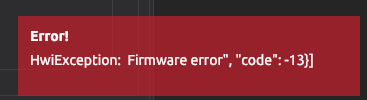
gilsanjuan
on 16 Apr 2020
@lontivero when I was testing I completely deleted the .walletwasabi directory each time before opening up wasabi. Would that also remove the Trezor .json and WasabiBackups folder and Wallets folder that @gilsanjuan talked about?
When I delete the .walletwasabi folder and try to open up wasabi for both version 1.1.10 and 1.1.11 I select "Hardware Wallet" > "Search Hardware Wallets" > then select the "Trezor_T - Needs Passphrase Sent" from the list. and hit the button "Load Wallet"
It then give error code "Error! HwiException: FirmwareError: Firmware error" in a red box at bottom right like what @gilsanjuan posted and never gives me an option to put in the trezor pass.
I hope this information is of help. If I have time later today I will see if I can test with passphrase protection on Trezor disabled.
lee-chiffre
on 17 Apr 2020
Here is log output related to my last comment
2020-04-17 00:28:34 ERROR   ConnectHardwareWalletViewModel (362)    WalletWasabi.Hwi.Exceptions.HwiException: FirmwareError: Firmware error
   at WalletWasabi.Hwi.HwiClient.ThrowIfError(String responseString, IEnumerable`1 options)
   at WalletWasabi.Hwi.HwiClient.SendCommandAsync(IEnumerable`1 options, Nullable`1 command, String commandArguments, Boolean openConsole, CancellationToken cancel, Boolean isRecursion)
   at WalletWasabi.Hwi.HwiClient.GetXpubImplAsync(Nullable`1 deviceType, String devicePath, Nullable`1 fingerprint, KeyPath keyPath, CancellationToken cancel)
   at WalletWasabi.Hwi.HwiClient.GetXpubAsync(HardwareWalletModels deviceType, String devicePath, KeyPath keyPath, CancellationToken cancel)
   at WalletWasabi.Gui.Tabs.WalletManager.HardwareWallets.ConnectHardwareWalletViewModel.LoadKeyManagerAsync()
Trezor firmware versions 2.3 and 1.9 changed a couple of things that were causing HWI to not work with them. This PR fixes those things.
 yahiheb
on 17 Apr 2020
yahiheb
on 17 Apr 2020
Oh! Thanks @yahiheb. Once HWI releases a new version with the fix we will be able to update it. If you downgrade the firmware to the previous compatible version or wait until we release a new version with this fix.
lontivero
on 17 Apr 2020
Hi there! @lee-chiffre thank you for reporting this.
I have bad news regarding the 2.3 firmware. According to @yahiheb comment, this will be a breaking change for the users with Trezor_T and using a passphrase:
https://github.com/bitcoin-core/HWI/pull/319
Due to the passphrase and session changes to the Trezor T, users using firmware 2.3 will be required to enter the passphrase on the host in the same way that is done with the Trezor 1.
You will no longer able to enter the passphrase on the device. However, on the website, I can still trigger the device side input, so it is still in the firmware but probably not available from the interface that is used by HWI. @prusnak can you confirm this?
 molnard
on 17 Apr 2020
molnard
on 17 Apr 2020
It definitively is possible (we sent working https://github.com/spesmilo/electrum/pull/6064 to Electrum already), but there will be probably some more changes needed in HWI. Will consult with my team.
 prusnak
on 17 Apr 2020
prusnak
on 17 Apr 2020
Related: I think using HWI for Wasabi is not a good idea. Wasabi would be much better IMO if you used native .NET libraries from https://github.com/MelbourneDeveloper (Trezor.NET, Ledger.NET, etc.), which you can actively help to maintain. But I respect your priorities and where you want to put your focus on.
prusnak
on 17 Apr 2020
@prusnak this is not about libraries. This is because Trezor, not Wasabi, decided to change the API without giving much importance to the impact that could cause in wallet projects. I am sure it is possible to improve the product without damaging others.
lontivero
on 17 Apr 2020
@lontivero As said in https://github.com/bitcoin-core/HWI/pull/319#issuecomment-615390995 - we did not change the API in a non-compatible way. In fact, we were really careful to not break the API.
prusnak
on 17 Apr 2020
@prusnak thank you for your quick answer and the support at HWI repo. With all respect, the issue triggered by this new firmware pushed me in a worrisome situation about Trezor. Not breaking working features is one of the highest aims at Wasabi - at some point, it seemed to be broken hopefully solved soon.
In the past, we put down our vote on HWI and it is not changed - it was a team decision.
Let me put down a direct question: do we need to use https://github.com/MelbourneDeveloper to have reliable compatibility with Trezor?
What do you think? Can we expect further compatibility issues with HWI and Trezor? Can we improve our current cooperation in some way, with testing for example?
molnard
on 18 Apr 2020
- No, you don't have to. But it makes more sense IMO and feels much less than a hack.
- Since HWI is not using python-trezor as a dependency, but rather they use an in-tree forked copy from February 2019 it's hard to guarantee anything. That said, we try to avoid breaking changes while we can. About testing: yes, we have a beta-program where people receive firmware updates one month in advance. You are more than welcome to join: https://blog.trezor.io/join-the-trezor-beta-testers-community-b19761f4960a
prusnak
on 18 Apr 2020
@gilsanjuan @lee-chiffre
The new Trezor firmware is incompatible with Wasabi - we are on it and hopefully, fix it soon. I will let you know about the hotfix, here. Until then please use the previous firmware.
Thank you for your patience!
molnard
on 20 Apr 2020
@prusnak Wasabi is using HWI that is part of the bitcoin core and that gives "some" reputation to it. It might be outdated but it should not be considered as a hack. Contributions by coding or testing can be made. That would be very unlikely to lose the compatibility with Trezor, such a nice device - but Wasabi cannot add another 3rd party library only for Trezor devices.
Thx, I subscribed as a beta tester - it will slightly increase the chance of catching a bug.
molnard
on 20 Apr 2020
@MaxHillebrand I replaced the hwi binary in Wasabi 1.1.10 and 1.1.11 with the one in this pull request that was merged. Trezor now works again and with the passphrase on device.
@molnard thank you! I have a question about this linux hwi binary that was merged with sha256 of 1e98a59ee0b99ccac7ec6a62e55bf9fa88650250009aecba50fd10468031ed01
Are the hwi binaries in Wasabi built using the HWI using the reproducible build process? Are the hwi binaries in Wasabi confirmed of resulting hash before merged?
lee-chiffre
on 23 Apr 2020
I am not sure that HWI is using reproducible builds. The repository is here: https://github.com/bitcoin-core/HWI, take a look around you might find an answer.
There is no specific verification in Wasabi regarding hwi binary. On OSX we are signing executables so any change in the files results in a certificate error. AFAIK on linux deb there is no such thing. @lontivero?
molnard
on 25 Apr 2020
@molnard I think HWI might have a deterministic build option. If this is possible it would be a good idea to use this process for Wasabi for security reasons. Wasabi is a deterministic build it so binaries it uses should be also. Deterministic build gives more trust to software. This is something I would need to explore. https://github.com/bitcoin-core/HWI/blob/2bf3d418e1b6866872529ae84185ac8107e50e6e/docs/release-process.md
If HWI with deterministic build is possible I should probably open this as another case instead of using this closed case.
lee-chiffre
on 2 May 2020
We have 3 built-in binaries.
- Tor
- Knots
- HWI
It should be done on all or nothing. As I can see HWI macOS build is non-deterministic, also I have no idea, about the other two binary.
molnard
on 3 May 2020
Related issues
yahiheb
·
3Comments
 the-metalworker
·
3Comments
the-metalworker
·
3Comments
 kenny47
·
3Comments
yahiheb
·
3Comments
kenny47
·
3Comments
yahiheb
·
3Comments
 nopara73
·
3Comments
nopara73
·
3Comments
Most helpful comment
@molnard I think HWI might have a deterministic build option. If this is possible it would be a good idea to use this process for Wasabi for security reasons. Wasabi is a deterministic build it so binaries it uses should be also. Deterministic build gives more trust to software. This is something I would need to explore. https://github.com/bitcoin-core/HWI/blob/2bf3d418e1b6866872529ae84185ac8107e50e6e/docs/release-process.md
If HWI with deterministic build is possible I should probably open this as another case instead of using this closed case.