Walletwasabi: Wasabi Wallet cannot connect to tor SOCK5 server on local network
General Description
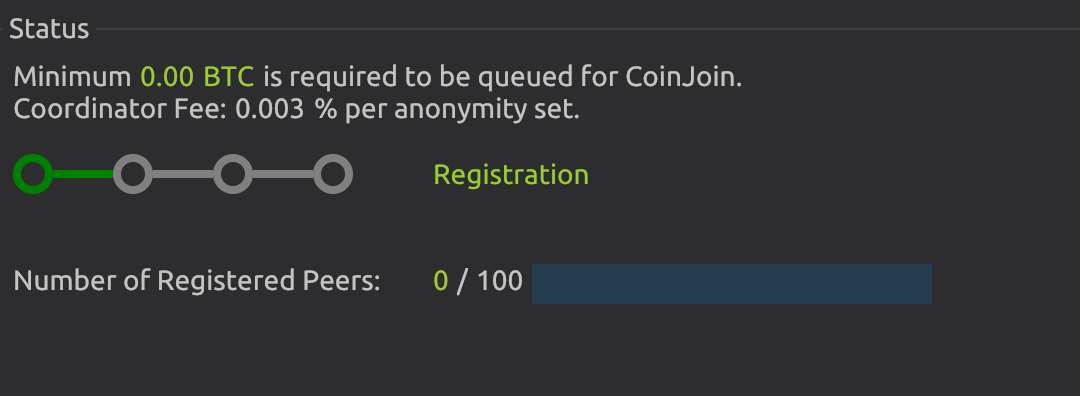
I'm trying to get Wasabi to use my local network's TOR sever instead of running one in the background on my desktop. It shows 8 peers connected at the bottom of the window, but in CoinJoin it shows 0/100 registered peers. Numerous error log entries
How To Reproduce?
- Configured SOCK5 endpoint x.x.x.x:9050 pointing to my local server
- Restarted Wasabi
- I get zero errors and it connects to my local bitcoind fine, but it never progresses past 0/100 registered peers
Screenshots

Operating System
Wasabi on Mojave
Tor Server running Debian 10
Tor version 0.3.5.8
Port 9050 open on the firewall
SOCKSPORT configured to x.x.x.x:9050, local IP of server in server's torrc
I can connect to the local tor server fine with electrum
Logs
Numerous log entries:
2020-03-16 09:10:26 ERROR    WasabiSynchronizer (305)    System.ArgumentException: 'TCP' Client can only accept InterNetwork or InterNetworkV6 addresses. (Parameter 'family')
   at System.Net.Sockets.TcpClient..ctor(AddressFamily family)
   at WalletWasabi.TorSocks5.TorSocks5Client..ctor(EndPoint endPoint)
   at WalletWasabi.TorSocks5.TorHttpClient.SendAsync(HttpRequestMessage request, CancellationToken cancel)
   at WalletWasabi.TorSocks5.TorHttpClient.SendAsync(HttpMethod method, String relativeUri, HttpContent content, CancellationToken cancel)
   at TorHttpClientExtensions.SendAndRetryAsync(ITorHttpClient client, HttpMethod method, HttpStatusCode expectedCode, String relativeUri, Int32 retry, HttpContent content, CancellationToken cancel)
   at WalletWasabi.WebClients.Wasabi.WasabiClient.GetSynchronizeAsync(uint256 bestKnownBlockHash, Int32 count, Nullable`1 estimateMode, CancellationToken cancel)
   at System.Threading.Tasks.TaskExtensions.WithAwaitCancellationAsync[T](Task`1 me, CancellationToken cancel, Int32 waitForGracefulTerminationMilliseconds)
   at WalletWasabi.Services.WasabiSynchronizer.<>c__DisplayClass60_0.<<Start>b__0>d.MoveNext()
2020-03-16 09:10:26 ERROR   WasabiSynchronizer (305)    System.ArgumentException: 'TCP' Client can only accept InterNetwork or InterNetworkV6 addresses. (Parameter 'family')
   at System.Net.Sockets.TcpClient..ctor(AddressFamily family)
   at WalletWasabi.TorSocks5.TorSocks5Client..ctor(EndPoint endPoint)
   at WalletWasabi.TorSocks5.TorHttpClient.SendAsync(HttpRequestMessage request, CancellationToken cancel)
   at WalletWasabi.TorSocks5.TorHttpClient.SendAsync(HttpMethod method, String relativeUri, HttpContent content, CancellationToken cancel)
   at TorHttpClientExtensions.SendAndRetryAsync(ITorHttpClient client, HttpMethod method, HttpStatusCode expectedCode, String relativeUri, Int32 retry, HttpContent content, CancellationToken cancel)
   at WalletWasabi.WebClients.Wasabi.WasabiClient.GetSynchronizeAsync(uint256 bestKnownBlockHash, Int32 count, Nullable`1 estimateMode, CancellationToken cancel)
   at System.Threading.Tasks.TaskExtensions.WithAwaitCancellationAsync[T](Task`1 me, CancellationToken cancel, Int32 waitForGracefulTerminationMilliseconds)
   at WalletWasabi.Services.WasabiSynchronizer.<>c__DisplayClass60_0.<<Start>b__0>d.MoveNext()
Wasabi Version
wasabi 1.1.10.3
 oitdmser
All 8 comments
Update: I was specifying hostnames torserver:9050 and/or torserver.mydomain.org in the config. (I have a local DNS server and FQDNs on my local network that work elsewhere) When I switched to x.x.x.x:9050 it connects fine. It seems the Wasabi tor client simply doesn't resolve the hostname correctly, perhaps it does not use the DNS server configured on the system?
oitdmser
on 16 Mar 2020
Thank you for the answer. but I don’t understand what needs to be done
 pi4i
on 17 Mar 2020
pi4i
on 17 Mar 2020
for a FQDN network, if I enter a FQDN as the tor server, wasabi fails to connect. If I enter the ip address it works. Should wasabi use FQDNs for tor servers? If not, the UI should be clear about what is allowed to be entered in that field, given that FQDNs work for the bitcoind daemon
oitdmser
on 17 Mar 2020
This has been automatically marked as stale because it has not had recent activity. It will be closed if no further activity occurs. Thank you for your contributions.
![stale[bot] picture](https://avatars3.githubusercontent.com/in/1724?v=4&s=40) stale[bot]
on 27 Aug 2020
stale[bot]
on 27 Aug 2020
@oitdmser If you are using the Tor browser then you should change the port to 9150 in the settings.
 yahiheb
on 27 Aug 2020
yahiheb
on 27 Aug 2020
I’m not connecting to a Tor Browser instance, I’m connecting to a Tor node on the local network that uses port 9050.
The issue here is not that Wasabi can not connect. It can, if I use the IP address of the Tor server, but if I enter the Domain Name of the server in Wasabi, it fails to connect because it does not do a DNS lookup.
I raised this issue to open a discussion of whether or not performing DNS lookups for the Tor Server field is even a good idea.
Also it would be a good idea to have a note informing the user to only enter IP addresses, not to use FQDN for the Tor server. It’s an edge case to be sure, but it’s worth improving the UI.
oitdmser
on 27 Aug 2020
This has been automatically marked as stale because it has not had recent activity. It will be closed if no further activity occurs. Thank you for your contributions.
stale[bot]
on 26 Oct 2020
This issue is still active. Wasabi needs at least some verbiage indicating only IP addresses work in this field. A simple sanity check to reject computer/domain names would fix the issue
On Oct 26, 2020, at 1:11 PM, stale[bot] notifications@github.com wrote:
This has been automatically marked as stale because it has not had recent activity. It will be closed if no further activity occurs. Thank you for your contributions.
—
You are receiving this because you were mentioned.
Reply to this email directly, view it on GitHub, or unsubscribe.
oitdmser
on 26 Oct 2020
Related issues
yahiheb
·
3Comments
 gabridome
·
3Comments
gabridome
·
3Comments
 nopara73
·
3Comments
nopara73
·
3Comments
 RiccardoMasutti
·
3Comments
RiccardoMasutti
·
3Comments
 MaxHillebrand
·
3Comments
MaxHillebrand
·
3Comments
Most helpful comment
I’m not connecting to a Tor Browser instance, I’m connecting to a Tor node on the local network that uses port 9050.
The issue here is not that Wasabi can not connect. It can, if I use the IP address of the Tor server, but if I enter the Domain Name of the server in Wasabi, it fails to connect because it does not do a DNS lookup.
I raised this issue to open a discussion of whether or not performing DNS lookups for the Tor Server field is even a good idea.
Also it would be a good idea to have a note informing the user to only enter IP addresses, not to use FQDN for the Tor server. It’s an edge case to be sure, but it’s worth improving the UI.