Walletwasabi: Wasabi Wallet not opening up
General Description
I updated to the latest version of wasabi (v1.1.10.2), it worked fine after the update. The day after I try to reopen my wallet but the GUI would not open. My cursor loads for aprox 5 seconds and then it stops and nothing happens.
I've tried restarting my PC, reinstalling wasabi wallet; but nothing seems to work.
I have started wassabeed.exe and have posted the results below.
How To Reproduce?
- Go to '...'
- Click on '....'
- Scroll down to '....'
- See error
Screenshots
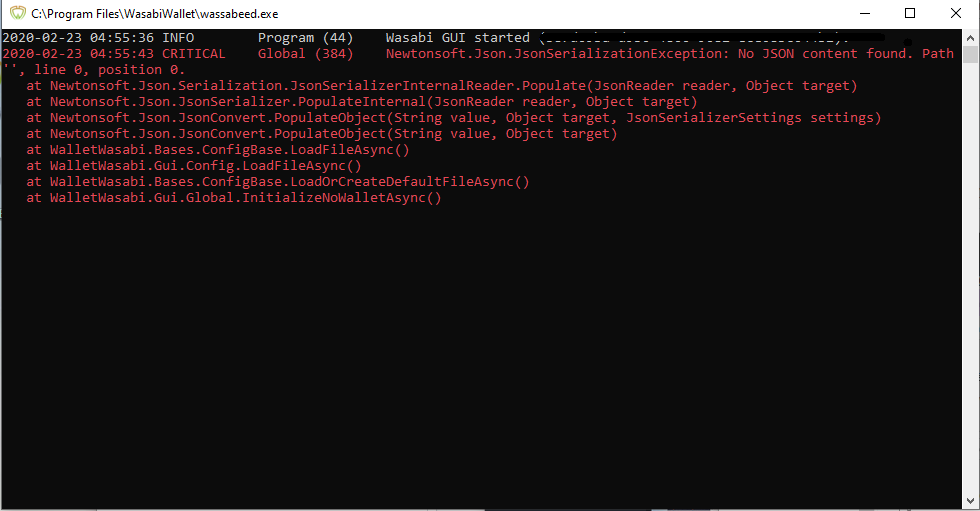
(https://anonfile.com/hbJ9l4c9ob/Namnl_s_png)
Operating System
Windows 10
Logs
Please consider your privacy, before completing this section.
You can find the log file by opening it from the main menu: File/Open/Logs File or File/Open/TorLogs File.
Wasabi Version
v1.1.10.2
 bigfatjay
All 8 comments
Try to delete the UiConfig.json file (back it up first), then lunch Wasabi again and see if it works.
 yahiheb
on 22 Feb 2020
yahiheb
on 22 Feb 2020
Can you try it from code before that? I think it's fixed already, just not released. https://github.com/zkSNACKs/WalletWasabi#build-from-source-code
 nopara73
on 22 Feb 2020
nopara73
on 22 Feb 2020
Try to delete the
UiConfig.jsonfile (back it up first), then lunch Wasabi again and see if it works.
I don't have such file in my wasabi folder.
Can you try it from code before that? I think it's fixed already, just not released. https://github.com/zkSNACKs/WalletWasabi#build-from-source-code
I have almost no experiance with code. Is this done in powershell?
bigfatjay
on 23 Feb 2020
I don't have such file in my wasabi folder.
Write this to file explorer's search bar: %appdata%\WalletWasabi\Client.
I have almost no experiance with code. Is this done in powershell?
You can use cmd or powershell it's up to you. I think you should be able to do it as many others with zero software development experience succeeded too.
nopara73
on 23 Feb 2020
I don't have such file in my wasabi folder.
Write this to file explorer's search bar:
%appdata%\WalletWasabi\Client.I have almost no experiance with code. Is this done in powershell?
You can use
cmdorpowershellit's up to you. I think you should be able to do it as many others with zero software development experience succeeded too.
Ok, if that's the case, I think I'll manage, but I've a question.
Where do I type in these commands?
git clone https://github.com/zkSNACKs/WalletWasabi.git
cd WalletWasabi/WalletWasabi.Gui
dotnet build
Do I do it in powershell in this folder ''%appdata%WalletWasabiClient''?
bigfatjay
on 23 Feb 2020
I don't have such file in my wasabi folder.
Here is where you can find the Wasabi data folder https://docs.wasabiwallet.io/FAQ/FAQ-UseWasabi.html#where-can-i-find-the-wasabi-data-folder.
Don't you have UiConfig.json file there?
Where do I type in these commands?
git clone https://github.com/zkSNACKs/WalletWasabi.git
cd WalletWasabi/WalletWasabi.Gui
dotnet build
Since you are asking where to type these commands I assume you have have downloaded git and .NET Core 3.1 SDK.
You should type them on Git Bash, which you should have it after installing git.
If you are on windows right-click on your desktop and choose Git Bash Here https://www.ajonit.com/wp-content/uploads/2018/07/git-bash-gui.jpg
yahiheb
on 23 Feb 2020
I don't have such file in my wasabi folder.
Here is where you can find the Wasabi data folder https://docs.wasabiwallet.io/FAQ/FAQ-UseWasabi.html#where-can-i-find-the-wasabi-data-folder.
Don't you haveUiConfig.jsonfile there?Where do I type in these commands?
git clone https://github.com/zkSNACKs/WalletWasabi.git
cd WalletWasabi/WalletWasabi.Gui
dotnet buildSince you are asking where to type these commands I assume you have have downloaded git and .NET Core 3.1 SDK.
You should type them on
Git Bash, which you should have it after installing git.If you are on windows right-click on your desktop and choose
Git Bash Herehttps://www.ajonit.com/wp-content/uploads/2018/07/git-bash-gui.jpg
Hello, thanks for your reply.
I tried removing (backed up) UiConfig.json but it did no difference, I put the backup; back in the folder.
Yes, I do have git and .NET core 3.1 SDK.
I right clicked my desktop, opened Git Bash Here, copy pasted this command:
git clone https://github.com/zkSNACKs/WalletWasabi.git
But I got this error MSG:
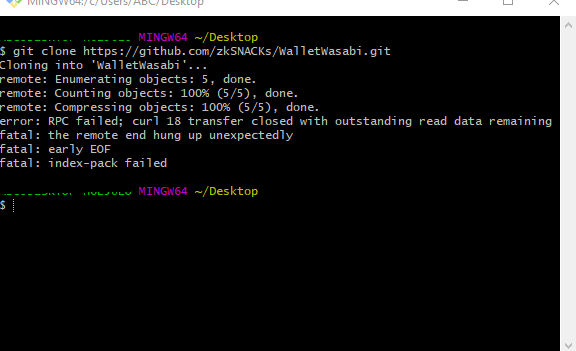
Edit:
I am trying again...
Edit 2:
Worked after I tried again.
bigfatjay
on 23 Feb 2020
Thank you for all the help, I solved it through the guide.
bigfatjay
on 23 Feb 2020
Related issues
 MaxHillebrand
·
3Comments
MaxHillebrand
·
3Comments
 molnard
·
3Comments
yahiheb
·
3Comments
yahiheb
·
3Comments
molnard
·
3Comments
yahiheb
·
3Comments
yahiheb
·
3Comments
 2pac1
·
3Comments
2pac1
·
3Comments
Most helpful comment
Thank you for all the help, I solved it through the guide.