Walletwasabi: UI scale is really big (cannot make smaller) on Ubuntu and lower resolution
General Description
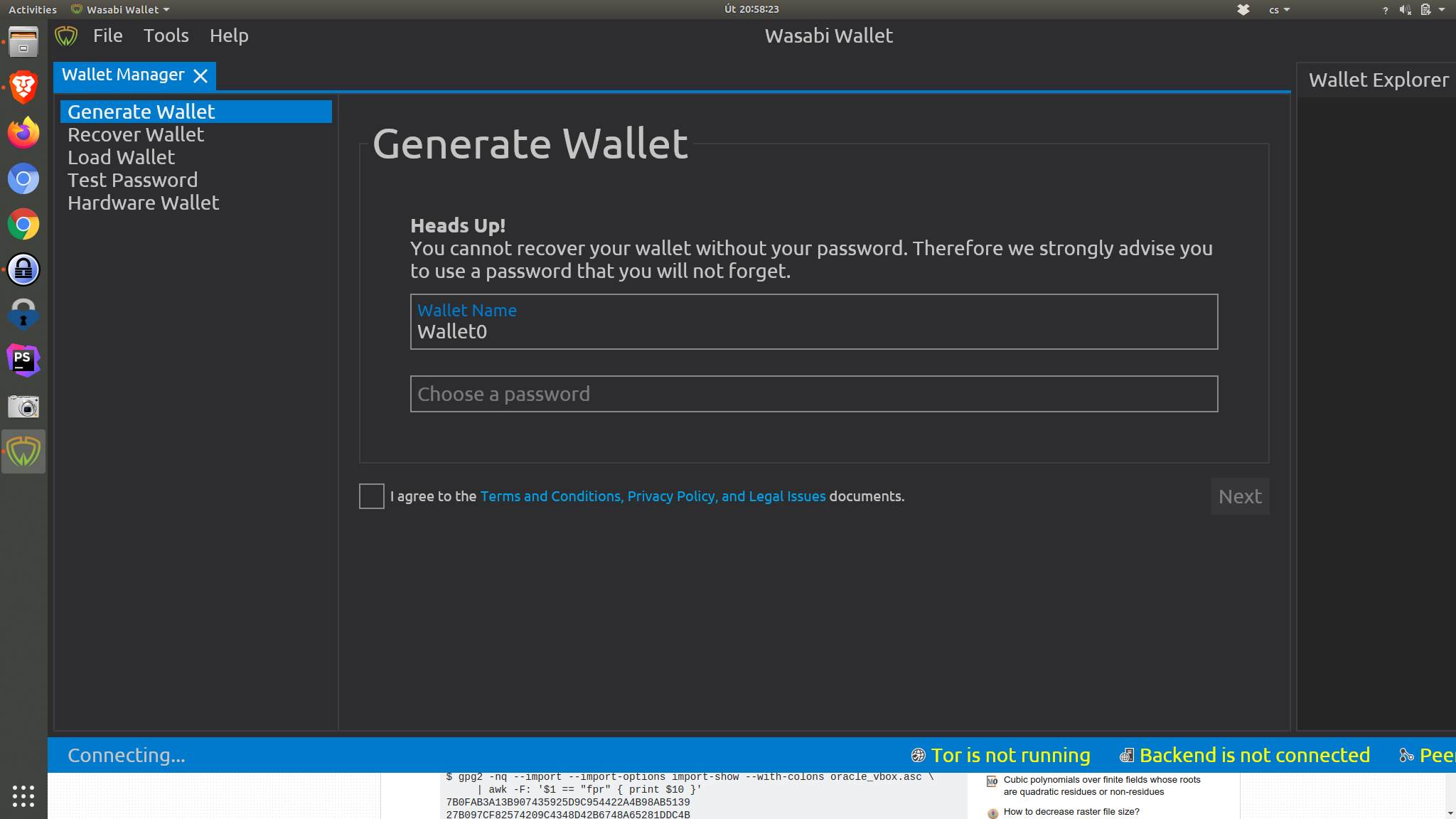
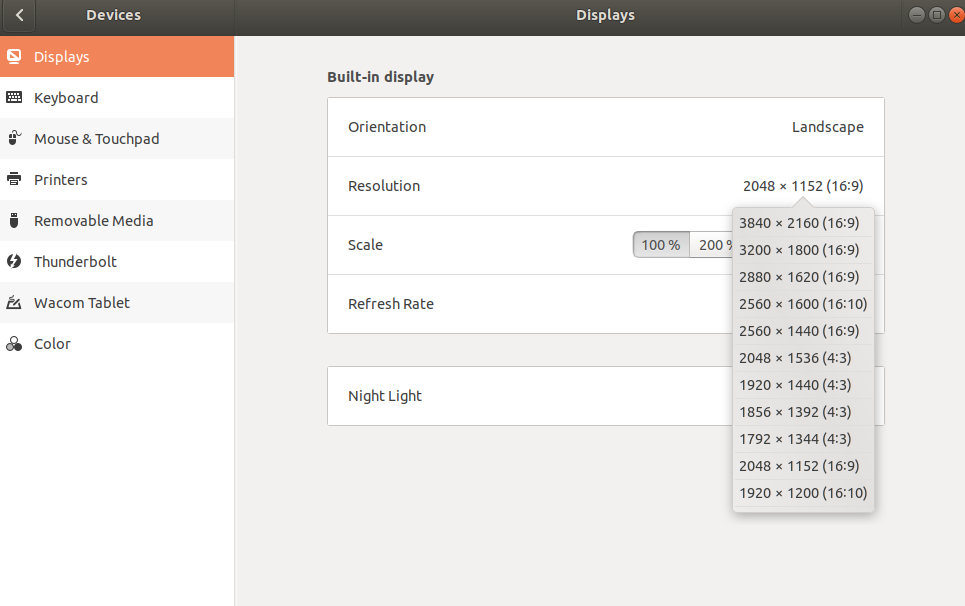
I have laptop with 4k display, but I have downscaled resolution to 2048x1152. The minimal size of app is then bigger than the screen and cannot be viewed.
How To Reproduce?
- Run Wasabi on Ubuntu with resolution
2048x1152on display that supports 4k
Screenshots
Operating System
Distributor ID: Ubuntu
Description:    Ubuntu 18.04.3 LTS
Release:    18.04
Codename:   bionic
Wasabi Version
1.1.10.1
 petrhejna
All 17 comments
same problem here. Even worst; I can't see the "Wallet explorer" at all... I have to set my resolution to 1980x1200 at 100% to see the full window. Really annoying.
 piratoskratos
on 30 Jul 2020
piratoskratos
on 30 Jul 2020
@danwalmsley anything about this in the latest Avalonia progress?
 MaxHillebrand
on 31 Jul 2020
MaxHillebrand
on 31 Jul 2020
@MaxHillebrand no changes in DPI stuff (because we dont have any test vectors for it yet)
 jmacato
on 31 Jul 2020
jmacato
on 31 Jul 2020
We really need to get Jumar a 4K monitor to test this.
 danwalmsley
on 31 Jul 2020
danwalmsley
on 31 Jul 2020
Probably a quickfix (it do the job!) would be greatly appreciate is to allow user to set some argument to zoom out or zoom in , like on spotify (https://wiki.archlinux.org/index.php/HiDPI#Spotify) with something like "--force-device-scale-factor=1.5"
piratoskratos
on 1 Aug 2020
 kekekeks
on 18 Aug 2020
kekekeks
on 18 Aug 2020
@MaxHillebrand seems like the guide @kekekeks has posted is the only solution. Linux doesnt have any standard way to get the correct DPI accurately unfortunately.
Will close issue as we now have a solution.
danwalmsley
on 18 Aug 2020
@MaxHillebrand @danwalmsley why are you closing this? There is no fix !
The @kekekeks solution doesnt work. Tried multiple times with different DPI values, there is absolutely no change at all.
Even if this can works for some people, It need a real solution anyway.
When I open it : wazabi UI is 300% larger than my screen. If I resize it, smallest as I can, I'm able to see ~ 80% of the UI.
piratoskratos
on 18 Aug 2020
@piratoskratos we are preparing a UI engine upgrade here: https://github.com/zkSNACKs/WalletWasabi/pull/3925
Can you check out that PR and build it from the source?
https://docs.github.com/en/github/collaborating-with-issues-and-pull-requests/checking-out-pull-requests-locally
https://github.com/zkSNACKs/WalletWasabi#build-from-source-code
 molnard
on 27 Aug 2020
molnard
on 27 Aug 2020
@piratoskratos we need to investigate why it didnt work. We will find a solution to this, it was closed because that should have worked..
Can you share with us an example of what you tried?
danwalmsley
on 27 Aug 2020
@piratoskratos iv had someone test this on linux, and the environment variable definately works... how did you set the environement variable?
remember if you set it in /etc/profile or similar you will need to restart your session before it takes effect.
danwalmsley
on 1 Sep 2020
@molnard potentially we could add a dialog, similar to the display settings in windows 10...
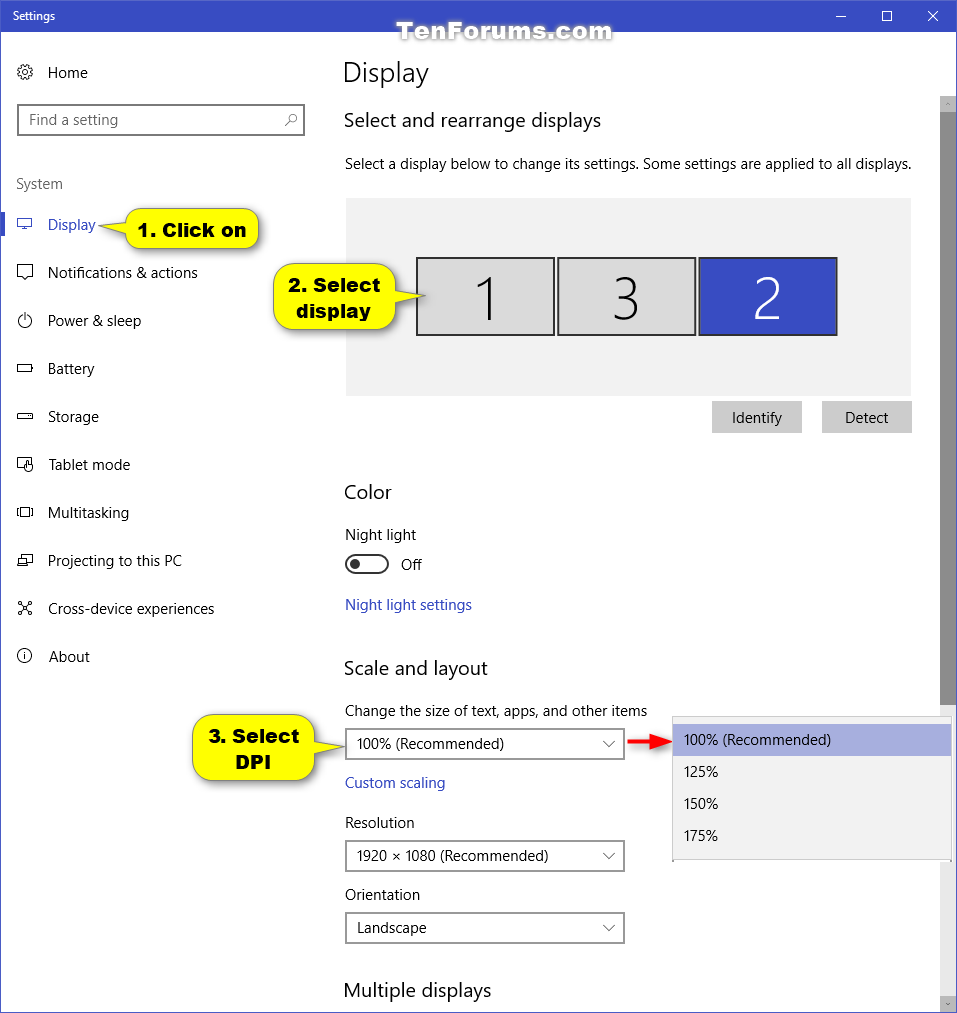
It would only need to display the monitors / resolutions, and offer user some scale factors to select.
It could be a standard dialog in Avalonia that apps like wasabi trigger, and it allows OS to be overridden in the case you get this where there is no standard way we can detect the correct DPI.
danwalmsley
on 1 Sep 2020
This is a rare issue and probably fixed in the future where Avalonia will be able to detect the OS settings. @danwalmsley just put it into the UiConfig.json file - do not need to create a dialog for it.
molnard
on 2 Sep 2020
yes, I tend to agree @molnard, this is not a worth having UI clutter...
MaxHillebrand
on 2 Sep 2020
@piratoskratos iv had someone test this on linux, and the environment variable definately works... how did you set the environement variable?
remember if you set it in
/etc/profileor similar you will need to restart your session before it takes effect.
Just like it was explained. added at the bottom profile files : AVALONIA_SCREEN_SCALE_FACTORS='eDP-1=2'
tried with different values, no effect. (eDP-1 is correct as the _xrandr --listactivemonitors_ command)
Restart session or reboot, and still no effect.
piratoskratos
on 19 Nov 2020
Ok, I make it work by launching wasabi this way : AVALONIA_SCREEN_SCALE_FACTORS='eDP-1=2' /usr/local/bin/wasabiwallet/wassabee
Still don't know why it doesnt use my profile variables. Anyway, I'll use it this way from now.
EDIT : also export AVALONIA_SCREEN_SCALE_FACTORS='eDP-1=2' in profile file is working. the "export" keyword was required.
piratoskratos
on 19 Nov 2020
@piratoskratos we are currently refactoring the whole UI and the UI engine. We will focus on that as the current UI will be obsoleted. I am happy that you could make it work. thx for elaborating on it.
molnard
on 23 Nov 2020
Related issues
MaxHillebrand
·
3Comments
 davterra
·
3Comments
davterra
·
3Comments
 yahiheb
·
3Comments
yahiheb
·
3Comments
 the-metalworker
·
3Comments
yahiheb
·
3Comments
the-metalworker
·
3Comments
yahiheb
·
3Comments
Most helpful comment
@piratoskratos we are currently refactoring the whole UI and the UI engine. We will focus on that as the current UI will be obsoleted. I am happy that you could make it work. thx for elaborating on it.