Walletwasabi: Coldcard PSBT's not being recognized
I recently purchased a coldcard MK2, and have been testing with my Wasabi Wallet, which is running latest version on a MacBook Pro. Both Wasabi and CC are updated to latest firmware.
I was able to create, open and receive a test transaction of BTC into a "skeleton wallet". No problems.
However, I have tried two methods of sending that BTC out of the Coldcard, and both are failing.
First, building a PSBT in the skeleton wallet in Wasabi, saving and moving it over to the CC on MicroSD card, then selecting it for signing brings up: "Failure. None of the keys involved in this transaction belong to this CC." (I don't have another CC.) I have tried creating three different skeleton CC wallets, all show the BTC, all fail at the point of signing on the CC.
Second, I tried loading the CC directly into Wasabi, via USB connection. The CC is found and is able to load, and I see the BTC in the wallet. However, when I try to send, I get the same "Failure" message upon signing on the CC.
I contacted Coldcard support, and this was their reply:
This is a bug in Wasabi and not Coldcard. It would be best if you could open a Bug report with them, using this link:
https://github.com/zkSNACKs/WalletWasabi/issues/new/choose
We will help them fix the problem, but it's still best if it starts there. Thanks!
-Coinkite Team
I am running the latest version of Wasabi, 1.1.9.2 and Coldcard is also updated to latest.
 Flersher
All 52 comments
Can you try the master? https://github.com/zkSNACKs/WalletWasabi#build-from-source-code
There was a large hardware wallet stabilization work done that's not yet released.
 nopara73
on 6 Nov 2019
nopara73
on 6 Nov 2019
Can you please check the wallet fingerprint in both Wasabi and ColdCard?
Might this be the reverse byte thing again?
 MaxHillebrand
on 6 Nov 2019
MaxHillebrand
on 6 Nov 2019
I tried build from master, from link above in this thread. Build fine, wallet opens without issue. (Closes on command without issue too, which is nice to see.)
But PSBT failed in exactly the same way when moved to CC via MicroSD.
When I tried the send with the CC attached to macbook via usb, I got a different error, "Hwi exception: could not find device with specified fingerprint"
Max, where do I find the fingerprint?
Flersher
on 6 Nov 2019
Hi Guys, I had built a PSBT in wasabi to be signed by Coldcard but it is saying on the coldcard Msg = None of the keys involved in this transaction belong to this coldcard (need xxxxxxxx)
CC firmware 3.0.2 and wasabi 1.1.9 , I also tried the same txn with Electrum and it sign and work ok.
 mjlamb
on 6 Nov 2019
mjlamb
on 6 Nov 2019
We tested it with 2.1.1 CC firmware on Ubuntu 18.04 with master branch and PSBT workflow works properly.
We tested it with 3.0.3 CC firmware on Ubuntu 18.04 with master branch and PSBT workflow works properly too.
Can you provide us the firmware version you are using please?
We will continue debugging the other problem about "Hwi exception: could not find device with specified fingerprint".
 lontivero
on 7 Nov 2019
lontivero
on 7 Nov 2019
Hi I have given the firmware details in post.
Coldcard FW = v3.0.2
Wasabi v1.1.9
on Windows10.
mjlamb
on 7 Nov 2019
I'll try upgrade to the latest v3.0.3 and try that.
mjlamb
on 7 Nov 2019
I tested it with 3.0.3 CC firmware on Windows 10 with master branch on testnet and USB workflow works properly.
When I go to Wasabi's advanced information tab, I see the fingerprint is the same as Coldcard view identity tab is showing. This is strange, because Coldcard was using reversed fingerprint previously. @peter-conalgo did you do something with later firmware releases?
nopara73
on 8 Nov 2019
@peter-conalgo I also noticed that my coldcard was set to mainnet, yet I worked with testnet through Wasabi. Previously it didn't. Did you do something there, too?
nopara73
on 8 Nov 2019
Coldcard Version 3.0.1
Broad change: extended public key finger (XFP) values used to be shown in the wrong endian (byte swapped), and prefixed with 0x to indicate they were a number. In fact, they are a byte string and should be shown in network order. Everywhere you might be used to seeing your XFP value has been switched, so 0x0f056943 becomes 4369050F (all caps, no 0x prefix). Affected areas include:
- BIP39 password confirmation screen
- Advanced > View Identity screen
- Electrum skeleton wallet export (label of wallet)
- Dump public data file (text in file header)
- xfp command in ckcc CLI helper (can show opposite endian, if needed)
nopara73
on 8 Nov 2019
@mjlamb @Flersher can you try to manually reverse your fingerprint byte order in your Wasabi wallet file and see what happens?
So if you have a master fingerprint like 12345678 then you reverse it like: 78563412. (2 character = 1 byte)
nopara73
on 8 Nov 2019
@nopara73 Unfortunately I reversed the byte order as you have said but that also displays the same message on the Coldcard, I also had upgrade to v3.0.3 on the CC, still receive "None of the keys involved in this transaction belong to this coldcard (need xxxxxxxx)" displayed on the CC
mjlamb
on 8 Nov 2019
Yes this is definitely an endian issue, and there were changes in version 3.0.1, as you've highlighted.
On a Coldcard, Advanced > View Identity will show the XFP (fingerprint) first in the correct endian, but also byte-swapped a little lower down for debugging purposes. I think you'll find Wasabi is making PSBT files with the wrong endian compared to what the Coldcard needs (post v3.0.1 at least). I don't know where the endian issue arose, but since Wasabi shows the correct value at the UX level, I think the change might be needed in the PSBT creation process. XFP values in the PSBT, as required by BIP174, are LE32 (little endian 32 bit integers) and not 4-byte strings (as they should be, IMHO). Therefore, if Wasabi stores the wallet XFP as 4-byte array (string), you should do a byte-swap when writing that in the PSBT (ie. the XFP in path derivations).
@peter-conalgo I also noticed that my coldcard was set to mainnet, yet I worked with testnet through Wasabi. Previously it didn't. Did you do something there, too?
No changes there; the Coldcard can't tell from a PSBT what the blockchain is, so we rely on the setting inside Coldcard. Recently we added a USB command to ask the Coldcard which mode it's in. It's read only.
 peter-conalgo
on 8 Nov 2019
peter-conalgo
on 8 Nov 2019
Hi there @mjlamb,
Windows10 x64, ColdCard: 3.0.3
- Imported the Skeleton file into Wasabi.
- Create a transaction to the SD card
- Sign with CC.
- Import from SD card and broadcast with Wasabi.
It worked fine for me.
@lontivero mentioned that maybe you created the skeleton file with an older firmware version and that caused the trouble. He tried with 3.0.3, 3.0.2, 2.1.6. and worked.
My suggestion is:
- Backup your wallet file.
- Create a new skeleton file with CC and import it to wasabi.
- Figure out which is the newly imported wallet and load it
- Try the same procedure what I did.
We have no other clue at the current moment because it is working as it should. Do you have any more idea could we reproduce the issue? Did you try to create a brand new wallet on another machine?
@Flersher I am getting a mac and soon I will post the results.
 molnard
on 16 Nov 2019
molnard
on 16 Nov 2019
@Flersher tested it on mac. Unfortunately, we could not reproduce it there.
molnard
on 16 Nov 2019
I created backup, created new skeleton under v3.0.3, imported to wasabi, created PSBT, and still get the very same error when trying to sign on the CC. "None of the keys involved in this transaction...."
before trying all this, I ran "git pull" in terminal, which seemed to update quite a number of items.
Flersher
on 16 Nov 2019
I too have created a new skeleton file onto SD and tried a new import into Wasabi, I also still have the same message when trying to sign in CC. "None of the keys involved in this transaction...."
I use electrum and it works fine! Using the same CC card, of course using the electrum export skeleton file of course.
mjlamb
on 16 Nov 2019
Could you generate and share here a signed psbt file for testnet that we can review? Because we have tried it all and we cannot reproduce it.
lontivero
on 17 Nov 2019
I'm not connected to test net and I cannot sign the psbt anyway that is the problem, the CC rejectss it, would it be safe if I posted the psbt that will not sign?
mjlamb
on 17 Nov 2019
The Wasabi file is pretty straight forward, xpub, fingerprint and firmware version. I can say that the finger print is just the same integer that the Coldcard displays, no formatting not special stuff.
mjlamb
on 17 Nov 2019
If it is meant to be in the same format as the Electrum file it is not, the electrum file has a "ckcc_xfp" which may be the masterfingerprint ??? Which is a different number altogether.
mjlamb
on 17 Nov 2019
I'm not connected to test net and I cannot sign the psbt anyway that is the problem, the CC rejectss it, would it be safe if I posted the psbt that will not sign?
Sorry, I messed my mind with a different issue. Could you share the unsigned psbt file?
lontivero
on 17 Nov 2019
i have been having the same problem with wasabi and CC, "Failure, keys don't belong to this CC." I am on a mac. did anyone resolve this problem.
 qwerty1234567c
on 20 Nov 2019
qwerty1234567c
on 20 Nov 2019
Not as far as I'm aware, I'll post a PSBT file here soon.
mjlamb
on 20 Nov 2019
@lontivero Here is a PSBT unsigned that fails with CC message as above...
{
"fee": "0.00000110 BTC",
"feeRate": "1 Sat/B",
"tx": {
"hash": "f34b8d9e1fd83172a2b9f15ffb0e68acfb9ae36bb2808c92f8d262f836ba44a0",
"ver": 1,
"vin_sz": 1,
"vout_sz": 1,
"lock_time": 0,
"size": 82,
"in": [
{
"prev_out": {
"hash": "c5ea6df6c55c3d1b1f7696e371755911d426a0e97048f41b65eebc635e7c81c8",
"n": 0
},
"scriptSig": ""
}
],
"out": [
{
"value": "0.09999890",
"scriptPubKey": "0 50861bfdf939899376e9cf028024b9d8470c4823"
}
]
},
"inputs": [
{
"index": 0,
"partial_signatures": {},
"witness_utxo": {
"value": "0.10000000",
"scriptPubKey": "0 71ed0a286722b0e4ae48a2c933701a17310e4fe0"
},
"bip32_derivs": [
{
"pubkey": "02f18a2352059293b4e521e087518b5a7182b2e9e3e2b2d504b448ad8c2209a614",
"master_fingerprint": "268ae001",
"path": "84'/0'/0'/0/11"
}
]
}
],
"outputs": [
{
"bip32_derivs": []
}
]
}
mjlamb
on 20 Nov 2019
That master_fingerprint looks suspect, since I would expect that to be the one displayed in CC ?
mjlamb
on 20 Nov 2019
I'm unable to compare the Electrum psbt (which works) to the Wasabi one as it seems to be encoded and wont display as plain text in notepad++, seems to be a different format altogether.
mjlamb
on 20 Nov 2019
I go through the following procedure:
Wasabi: master
CC: 303
Net: Testnet
Backup wallet files of Wasabi
- Make a copy, whole folder: Roaming\WalletWasabi\Client\Wallets
Delete Coldcard wallet files
- Delete CC Wallet files: Roaming\WalletWasabi\Client\Wallets
- Delete CC Wallet files: Roaming\WalletWasabi\Client\WalletBackups
Create the skeleton file:
- In skeleton file, new-wasabi-4:
"MasterFingerprint": "F143E112", "ColdCardFirmwareVersion": "3.0.3" - Wallet info in Wasabi:

- CC: Master Key Fingerprint: F143E112
Create the unsigned tx:
Sign on CC - Failure - None of the keys involved.
It is not signed by CC and no files were created on SD card.
molnard
on 20 Nov 2019
Result of my test
Finally, I was able to reproduce the issue as you can see above.
- So I had a CC with a wallet initialized on it.
- Successfully generated a PSBT with Wasabi which was failed to sign by CC.
- I saved this failing PSBT file to my computer during the procedure.
- Generated another PSBT with multiple outputs, I used the same input.
[Meanwhile*] - This transaction was signed by CC. I broadcasted it.
- Generated another transaction with the output of the prev with a full coin.
- Signed by CC.
- Now I put back the failing PSBT to the SD card.
- Surprisingly now it is signed by CC without any problem.
Double checked the file and I am sure it was the same file that was not signed at the beginning. Binary and json compared converted (with NBitcoin) and vice-versa - it is the same.
*[Meanwhile] I unplug and replug CC - did not change anything.
Theory
I have a theory but I don't want to go into guessing.
The case is simple IMO:
I got a PSBT file. In the beginning, it is not signed by CC. After something, it is signing the same file.
So it can be the SD card or the Coldcard.
@Flersher @mjlamb my suggestion:
Try to create a transaction with more outputs to yourself with the same input and sign it with CC - you do not have to broadcast it!
If it signs then try to sign your original transaction.
Oh and I also entered into the Address Explorer menu on CC - so try that too maybe it has something to do with it. Go inside and press 4 - you will see an address list.
molnard
on 20 Nov 2019
Here is an example PSBT file that triggers the issue. I made it for the Coldcard Simulator using Wasabi v1.1.9.2 on a Mac.
To be honest, I don't see anything wrong with the file. My tools (psbt_dump) show the XFP as 0F056943 which is the XFP for the simulator. It does have only a single input to be signed, but that's nothing special.
The XFP in the PSBT file is endian-swapped. I need to update psbt_dump to show endian of XFP to match BIP32 spec (big endian, not little).
peter-conalgo
on 20 Nov 2019
Here is mine:
{
  "fee": "0.00000110 BTC",
  "feeRate": "1 Sat/B",
  "tx": {
    "hash": "0826b9ea00c42c771a4a3561b110547b378e39717093fec305ab5e3c9a1a3dea",
    "ver": 1,
    "vin_sz": 1,
    "vout_sz": 1,
    "lock_time": 0,
    "size": 82,
    "in": [
      {
        "prev_out": {
          "hash": "55fe58052521faeebb0c9f833cf3a052ac67e4767a9b0b5379d3bf411070a7a1",
          "n": 0
        },
        "scriptSig": ""
      }
    ],
    "out": [
      {
        "value": "0.01228770",
        "scriptPubKey": "0 0eb41ce0ee65247bc22b7cf1935fedd39f268b24"
      }
    ]
  },
  "inputs": [
    {
      "index": 0,
      "partial_signatures": {},
      "witness_utxo": {
        "value": "0.01228880",
        "scriptPubKey": "0 84bea71813f7525a0eca0f609697e96817223f4d"
      },
      "bip32_derivs": [
        {
          "pubkey": "03b1a1820f42b341bca8d9ee024146b5d00db9b0e3650cbe7b835fb2add96ea5de",
          "master_fingerprint": "f143e112",
          "path": "84'/0'/0'/0/6"
        }
      ]
    }
  ],
  "outputs": [
    {
      "bip32_derivs": []
    }
  ]
}
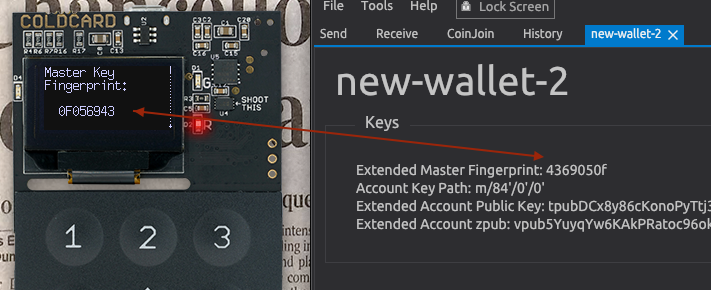
Again, on a Mac ... HWI and/or Wasabi has captured the XFP in the wrong endian at some point.
peter-conalgo
on 20 Nov 2019
I will investigate that but in the current issue, the Fingerprint is OK for both users.
BTW did you use the import button at Hardware wallet tab?
molnard
on 22 Nov 2019
@molnard Not sure if you are directing that to me, but yes I use the "Import Coldcard" button in the Hardware Wallet Tab.
mjlamb
on 22 Nov 2019
@mjlamb the question was for Peter. Let me know if you have some result with this: https://github.com/zkSNACKs/WalletWasabi/issues/2498#issuecomment-555994384
molnard
on 24 Nov 2019
Coldcard Mk3 with firmware 3.0.3 and Wasabi 1.1.9.2 :
I have been playing around with Wasabi and coldcard according to above this weekend and encountered the same issue. When importing a coldcard wallet .json file to Wasabi with BIP-39 passphrase enabled, the fingerprint of the wallet in Wasabi didn't match the fingerprint shown on the coldcard. Also, when sending funds to one of the addresses of this wallet, the funds can be seen in Wasabi, but when generating a PSBT transaction and trying to sign it with the coldcard, I also got the same issue as you did, with the "Failure... " message.
For me, the fingerprint and signing transactions work fine when using the coldcard with wasabi when using my imported coldcard wallet without any BIP-39 passphrase. However, the wallet generated when using the passphrase seem to cause the above signing and non-matching fingerprint problem. I double checked the addresses generated, and it seems that the addresses generated on the coldcard based on the passphrased wallet does exactly match the addresses shown in Wasabi based on the same wallet, so there seem to be no risk of permanent loss of funds, only impossible to move the funds by using wasabi until this issue is resolved.
I'm sure the funds can still be moved using electrum or other software to generate the PSBT transaction, but very unfortunate if it cannot be done with Wasabi of course. I haven't yet tried to move them using another software though so cannot fully confirm that.
 nanguapie
on 24 Nov 2019
nanguapie
on 24 Nov 2019
@nanguapie I had tried the same failed transaction in Electrum and it worked fine, so I was able to transact as expected, it was just the Wasabi side that failed.
mjlamb
on 25 Nov 2019
Hi there,
I am failed to reproduce the fingerprint reverse order issue (Windows, OSX). It might be a version mismatch I don't know but we have not changed anything since the release - see my links below.
But I discovered a user path that has very similar results.
- Power up CC.
- Set the Passphrase.
- Export skeleton to SD.
- Import the wallet to wasabi.
- Power down CC.
- Power up CC.
- Load my wallet in Wasabi.
- Create PSBT and export it to SD.
- Try to sign it with CC.
- I get Failure.
So if you forget to set the Passphrase after power-up or set the wrong one you will get the failure. It is a good practice to check the fingerprint in wasabi and in CC. If it is different you probably use the wrong passphrase in CC.
If it is in reverse order then it is a different issue and needs further investigation.
@nanguapie here you can see our algorithm to determine the reverse byte order. There might be a bug or a CC firmware change we missed. It is also important to note when we are on USB we are using HWI which is another layer.
Current master:
https://github.com/zkSNACKs/WalletWasabi/blob/master/WalletWasabi.Gui/Tabs/WalletManager/LoadWalletViewModel.cs#L102
molnard
on 26 Nov 2019
Thank you @molnard !
Please not though that the fingerprint shown on my coldcard and the fingerprint shown in Wasabi are completely different when viewing my BIP-39 passphrased watch-only wallet in Wasabi and the same BIP-39 passphrased wallet in the physical coldcard.
As mentioned, the addresses shown in Wasabi perfectly match the addresses that are shown on the coldcard screen (and also the same addresses as exported to .txt file from the coldcard just to make sure)
So the two (related) issues i noticed in the following user path are: Complete mis-match between the fingerprints of the wallet between wasabi and coldcard, and unability of the coldcard to sign a PSBT transaction as created by Wasabi and loaded on the microSD card from this same wallet.
1) Power up CC
2) Set the Passphrase.
- Export skeleton to SD.
- Import the wallet to wasabi.
- Generate the wallet's first receive address in wasabi
- confirm that this address is the same as the first address shown on the coldcard for this wallet
- send funds to this address
- wait for confirmation
- Build PSBT transaction in Wasabi, based on the address now with funds
- store this PSBT transaction on the microSD card
- Insert microSD card in coldcard
- choose sign transaction
- Confirm signing the transaction
- FAILURE - error message saying something like "xxxxxx fingerprint needed" where xxxxxx is the actual fingerprint of the coldcard wallet, but not the one shown in the Wasabi GUI
Hope that this clarified a little bit further my user path.
Perhaps this is already fixed in the upcoming version of Wasabi, I am as mentioned running v1.1.9.2
thank you :)
nanguapie
on 26 Nov 2019
At the same time, as I believe I mentioned, the wasabi and coldcard are working perfectly together when using the standard coldcard wallet without setting any BIP-39 passphrase.
nanguapie
on 26 Nov 2019
Hi I do not use a BIP-39 passphase in my CC and I still receive the error as detailed previously.
mjlamb
on 27 Nov 2019
That master_fingerprint looks suspect, since I would expect that to be the one displayed in CC ?
What is your master fingerprint on CC?
It might solve - you can test the new release candidate: https://github.com/zkSNACKs/WalletWasabi/releases/tag/v1.1.10rc1
molnard
on 5 Dec 2019
@mjlamb we pushed out our new release. Can you test it?
molnard
on 17 Dec 2019
Ok so I have upgraded Wasabi v1.1.10.0, I have reloaded the wallet file, and built a transaction to sign. Unfortunately I still get the same error message on the CC "None of the keys involved in this transaction...." cannot sign.
mjlamb
on 17 Dec 2019
Thank you for your feedback. I read back the conversation.
So your fingerprint is not in reverse order it is completely different?
Can you just import the skeleton file again with import on Hardware Wallet Tab?
After that go to Wallet information in wasabi and check if the fingerprint is correct.
molnard
on 18 Dec 2019
The wasabi json file has a finger print of = 31492646 which is identical to the ColdCard display. However in the Wasabi desktop client under Advanced -> "Wallet Info" = 268ae001
mjlamb
on 18 Dec 2019
@mjlamb thanks to your sustained feedback I got the issue. Created a PR to solve it, it will be in the next silent release. Until then you can compile from source after this merged: https://github.com/zkSNACKs/WalletWasabi/pull/2873
molnard
on 18 Dec 2019
Well, I committed this bug. Sorry guys for spending so much time on it. @molnard great find!
nopara73
on 18 Dec 2019
Looking forward to the next release! I really like the coin control feature of Wasabi while working with CC over "air-gapped" SD!
nanguapie
on 19 Dec 2019
Great looking forward to the release. Great work @molnard
mjlamb
on 19 Dec 2019
@mjlamb We fixed a few things with this hotfix, try it!
https://github.com/zkSNACKs/WalletWasabi/releases
Good luck!
molnard
on 21 Dec 2019
We have success I have managed to create and sign the psbt. Wasabli v1.1.10.1 Thanks all that help solve this one.
mjlamb
on 22 Dec 2019
Related issues
nopara73
·
3Comments
MaxHillebrand
·
3Comments
MaxHillebrand
·
3Comments
 yahiheb
·
3Comments
MaxHillebrand
·
3Comments
yahiheb
·
3Comments
MaxHillebrand
·
3Comments
Most helpful comment
@mjlamb thanks to your sustained feedback I got the issue. Created a PR to solve it, it will be in the next silent release. Until then you can compile from source after this merged: https://github.com/zkSNACKs/WalletWasabi/pull/2873