Walletwasabi: Insufficient time to enter Passphrase before timeout when using Trezor T
General Description
When using a Trezor T with Passphrase encryption enabled, Wasabi only provides one minute of time after clicking 'load wallet' for the user to enter the passphrase into the device. For long passphrases (such as those long enough to resist brute force attacks), this may not be enough time for users to fully enter it before Wasabi throws a timeout error. If the error occurs before the user finishes entering it, the wallet will not load. I understand if there is a reason to enforce timeouts for passphrase entry, but as a possible suggestion, could this timeout duration variable be added to the config file, so that users can increase it to allow for entering longer passphrases?
How To Reproduce?
- Ensure that the Trezor T has passphrase encryption enabled. This can be done using the python-trezor Trezorctl commands. See https://wiki.trezor.io/Using_trezorctl_commands_with_Trezor "Enable Passphrase" section.
- Plug in the Trezor to your computer.
- Start Wasabi and navigate to the "Hardware Wallet" tab. At first no wallets will be displayed on screen, and the Trezor touchscreen will display "How would you like to enter the passphrase" with two buttons, "Enter on host" and "Enter on device".
- Select "Enter on host". Wasabi will now show the Trezor wallet on the screen as a loadable wallet.
- Click "load wallet". The Trezor touchscreen will now display the same display as in step three. This time, select "Enter on device".
- Trezor touchscreen will now provide an interface for entering the passphrase. The user now has approximately 60 seconds to enter their passphrase.
- If a passphrase is not entered and submitted within 60 seconds, Wasabi will display the error "TimeoutException: Timeout occurred during the hwi operation". The user may continue to finish entering their passphrase, but at this point doing so will not load the corresponding wallet.
Screenshots
N/A
Operating System
macOS Mojave 10.14.2
Logs
ERROR LoadWalletViewModel: System.TimeoutException: Timeout occured during the hwi operation. ---> System.Threading.Tasks.TaskCanceledException: A task was canceled.
at System.Diagnostics.ProcessExtensions.WaitForExitAsync(Process process, CancellationToken cancellationToken)
at WalletWasabi.Hwi.HwiProcessManager.SendCommandAsync(String command, CancellationToken cancellationToken, Boolean isMutexPriority)
--- End of inner exception stack trace ---
at WalletWasabi.Hwi.HwiProcessManager.SendCommandAsync(String command, CancellationToken cancellationToken, Boolean isMutexPriority)
at WalletWasabi.Hwi.HwiProcessManager.GetXpubAsync(HardwareWalletInfo hardwareWalletInfo)
at WalletWasabi.Gui.Tabs.WalletManager.LoadWalletViewModel.LoadKeyManagerAsync(Boolean requirePassword, Boolean isHardwareWallet)
Wasabi Version
Version 1.1.6, downloaded from WasabiWallet.io. Verified PGP signature.
 NallyGhee
All 10 comments
Yes, this is bad UX.
Are there any security concerns with a longer timeout? Brute force or such? I can't think of how...
 MaxHillebrand
on 6 Aug 2019
MaxHillebrand
on 6 Aug 2019
Yeah we could make the timeout longer or give some sort of indication that the timeout has expired
 benthecarman
on 6 Aug 2019
benthecarman
on 6 Aug 2019
HWI is not limiting the time but Wasabi does. So I have changed it to 3 minutes. I did not set up my trezor so could not test the solution.
First I need to know which command times out. I added the command name to the Timeout log entry.
Can you check out my PR and tell me the command which times out?
 molnard
on 14 Aug 2019
molnard
on 14 Aug 2019
@NallyGhee I will wait for your feedback and then close the issue.
molnard
on 14 Aug 2019
@NallyGhee #2120 is the PR @molnard wants you to check.
 yahiheb
on 14 Aug 2019
yahiheb
on 14 Aug 2019
@yahiheb It's in the master already, so no need to check out the PR.
 nopara73
on 15 Aug 2019
nopara73
on 15 Aug 2019
Apologies for the delay. I should be able to test this within the next few days. So far I have only ever downloaded binaries from WasabiWallet.io. As I understand it, I'll need to build from the source code from the github repo to test this. I have two related questions:
- How will this interact with my existing WasabiWallet client already on my computer? Do I need to uninstall it?
- What is the process for safely verifying the build compiled correctly? Is there a signature I can run against the repo I pull from github to ensure it wasn't modified, or am I safe simply following the instructions in the README?
NallyGhee
on 24 Aug 2019
How will this interact with my existing WasabiWallet client already on my computer? Do I need to uninstall it?
No, it won't cause issues.
What is the process for safely verifying the build compiled correctly? Is there a signature I can run against the repo I pull from github to ensure it wasn't modified, or am I safe simply following the instructions in the README?
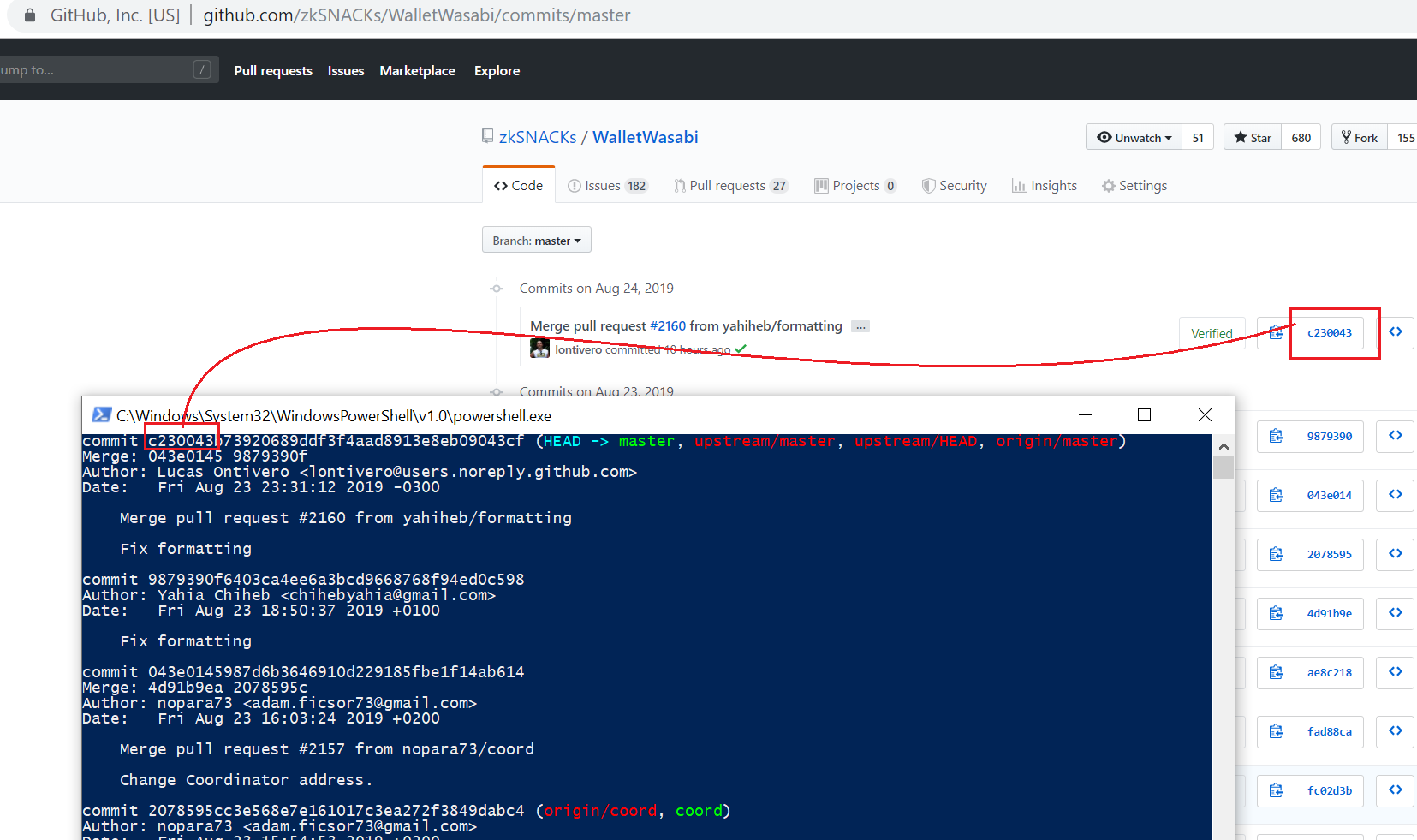
Just follow the instructions in the readme. Then do a git log and check if the hash of the last commit that GitHub shows is the same as the last commit in your local repo. The rest of the commits from the beginning of the time is in that hash, too, so you can verify code integrity. It's cool, but honestly nobody does this. The basic SSL gets the job done so nobody can tamper with it other than GitHub.
nopara73
on 24 Aug 2019
@molnard
Just ran some additional tests. The timeout duration has indeed been increased to where it is long enough so that I can enter it without timing out.
I also captured the error that was printed to the logfile. From my log:
"ERROR LoadWalletViewModel: System.TimeoutException: Timeout occurred during the hwi operation --device-type "trezor" --device-path "webusb:004:1" getxpub m/84h/0h/0h. ---> System.Threading.Tasks.TaskCanceledException: A task was canceled."
NallyGhee
on 26 Aug 2019
Simple user here:
Running 1.1.9 on debian 10
Seems like the issue is not resolved for me:
The difference with my configuration is that my Trezor T is configured to ONLY ALLOW entry of the passphrase on the Trezor device. There is no prompt to the user on where the password is inputted, so Trezor opens the Password menu right away when Wasabi gets opened.
- Wasabi opens on start, and I navigate to Hardware Wallets page.
- Wasabi States: "Looking for Hardware Wallets"
- The password prompt gets opened on trezor. If I type a short password only after this, will Trezor appear on the Hardware Wallets list in the Wasabi UI.
- I can select Trezor and click Load Wallet, and I will be prompted to re-enter my password on my hardware wallet. If I don't enter the password, Wasabi appears to hang for a while. I'm not sure if this is related behavior but maybe it is found useful. (maybe this is where the 3 minutes comes in?)
- Once password is entered for a second time, Wasabi continues as expected to have wallet send/receive screens open.
4.1. Now if I type in a long password, I get a timed out error before I can finish typing. Only once the error appears, then a Trezor wallet appears in the Hardware Wallets list.
The amount of time to type this password is around 60 seconds it seems.
"Timeout occurred during HWI operation enumerate"
At this point, Trezor appears on the Hardware Wallets list screen as
Trezor -- Could Not Open Client or get Fingerprint Information LIBUSB_ERROR_BUSY -6
I would assume this is related to the fact that my Trezor does not prompt the user on where to input the password? This seems like where my Trezor's/Wasabi's behavior deviates.
Let me know how I could be of more assistance.
 99ytrewq911
on 18 Sep 2019
99ytrewq911
on 18 Sep 2019
Related issues
 RiccardoMasutti
·
3Comments
MaxHillebrand
·
3Comments
RiccardoMasutti
·
3Comments
MaxHillebrand
·
3Comments
 gabridome
·
3Comments
yahiheb
·
3Comments
MaxHillebrand
·
3Comments
gabridome
·
3Comments
yahiheb
·
3Comments
MaxHillebrand
·
3Comments
Most helpful comment
@molnard
Just ran some additional tests. The timeout duration has indeed been increased to where it is long enough so that I can enter it without timing out.
I also captured the error that was printed to the logfile. From my log:
"ERROR LoadWalletViewModel: System.TimeoutException: Timeout occurred during the hwi operation --device-type "trezor" --device-path "webusb:004:1" getxpub m/84h/0h/0h. ---> System.Threading.Tasks.TaskCanceledException: A task was canceled."