I am using vs-tabs component. This works fine if I load static data, but if I load data from API, it gives error in browser console like below.
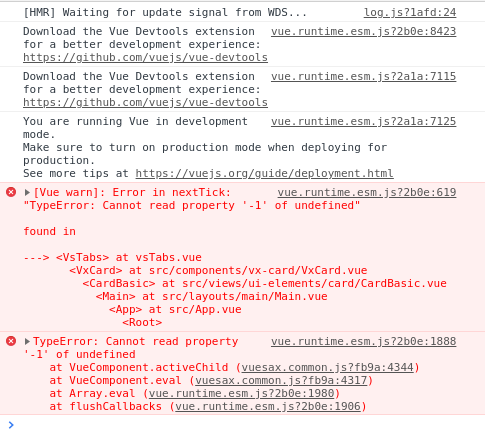
- Your OS: Ubuntu
- Node.js version: 10.15.3
- Vuesax version: 3.9.0
- Which package manager did you use for the install? : Yarn
 jsinhSolanki
All 7 comments
The same!
 guicolares
on 16 Aug 2019
guicolares
on 16 Aug 2019
The <vs-tabs> component doesn't support <vs-tab> components being added/removed as child components dynamically.
The Vuesax team will need to update the component to support this functionality. If I can find some time, I'll look into it and submit a pull request.
In the meaning, here's a hack you can use to get around it:
<div :key="forceRender">
    <vs-tabs>
        <template v-for="(user, index) in myUsers">
            <vs-tab :key="index" :label="user.firstName">
                {{ user.address }}
            </vs-tab>
        </template>
    </vs-tabs>
</div>

<script>
export default {
    watch: {
        myUsers(val) {
            this.forceRender += 1
        }
    },
}
</script>
 phuze
on 23 Sep 2019
phuze
on 23 Sep 2019
I have a similar issue how do I make the tabs label reactive to localization change as other components. vs-tab doesn't seem to bind the values unless the page is reloaded.
 Dawith305
on 13 Nov 2019
Dawith305
on 13 Nov 2019
Same here. I can not make tabs from API call result. Is there any progress?
 Jam3si
on 4 May 2020
Jam3si
on 4 May 2020
I have a similar issue how do I make the tabs label reactive to localization change as other components. vs-tab doesn't seem to bind the values unless the page is reloaded.
I solved it like this. It might work for you. After page load, I change to localization titles with javascript.
```
users
groups
 emrullahtastan
on 10 Jun 2020
emrullahtastan
on 10 Jun 2020
This problem appears just because "vs-tabs" loads before the api call finished. To prevent this, add v-if="apiCallData.length" condition for "vs-tabs" so that it be loaded only after the data recieved completely from the server.
<vs-tabs v-if="apiCallData.length">
    <vs-tab :label="record.label" v-for="record in apiCallData">
        {{ record.content }}
    </vs-tab>
</vs-tabs>
 morez-s
on 16 Nov 2020
morez-s
on 16 Nov 2020
This problem appears just because "vs-tabs" loads before the api call finished. To prevent this, add v-if="apiCallData.length" condition for "vs-tabs" so that it be loaded only after the data recieved completely from the server.
<vs-tabs v-if="apiCallData.length">
    <vs-tab :label="record.label" v-for="record in apiCallData">
        {{ record.content }}
    </vs-tab>
</vs-tabs>
I think this is the most efficient solution, simple. Working, thanks.
 sadicann
on 14 Dec 2020
sadicann
on 14 Dec 2020
Related issues
 sangdth
·
4Comments
sangdth
·
4Comments
 jupox
·
3Comments
jupox
·
3Comments
 MeastBlue
·
3Comments
MeastBlue
·
3Comments
 Deltalus
·
3Comments
Deltalus
·
3Comments
 mjmnagy
·
3Comments
mjmnagy
·
3Comments