Currently there is no way to position a drop down
I have added a dropdown with a menu inside of it into the navbar at the very left hand corner
The dropdown menu left value is calculating automatically but positions it outside the view. (not left enough / position is wrong)
Not only does the positioning not work but the little arrow at the bottom/top(depending on the dropdown opening up or down) stays in the same spot
I think there needs to be better control of the positioning of the component
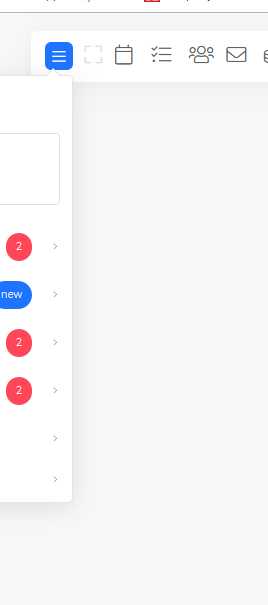
In the image, there is a dropdown that has a menu in it. it positioning is left: 72.7969px; top: 52.375px;
If i add classes to the container or the dropdown, i cannot get it to be inline with the the navbar.
 mjmnagy
All 3 comments
i figured it out
mjmnagy
on 26 Jul 2019
@mjmnagy
Hi Sir, how did you do ?
I have the same problem.
I looked at vuesax documentation and it says to insert a .dropright wrapper, but in my case it doesn't work.
 ConsoliNiccolo
on 18 Sep 2019
ConsoliNiccolo
on 18 Sep 2019
@ConsoliNiccolo I believe this has been updated with a new property value. Check out the documentation here https://github.com/lusaxweb/vuesax/blob/master/src/components/vsDropDown/vsDropDown.vue vsDropRight
mjmnagy
on 27 Sep 2019
Related issues
 webafra
·
3Comments
webafra
·
3Comments
 jupox
·
3Comments
jupox
·
3Comments
 Deltalus
·
3Comments
Deltalus
·
3Comments
 fahada95
·
4Comments
fahada95
·
4Comments
 alexflorea2
·
4Comments
alexflorea2
·
4Comments
Most helpful comment
@ConsoliNiccolo I believe this has been updated with a new property value. Check out the documentation here
https://github.com/lusaxweb/vuesax/blob/master/src/components/vsDropDown/vsDropDown.vuevsDropRight