Vuesax: Vue DevsTool shows duplicated components when using vs-select
When I remove the vs-select, the component list goes back to normal. When I use it, and go to the view that uses vs-select, Vue DevsTool shows duplicated.
Use vs-select:
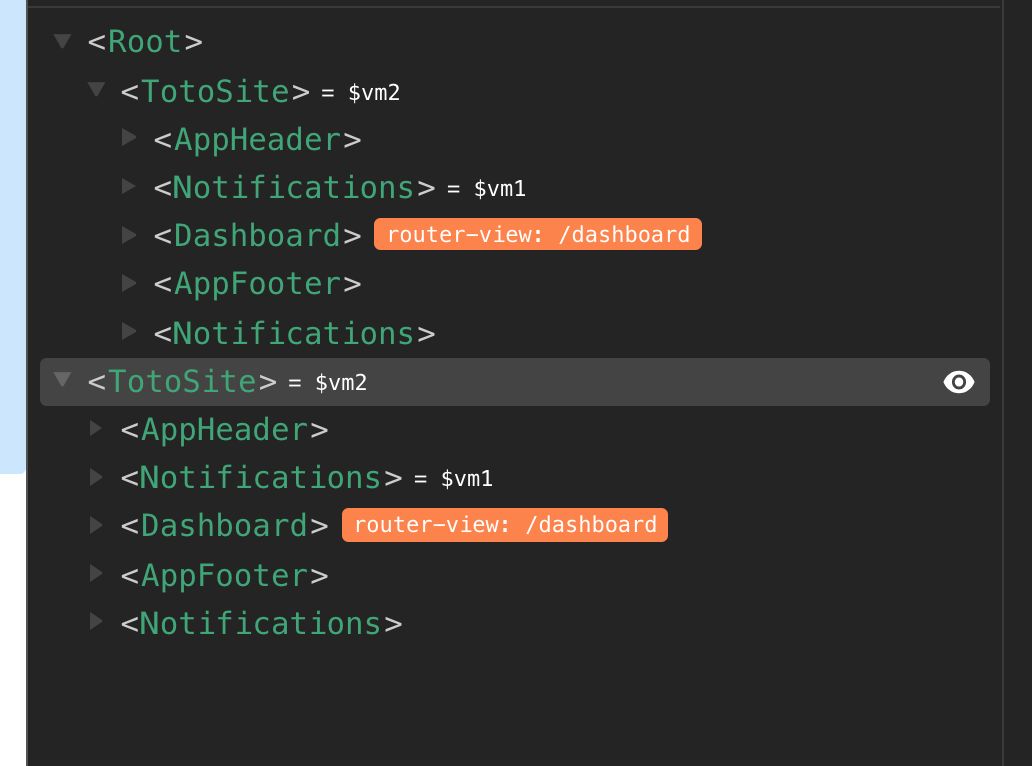
Delete vs-select:

- Your OS: MacOS X 10.13.6
- Node.js version: 8.11.4
- Vuesax version: 3.4.7
- Browser version: Google Chrome 69.0.3497.100
- Which package manager did you use for the install? Yarn
 sangdth
All 4 comments
@sangdth hi!
on print screen, i can see two instances of vuejs, $vm1 and $vm2. You use Event Bus? Why you maintain two instances?
Maybe this, i could not simulate this, all my tests have only one and dont have any code to make duplicate this.
Regards.
 brunokunace
on 12 Oct 2018
brunokunace
on 12 Oct 2018
Hi brunokunace,
No I do not use event bus. And I do not maintain multiple instances.

The picture above is test vue app generated by Vue CLI recent version, pure Vue, nothing else. As you can see, $vm0, $vm1, $vm2 is there.
I think it is not related to my issue.
sangdth
on 16 Oct 2018
I'm having the same problem. When i remove vs-select it all gets back to normal. And the options in the vs-select are not visible. But in my case is the root node that gets duplicated, and both is related to $vm0.
 yvescavalcanti
on 29 Oct 2018
yvescavalcanti
on 29 Oct 2018
This is a duplicate of #340 it seems.
 jacrys
on 2 Nov 2018
jacrys
on 2 Nov 2018
Related issues
 webafra
·
3Comments
webafra
·
3Comments
 ccalvarez
·
4Comments
ccalvarez
·
4Comments
 jupox
·
3Comments
jupox
·
3Comments
 Deltalus
·
3Comments
Deltalus
·
3Comments
 fahada95
·
4Comments
fahada95
·
4Comments
Most helpful comment
This is a duplicate of #340 it seems.