Vscode: Useless "Accounts" icon in activities bar
- VSCode Version: 1.46.0
- OS Version: MacOS 10.15.5
Steps to Reproduce:
- Open VSCode
Does this issue occur when all extensions are disabled?: Yes
Since the last update I now have a useless "Accounts" icon in the Activities bar.
Here's how it looks when clicked:
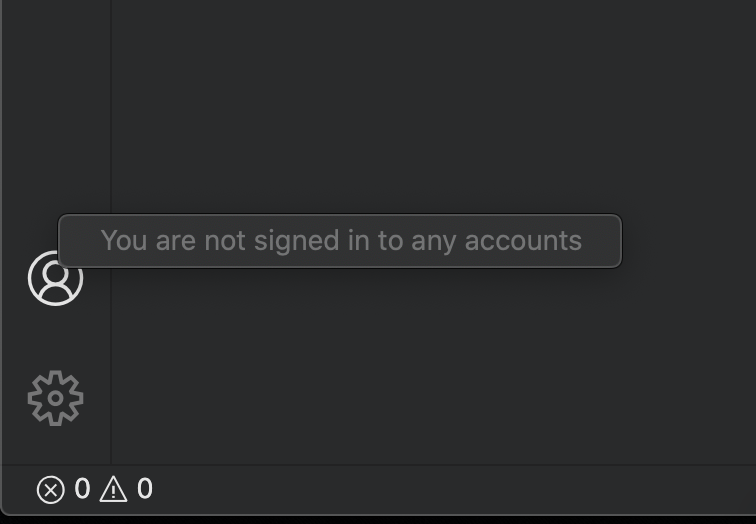
- I cannot sign-in (nor do I want to)!
- I cannot remove this icon
- I cannot do anything else with it!
 tborychowski
All 13 comments
 gjsjohnmurray
on 12 Jun 2020
gjsjohnmurray
on 12 Jun 2020
Also #97167 requesting the ability to hide it.
gjsjohnmurray
on 12 Jun 2020
Thanks @gjsjohnmurray
I still think this is a bug, as it shows the button for the functionality that is not yet ready/enabled.
tborychowski
on 12 Jun 2020
The button becomes functional if you have certain extensions installed that integrate with external accounts, for example 'Visual Studio Codespaces'
gjsjohnmurray
on 12 Jun 2020
Thanks @gjsjohnmurray for the explanation.
It makes more sense now.
In that case - it should be very easy to check if any extension needs the button, and - if not - than the button is useless, and should not be visible :-)
I'd be very happy even if there's a simple boolean setting that would allow me to hide it.
tborychowski
on 12 Jun 2020
Was this ever solved? I'm facing the same issue. I would like to either not see it or figure out how to actually log into an account.
 jmarsh24
on 4 Jul 2020
jmarsh24
on 4 Jul 2020
Not yet.
tborychowski
on 4 Jul 2020
The "Accounts" icon still can't be hidden in VSCode Version: 1.47.0
Damn ugly!!!!
 dacapoday
on 10 Jul 2020
dacapoday
on 10 Jul 2020
Bumping this... Would be nice to link my settings and extensions to an account for my multiple machines. At the very least, only show this Account icon when it's needed? Seems obvious?
 douglasrcjames
on 16 Jul 2020
douglasrcjames
on 16 Jul 2020
Would be nice to link my settings and extensions to an account for my multiple machines.
Already possible as long as you're willing to use Insiders. See here.
gjsjohnmurray
on 16 Jul 2020
Thank you!! Exactly what I was looking for.
douglasrcjames
on 16 Jul 2020
As a KDE user, I do not want to use this feature unless you support KWallet. I do not want to install gnome-keyring, If this cannot be provided, a way to disable this feature entirely and cleanly would be necessary
 Ambyjkl
on 24 Jul 2020
Ambyjkl
on 24 Jul 2020
Closing this issue, as in the next release settings sync will ship which adds an entry to this menu by default, and as the icon will be hideable.
 RMacfarlane
on 11 Aug 2020
RMacfarlane
on 11 Aug 2020
Related issues
 ozsay
·
247Comments
ozsay
·
247Comments
 fabiopicchi
·
192Comments
fabiopicchi
·
192Comments
 jsftw86
·
361Comments
jsftw86
·
361Comments
 Tyriar
·
314Comments
Tyriar
·
314Comments
 Brakkar
·
364Comments
Brakkar
·
364Comments
Most helpful comment
Thanks @gjsjohnmurray for the explanation.
It makes more sense now.
In that case - it should be very easy to check if any extension needs the button, and - if not - than the button is useless, and should not be visible :-)
I'd be very happy even if there's a simple boolean setting that would allow me to hide it.