Vscode-remote-release: ssh connection fail to establish
I am suffering the following issue by trying to establish ssh connection in vscode.
02:50:33.676] [email protected]
[02:50:33.676] win32 x64
[02:50:33.690] SSH Resolver called for "ssh-remote+7b22686f73744e616d65223a22737368322e746e742e756e692d68616e6e6f7665722e6465222c2275736572223a22737368206c69616f227d", attempt 1
[02:50:33.691] SSH Resolver called for host: ssh username@hostname
[02:50:33.691] Setting up SSH remote "hostname"
[02:50:33.954] Using commit id "6ab598523be7a800d7f3eb4d92d7ab9a66069390" and quality "stable" for server
[02:50:33.970] Testing ssh with ssh -V
[02:50:36.271] ssh exited with code: 0
[02:50:36.271] Got stderr from ssh: OpenSSH_7.9p1, OpenSSL 1.0.2p  14 Aug 2018
[02:50:36.288] Running script with connection command: ssh -T -D 50860 "ssh username@hostname" bash
[02:50:36.293] Install and start server if needed
[02:50:36.306] Terminal shell path: C:\WINDOWS\System32\cmd.exe
[02:50:36.738] >
>
>C:\WINDOWS\System32\cmd.exe
[02:50:36.739] Got some output, clearing connection timeout
[02:50:36.835] >
>
>
>
[02:50:42.971] > ssh username@hostname's password:
[02:50:42.971] Showing password prompt
[02:50:43.006] >
[02:50:43.007] Showing password prompt
[02:50:43.016] Password dialog canceled
[02:50:43.017] "install" terminal command canceled
[02:50:43.018] Resolver error: Connecting was canceled
[02:50:43.024] TELEMETRY: {"eventName":"resolver","properties":{"outcome":"failure","reason":"Canceled","askedPw":"1","askedPassphrase":"0","asked2fa":"0","askedHostKey":"0","gotUnrecognizedPrompt":"0","remoteInConfigFile":"0"},"measures":{"resolveAttempts":1,"retries":1}}
[02:50:43.026] ------
It works before this month. I have tried to reinstall vscode completely in different versions (1.37~1.39.2) and all of them have the same issue.
I can establish the ssh connection from the terminal in vscode or windows vscode.
- VSCode Version: 1.39.2
- Local OS Version: win10 Version 1903 (OS Build 18362.418)
- Remote OS Version: openSUSE Leap 15.0
- Remote Extension/Connection Type: SSH
Steps to Reproduce:
- in vscode press F1
- remove-ssh: connect to host
- ssh [email protected]
Does this issue occur when you try this locally?: Yes
Does this issue occur when you try this locally and all extensions are disabled?: Yes
 wtliao
All 20 comments
BTW, there is no problem on macos catalina with vscode 1.39........
wtliao
on 16 Oct 2019
Does it work with an older version of the extension? You can install other versions by right clicking on the extension.
 roblourens
on 16 Oct 2019
roblourens
on 16 Oct 2019
similar issue here as well. happening after 1.39.2 update.
 BaconPancakes
on 17 Oct 2019
BaconPancakes
on 17 Oct 2019
Everyone, "similar issue" doesn't help. @ivanthewebber you are seeing different symptoms from the OP so please open a new issue. @BaconPancakes please open an issue for yourself as well with the log.
roblourens
on 17 Oct 2019
@roblourens
I have tried to reinstalled versions from 1.37-1.39.2. but non of them works. Interesting is that version 1.39 is updated in my MBP and it works.
wtliao
on 18 Oct 2019
I mean version of the extension, not vscode. You can install other versions by right clicking on the extension.
The log says that the password prompt showed up, then immediately was canceled. Do you see a password prompt show up for a brief moment?
roblourens
on 19 Oct 2019
@roblourens It does not work by reinstalling the older version of the extension.
I can not input the password because of a pop-up message saying that the connection is canceled.
wtliao
on 20 Oct 2019
Do you press esc at any point in this process? I don't know why the dialog is being hidden immediately after being shown.
roblourens
on 21 Oct 2019
This issue has been closed automatically because it needs more information and has not had recent activity. See also our issue reporting guidelines.
Happy Coding!
![vscodebot[bot] picture](https://avatars2.githubusercontent.com/in/2406?v=4&s=40) vscodebot[bot]
on 28 Oct 2019
vscodebot[bot]
on 28 Oct 2019
@roblourens
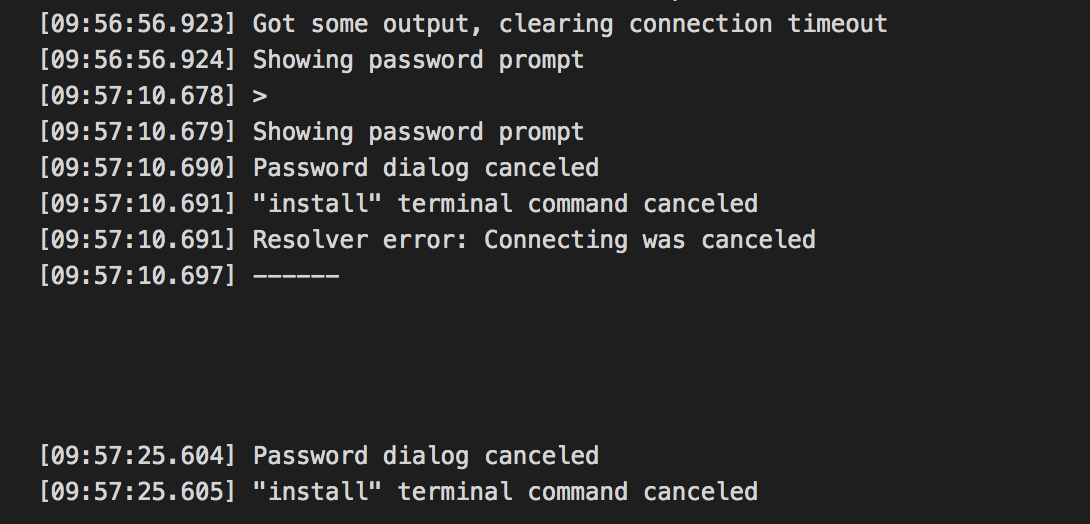
the screenshot is as below

wtliao
on 29 Oct 2019
I see the problem. If windows sends you a random newline after the password prompt, it will trigger the password prompt a second time.
roblourens
on 29 Oct 2019
Is there any known workaround for this issue?
 lmontoute
on 13 Nov 2019
lmontoute
on 13 Nov 2019
Is there any known workaround for this issue?
Unchecking conpty in vscode settings worked for me.
 Robert-Kaluza
on 2 Dec 2019
Robert-Kaluza
on 2 Dec 2019
@Robert-Kaluza
Could you give more information on how to set it? Thanks in advance
wtliao
on 2 Dec 2019
@Robert-Kaluza
Could you give more information on how to set it? Thanks in advance
As I mentioned:
- go to vscode settings
- search for conPTY
- uncheck the checkbox

Hope it will work also for you.
Robert-Kaluza
on 2 Dec 2019
@Robert-Kaluza Thanks so much! It works for me!
wtliao
on 3 Dec 2019
roblourens
on 12 Dec 2019
any other ideas...
(mac / connection to ubuntu 18.04 digital ocean droplet)
 romain130492
on 16 Dec 2019
romain130492
on 16 Dec 2019
Could not reproduce in the stable release. Any steps to reproduce? (I'm on the latest Windows stable.)
 chrmarti
on 31 Jan 2020
chrmarti
on 31 Jan 2020
This only happens when Windows does something weird. I'll call it verified, I was able to hit this and tested it carefully.
roblourens
on 31 Jan 2020
Related issues
 jkoritzinsky
·
3Comments
jkoritzinsky
·
3Comments
 kieferrm
·
3Comments
kieferrm
·
3Comments
 JacksonKearl
·
3Comments
JacksonKearl
·
3Comments
 sulume
·
3Comments
sulume
·
3Comments
 gurdevrana
·
3Comments
gurdevrana
·
3Comments
Most helpful comment
As I mentioned:
Hope it will work also for you.