Vscode-remote-release: Connection error : Version mismatch, client refused
- VSCode Version: 1.45.1 (user setup)
- Local OS Version: Windows 10
- Remote OS Version: Linux
- Remote Extension/Connection Type: SSH
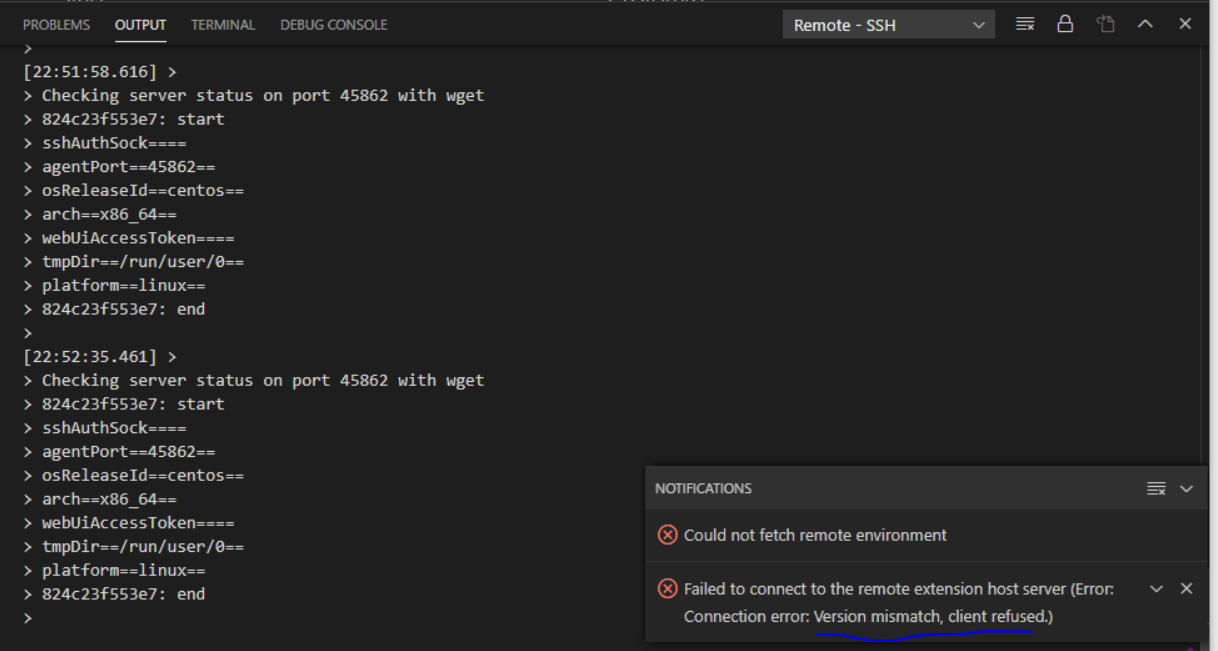
Steps to reproduce:-
- Just install Visual studio code and install the Remote SSH for remote development
- Generated the private keys using ssh-keygen and i am able to connect with the Linux server using the keys and with ssh
- Added the keys path in IdentityFile and other details like host, hostname etc in config file in .ssh directory for Visual code
- Tried connecting with the Linux server but failed
[22:51:22.730] Log Level: 2
[22:51:22.739] [email protected]
[22:51:22.739] win32 x64
[22:51:22.741] SSH Resolver called for "ssh-remote+service-couchdb", attempt 1
[22:51:22.741] SSH Resolver called for host: service-couchdb
[22:51:22.741] Setting up SSH remote "service-couchdb"
[22:51:22.760] Using commit id "5763d909d5f12fe19f215cbfdd29a91c0fa9208a" and quality "stable" for server
[22:51:22.761] Install and start server if needed
[22:51:22.765] Checking ssh with "ssh -V"
[22:51:22.970] > OpenSSH_for_Windows_7.7p1, LibreSSL 2.6.5
[22:51:22.972] Running script with connection command: ssh -T -D 59074 service-couchdb bash
[22:51:22.975] Terminal shell path: C:\Windows\System32\cmd.exe
[22:51:23.435] >
]0;C:\Windows\System32\cmd.exe
[22:51:23.435] Got some output, clearing connection timeout
[22:51:23.464] >[22:51:23.704] >
[22:51:24.046] > /root/.bashrc: line 1: .bashrc: command not found
[22:51:24.119] > 824c23f553e7: running
[22:51:24.156] > Acquiring lock on /root/.vscode-server/bin/5763d909d5f12fe19f215cbfdd29a91c0fa9208a/vscode-remote-lock.root.5763d909d5f12fe19f215cbfd
d29a91c0fa9208a[22:51:24.165] > \ln /root/.vscode-server/bin/5763d909d5f12fe19f215cbfdd29a91c0fa9208a/vscode-remote-lock.root.5763d909d5f12fe19f215cbfdd29a91c0fa9208
a.target /root/.vscode-server/bin/5763d909d5f12fe19f215cbfdd29a91c0fa9208a/vscode-remote-lock.root.5763d909d5f12fe19f215cbfdd29a91c0f
a9208a[22:51:24.259] > Found existing installation at /root/.vscode-server/bin/5763d909d5f12fe19f215cbfdd29a91c0fa9208a...
[22:51:24.266] > Found running server...
*
- Reminder: You may only use this software with Visual Studio family products,
- as described in the license (https://go.microsoft.com/fwlink/?linkid=2077057)
*[22:51:24.274] >
Checking server status on port 45862 with wget[22:51:24.309] > 824c23f553e7: start
sshAuthSock====
agentPort==45862==
osReleaseId==centos==
arch==x86_64==
webUiAccessToken====
tmpDir==/run/user/0==
platform==linux==
824c23f553e7: end[22:51:24.310] Received install output:
sshAuthSock====
agentPort==45862==
osReleaseId==centos==
arch==x86_64==
webUiAccessToken====
tmpDir==/run/user/0==
platform==linux==
[22:51:24.312] Remote server is listening on port 45862
[22:51:24.312] Parsed server configuration: {"agentPort":45862,"osReleaseId":"centos","arch":"x86_64","webUiAccessToken":"","sshAuthSock":"","tmpDir":"/run/user/0","platform":"linux"}
[22:51:24.315] Starting forwarding server. localPort 59077 -> socksPort 59074 -> remotePort 45862
[22:51:24.317] Forwarding server listening on 59077
[22:51:24.317] Waiting for ssh tunnel to be ready
[22:51:24.319] Tunneled remote port 45862 to local port 59077
[22:51:24.319] Resolved "ssh-remote+service-couchdb" to "127.0.0.1:59077"
[22:51:24.320] [Forwarding server 59077] Got connection 0
[22:51:24.331] ------
[22:51:24.365] [Forwarding server 59077] Got connection 1
[22:51:24.366] [Forwarding server 59077] Got connection 2
[22:51:32.715] >
Checking server status on port 45862 with wget
824c23f553e7: start
sshAuthSock====
agentPort==45862==
osReleaseId==centos==
arch==x86_64==
webUiAccessToken====
tmpDir==/run/user/0==
platform==linux==
824c23f553e7: end[22:51:50.311] >
Checking server status on port 45862 with wget
824c23f553e7: start
sshAuthSock====
agentPort==45862==
osReleaseId==centos==
arch==x86_64==
webUiAccessToken====
tmpDir==/run/user/0==
platform==linux==
824c23f553e7: end[22:51:58.616] >
Checking server status on port 45862 with wget
824c23f553e7: start
sshAuthSock====
agentPort==45862==
osReleaseId==centos==
arch==x86_64==
webUiAccessToken====
tmpDir==/run/user/0==
platform==linux==
824c23f553e7: end[22:52:35.461] >
Checking server status on port 45862 with wget
824c23f553e7: start
sshAuthSock====
agentPort==45862==
osReleaseId==centos==
arch==x86_64==
webUiAccessToken====
tmpDir==/run/user/0==
platform==linux==
824c23f553e7: end
I Have gone through all the google till page 3 and i found no solution .. Found a thread which says to downgrade the remote-SSH extension to 0.37 but still it doesn't works.
Please help... plzzz help...PLZ
 gurdevrana
All 3 comments
Same problem.
 Halelee0902
on 29 Jul 2020
Halelee0902
on 29 Jul 2020
Did you use code-oss or ms-vscode? On archlinux, I had a similar issue with code-oss. It started working on installing visual-studio-code-bin instead.
 sankeerth95
on 9 Oct 2020
sankeerth95
on 9 Oct 2020
@gurdevrana @Halelee0902 Are you still experiencing this issue? Does @sankeerth95's suggestion help?
 bamurtaugh
on 4 Nov 2020
bamurtaugh
on 4 Nov 2020
Related issues
 kzawad1
·
3Comments
kzawad1
·
3Comments
 mxdmedia
·
3Comments
mxdmedia
·
3Comments
 gulshan
·
3Comments
gulshan
·
3Comments
 tianomagdaong
·
3Comments
tianomagdaong
·
3Comments
 abdullahiabdirahman
·
3Comments
abdullahiabdirahman
·
3Comments
Most helpful comment
Did you use code-oss or ms-vscode? On archlinux, I had a similar issue with code-oss. It started working on installing visual-studio-code-bin instead.