Vscode-remote-release: Extension packs are not installed on correct location
- Open a remote window
- Look for an extension pack that has workspace extensions. Eg: PHP Extension Pack
🐛 It shows a button install locally
Expected to show Install on remote
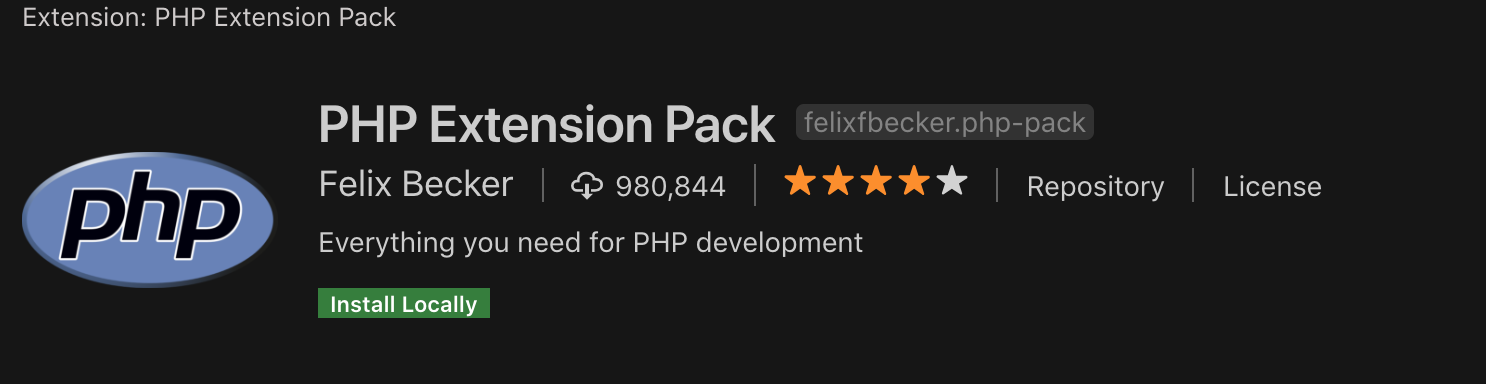
🐛 Clicking on Install, installs PHP extensions locally.
Expected to install remotely
 sandy081
All 6 comments
The fix in the code to analyze the dependencies has to be deferred to May.
The impacted extension packs are extension packs without a main/code. For example, the Java Extension Pack works fine since it has code.
The work around is to install the extensions from the packs individually or when using remote-containers in the devcontainer.json.
Popular affected extension packs are listed below.
- Anaconda Extension Pack
- PHP Extension Pack
- Salesforce Extension Pack
- Python Extension Pack
- Angular Essentials
- Live Share Extension Pack
- Vue.js Extension Pack
- Angular Extension Pack
- Node.js Extension Pack
- Angular Extension Pack
- Vue VS Code Extension Pack
- VS Code for Node.js - Development Pack
- Spring Boot Extension Pack
- Laravel Extension Pack
- Git Extension Pack
- Azure Tools
 egamma
on 2 May 2019
egamma
on 2 May 2019
We should consider fixing this for stable as IMO installing extension packs is broken. In terms of risk, it is low because it is already implemented correctly for dependencies and fixing is to use the same strategy.
sandy081
on 2 May 2019
An extension pack is an extension that comprises of multiple other extensions. Included extension can be any extension (pack or ui or workspace). So it means an extension pack can be
- Workspace pack that comprises of all Workspace extensions
- UI pack that comprises of all UI extensions
- Hybrid pack that comprises of Workspace and UI extensions
When an extension pack is installed, included extensions should be installed at the appropriate location. Following is my proposal:
An extension pack is considered as workspace extension kind unless specified by the extension.
A workspace extension pack is installed on the remote and if it includes any UI extensions, then they will be installed locally. When a workspace extension pack comprises UI extensions, then user will be notified that installing such a pack also installs some extensions locally.
A UI extension pack is always installed locally and there will be no special treatment.
sandy081
on 7 May 2019
@alexandrudima FYI
sandy081
on 7 May 2019
@sandy081 I think this makes sense, but I am concerned about our isUIExtension implementation. The definition you propose would make isUIExtension no longer work on a single package.json. i.e. by looking at the package.json of an extension pack it would no longer be possible to determine where it should execute...
 alexdima
on 7 May 2019
alexdima
on 7 May 2019
An extension pack is considered as workspace extension kind unless specified by the extension.
@alexandrudima Its isUIExtension that determines above. So it still holds the logic to determine whether an extension is ui extension or not.
sandy081
on 7 May 2019
Related issues
 gurdevrana
·
3Comments
gurdevrana
·
3Comments
 Yvand
·
3Comments
Yvand
·
3Comments
 kieferrm
·
3Comments
kieferrm
·
3Comments
 peterkappelt
·
3Comments
peterkappelt
·
3Comments
 Arunselvan-AS
·
3Comments
Arunselvan-AS
·
3Comments