Vscode-react-native: [Error] Failed to run the application in Android
Stack: Error: Failed to run the application in Android: Unknown error: not all success patterns were matched.
It means that "react-native run-android" command failed. Please, check the View -> Toggle Output -> React Native, View -> Toggle Output -> React Native: Run android output windows.
at Function.getWrappedError (C:Usersnagnihotri.vscodeextensionsvsmobile.vscode-react-native-0.6.16srccommonerrorinternalError.js:35:16)
at Function.wrapError (C:Usersnagnihotri.vscodeextensionsvsmobile.vscode-react-native-0.6.16srccommonerrorerrorHelper.js:18:44)
at resultOfCode.done.reason (C:Usersnagnihotri.vscodeextensionsvsmobile.vscode-react-native-0.6.16srccommonentryPointHandler.js:43:72)
at _rejected (C:Usersnagnihotri.vscodeextensionsvsmobile.vscode-react-native-0.6.16node_modulesqq.js:844:24)
at C:Usersnagnihotri.vscodeextensionsvsmobile.vscode-react-native-0.6.16node_modulesqq.js:870:30
at Promise.when (C:Usersnagnihotri.vscodeextensionsvsmobile.vscode-react-native-0.6.16node_modulesqq.js:1122:31)
at Promise.promise.promiseDispatch (C:Usersnagnihotri.vscodeextensionsvsmobile.vscode-react-native-0.6.16node_modulesqq.js:788:41)
at C:Usersnagnihotri.vscodeextensionsvsmobile.vscode-react-native-0.6.16node_modulesqq.js:604:44
at runSingle (C:Usersnagnihotri.vscodeextensionsvsmobile.vscode-react-native-0.6.16node_modulesqq.js:137:13)
at flush (C:Usersnagnihotri.vscodeextensionsvsmobile.vscode-react-native-0.6.16node_modulesqq.js:125:13)
at _combinedTickCallback (internal/process/next_tick.js:131:7)
at process._tickCallback (internal/process/next_tick.js:180:9)
 nagnihotri
All 16 comments
every time I create a fresh react native app it works for some times from CMD npm run android and after few successful runs it is throwing this error. however vscode never runs it successful if I choose React native: run android simulator
Unknown error: not all success patterns were matched. It means that "react-native run-android" command failed. Please, check the View -> Toggle Output -> React Native, View -> Toggle Output -> React Native: Run android output windows.
nagnihotri
on 17 Sep 2018
Hi @nagnihotri and thanks for questioning. Did you check out View -> Toggle Output -> React Native, View -> Toggle Output -> React Native: Run android output windows as log message has suggested? What were the outputs?
 ruslan-bikkinin
on 18 Sep 2018
ruslan-bikkinin
on 18 Sep 2018
Hello @ruslan-bikkinin Yes I did check and that will take you to the error what I posted as question.
nagnihotri
on 18 Sep 2018
This issue actually never resolved and developers have been struggling with this issue, like this https://github.com/Microsoft/vscode-react-native/issues/624#issuecomment-384942115
Please dont close this issue and lets try to fix this now with proper steps and global resolution.
nagnihotri
on 18 Sep 2018
Could you please still paste here output of View -> Toggle Output -> React Native, View -> Toggle Output -> React Native: Run android windows just after your attempt of debugging?
ruslan-bikkinin
on 18 Sep 2018
Also, please update you first message with all the info from our issue template
ruslan-bikkinin
on 18 Sep 2018
Sure @ruslan-bikkinin
Error:
Stack: Error: Failed to run the application in Android: Unknown error: not all success patterns were matched.
at Function.getWrappedError (C:Usersnagnihotri.vscodeextensionsvsmobile.vscode-react-native-0.6.16srccommonerrorinternalError.js:35:16)
at Function.wrapError (C:Usersnagnihotri.vscodeextensionsvsmobile.vscode-react-native-0.6.16srccommonerrorerrorHelper.js:18:44)
at resultOfCode.done.reason (C:Usersnagnihotri.vscodeextensionsvsmobile.vscode-react-native-0.6.16srccommonentryPointHandler.js:43:72)
at _rejected (C:Usersnagnihotri.vscodeextensionsvsmobile.vscode-react-native-0.6.16node_modulesqq.js:844:24)
at C:Usersnagnihotri.vscodeextensionsvsmobile.vscode-react-native-0.6.16node_modulesqq.js:870:30
at Promise.when (C:Usersnagnihotri.vscodeextensionsvsmobile.vscode-react-native-0.6.16node_modulesqq.js:1122:31)
at Promise.promise.promiseDispatch (C:Usersnagnihotri.vscodeextensionsvsmobile.vscode-react-native-0.6.16node_modulesqq.js:788:41)
at C:Usersnagnihotri.vscodeextensionsvsmobile.vscode-react-native-0.6.16node_modulesqq.js:604:44
at runSingle (C:Usersnagnihotri.vscodeextensionsvsmobile.vscode-react-native-0.6.16node_modulesqq.js:137:13)
at flush (C:Usersnagnihotri.vscodeextensionsvsmobile.vscode-react-native-0.6.16node_modulesqq.js:125:13)
at _combinedTickCallback (internal/process/next_tick.js:131:7)
at process._tickCallback (internal/process/next_tick.js:180:9)
nagnihotri
on 18 Sep 2018
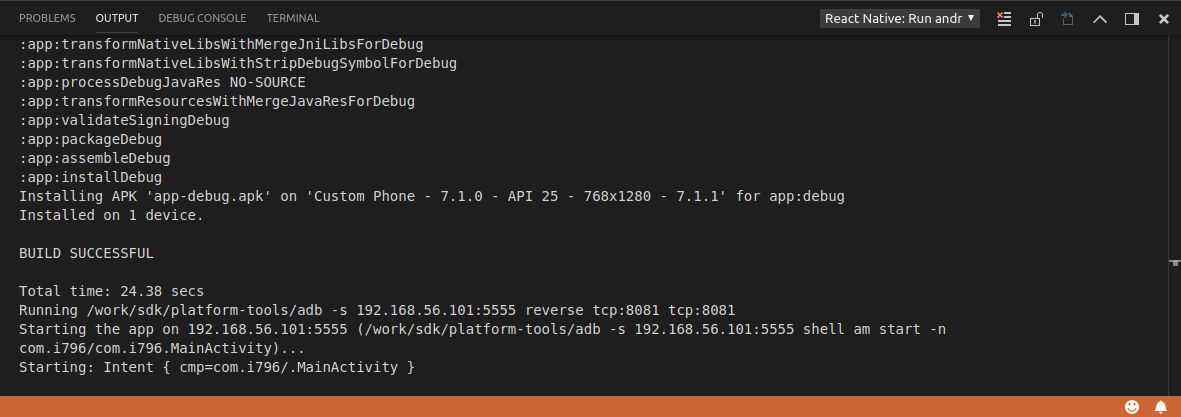
@nagnihotri looks like this is not what I am expecting. Could you please copy paste the output from the following windows:

ruslan-bikkinin
on 18 Sep 2018

[Info] Starting Packager
Scanning folders for symlinks in e:FullStackDevAwesomeProjectnode_modules (75ms)
┌──────────────────────────────────────────────────────────────────────────────┐
│ │
│ Running Metro Bundler on port 8081. │
│ │
│ Keep Metro running while developing on any JS projects. Feel free to │
│ close this tab and run your own Metro instance if you prefer. │
│ │
│ https://github.com/facebook/react-native │
│ │
└──────────────────────────────────────────────────────────────────────────────┘
Looking for JS files in
e:FullStackDevAwesomeProject
e:FullStackDevAwesomeProject.vscode
Metro Bundler ready.
[Info] Packager started.
[Error] Failed to run the application in Android
Stack: Error: Failed to run the application in Android: Unknown error: not all success patterns were matched.
It means that "react-native run-android" command failed. Please, check the View -> Toggle Output -> React Native, View -> Toggle Output -> React Native: Run android output windows.
at Function.getWrappedError (C:Usersnagnihotri.vscodeextensionsvsmobile.vscode-react-native-0.6.16srccommonerrorinternalError.js:35:16)
at Function.wrapError (C:Usersnagnihotri.vscodeextensionsvsmobile.vscode-react-native-0.6.16srccommonerrorerrorHelper.js:18:44)
at resultOfCode.done.reason (C:Usersnagnihotri.vscodeextensionsvsmobile.vscode-react-native-0.6.16srccommonentryPointHandler.js:43:72)
at _rejected (C:Usersnagnihotri.vscodeextensionsvsmobile.vscode-react-native-0.6.16node_modulesqq.js:844:24)
at C:Usersnagnihotri.vscodeextensionsvsmobile.vscode-react-native-0.6.16node_modulesqq.js:870:30
at Promise.when (C:Usersnagnihotri.vscodeextensionsvsmobile.vscode-react-native-0.6.16node_modulesqq.js:1122:31)
at Promise.promise.promiseDispatch (C:Usersnagnihotri.vscodeextensionsvsmobile.vscode-react-native-0.6.16node_modulesqq.js:788:41)
at C:Usersnagnihotri.vscodeextensionsvsmobile.vscode-react-native-0.6.16node_modulesqq.js:604:44
at runSingle (C:Usersnagnihotri.vscodeextensionsvsmobile.vscode-react-native-0.6.16node_modulesqq.js:137:13)
at flush (C:Usersnagnihotri.vscodeextensionsvsmobile.vscode-react-native-0.6.16node_modulesqq.js:125:13)
at _combinedTickCallback (internal/process/next_tick.js:131:7)
at process._tickCallback (internal/process/next_tick.js:180:9)
Loading dependency graph, done.
nagnihotri
on 18 Sep 2018
@nagnihotri okay, this is from View -> Toggle Output -> React Native window, but do you have any output from View -> Output -> React Native: Run android window? Could you please make a screenshot of it and copy the output too?
ruslan-bikkinin
on 18 Sep 2018
That's all I have to share.
nagnihotri
on 18 Sep 2018
Well, that's strange, because error that you are describing happens only in the case when react-native run-android has failed and this window eventually should be appeared. Also, I noticed here https://github.com/Microsoft/vscode-react-native/issues/796#issuecomment-422050910 that you use npm run android in freshly created application, but android entry doesn't exist in scripts section of package.json file generated by react-native init command (at least on React Native 0.56). Could you please update your first message with all the information from our issue template so we could get more context of what are you trying to do?
ruslan-bikkinin
on 18 Sep 2018
Well, you follow these commands and you will get that added
npm install -g create-react-native-appcreate-react-native-app AwesomeProjectcd AwesomeProjectnpm run android
Now do we have any concrete answer for many developers like me for this issue? I never wanted to post an issue here but after hunting around the internet I have seen there are many developers struggling with this strange issue. I have noticed no proper answer was ever provided for this issue or no root cause were ever found for this issue.
I am new to VS code and react-native, how should I deal with this when authentic commands start failing with no proper reason. I looked github and stack overflow, trust me only more questions are there, not solution.
nagnihotri
on 18 Sep 2018
@ruslan-bikkinin Any update on this?
nagnihotri
on 19 Sep 2018
@nagnihotri you still didn't give us information about your environment, RN version etc as already has been asked (https://github.com/Microsoft/vscode-react-native/issues/796#issuecomment-422429867, https://github.com/Microsoft/vscode-react-native/issues/796#issuecomment-422313528), so it is hard to make any further investigation without it.
Also, it is more likely that something wrong with your particular setup and not connected with the extension because as you said you are struggling to run your application even outside VS Code. Did you try to ask folks from https://github.com/facebook/react-native repo?
ruslan-bikkinin
on 20 Sep 2018
We are really sorry to see that situation, but just to summarize (correct me if I’m not right) :
You are unable to run you app no matter with or without vscode extension, you get an error when you run react-native run-android.
This way it looks like this issue relates to react-native environment, not the extension team. I’m closing the issue, but if you believe that this is somehow related to our extension - we are open for any discussion.
ruslan-bikkinin
on 21 Sep 2018
Related issues
 buddhamangler
·
5Comments
buddhamangler
·
5Comments
 tavrez
·
4Comments
tavrez
·
4Comments
 Jacky9425
·
4Comments
Jacky9425
·
4Comments
 peterp
·
4Comments
peterp
·
4Comments
 AlexandreLouisnard
·
3Comments
AlexandreLouisnard
·
3Comments
Most helpful comment
We are really sorry to see that situation, but just to summarize (correct me if I’m not right) :
You are unable to run you app no matter with or without vscode extension, you get an error when you run
react-native run-android.This way it looks like this issue relates to react-native environment, not the extension team. I’m closing the issue, but if you believe that this is somehow related to our extension - we are open for any discussion.