Vscode-react-native: RUN problem since last update
Actual Behavior
Since last update (0.7.0).
When running "run on Android device", the packager starts but fails to run the app. Tested with 2 different applications.
Already tried:
npm cache clean --force
rm -rf node_modules && npm install
Expected Behavior
Works fine when running in the terminal 'react-native run-android' (but I can't use the debugger...)
Software versions
- React-Native VS Code extension version: 0.7.0 (0.6.18 was fine)
- VSCode version: 1.29.1
- OS platform and version: Win 10
- NodeJS version: 8.9.3
- React Native version: 0.57.5
- Expo SDK version (include if relevant): N/A
Outputs (Include if relevant)
React Native output:
error: bundling failed: SyntaxError: Unexpected end of JSON input
    at JSON.parse (<anonymous>)
    at FileStore.get (c:\Proj\15985_PORTALP_RS_user_app\portalp-user-react-native\node_modules\metro-cache\src\stores\FileStore.js:34:21)
    at c:\Proj\15985_PORTALP_RS_user_app\portalp-user-react-native\node_modules\metro-cache\src\Cache.js:76:40
    at Generator.next (<anonymous>)
    at step (c:\Proj\15985_PORTALP_RS_user_app\portalp-user-react-native\node_modules\metro-cache\src\Cache.js:18:30)
    at c:\Proj\15985_PORTALP_RS_user_app\portalp-user-react-native\node_modules\metro-cache\src\Cache.js:37:14
    at new Promise (<anonymous>)
    at c:\Proj\15985_PORTALP_RS_user_app\portalp-user-react-native\node_modules\metro-cache\src\Cache.js:15:12
    at Cache.get (c:\Proj\15985_PORTALP_RS_user_app\portalp-user-react-native\node_modules\metro-cache\src\Cache.js:102:7)
    at c:\Proj\15985_PORTALP_RS_user_app\portalp-user-react-native\node_modules\metro\src\DeltaBundler\Transformer.js:166:34
 DELTA  [android, dev] ./index.js ░░░░░░░░░░░░░░░░ 0.0% (0/1), failed.
Device red screen output (see attachment):
The development server returned response error code: 500.
Metro Bundler has encountered an internal error, please check your terminal error output for more details.
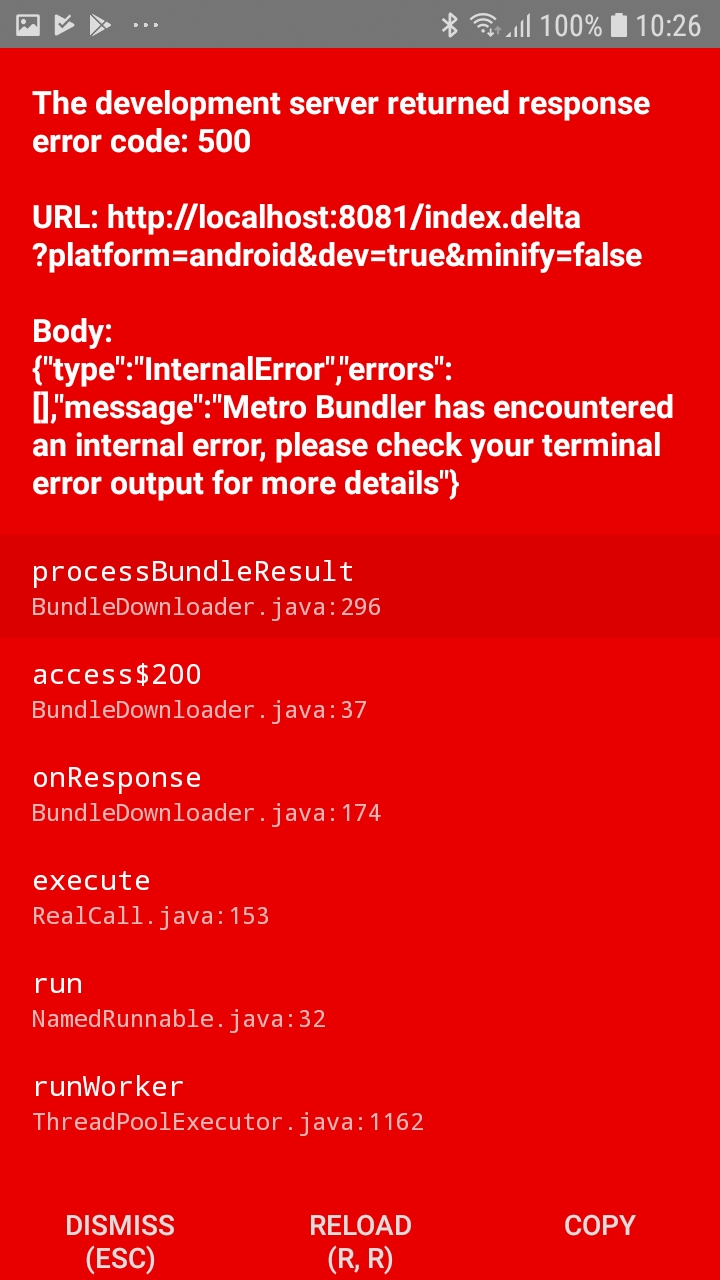
.
 AlexandreLouisnard
All 3 comments
Hi @AlexandreLouisnard and thanks for reaching us.
This is more likely a metro cache problem, please try to run rm -rf $TMPDIR/react-* && rm -rf $TMPDIR/metro* && rm -rf $TMPDIR/haste-* in addition to commands you already ran.
 ruslan-bikkinin
on 5 Dec 2018
ruslan-bikkinin
on 5 Dec 2018
Hello,
Indeed. As it happened right after the update and it was still working when starting the server from outside vscode I thought it was linked.
Thanks for your answer and sorry for bothering.
Regards
AlexandreLouisnard
on 5 Dec 2018
windows delete 'C:\Users\admin\AppData\Local\Temp\metro-cache'
 ShaoGongBra
on 15 Apr 2021
ShaoGongBra
on 15 Apr 2021
Related issues
 webda2l
·
3Comments
webda2l
·
3Comments
 buddhamangler
·
5Comments
buddhamangler
·
5Comments
 Jacky9425
·
4Comments
Jacky9425
·
4Comments
 dimitarnestorov
·
4Comments
dimitarnestorov
·
4Comments
 canpoyrazoglu
·
3Comments
canpoyrazoglu
·
3Comments
Most helpful comment
Hi @AlexandreLouisnard and thanks for reaching us.
This is more likely a metro cache problem, please try to run
rm -rf $TMPDIR/react-* && rm -rf $TMPDIR/metro* && rm -rf $TMPDIR/haste-*in addition to commands you already ran.