Vscode-react-native: White Screen react native app in debugging mode with successful build.
Hi, i am setting up react native with vscode (previously done before). However after everything went smoothly from setting up react native, create android environment and installing vs code. I try to run the app from vs code. However the result was getting a white screen on my physical device. I found out that it only occurs in debugging mode of vs code. If it is not in debugging mode, the app works fine and renders every component. Works fine as well if i was debugging outside vscode debugger (React Native Debugger for instance). Below are the outputs i got from the consoles. Not sure if i get everything there but i notice there is an "runtime error" proc in debugging mode. So i doubt it was the cause of the blank screen issue. Im using latest React-Native v^0.59.6. No extra packages are installed in the process.
Output of the Debug Console (View -> Toggle Debug Console):
Starting debugger app worker.
Established a connection with the Proxy (Packager) to the React Native application
Debugger worker loaded runtime on port 27929
******** Unhandled error in debug adapter - Unhandled promise rejection: Error: Cannot connect to runtime process, timeout after {_timeout} ms - (reason: {_error}).
    at Object.runtimeConnectionTimeout (c:\Users\Jacky\AppData\Local\Programs\Microsoft VS Code\resources\app\extensions\ms-vscode.node-debug2\node_modules\vscode-chrome-debug-core\out\src\errors.js:91:12)
    at utils.retryAsync.catch.err (c:\Users\Jacky\AppData\Local\Programs\Microsoft VS Code\resources\app\extensions\ms-vscode.node-debug2\node_modules\vscode-chrome-debug-core\out\src\chrome\chromeConnection.js:110:49)
    at process._tickCallback (internal/process/next_tick.js:68:7)
Output of the React-Native output channel (View -> Toggle Output -> Select React-Native in ListBox):
BUILD SUCCESSFUL in 38s
146 actionable tasks: 1 executed, 145 up-to-date
info Running C:\Users\Jacky\AppData\Local\Android\Sdk/platform-tools/adb -s 62213210HY116BF02QV reverse tcp:8081 tcp:8081
info Starting the app on 62213210HY116BF02QV (C:\Users\Jacky\AppData\Local\Android\Sdk/platform-tools/adb -s 62213210HY116BF02QV shell am start -n com.naicha/com.naicha.MainActivity)...
Starting: Intent { cmp=com.naicha/.MainActivity }
Output of the Developer Tools console (Help -> Toggle Developer Tools -> Select Console tab):
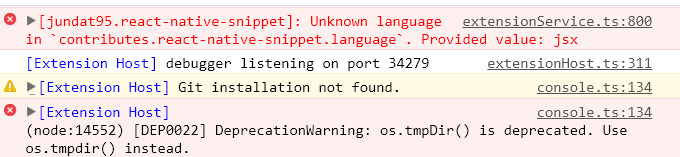
 Jacky9425
All 4 comments
@Jacky9425 Could you please run react-native info in your terminal and copy the results here? Also please say which Node.js version do you use.
 SounD120
on 8 May 2019
SounD120
on 8 May 2019
react-native info results
React Native Environment Info:
    System:
      OS: Windows 10
      CPU: (8) x64 Intel(R) Core(TM) i7-7700HQ CPU @ 2.80GHz
      Memory: 3.08 GB / 7.85 GB
    Binaries:
      Yarn: 1.15.2 - C:\Program Files (x86)\Yarn\bin\yarn.CMD
      npm: 6.9.0 - C:\Program Files\nodejs\npm.CMD
    IDEs:
      Android Studio: Version  3.4.0.0 AI-183.5429.30.34.5452501
Node.js version: v12.1.0
Jacky9425
on 8 May 2019
@Jacky9425 I tried to run application on Node 12.1.0 and I have the same behavior as in #997 . Could you please try to install Node 10.15.3 and let us know if it works for you?
SounD120
on 8 May 2019
Thanks. App runs fine now with debugging mode.
Jacky9425
on 9 May 2019
Related issues
 Gabemb
·
4Comments
Gabemb
·
4Comments
 springcoil
·
5Comments
springcoil
·
5Comments
 molant
·
3Comments
molant
·
3Comments
 vladimir-kotikov
·
5Comments
vladimir-kotikov
·
5Comments
 vsccarl
·
3Comments
vsccarl
·
3Comments