Vscode-r: Run/Source commands not friendly to user started R session
In my use case, I usually work with remote development via SSH on remote machine and most of the time I also need to start a R session in a tmux window so that the session is preserved.
Therefore, Run or source command should work with the session I start in tmux rather than start a new session. PR #104 partially solves this problem stated in #80, but most run-code related commands should be able to send code to active terminal.
However, it may not make sense to have all commands split into original version and Active Terminal version. I'm wondering if it makes sense to add an option to opt out the behavior to always start a R session if no session started by vscode-R extension is detected?
 renkun-ken
All 9 comments
This sounds good to me, and I think is definitely a better approach than having original/Active Terminal versions for all commands. I would use this option too.
 andycraig
on 21 Sep 2019
andycraig
on 21 Sep 2019
I would like to add also,
The current behavior of ctrl+enter is to run selected lines in the current terminal. In case no R session is active, it will start one.
Would be nice if ctrl+enter can detect if the active terminal is connected to ssh or not, and then launch an R session based on the ssh status (R over the remote machine or the local machine). This is important since making plots is not allowed via the remote R.
 hmassalha
on 29 Sep 2019
hmassalha
on 29 Sep 2019
Hi @hmassalha, I don’t think there’s a way of checking whether the active terminal is connected to ssh or not.
It may be possible to get plots displaying using port forwarding if that’s available (https://stackoverflow.com/a/3453318) but I haven’t tried that myself.
andycraig
on 30 Sep 2019
Thanks for your note, I am not managing to set the forwarding ports!
hmassalha
on 30 Sep 2019
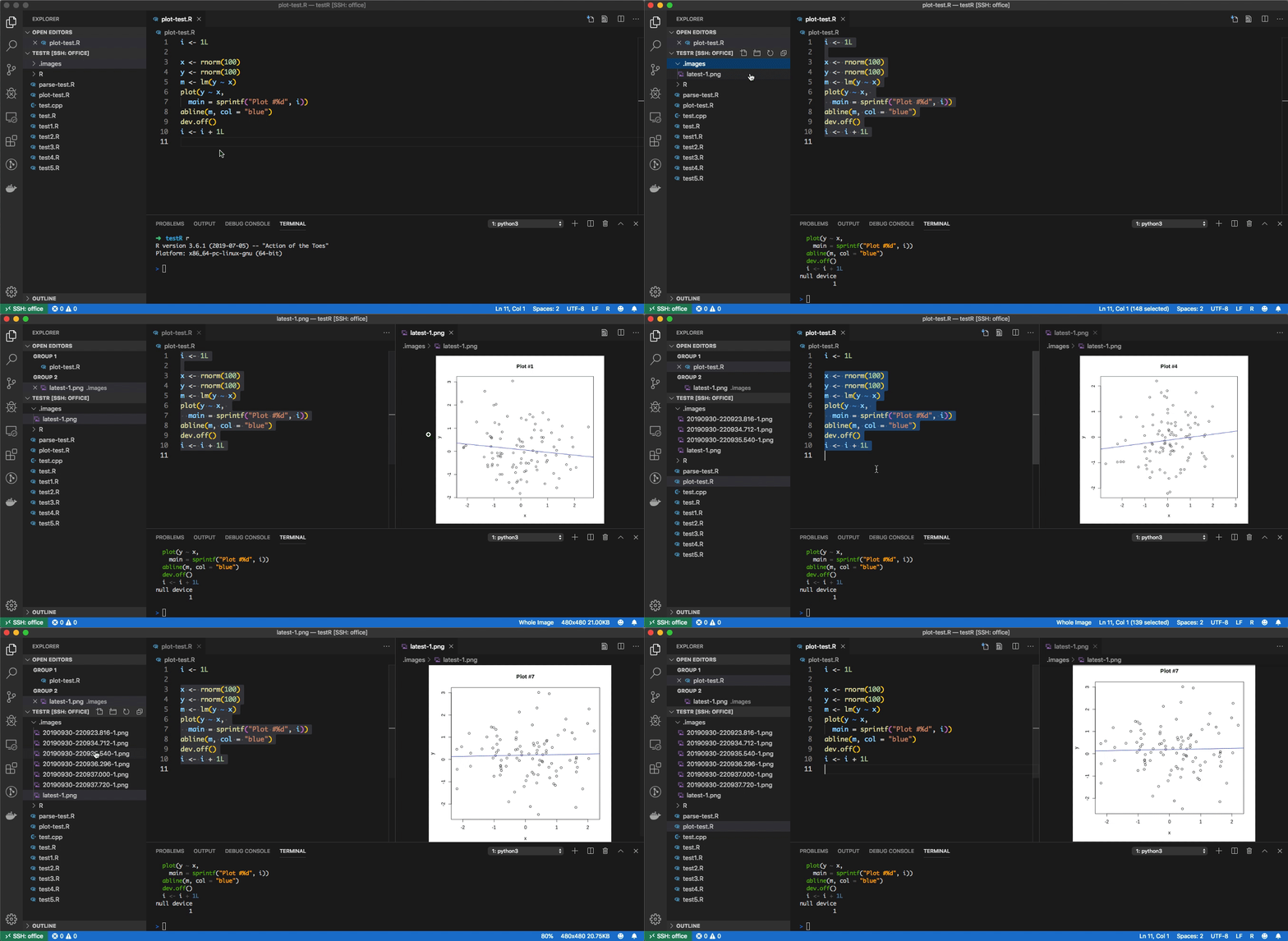
For plots, I find X11 forwarding is not working well even if the white window shows the experience is not good.
I write a default device in .Rprofile (see https://github.com/renkun-ken/dotfiles/blob/master/.Rprofile#L6-L26), and it produces png files to .images folder in the working directory and always write the last plot to latest-%d.png. Each time a new plot is generated, the current latest-%d.png files are renamed to time-stamp file name so that history plots are stored. In vscode, you only need to open latest-1.png and you can preview the file instantly when the device is closed.
renkun-ken
on 30 Sep 2019
Thanks for your suggestion.
I found the following https://github.com/cloudyr/rmote is a nice solution. You can generate and update the same plot several times, while the browser will keep the previous ones.
*I noticed you have a colored terminal, how I can get something similar? Thanks,
hmassalha
on 30 Sep 2019
For the R terminal I use, please checkout radian.
renkun-ken
on 1 Oct 2019
I will work on this (option to make all commands use the active terminal) next.
andycraig
on 4 Oct 2019
Thanks!
renkun-ken
on 13 Oct 2019
Related issues
 nathaneastwood
·
6Comments
nathaneastwood
·
6Comments
 LePeti
·
4Comments
renkun-ken
·
3Comments
LePeti
·
4Comments
renkun-ken
·
3Comments
 Kalaschnik
·
4Comments
Kalaschnik
·
4Comments
 bdeshon
·
3Comments
bdeshon
·
3Comments
Most helpful comment
For plots, I find X11 forwarding is not working well even if the white window shows the experience is not good.
I write a default device in
.Rprofile(see https://github.com/renkun-ken/dotfiles/blob/master/.Rprofile#L6-L26), and it produces png files to.imagesfolder in the working directory and always write the last plot tolatest-%d.png. Each time a new plot is generated, the currentlatest-%d.pngfiles are renamed to time-stamp file name so that history plots are stored. In vscode, you only need to openlatest-1.pngand you can preview the file instantly when the device is closed.