Vscode-python: Applying code action 'Sort imports' hangs indefinitely
Environment data
- VS Code version: 1.47.3
- Extension version (available under the Extensions sidebar): v2020.7.96456
- OS and version: Ubuntu 20.04
- Python version: 3.8.3 (installed by pyenv)
- Type of virtual environment used: pyenv-virtualenv
- Relevant/affected Python packages and their versions: XXX
- Relevant/affected Python-related VS Code extensions and their versions: XXX
- Value of the
python.languageServersetting: doesn't seem to matter; I have tried Jedi, Microsoft, Pylance, and None - isort version: 4.3.21
Expected behaviour
When I hit save on a Python file, I expect it to quickly/automatically sort my imports
Actual behaviour
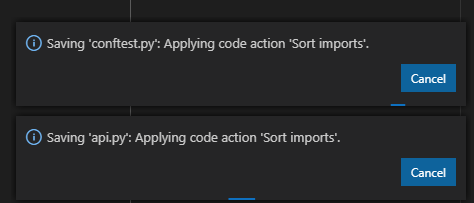
It pops up a box much like this one:
Saving 'main.py': Applying code action 'Sort imports'.
And that box never goes away. It hangs indefinitely. Obviously it never actually sorts my imports either, nor does it proceed to linting / auto-formatting. It just gets stuck.
Steps to reproduce:
- pip install black pylint isort autoflake
- Copy my settings.json file
- Save a Python file
Logs
Python in the Output panel (View→Output, change the drop-down the upper-right of the Output panel to Python)
> ~/.pyenv/versions/myproject/bin/python ~/.vscode/extensions/ms-python.python-2020.7.96456/pythonFiles/pyvsc-run-isolated.py ~/.vscode/extensions/ms-python.python-2020.7.96456/pythonFiles/sortImports.py - --diff
cwd: ~/src/myproject/home
> ~/.pyenv/versions/myproject/bin/python ~/.vscode/extensions/ms-python.python-2020.7.96456/pythonFiles/pyvsc-run-isolated.py ~/.vscode/extensions/ms-python.python-2020.7.96456/pythonFiles/sortImports.py - --diff
cwd: ~/src/myproject/home
 soapergem
All 43 comments
@soapergem this seem similar to #12949
I've been having these issues for a long time. ~and they seem to be fixed on the insiders version.~
 bguisard
on 6 Aug 2020
bguisard
on 6 Aug 2020
Actually they are not solved on the insiders version. It intermittently stopped happening after I started using the insiders version, but I am still experiencing the problem.
bguisard
on 6 Aug 2020
I have been having this exact problem since the recent version. Starting a new session everything works fine. After some time, not sure exactly what happens to trigger it or exact time frame, but at some point I try to save and all I get is a spinning circle as shown below.
It never finishes and the file does not get saved at all.
 brgirgis
on 6 Aug 2020
brgirgis
on 6 Aug 2020
Looking at .vscode\extensions\ms-python.python-2020.7.96456\pythonFiles\sortImports.py, this code looks fishy!
# Work around stdin buffering issues on windows (https://bugs.python.org/issue40540)
# caused in part by isort seeking within the stdin stream by replacing the
# stream with something which is definitely seekable.
try:
    # python 3
    stdin = sys.stdin.buffer
except AttributeError:
    # python 2
    stdin = sys.stdin

sys.stdin = io.BytesIO(stdin.read())
# End workaround
I disabled this block of code. I'm using python 3.7.4, VSCode 1.47.3 and ms-python.python v2020.7.96456 on Windows 10. I will let you know if this issues is still reproducible without this block of code.
brgirgis
on 6 Aug 2020
Disabling this code block does not stop this issue.
brgirgis
on 7 Aug 2020
I am also facing the same issue. I am using vscode 1.47.3. OS Ubuntu 20.04.
 vishal16babu
on 7 Aug 2020
vishal16babu
on 7 Aug 2020
To add another data point, I'm experiencing this problem as well, with VSCode version on Mac:
Version: 1.47.3
Commit: 91899dcef7b8110878ea59626991a18c8a6a1b3e
Date: 2020-07-23T13:08:29.692Z (2 wks ago)
Electron: 7.3.2
Chrome: 78.0.3904.130
Node.js: 12.8.1
V8: 7.8.279.23-electron.0
OS: Darwin x64 18.5.0
I find it is still possible to format and save the file without sorting the imports by running these two commands from the command palette, which don't seem to invoke import sorting:
Format DocumentFile: Save without Formatting
which tides me over for now. Though it would be cool to know if there's a potential fix to the hanging "Sort imports", as it's awesome to have the editor manage them automatically :-)
 andrewhead
on 10 Aug 2020
andrewhead
on 10 Aug 2020
This issue got fixed by installing isort in my virtual environment
pip install isort
Usually vscode asks if it can install black or flake8 or any linter which is part of your settings but in case of isort it just hangs without showing any such message.
vishal16babu
on 10 Aug 2020
This issue got fixed by installing isort in my virtual environment
No it didn't. That does not fix the issue. In fact, installing isort in your virtual environment is the first step that I posted in the "Steps to Reproduce" above.
soapergem
on 10 Aug 2020
I have it saving and sorting in a venv but not in a pyenv...... Same exact version of python, isort, black, vscode, same everything.
 danrneal
on 10 Aug 2020
danrneal
on 10 Aug 2020
There's no difference between a venv and "a pyenv" as you put it... pyenv is simply a tool for managing your virtual environments. Are you similarly on Ubuntu 20.04? I see other comments confirming this bug exists there.
soapergem
on 10 Aug 2020
I'm on 18.04. And I know! There should be no difference! And yet, the behavior is different. I tried the same file with the same settings.json and same packages installed from a fresh 3.8.2 pyenv and venv. Yet, when I used pyenv, it hangs but not with venv.
danrneal
on 10 Aug 2020
Huh. You're absolutely right. I just confirmed that this behavior works with a plain vanilla virtual environment, but not when using pyenv-virtualenv. That is the strangest thing.
soapergem
on 10 Aug 2020
It only happens when I use anaconda's python as my interpreter. I was able to fix it by installing miniconda.
 Espylapiza
on 11 Aug 2020
Espylapiza
on 11 Aug 2020
I use venv as per https://docs.python.org/3/library/venv.html using python 3.7.4 in a sub directory inside my work area called ".pyenv" and I can reproduce this issue sporadically.
brgirgis
on 11 Aug 2020
@soapergem, thanks for letting us know about this. It is definitely undesirable that sort-imports-on-save would prevent saving the file. We'll work on identifying the problem and fixing it.
 ericsnowcurrently
on 11 Aug 2020
ericsnowcurrently
on 11 Aug 2020
It only happens when I use anaconda's python as my interpreter. I was able to fix it by installing miniconda.
Just to note, I've only ever used miniconda and I'm seeing this isort issue
 iutlu
on 13 Aug 2020
iutlu
on 13 Aug 2020
I get this too and I use miniconda. Though for me it works for a while every time I restart vscode but after a while it stops working (after multiple edits/saves, which might trigger it to show again).
 jvanheugten
on 14 Aug 2020
jvanheugten
on 14 Aug 2020
I also see this issue, and I operate in a completely different environment. I see the issue when using the dev container feature only. I can use sort imports just fine when not connected to the dev container. I do not use any virtual environment. Host machine is a mac.
 ian-axelrod
on 18 Aug 2020
ian-axelrod
on 18 Aug 2020
I managed to workaround the problem by adding the following to settings.json (change according to your location of isort script):
"python.sortImports.path": "${env:HOME}/.local/bin/isort",
 dave-pi
on 20 Aug 2020
dave-pi
on 20 Aug 2020
@dave-pi Thanks a ton!
Worked for me by adding the following where I have isort:
"python.sortImports.path": "/usr/local/bin/isort",
 roman-vynar
on 21 Aug 2020
roman-vynar
on 21 Aug 2020
Adding the path didn't work for me unfortunately. (On a mac btw).
jvanheugten
on 21 Aug 2020
Thanks. Just confirmed that adding the explicit path worked for me, too.
soapergem
on 21 Aug 2020
Adding the path didn't work for me unfortunately. (On a mac btw).
Are you running in dev containers? Just wondering.
ian-axelrod
on 21 Aug 2020
No, I'm not running in dev containers.
Tried setting the path, and restarting, etc. but none helped.
Virtual environment: conda 4.8.3
isort: 4.3.21
VSCode install:
Version: 1.48.1
Commit: 3dd905126b34dcd4de81fa624eb3a8cbe7485f13
Date: 2020-08-19T17:09:41.484Z
Electron: 7.3.2
Chrome: 78.0.3904.130
Node.js: 12.8.1
V8: 7.8.279.23-electron.0
OS: Darwin x64 19.6.0
Hi all,
We recently shipped isort5 in the insiders version of the extension. Can anyone try using the Switch to Insider weekly command to install the insiders version of the extension, and see if it has this issue?
Unfortunately, I'm unable to reproduce this either on the stable or the insiders. Note we use the isort shipped in the extension by default, so it shouldn't matter what kind of virtual environment you're using, unless you use the python.sortImports.path setting to use a different version of isort. I would appreciate if someone can give me a small reproducible example, which includes the virtual environment.
 karrtikr
on 1 Sep 2020
karrtikr
on 1 Sep 2020
Hi all,
We recently shipped isort5 in the insiders version of the extension. Can anyone try using the
Switch to Insider weeklycommand to install the insiders version of the extension, and see if it has this issue?Unfortunately, I'm unable to reproduce this either on the stable or the insiders. Note we use the isort shipped in the extension by default, so it shouldn't matter what kind of virtual environment you're using, unless you use the
python.sortImports.pathsetting to use a different version of isort. I would appreciate if someone can give me a small reproducible example, which includes the virtual environment.
This strategy sounds counter intuitive. I would expect (and always thought) that when I set a python interpreter in my workspace, you would try and use everything from that interpreter. Setting the special variable would deviate from that norm and choose a separate one if needed.
brgirgis
on 2 Sep 2020
@brgirgis We have our reasons for doing so. It's a direct integration with "sort imports" and there is/was only one real choice - i.e we know for a fact that users would need to install isort anyway to sort imports. So we ship it in the box, similar to how we ship Jedi because we know everyone will use it. This also helps onboarding new users who expect everything to work by default without installing.
karrtikr
on 2 Sep 2020
@karrtikr - FYI, I just switched to insider weekly and it didn't fix it for me. VS code on mac, using a remote linux box with miniconda.
I've also tried setting the path as above and no luck, still hangs forever.
Version: 1.48.2
Commit: a0479759d6e9ea56afa657e454193f72aef85bd0
Date: 2020-08-25T10:09:08.021Z
Electron: 7.3.2
Chrome: 78.0.3904.130
Node.js: 12.8.1
V8: 7.8.279.23-electron.0
OS: Darwin x64 19.5.0
 dgmp88
on 2 Sep 2020
dgmp88
on 2 Sep 2020
I am able to reproduce this issue with the following settings:
{
    "python.formatting.provider": "black",
    "[python]": {
        "editor.formatOnSave": true,
        "editor.codeActionsOnSave": {
            "source.organizeImports": true
        }
    },
    "python.formatting.blackArgs": [
        "--line-length=88"
    ],
    "python.linting.enabled": true,
    "python.linting.flake8Enabled": true,
    "python.linting.flake8Args": [
        "--max-line-length=88",
        "--ignore=E203,E266,E501,E501,W503,E266,F541",
    ]
}
I'm using Miniconda. I selected my Conda environment in the python interpreter. When I edit and save a file, sort import hangs indefinitely
vishal16babu
on 2 Sep 2020
I had the same problem as well, I found that my problem was in .editorconfig file.
isort is reading the config from .editorconfig file, and it failed due to inline comments as below.
max_line_length = 89 # black preference
I found the problem because isort failed even when I ran manually.
Working version:
# black preference
max_line_length = 89
 gmichaeljaison
on 2 Sep 2020
gmichaeljaison
on 2 Sep 2020
Idk if this is related, but i had the same issue today (Version | 2020.8.105369)
I noticed this message in the Log(Window):
/usr/lib/python3.8/site-packages/setuptools/distutils_patch.py:25: UserWarning: Distutils was imported before Setuptools. This usage is discouraged and may exhibit undesirable behaviors or errors. Please use Setuptools' objects directly or at least import Setuptools first.
  warnings.warn(
I applied a quick dirty "fix", by modifying:
~/.vscode/extensions/ms-python.python-2020.8.105369/pythonFiles/lib/python/isort/settings.py (246 line)
            # Only some configuration formats support native boolean values.
            if not isinstance(value, bool):
-                value = bool(strtobool(value))
+                value = bool(value.lower() == 'true')
            computed_settings[access_key] = value
And removed distutils import.
After that, isort started working
 KycKyc
on 3 Sep 2020
KycKyc
on 3 Sep 2020
I have also been suffering from isort hanging for the past few versions of VS Code (I am also running Ubuntu 20.04 which was mentioned by others). The good news (for me): I got it working again. The bad news: I am no longer able to reproduce the (edit: original) hanging behavior to work out how I fixed it.
But in case it's useful for someone else, I discovered that if you make a mistake with the isort options in the "python.sortImports.args" section then you will get the hanging behavior. I am pretty sure I hadn't made a mistake in those options, and it was only when I was messing with them that the mistake got introduced. Nonetheless, when I fixed the newly-introduced errors, that's when isort started working for me again and as mentioned I can't make it hang any more unless I make a mistake with specifying an option. For the record, I was attempting to use isort with black (I suspect this is quite a common combination).
My trouble-shooting consisted of:
- Making sure I had
"source.organizeImports": truein mysettings.jsonand then saving a Python file, and seeing that the hang was occurring. - Going to the
OUTPUTtab of the 'Panel' (the thing you bring up with ctrl+J which houses the terminal, problems and so on), and choosingPythonfrom the dropdown. - Finding the line where
isortwas being invoked, and then pasting that command into my terminal. I gotisort: error: unrecognized arguments:messages that revealed my mistakes. - Correct the contents of
python.sortImports.argsto reflect the correct way to specify the options. When those were fixed, my isort problems went away.
Now I know you are thinking "but the difference between your and my problem is that I'm not an idiot and I can specify my isort options in python.sortImports.args correctly". And I agree, except there are some subtle ways to mess up the options to do with spaces which will cause the VS Code invocation to put the option between double quotes which in turn makes isort unhappy. For example, "--line-width 88" doesn't work. It needs to be either "--line-width=88" or two separate array elements: "--line-width", "88".
 jlmelville
on 16 Sep 2020
jlmelville
on 16 Sep 2020
@jlmelville workaround doesn't help here. I'm on macOS Catalina 10.15.6, vscode 1.49.0, python extension v2020.8.109390
The sortImports command just hangs indefinitely. I've located the command in Python output panel:
~/Projects/test/.venv/bin/python ~/.vscode/extensions/ms-python.python-2020.8.108011/pythonFiles/pyvsc-run-isolated.py ~/.vscode/extensions/ms-python.python-2020.8.108011/pythonFiles/sortImports.py - --diff
This command never finishes and the same thing happens when I run it manually in the terminal. I have no extra arguments for isort, only "source.organizeImports": true in settings.
vscode info:
Version: 1.49.0
Commit: e790b931385d72cf5669fcefc51cdf65990efa5d
Date: 2020-09-10T17:39:53.251Z
Electron: 9.2.1
Chrome: 83.0.4103.122
Node.js: 12.14.1
V8: 8.3.110.13-electron.0
OS: Darwin x64 19.6.0
 ivasic
on 17 Sep 2020
ivasic
on 17 Sep 2020
@ivasic when it started working, my invocation of isort also hangs when run directly from the terminal (I assume that's to do with reading from stdin).
One difference is that I installed my own isort into a venv in the workspace directory, so at least on Linux it looks much more like a standard execution of isort (I realize this goes against the advice of using the insiders build of the python extension with its own isort). Assuming you have a virtual environment installed, what happens if you pip3 install isort and then explicitly set "python.sortImports.path": "${workspaceFolder}/venv/bin/isort" in your settings.json?
jlmelville
on 17 Sep 2020
@jlmelville yeah, I was afraid the stdin read might have had something to do with the hang when I run the command manually.
But great workaround using the locally installed isort via python.sortImports.path! It actually works without any issues along with the isort arguments and everything.
Ideally the problem should be solved, of course, but I'm happy with the workaround for the time being. Thanks for the tip!
edit: I swear I tried this before (some other people in the thread suggested it long time ago) and it didn't work. Wonder what changed in the mean time...
ivasic
on 17 Sep 2020
@ivasic does your process still hang if you remove the python.sortImports.path entry and go back to the default (i.e. using ~/.vscode/extensions/ms-python.python-2020.8.108011/pythonFiles/sortImports.py)? The confounding thing for me was not being able to get back to reproducing the problematic behavior.
jlmelville
on 17 Sep 2020
@jlmelville yes, if I go back to the default it still hangs :/
Tried toggling it a few times as well, local isort works, vscode default hangs
ivasic
on 17 Sep 2020
Folks would you mind trying out our Insiders build to see if you still have this issue? (View > Command Palette... and run Python: Switch to Insiders Weekly Channel)
 luabud
on 17 Sep 2020
luabud
on 17 Sep 2020
Switching to the Insiders Weekly Channel seems to have fixed the issue.
 sabith-th
on 18 Sep 2020
sabith-th
on 18 Sep 2020
Can confirm here as well. Insiders weekly seems to do the trick
ivasic
on 18 Sep 2020
Awesome🎉 The fix should be officially out in the next stable release which is scheduled in a week.
(FYI we think https://github.com/microsoft/vscode-python/pull/13717 fixed the issue, we weren't handling errors thrown by isort correctly, we also upgraded to isort 5.5.2 which might have helped)
karrtikr
on 18 Sep 2020
Related issues
 TotallyFred
·
3Comments
TotallyFred
·
3Comments
 DTKx
·
4Comments
DTKx
·
4Comments
 misolori
·
5Comments
misolori
·
5Comments
 Amtran7599
·
4Comments
Amtran7599
·
4Comments
 Reeaveld
·
6Comments
Reeaveld
·
6Comments
Most helpful comment
I managed to workaround the problem by adding the following to settings.json (change according to your location of isort script):
"python.sortImports.path": "${env:HOME}/.local/bin/isort",