Vscode-python: On startup conda environment not activated on first terminal - ok on subsequent
Issue Type: Bug
This is a newly introduced discrepancy.
When launching VSC, the previous workspace is reopened as it should, the python plugin activate and the conda environment is properly selected.
In the past: the first terminal was opened with the proper conda environment (correct)
Now: the first terminal is not conda-activated. Creating a new terminal activates the proper conda environment. (bug)
Extension version: 2020.8.109390
VS Code version: Code 1.49.0 (e790b931385d72cf5669fcefc51cdf65990efa5d, 2020-09-10T17:39:53.251Z)
OS version: Darwin x64 19.6.0
System Info
|Item|Value|
|---|---|
|CPUs|Intel(R) Core(TM) i7-7820HQ CPU @ 2.90GHz (8 x 2900)|
|GPU Status|2d_canvas: enabled
flash_3d: enabled
flash_stage3d: enabled
flash_stage3d_baseline: enabled
gpu_compositing: enabled
metal: disabled_off
multiple_raster_threads: enabled_on
oop_rasterization: enabled
opengl: enabled_on
protected_video_decode: unavailable_off
rasterization: enabled
skia_renderer: disabled_off_ok
video_decode: enabled
webgl: enabled
webgl2: enabled|
|Load (avg)|3, 3, 3|
|Memory (System)|16.00GB (0.13GB free)|
|Process Argv|--crash-reporter-id 870324f9-1c13-4116-b32c-3fedfd782d8c|
|Screen Reader|no|
|VM|0%|
 TotallyFred
All 3 comments
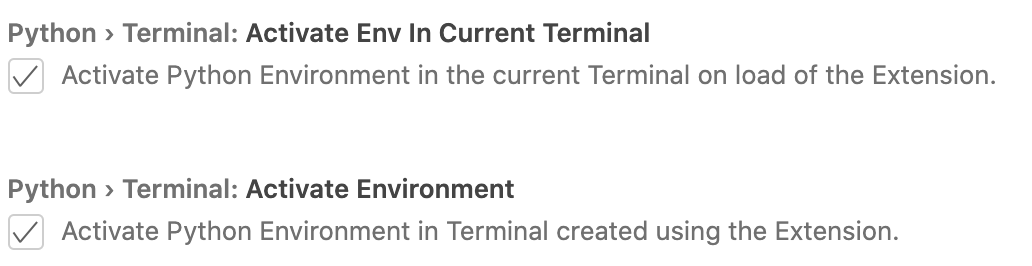
Do your settings reflect the following?
 jbeyer16
on 17 Sep 2020
jbeyer16
on 17 Sep 2020
Activate on load was disabled.
When I check this option, the initial terminal is properly conda-activated.
My bad. Had never seen this option before.
TotallyFred
on 17 Sep 2020
Thank you for your input @jbeyer16!
Closing this as resolved, let us know if you encounter further issues @TotallyFred and we can reopen this issue.
Thank you everyone!
 kimadeline
on 17 Sep 2020
kimadeline
on 17 Sep 2020
Related issues
 zgoda
·
3Comments
zgoda
·
3Comments
 Amtran7599
·
4Comments
Amtran7599
·
4Comments
 schperplata
·
4Comments
schperplata
·
4Comments
 ShlomiRex
·
3Comments
ShlomiRex
·
3Comments
 misharigot
·
4Comments
misharigot
·
4Comments