Vscode-pull-request-github: Fetching pull requests for remote 'origin' failed,
Fetching pull requests for remote 'origin' failed, please check if the url https://github.com/*/**.git is valid.
- Extension version: v0.17.0
- VSCode Version:
Versão: Commit de 1.46.1 (system setup): cd9ea6488829f560dc949a8b2fb789f3cdc05f5d Data: 2020-06-17T21:13:20.174Z elétron: 7.3.1 Chrome: 78.0.3904.130 node. js: 12.8.1 V8: 7.8.279.23-electron.0 OS: Windows_NT x64 10.0.18363 - OS: Windows 10

**Important note.
This specific repository is private and recently ceased to be a user to become an organization**
 alexandremsouza1
All 17 comments
@alexandremsouza1 Can you run the command Developer: Toggle Developer Tools and see if there is any additional error info in the console? Do you see the failed request in the network tab there?
 RMacfarlane
on 29 Jun 2020
RMacfarlane
on 29 Jun 2020
@alexandremsouza1 Can you run the command
Developer: Toggle Developer Toolsand see if there is any additional error info in the console? Do you see the failed request in the network tab there?

alexandremsouza1
on 29 Jun 2020
The error about the buffer can be ignored, what's the warning above it?
This notification is shown when the fetch call 404's, can you double check that the you're able to access https://github.com/***/*** normally in the browser, and that the user you're currently logged into VSCode with has access ot this repo?
RMacfarlane
on 29 Jun 2020
O erro sobre o buffer pode ser ignorado, qual é o aviso acima?
Essa notificação é mostrada quando a chamada de busca 404 é, você pode verificar
https://github.com/***/***novamente se consegue acessar normalmente no navegador e se o usuário com o qual está conectado no VSCode atualmente tem acesso a este repo?
Yes, I have access to the repository.
if I click on "sigin out and sigin in" it works.
The problem is having to do this every time.
alexandremsouza1
on 29 Jun 2020

alexandremsouza1
on 30 Jun 2020
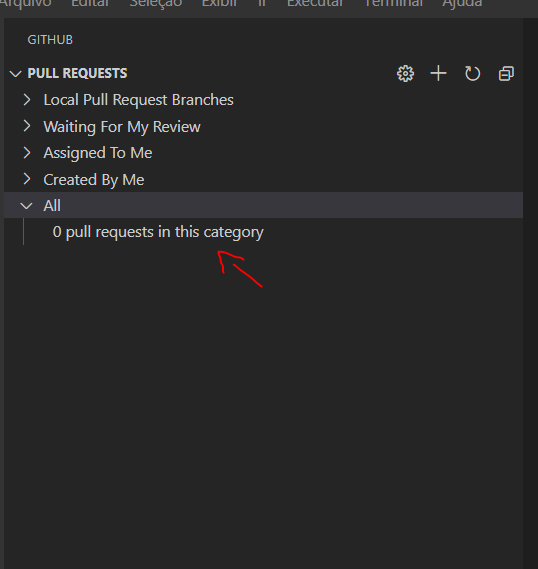
Every time i click on the item i lose my credentials
alexandremsouza1
on 30 Jun 2020
It actually looks like I'm losing my token when the plugin to refresh
alexandremsouza1
on 30 Jun 2020

it's still happening
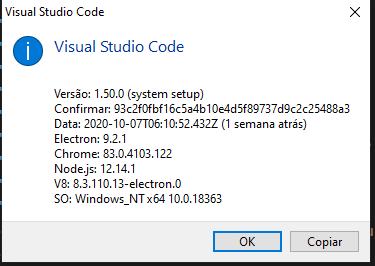
alexandremsouza1
on 14 Oct 2020
alexandremsouza1
on 14 Oct 2020
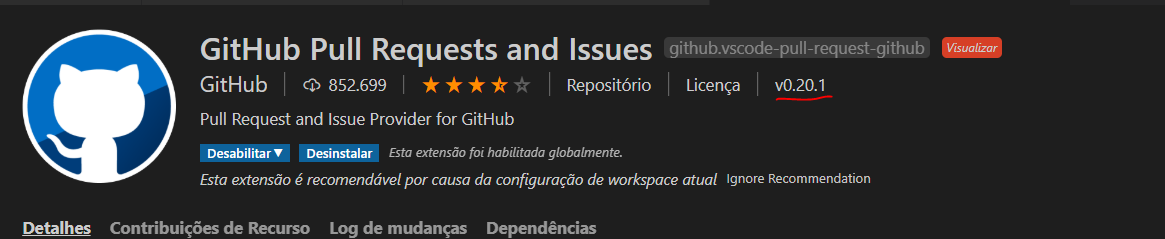
alexandremsouza1
on 14 Oct 2020
@alexandremsouza1 Can you also share if there is anything in the Output panel when "GitHub Pull Request" is selected? And is there anything in the console if you run the command "Developer: Toggle Developer Tools"?
RMacfarlane
on 14 Oct 2020
alexandremsouza1
on 14 Oct 2020
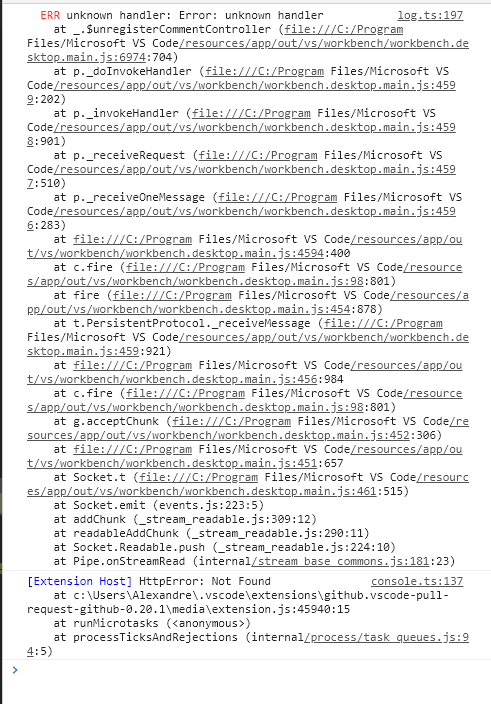
alexandremsouza1
on 15 Oct 2020
UPDATE
Oof... I missed this note https://github.com/Microsoft/vscode-pull-request-github/wiki#2-is-github-enterprise-supported
I'm having issues with using this extension with GitHub Enterprise repos, which is expected per the above note about support for GHE is discontinued.
Original Comment
I'm also getting this error recently although via git CLI and browser I'm able to access the repositories just fine.

Extension Version
v0.21.0

About Visual Studio Code
Version: 1.51.0
Commit: fcac248b077b55bae4ba5bab613fd6e9156c2f0c
Date: 2020-11-05T18:14:40.758Z
Electron: 9.3.3
Chrome: 83.0.4103.122
Node.js: 12.14.1
V8: 8.3.110.13-electron.0
OS: Darwin x64 19.6.0
Things I've Tried
I even tried setting my personal access token to our GitHub Enterprise instance in settings according to this article.
"githubPullRequests.hosts": [
{
"host": "https://our-github-enterprise.com",
"token": "my-access-token",
"username": "my-user-name"
}
],
 douglascayers
on 9 Nov 2020
douglascayers
on 9 Nov 2020
Possibly related to #795
douglascayers
on 10 Nov 2020
@alexandremsouza1 Do you still see this issue with the latest version of VS Code?
RMacfarlane
on 11 Nov 2020
I'm having the same issue. I have two accounts in my computer.
The way I set them up was using SSH with a config file:
Host github.com
  HostName github.com
  User git
  IdentityFile ~/.ssh/id_rsa

Host github-work
  HostName github.com
  User git
  IdentityFile ~/.ssh/id_work_rsa
and when I need to clone a repository I do the following:
git clone git@github-work:****-org/****.git This is for my work account
git clone [email protected]:HugoLiconV/****git This is for my personal account
This works fine but when I tried to set up the extension to work for my work account I get the same error.
What I did was to add this configuration:
  "githubPullRequests.hosts": [

    {
      "host": "https://github-work.com",
      "token": "5abddc5f2f**********************" // The token I got it from `Personal access tokens`
    }
  ]
 hugo-licon
on 17 Nov 2020
hugo-licon
on 17 Nov 2020
Related issues
 alexdima
·
3Comments
alexdima
·
3Comments
 RamonMeffert
·
3Comments
RamonMeffert
·
3Comments
 scrossan-crown
·
4Comments
scrossan-crown
·
4Comments
 erihanse
·
4Comments
erihanse
·
4Comments
 jrieken
·
3Comments
jrieken
·
3Comments
Most helpful comment
I'm having the same issue. I have two accounts in my computer.
The way I set them up was using SSH with a config file:
and when I need to clone a repository I do the following:
git clone git@github-work:****-org/****.gitThis is for my work accountgit clone [email protected]:HugoLiconV/****gitThis is for my personal accountThis works fine but when I tried to set up the extension to work for my work account I get the same error.
What I did was to add this configuration: