Vscode-pull-request-github: Remotes added via SSH do not work.
Remotes using ssh ([email protected]:USER/REPO) are not found, and if only they exist, an error message of 'no remotes match the existing setting' exist.
- Extension version: Nightly, 2020.4.25381 (also present on non-nightly)
- VSCode Version: 1.45.0-insider (2020-04-15 version)
- OS: Fedora 31
Steps to Reproduce:
- Add a repository where all remotes are added via HTTPS
- See the 'no remotes match the existing setting' error message show up.
 askvortsov1
All 24 comments
@askvortsov1 I'm having trouble reproducing this, I've tried setting remotes to ssh form and they're correctly found
~/dev/vscode-pull-request-github$ git remote -v
origin [email protected]:microsoft/vscode-pull-request-github (fetch)
origin [email protected]:microsoft/vscode-pull-request-github (push)
Are you able to share the full remote url you're using?
 RMacfarlane
on 22 Apr 2020
RMacfarlane
on 22 Apr 2020
Thanks for the quick reply! I currently have the following remotes:
origin [email protected]:flarum/core.git (fetch)
origin [email protected]:flarum/core.git (push)
rem [email protected]:askvortsov1/core.git (fetch)
rem [email protected]:askvortsov1/core.git (push)
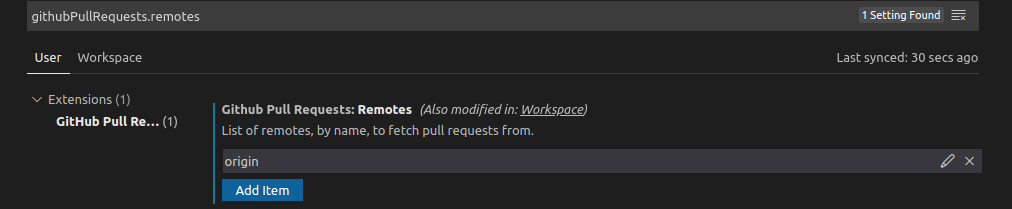
In recent versions of nightly, the situation has changed a bit: instead of just saying that there's no matching remotes found, there's an error message in the bottom right corner saying 'The remote 'rem' is not a valid Github repository'. A similar message occasionally pops up for origin. My current list of remotes in settings is:
- origin
- rem
- upstream
- central
askvortsov1
on 24 Apr 2020
What version of the nightly extension are you using? Does the pull request tree load despite the error message? Can you open the output panel and choose "GitHub Pull Request" and copy the logs from that here?
RMacfarlane
on 24 Apr 2020
I'm on 2020.4.34022. The pull request tree does not load. After further testing, it looks like that error message only shows up if I add another remote over https (in which case the pull request tree DOES load), otherwise, it behaves like described in https://github.com/microsoft/vscode-pull-request-github/issues/1656#issue-603412513. Apologies for not clarifying that in my previous comment.
After examination of the output logs (forgot that existed, I was trying to look in the dev tools section), it looks like it might be an issue with my OpenSSL installation, so perhaps the solution here is documenting requirements for that / having an error message for that particular error? I put the logs below.
Without a working https remote:
No error message in the bottom right corner shows up. However, the pull request tree is empty, and shows a 'no remotes match the current setting' message.
Remote List:
origin [email protected]:flarum/core.git (fetch)
origin [email protected]:flarum/core.git (push)
rem [email protected]:askvortsov1/core.git (fetch)
rem [email protected]:askvortsov1/core.git (push)
Output Log:
[Info] Review> Queuing additional validate state
[Info] Review> Validating state...
[Info] No remote with name 'origin' found. Please update your 'githubPullRequests.remotes' setting.
[Info] No remote with name 'upstream' found. Please update your 'githubPullRequests.remotes' setting.
[Info] No remote with name 'rem' found. Please update your 'githubPullRequests.remotes' setting.
[Info] No remote with name 'central' found. Please update your 'githubPullRequests.remotes' setting.
[Info] No remote with name 'https_central' found. Please update your 'githubPullRequests.remotes' setting.
[Info] No GitHub remotes found
[Info] Review> no matching pull request metadata found for current branch master
With a working https remote:
An error message in the bottom right corner ocasionally shows up.
Both the PR tree and the issues tree are populated correctly.
Remote List:
https_central https://github.com/flarum/core.git (fetch)
https_central https://github.com/flarum/core.git (push)
origin [email protected]:flarum/core.git (fetch)
origin [email protected]:flarum/core.git (push)
rem [email protected]:askvortsov1/core.git (fetch)
rem [email protected]:askvortsov1/core.git (push)
Output Log:
[Info] GitHubServer> No response from host https://ssh.github.com/flarum/core: write EPROTO 68236703676168:error:100000f7:SSL routines:OPENSSL_internal:WRONG_VERSION_NUMBER:../../third_party/boringssl/src/ssl/tls_record.cc:242:
[Info] GitHubServer> No response from host https://ssh.github.com/askvortsov1/core: write EPROTO 68236703676168:error:100000f7:SSL routines:OPENSSL_internal:WRONG_VERSION_NUMBER:../../third_party/boringssl/src/ssl/tls_record.cc:242:
[Info] No remote with name 'origin' found. Please update your 'githubPullRequests.remotes' setting.
[Info] No remote with name 'upstream' found. Please update your 'githubPullRequests.remotes' setting.
[Info] No remote with name 'rem' found. Please update your 'githubPullRequests.remotes' setting.
[Info] No remote with name 'central' found. Please update your 'githubPullRequests.remotes' setting.
[Info] Found GitHub remote
[Info] Review> no matching pull request metadata found for current branch as/view_namespace_extender
Were you able to solve the SSL issue? I am receiving similar logs from an enterprise github server, running 0.16.0
[Info] serverAuthPromises failed: request to http://{serveraddress} failed, reason: write EPROTO 140648442604280:error:100000f7:SSL routines:OPENSSL_internal:WRONG_VERSION_NUMBER:../../third_party/boringssl/src/ssl/tls_record.cc:242:
 ryanmahan
on 5 May 2020
ryanmahan
on 5 May 2020
Unfortunately no, I'm no longer sure it's an issue with my installation, I think it might be with the extension itself
askvortsov1
on 5 May 2020
@RMacfarlane any updates on this? Thanks!
askvortsov1
on 9 May 2020
I am also having the same issue: HTTPS remote and this extension says no remotes match the current settings
 balauppaloori
on 16 Jun 2020
balauppaloori
on 16 Jun 2020
I'm on VSCode 1.47.3, node 12.8.1, GitHub Issues 0.18.0. I am getting this same message whenever I try to use SSH remotes:
[Info] serverAuthPromises failed: request to http://{serveraddress} failed, reason: write EPROTO 140648442604280:error:100000f7:SSL routines:OPENSSL_internal:WRONG_VERSION_NUMBER:../../third_party/boringssl/src/ssl/tls_record.cc:242:
This was true on Linux (Pop_OS) as well as WSL. ~Haven't tried other OSes yet.~ macOS seems to work fine with SSH (and essentially same versions of everything); haven't been able to get cloning via SSH working on Win 10 yet, so I don't know about that.
HTTPS seems to work okay, but I much prefer to use SSH.
 willryan
on 13 Aug 2020
willryan
on 13 Aug 2020
I'm having the same issue.
Version: 1.48.0
Commit: db40434f562994116e5b21c24015a2e40b2504e6
Date: 2020-08-13T08:03:27.059Z
Electron: 7.3.2
Chrome: 78.0.3904.130
Node.js: 12.8.1
V8: 7.8.279.23-electron.0
OS: Darwin x64 19.2.0
My origin is setup like this: git remote -v
origin [email protected]:remirror/remirror.git (fetch)
origin [email protected]:remirror/remirror.git (push)
And here's the error log.
[Info] GitHubServer> No response from host https://ssh.github.com/remirror/remirror: Client network socket disconnected before secure TLS connection was established
[Info] No remote with name 'origin' found. Please update your 'githubPullRequests.remotes' setting.
[Info] No remote with name 'upstream' found. Please update your 'githubPullRequests.remotes' setting.
[Info] No GitHub remotes found
 ifiokjr
on 17 Aug 2020
ifiokjr
on 17 Aug 2020
Same issue here on Mac:
Version: 1.48.2
Commit: a0479759d6e9ea56afa657e454193f72aef85bd0
Date: 2020-08-25T10:09:08.021Z
Electron: 7.3.2
Chrome: 78.0.3904.130
Node.js: 12.8.1
V8: 7.8.279.23-electron.0
OS: Darwin x64 18.7.0
git remote -v:
origin [email protected]:nextmv-io/info (fetch)
origin [email protected]:nextmv-io/info (push)
Info] Looking for git repository
[Info] Git repository found, initializing review manager and pr tree view.
[Info] Review> Validate state in progress
[Info] Review> Validating state...
[Info] GitHubServer> No response from host https://ssh.github.com/nextmv-io/info: Client network socket disconnected before secure TLS connection was established
[Info] No remote with name 'origin' found. Please update your 'githubPullRequests.remotes' setting.
[Info] No GitHub remotes found
[Info] Review> no matching pull request metadata found for current branch develop
 leetrout
on 3 Sep 2020
leetrout
on 3 Sep 2020
pretty much the same here as well. Pretty frustrating as I am just getting started with Github and VSCode and it is dead on arrival. Just can't use the repository at all so, having to reconsider where to go. Command line tools?
[Info] Git repository found, initializing review manager and pr tree view.
[Info] Review> Validate state in progress
[Info] Review> Validating state...
[Info] No remote with name 'origin' found. Please update your 'githubPullRequests.remotes' setting.
Pretty clearly though there is a valid remote:
> grant@grant-VirtualBox:~$ git remote -v
> origin    https://github.com/GrantBlack/portal.git (fetch)
> origin    https://github.com/GrantBlack/portal.git (push)
 GrantBlack
on 9 Sep 2020
GrantBlack
on 9 Sep 2020
Any progress on this? I have the same issue and it looks like pretty core functionality for this extension to have
 nperez0111
on 21 Oct 2020
nperez0111
on 21 Oct 2020
Having a similar issue to @GrantBlack here.
[Debug 133281s 932ms] GitHubServer> No response from host https://192.168.199.2/<org>/<repo>: connect ETIMEDOUT 192.168.199.2:443
[Debug 133281s 932ms] GitHubServer> Host https://192.168.199.2/<org>/<repo> is associated with GitHub: false
[Debug 133281s 933ms] No remote with name 'origin' found. Please update your 'githubPullRequests.remotes' setting.
[Debug 133281s 933ms] No remote with name 'upstream' found. Please update your 'githubPullRequests.remotes' setting.
[Debug 133281s 933ms] FolderRepositoryManager> Displaying configured remotes: origin, upstream
[Debug 133281s 938ms] No GitHub remotes found
[Debug 133281s 953ms] Review> no matching pull request metadata found for current branch main
That IP address is on a machine-local network only used for running VMs... which I sometimes SSH in to...
My workaround was:
$ mv ~/.ssh/config ~/.ssh/config.bk
I haven't yet looked into exactly /why/ vscode is getting confused by my (somewhat lengthy) ssh user config, but it's now Working(TM)[^1]
Maybe I'll post here again if I figure out what git + vscode + ssh are up to. Hope this helps someone!
[^1] after getting the non-OSS version installed and enabling the right API, but that's documented elsewhere
 tomryanx
on 29 Oct 2020
tomryanx
on 29 Oct 2020
Probably, I met same issue on creating issue via Create Issue from Selection menu.
There is no remote. Can't create an issue.
My origin is setup like this: git remote -v
$ git remote -v
origin  ssh://[email protected]/asciidwango/js-primer.git (fetch)
origin  ssh://[email protected]/asciidwango/js-primer.git (push)
Workaround: I've changed remote to https:// and This extension works.
$ git remote -v
origin  https://github.com/asciidwango/js-primer.git (fetch)
origin  https://github.com/asciidwango/js-primer.git (push)
env:
- VSCode Version: 1.51.1
- Extension Version: 0.21.2
 azu
on 28 Nov 2020
azu
on 28 Nov 2020
@azu Is there anything special in your ssh config? If you change the remotes back to how they were originally, can you check what's in the Output Panel when you select "GitHub Pull Request" in the dropdown there?
RMacfarlane
on 30 Nov 2020
@RMacfarlane Sorry for the delay.
Does vscode github pull request try to connect ssh.github.com?
Output:
[Info] Looking for git repository
[Info] Git repository found, initializing review manager and pr tree view.
[Info] Review> Validate state in progress
[Info] Review> Validating state...
[Info] GitHubServer> No response from host https://ssh.github.com/<owner>/<repo>: Client network socket disconnected before secure TLS connection was established
[Info] No remote with name 'origin' found.
[Info] No remote with name 'upstream' found.
[Info] No GitHub remotes found
[Info] Review> no matching pull request metadata found for current branch test
[Info] Review> no matching pull request metadata found on GitHub for current branch test
.ssh/config
$ cat ~/.ssh/config

Host github.com
    User git
    Hostname ssh.github.com
    Port 443
    IdentityFile ~/.ssh/github/id_rsa.github.com
    TCPKeepAlive yes
    IdentitiesOnly yes
Host gist.github.com
    User git
    Hostname ssh.github.com
    Port 443
    IdentityFile ~/.ssh/github/id_rsa.github.com
    TCPKeepAlive yes
    IdentitiesOnly yes
📝 After to apply my workaround: git remote set-url origin "https://<user>@github.com/<owner>/<repo>.git"
[Info] Looking for git repository
[Info] Git repository found, initializing review manager and pr tree view.
[Info] Review> Validate state in progress
[Info] Review> Validating state...
[Info] No remote with name 'upstream' found.
[Info] Found GitHub remote
[Info] Review> no matching pull request metadata found for current branch example-branch
The same happens in my env too.
I did clone my project using HTTPS and SSH. The extension works fine with the project cloned with HTTPS, but it failed to load anything with the project cloned with SSH (no remote matches the current setting).
env:
vs-code: 1.53.2
Extension version: 0.23.1
 akshay-sf
on 15 Feb 2021
akshay-sf
on 15 Feb 2021
Adding a me too here, I have an upstream as a http remote, and an origin as an ssh remote. attempting to create a PR complains that it cant find a github repo for origin
vscode 1.54.3
extension ver 0.24.0
 A-UNDERSCORE-D
on 23 Mar 2021
A-UNDERSCORE-D
on 23 Mar 2021
not work either.
My config:
(omicron) root@150d7868b97c:/apps/omicron# git remote -v
origin [email protected]:zillionare/omicron.git (fetch)
origin [email protected]:zillionare/omicron.git (push)
 zillionare
on 30 Mar 2021
zillionare
on 30 Mar 2021
more log:
[Info] Looking for git repository
[Info] Git repository found, initializing review manager and pr tree view.
[Info] Review> Validate state in progress
[Info] Review> Validating state...
[Info] GitHubServer> No response from host https://ssh.github.com/zillionare/omicron: request to https://ssh.github.com/api/v3/rate_limit failed, reason: write EPROTO 140619374663552:error:1408F10B:SSL routines:ssl3_get_record:wrong version number:../deps/openssl/openssl/ssl/record/ssl3_record.c:332:
[Info] No remote with name 'origin' found.
[Info] No GitHub remotes found
[Info] Review> no matching pull request metadata found for current branch release
[Info] Review> no matching pull request metadata found on GitHub for current branch release
zillionare
on 30 Mar 2021
after setting https as remote url, the extension works. But ssh is prefered. Please have this fixed, thanks!
zillionare
on 1 Apr 2021
This can be work around using one url for fetch, one for push. The following config in .git/config works:
[remote "origin"]
        url = https://github.com/zillionare/cookiecutter-pypackage.git
        pushurl = [email protected]:zillionare/cookiecutter-pypackage.git
        fetch = +refs/heads/*:refs/remotes/origin/*
This allows extension pull request with https, while we can still sumbit changes by ssh.
zillionare
on 19 Apr 2021
Hello All!
I'm also facing this issue.
OS: Windows 10 Pro
Vscode version 1.55.2
Extension version: 0.25.1
PR worked when remotes were set to https. They do not work on SSH.
Attaching log.
vscode_ext_log.txt
 piotr-zdunek
on 20 Apr 2021
piotr-zdunek
on 20 Apr 2021
Related issues
 Jonnokc
·
3Comments
Jonnokc
·
3Comments
 Tyriar
·
3Comments
Tyriar
·
4Comments
Tyriar
·
3Comments
Tyriar
·
4Comments
 kieferrm
·
4Comments
kieferrm
·
4Comments
 sbatten
·
4Comments
sbatten
·
4Comments
Most helpful comment
pretty much the same here as well. Pretty frustrating as I am just getting started with Github and VSCode and it is dead on arrival. Just can't use the repository at all so, having to reconsider where to go. Command line tools?
Pretty clearly though there is a valid remote: