Vscode-pull-request-github: Extension vanishes
Issue Type: Bug
- Open VScode
- Install GitHub Pull Requests extension
- Click on Icon
After these steps the extension suddenly disappears, I cannot access it from anywhere, when I click on github's icon it takes me to the VSCode's file explorer and the github's icon vanishes. I have tried closind VSCode, reinstalling the extension, disabling every other extension except GitHub Pull Request and the problem persists. Also nothing shows up at VSCode's SCM
Extension version: 0.5.0
VS Code version: Code 1.32.1 (05f146c7a8f7f78e80261aa3b2a2e642586f9eb3, 2019-03-08T00:51:49.278Z)
OS version: Windows_NT x64 10.0.17134
System Info
|Item|Value|
|---|---|
|CPUs|AMD FX(tm)-6300 Six-Core Processor (6 x 3516)|
|GPU Status|2d_canvas: enabled
checker_imaging: disabled_off
flash_3d: enabled
flash_stage3d: enabled
flash_stage3d_baseline: enabled
gpu_compositing: enabled
multiple_raster_threads: enabled_on
native_gpu_memory_buffers: disabled_software
rasterization: enabled
surface_synchronization: enabled_on
video_decode: enabled
webgl: enabled
webgl2: enabled|
|Memory (System)|7.98GB (3.90GB free)|
|Process Argv||
|Screen Reader|no|
|VM|0%|
 rabbit11
All 26 comments
same problem. the icon just vanishes just when the installation complete.
 clarkliming
on 13 Mar 2019
clarkliming
on 13 Mar 2019
What's the output from running git remote -v? Can you paste the contents of the Output panel when GitHub Pull Requests is selected from the dropdown?
 RMacfarlane
on 13 Mar 2019
RMacfarlane
on 13 Mar 2019
git remote -v simply gives me url to the remote repository (not sure if that is what you meant).
And from selecting the GitHub Pull Request in the dropdown this is what I got:

And I am sorry if this is a dumb mistake I have just started on git.
rabbit11
on 13 Mar 2019
This issue sometimes reproduces for me when disabling and re-enabling the extension. I'm still trying to figure out if it's a problem with the extension or VSCode. Running Reload Window after installing or enabling should show the tree view.
@rabbit11 For your case, the view only shows up when there are remotes that the extension identifies as pointing to GitHub. It looks like its not finding any in the folder you have open, can you include what the url to your remote repository looks like?
RMacfarlane
on 13 Mar 2019
So about Realoding the Window, after the installation it doesn't show me the Reload Window button, only after I uninstall or disable it. And even so, after installing it again the icon sometimes appears and when I click it vanishes again
And this is what I get after running git remote -v

rabbit11
on 13 Mar 2019
@rabbit11 After you install the extension, can you try manually reloading the window by using Ctrl+Shift+P and typing Developer: Reload Window?
RMacfarlane
on 14 Mar 2019
Same issue. Extension disappears after install. Tried disable and enable. Uninstall and reinstall. No luck!
 ckacx
on 14 Mar 2019
ckacx
on 14 Mar 2019
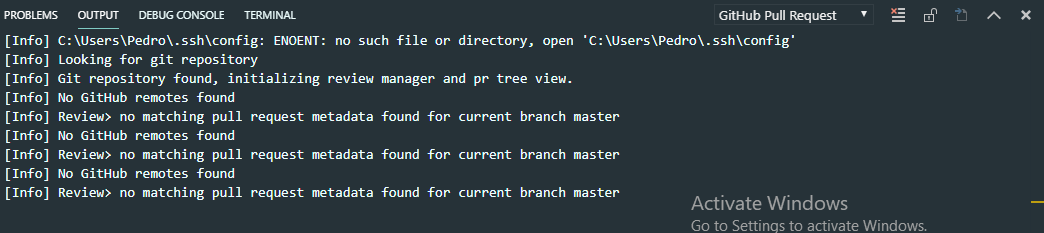
@RMacfarlane I tried it twice and nothing happens, I uninstalled reloaded the window, installed it again and then reloaded the window but the problem persists. I am also getting the same messages in the Output Panel:
rabbit11
on 14 Mar 2019
@rabbit11 And this is with the testing folder open?
RMacfarlane
on 14 Mar 2019
@RMacfarlane Yes, I even tried removing all the older folders from the workspace and still got the same issue
rabbit11
on 14 Mar 2019
I am having the exact same issue (been having it since December actually) that the extension just doesn't show up in my setup.
I am using GitHub enterprise but I do get the same output as @rabbit11 and here's the git remote -v:
origin  https://github.domain.com/root/product.git (fetch)
origin  https://github.domain.com/root/product.git (push)
I've tried this in multiple repos, folders and subfolders to see if any of them can be the cause but they all act the same.
I have authenticated using the git config --global credential.helper wincred and Personal access token when asked in VSCode. I've looked at this, but I don't have any github.hosts in my settings, so not sure how it's required.
 stoinov
on 14 Mar 2019
stoinov
on 14 Mar 2019
Same here, on vscode / mac 1.32.3. Remotes are configured correctly in my repo.
 mwhitis
on 15 Mar 2019
mwhitis
on 15 Mar 2019
I am not sure what I did but something did the trick for me. So here is everything I did in the mean time (git or github related):
- Deleted my past local repo which I was using in the past screenshots
- Created a new local repo, cloned one of my pre-existing repositories on GitHub and instead of using Git Bash as I was previously doing I used VSCode's terminal to run git's commands.
- Did a few commits and pushs.
- While I did my first push to origin (remote) a window popped up asking me to login to my GitHub account and so I did.
- After that I reinstalled GitHub Pull Requests and reloaded the window
- The GitHub icon is now showing on my sidebar and it seems to work just fine (not sure about all the functionalities)
Note: I hope this can help anyone that is having this same issue somehow.
rabbit11
on 15 Mar 2019
I tried following your process - removed all repos and clone them using the terminal. It did not helped me though. and I did not get a login prompt as you did.
What credentials did you entered for this? as I mentioned I used credential.helper wincred and Personal access token that I had to generate before hand as explained here. So I guess I'll try SSH authentication as a next step.
stoinov
on 18 Mar 2019
I setup my SSH setup and checked out using ssh. Removed the add-in restarted VSCode and added it again.
The Icon showed on the sidebar, but it disappeared once clicked so I still have this problem.
stoinov
on 18 Mar 2019
@stoinov I am not sure what credentials I used but I cloned my remote repo through HTTP and not SSH not sure if this is any relevant.
But basically what I did after deleting the testing folder was to create another folder and clone my repo from GitHub, was making sure I could add files, commit and even push to the remote origin on GitHub through the Git Bash and after that I think the login prompt popped up. I believe VSCode was opened the whole time, but I did not interact with it at all, besides adding the new folder to the workspace
rabbit11
on 19 Mar 2019
Same issue for me, identical logs as this
 abominab
on 3 Apr 2019
abominab
on 3 Apr 2019
@abominab Can you try installing https://marketplace.visualstudio.com/items?itemName=GitHub.vscode-pull-request-github-insiders and disabling the other version of the extension, and report what you see in the logs? There should be some additional output
RMacfarlane
on 4 Apr 2019
@RMacfarlane I did that, but I actually got less in the logs. Here it is:
[Info] C:\Users\~\.ssh\config: ENOENT: no such file or directory, open 'C:\Users\~\.ssh\config'
[Info] Looking for git repository
[Info] Git repository found, initializing review manager and pr tree view.
The icon is still missing the activity bar.
abominab
on 4 Apr 2019
@RMacfarlane - I did the same as @abominab , I got very few logs as well:
[Info] Looking for git repository
[Info] Git repository found, initializing review manager and pr tree view.
** EDIT
Changing to debug level got me the same output... FYI
** EDIT
FYI, here is my output for the prod extension:
[Debug 49846s 496ms] Looking for git repository
[Debug 49846s 496ms] Git repository found, initializing review manager and pr tree view.
[Debug 49846s 498ms] PullRequestManager> update repositories
[Debug 49846s 597ms] PullRequestManager> Displaying all github remotes
[Debug 49846s 597ms] PullRequestGitHelper> Get user created remotes - start
[Debug 49847s 21ms] PullRequestGitHelper> Get user created remotes - end
[Debug 49847s 22ms] No GitHub remotes found
[Debug 49847s 61ms] Review> no matching pull request metadata found for current branch horizontal-vault-slices
@mwhitis @abominab Sorry, should have specified this - that version of the extension also needs the Insiders version of VS Code. Can you try again using VS Code Insiders? (or wait a few hours for VS Code 1.33 to be released and u se that)
RMacfarlane
on 4 Apr 2019
@RMacfarlane - No change for me on insider or 1.33 with the daily build, however, I did see a new log entry on the release build when debug logging was turned on in 1.33 (in bold below):
>
Debug 68638s 815ms] Looking for git repository
[Debug 68638s 815ms] Git repository found, initializing review manager and pr tree view.
[Debug 68638s 826ms] PullRequestManager> update repositories
[Debug 68639s 7ms] GitHubServer> Host https://github..com/act/-web-ui is associated with GitHub: false*
[Debug 68639s 8ms] PullRequestManager> Displaying all github remotes
[Debug 68639s 8ms] PullRequestGitHelper> Get user created remotes - start
[Debug 68639s 210ms] PullRequestGitHelper> Get user created remotes - end
[Debug 68639s 211ms] No GitHub remotes found
[Debug 68639s 222ms] Review> no matching pull request metadata found for current branch horizontal-vault-slices
For reference, my repo is connected to github enterprise over ssh.
mwhitis
on 5 Apr 2019
@RMacfarlane - I've fixed my issue thanks to the new message and poking through the code and FAQ (https://github.com/Microsoft/vscode-pull-request-github/wiki).
I added a token mapping for my repo in the settings.json, and I'm authenticating now, and have the icon. One odd thing, though, is that I don't ever recall getting prompted for a user/pw as indicated in the faq, even though we support integrated sign in, as I've done it with other things before, and our version is 2.16.x.
Is it possible that there's something earlier in the auth process that's breaking, and preventing me from getting the prompt?
Additionally, for feedback, I'd like to suggest that it's better ux that the icon still be displayed (or at least have the option to) even if there's a problem detecting github or logging in. It'd be better to surface the errors there. As it is right now, it's jarring when you install an extension, and expect a new icon but it doesn't show.
I'm very interested to help troubleshooting this, so please let me know if I can be of further assistance.
mwhitis
on 5 Apr 2019
Thanks @mwhitis! I agree, having the icon always displayed and surfacing errors in that view would be a better experience
RMacfarlane
on 6 Apr 2019
I am experiencing a similar issue, but not exactly the same as @rabbit11. The GitHub activity bar icon will stay upon first installation, and I can click around within the extension, create and manage PRs, etc. But upon first reload, weather it be reloading the current session, or fully closing VSCode and opening it again, the Icon appears for but a second before vanishing.
I can make the icon/extension re-appear by disabling, reloading, and enabling the extension.
Let me know what I can do to help!
System Info
OS: Arch Linux x86_64
Model: Blade 3.04
Kernel: 5.0.13-arch1-1-ARCH
WM: i3
Resolution: 3200x1800
CPU: Intel i7-4720HQ (8) @ 3.600GHz
GPU: Intel 4th Gen Core Processor
GPU: NVIDIA GeForce GTX 970M
Memory: 1602MiB / 15962MiB
VSCode Version: 1.33.1
Commit: 51b0b28134d51361cf996d2f0a1c698247aeabd8
Date: 2019-04-12T08:59:47.459Z
Electron: 4.1.4
Chrome: 69.0.3497.128
Node.js: 10.11.0
V8: 6.9.427.30-electron.0
Extension Version: 0.6.0
 incomingstick
on 14 May 2019
incomingstick
on 14 May 2019
The extension icon is now always present on the activity bar, and will display a message if the extension is unable to locate a GitHub repository in the current folder
RMacfarlane
on 13 Aug 2019
Related issues
 erihanse
·
4Comments
erihanse
·
4Comments
 lumaxis
·
3Comments
lumaxis
·
3Comments
 scrossan-crown
·
4Comments
scrossan-crown
·
4Comments
 adrinjalali
·
4Comments
adrinjalali
·
4Comments
 RamonMeffert
·
3Comments
RamonMeffert
·
3Comments
Most helpful comment
@RMacfarlane - I've fixed my issue thanks to the new message and poking through the code and FAQ (https://github.com/Microsoft/vscode-pull-request-github/wiki).
I added a token mapping for my repo in the settings.json, and I'm authenticating now, and have the icon. One odd thing, though, is that I don't ever recall getting prompted for a user/pw as indicated in the faq, even though we support integrated sign in, as I've done it with other things before, and our version is 2.16.x.
Is it possible that there's something earlier in the auth process that's breaking, and preventing me from getting the prompt?
Additionally, for feedback, I'd like to suggest that it's better ux that the icon still be displayed (or at least have the option to) even if there's a problem detecting github or logging in. It'd be better to surface the errors there. As it is right now, it's jarring when you install an extension, and expect a new icon but it doesn't show.
I'm very interested to help troubleshooting this, so please let me know if I can be of further assistance.