Vscode-jupyter: In a notebook (.ipynb file) paste double pastes.
Issue Type: Bug
If I copy text from one cell and paste into another cell it double pastes.
If I cmd+z to undo it undoes one of the two pastes implying the issue is pasting. In .ipynb files, VSC double pastes.
I tried pasting in a .py file with no issue. Likewise pasting in the issue reporter has no issue, just in Jupyter Notebook cells.
I manually restarted VSC and the issue went away. After a while (12 minutes of use) the issue randomly came back when pasting between different notebooks.
The issue seems intermittent coming and going seemingly randomly.
VS Code version: Code 1.45.0 (d69a79b73808559a91206d73d7717ff5f798f23c, 2020-05-07T15:57:33.467Z)
OS version: Darwin x64 19.4.0
System Info
|Item|Value|
|---|---|
|CPUs|Intel(R) Core(TM) i7-9750H CPU @ 2.60GHz (12 x 2600)|
|GPU Status|2d_canvas: enabled
flash_3d: enabled
flash_stage3d: enabled
flash_stage3d_baseline: enabled
gpu_compositing: enabled
metal: disabled_off
multiple_raster_threads: enabled_on
oop_rasterization: disabled_off
protected_video_decode: unavailable_off
rasterization: enabled
skia_renderer: disabled_off_ok
video_decode: enabled
viz_display_compositor: enabled_on
viz_hit_test_surface_layer: disabled_off_ok
webgl: enabled
webgl2: enabled|
|Load (avg)|2, 2, 2|
|Memory (System)|16.00GB (0.10GB free)|
|Process Argv|-psn_0_12950617|
|Screen Reader|no|
|VM|0%|
Extensions (1)
Extension|Author (truncated)|Version
---|---|---
python|ms-|2020.5.78807
 ddouglas87
All 138 comments
I just came here to report this and I saw this.
I have the exact same OS and VSCode version and I see the exact same issue, as perfectly described by @ddouglas87
 lucasavila00
on 14 May 2020
lucasavila00
on 14 May 2020
Exact same here.
Version: 1.45.0
Commit: d69a79b73808559a91206d73d7717ff5f798f23c
Date: 2020-05-07T15:57:33.467Z (6 days ago)
Electron: 7.2.4
Chrome: 78.0.3904.130
Node.js: 12.8.1
V8: 7.8.279.23-electron.0
OS: Darwin x64 18.7.0
 juanitorduz
on 14 May 2020
juanitorduz
on 14 May 2020
Thanks for reporting this issue.
This is odd, I understand this is intermittent, but would appreciate some help trying to repro this so we can try to trace the underlying issue at our end.
Please could you:
- Provide output from
console window:
- Open
Developer: Toggle Developer Tools - Go into console tab
- Provide all of the contents from the console window. (i.e. past into this issue).
- Please do this when you come across the bug
- Open
- Please could you try reverting to the previous version of the extension to confirm it works
- Please could you try reverting to an older version of VS Code (1.44) & confirm it works
- Recently we may have identified a regression caused by the latest update to VSCode itself, though not sure how it could impact this.
- Any other information/steps that u think might be useful in repro-ing this issue.
- When u are pasting into a cell, are you in the middle of a cell execution?
- Are you pasting into a new cell or existing cell (i.e. pasting over something else)?
 DonJayamanne
on 14 May 2020
DonJayamanne
on 14 May 2020
Toggle Developer Tools is under the Help menu drop down, not Developer.
Provide all of the contents from the console window. (i.e. past into this issue).
Here is a paste of the console. It's a lot of text. The double paste happened May 14th at 11:13am. I grabbed a copy of the console (ctrl+a, ctrl+c) seconds after it happened.
Please could you try reverting to the previous version of the extension to confirm it works
I don't know how to do this.
Please could you try reverting to an older version of VS Code (1.44) & confirm it works
This issue is brand new to the newest VS Code. To verify, I do not know how to revert to an older version. I'm sure someone else will verify this though.
Any other information/steps that u think might be useful in repro-ing this issue.
When u are pasting into a cell, are you in the middle of a cell execution?
Are you pasting into a new cell or existing cell (i.e. pasting over something else)?
Both. It happens randomly in the middle of cells and in new cells. It has to do with pasting into cells, any cell.
When doing a cmd+v into a cell CSV reads it as two cmd+Vs being pressed, which is why cmd+z will undo one of the two pastes.
Because it is intermittent it might be a race issue?
ddouglas87
on 14 May 2020
Looks like a possible regression.
 greazer
on 14 May 2020
greazer
on 14 May 2020
@ddouglas87 Thanks for providing the information.
Unfortunately I'm unable to replicate this at our end and cannot find anything in the logs.
This issue is brand new to the newest VS Code. To verify, I do not know how to revert to an older version. I'm sure someone else will verify this though.
You can go to their releases page, see here https://code.visualstudio.com/updates/v1_44
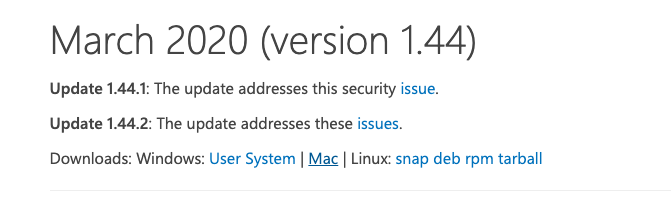
Please let me know if it repros.
DonJayamanne
on 21 May 2020
@ddouglas87, please follow Don's suggestion on installing an older version of VS Code to see if the problem is dependent on the latest build. Please let us know if the problem no longer repro's in 1.44 but does in the latest. If it repro's in the older version, then any additional details you can provide to help us reproduce the problem would be ideal.
greazer
on 28 May 2020
Can confirm, experiencing same issue on the latest version.
 santoshkumarradha
on 31 May 2020
santoshkumarradha
on 31 May 2020
Same issue is happening to @Saafo, here is his info:
- Jupyter server running: Local
- Extension version: 2020.5.80290
- VS Code version: 1.45.1
- Setting python.jediEnabled: false
- Setting python.languageServer: Microsoft
- Python and/or Anaconda version: Python 3.7.7 & conda 4.8.3
- OS: Mac
- Virtual environment: conda
 DavidKutu
on 3 Jun 2020
DavidKutu
on 3 Jun 2020
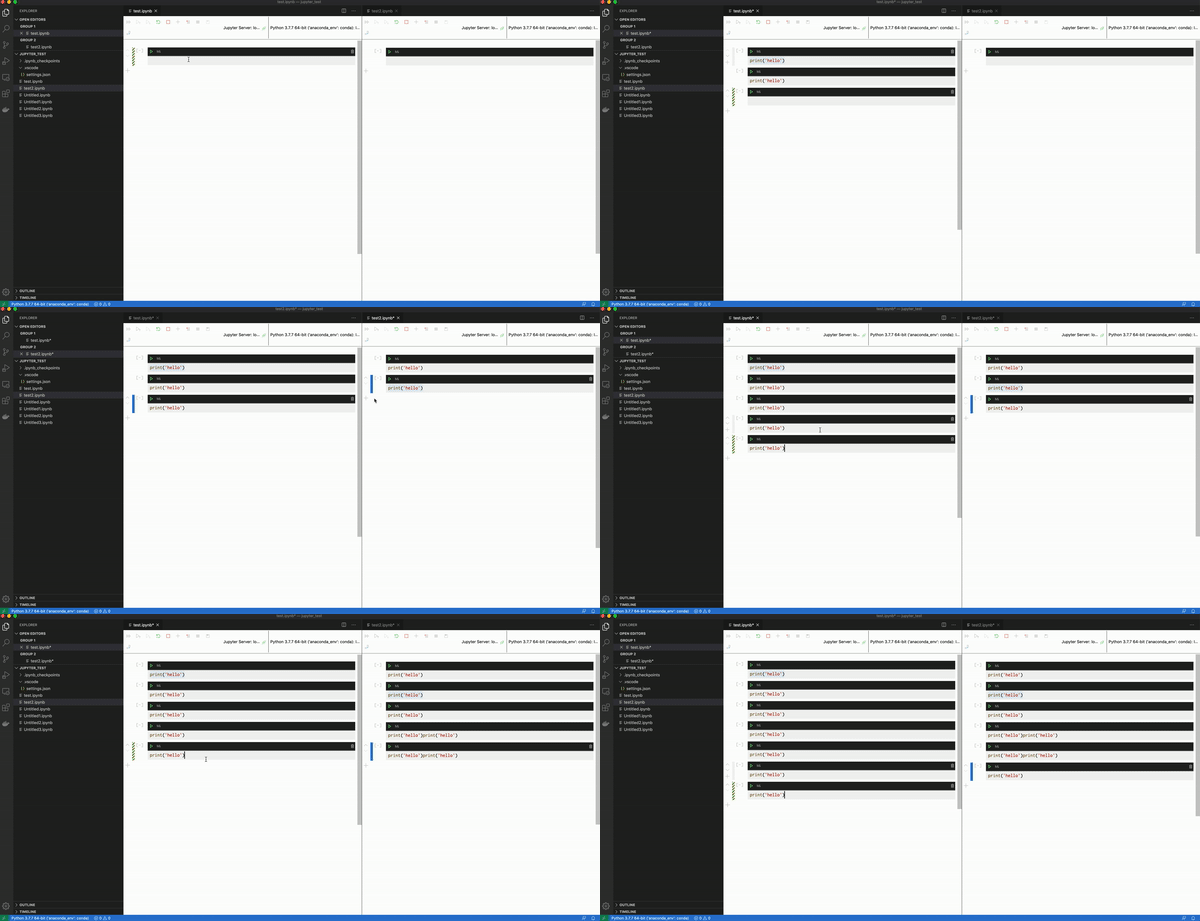
Been experiencing the same thing (1.45.1). This is not the first version I've noticed it on. Not sure if the screen grab is helpful or not, but you can definitely see how it's intermittent. I only do CNTRL + C when you see the text highlighted. As you can see, it happens, then seems to also clear itself, but is not consistent across tabs. Although this example includes copy and paste across two notebooks, I've seen it in just one as well.
I had the dev console open while recording this, but nothing printed to the screen at any point while noticing the duplicate pasting.
 jbeyer16
on 4 Jun 2020
jbeyer16
on 4 Jun 2020
Same here I've been experiencing this issue for the past few days,
also now copy paste doesn't work :/,
will be opening an issue
 YashKarthik
on 9 Jun 2020
YashKarthik
on 9 Jun 2020
I just updated the extension and now it's back to normal
YashKarthik
on 10 Jun 2020
Experiencing the same exact issue here
Version: 1.46.0
Commit: a5d1cc28bb5da32ec67e86cc50f84c67cc690321
Date: 2020-06-10T08:59:06.977Z (6 days ago)
Electron: 7.3.1
Chrome: 78.0.3904.130
Node.js: 12.8.1
V8: 7.8.279.23-electron.0
OS: Darwin x64 19.5.0
@YashKarthik which extension do you update?
 danielaik
on 17 Jun 2020
danielaik
on 17 Jun 2020
@danielaik I updated the entire python extension
I hadn't used vscode in a long time so the updates were pending for me.
YashKarthik
on 17 Jun 2020
This is still an issue for me. Copying between two locally saved notebooks on MacBook Pro causes still to paste the content twice.
I checked the python extension version, which I use daily (2020.06.88468 (16 June 2020))
And running VS Code 1.46 May 2020.
Update: If I select the contents of a cell, then click on an extension to see its information and then paste from clipboard, the contents is not duplicated. I know this is not a procedure that you would normally do, but performing an action in between prevents the duplication.
Switching the tabs on the left does the same.
My system information:
CPUs | Intel(R) Core(TM) i7-4770HQ CPU @ 2.20GHz (8 x 2200)
-- | --
GPU Status | 2d_canvas: enabledflash_3d: enabledflash_stage3d: enabledflash_stage3d_baseline: enabledgpu_compositing: enabledmetal: disabled_offmultiple_raster_threads: enabled_onoop_rasterization: disabled_offprotected_video_decode: unavailable_offrasterization: enabledskia_renderer: disabled_off_okvideo_decode: enabledviz_display_compositor: enabled_onviz_hit_test_surface_layer: disabled_off_okwebgl: enabledwebgl2: enabled
Load (avg) | 2, 2, 2
Memory (System) | 16.00GB (0.13GB free)
Process Argv |
Screen Reader | no
VM | 0%
 widovanheemstra
on 18 Jun 2020
widovanheemstra
on 18 Jun 2020
yup the problem is back again
YashKarthik
on 18 Jun 2020
Version: 1.46.1
Commit: cd9ea6488829f560dc949a8b2fb789f3cdc05f5d
Date: 2020-06-17T21:17:14.222Z
Electron: 7.3.1
Chrome: 78.0.3904.130
Node.js: 12.8.1
V8: 7.8.279.23-electron.0
OS: Darwin x64 18.7.0
experiencing same issue with Jupiter notebook.
 getashraf
on 24 Jun 2020
getashraf
on 24 Jun 2020
same here.
 arachid1
on 27 Jun 2020
arachid1
on 27 Jun 2020
Same here.
 visini
on 30 Jun 2020
visini
on 30 Jun 2020
same here.
 longlongman
on 30 Jun 2020
longlongman
on 30 Jun 2020
Same here.
 ryandamen
on 1 Jul 2020
ryandamen
on 1 Jul 2020
Same here

Version: 1.47.0-insider
Commit: 04545fa88043fd10d1f3edefd26be1b8245b516f
Date: 2020-07-02T05:34:14.274Z
Electron: 7.3.2
Chrome: 78.0.3904.130
Node.js: 12.8.1
V8: 7.8.279.23-electron.0
OS: Linux x64 5.4.0-40-generic snap
ms-python.python-2020.7.91871-dev
Probably not related, but:
Error 2020-07-02 12:01:48: Exception while attempting zmq : Error: /snap/core/current/usr/lib/x86_64-linux-gnu/libstdc++.so.6: version `GLIBCXX_3.4.22' not found (required by /home/chris/.vscode-insiders/extensions/ms-python.python-2020.7.91871-dev/out/client/node_modules/zeromq/prebuilds/linux-x64/electron.napi.glibc.node)
    at process.func (electron/js2c/asar.js:140:31)
    at process.func [as dlopen] (electron/js2c/asar.js:140:31)
    at Object.Module._extensions..node (internal/modules/cjs/loader.js:922:18)
    at Object.func (electron/js2c/asar.js:140:31)
    at Object.func [as .node] (electron/js2c/asar.js:140:31)
    at Module.load (internal/modules/cjs/loader.js:735:32)
    at Module._load (internal/modules/cjs/loader.js:648:12)
    at Module._load (electron/js2c/asar.js:717:26)
    at Function.Module._load (electron/js2c/asar.js:717:26)
    at Function.t._load (/snap/code-insiders/477/usr/share/code-insiders/resources/app/out/vs/workbench/services/extensions/node/extensionHostProcess.js:974:348)
    at Function.i._load (/snap/code-insiders/477/usr/share/code-insiders/resources/app/out/vs/workbench/services/extensions/node/extensionHostProcess.js:943:839)
    at Function.n._load (/snap/code-insiders/477/usr/share/code-insiders/resources/app/out/vs/workbench/services/extensions/node/extensionHostProcess.js:940:198)
    at Module.require (internal/modules/cjs/loader.js:775:19)
    at n (/snap/code-insiders/477/usr/share/code-insiders/resources/app/out/vs/loader.js:15:731)
    at load (/home/chris/.vscode-insiders/extensions/ms-python.python-2020.7.91871-dev/out/client/node_modules/node-gyp-build/index.js:21:10)
    at Object.<anonymous> (/home/chris/.vscode-insiders/extensions/ms-python.python-2020.7.91871-dev/out/client/node_modules/zeromq/lib/native.js:6:43)
    at Module.o._compile (/snap/code-insiders/477/usr/share/code-insiders/resources/app/out/vs/loader.js:15:956)
    at Object.Module._extensions..js (internal/modules/cjs/loader.js:892:10)
    at Module.load (internal/modules/cjs/loader.js:735:32)
    at Module._load (internal/modules/cjs/loader.js:648:12)
    at Module._load (electron/js2c/asar.js:717:26)
    at Function.Module._load (electron/js2c/asar.js:717:26)
    at Function.t._load (/snap/code-insiders/477/usr/share/code-insiders/resources/app/out/vs/workbench/services/extensions/node/extensionHostProcess.js:974:348)
    at Function.i._load (/snap/code-insiders/477/usr/share/code-insiders/resources/app/out/vs/workbench/services/extensions/node/extensionHostProcess.js:943:839)
    at Function.n._load (/snap/code-insiders/477/usr/share/code-insiders/resources/app/out/vs/workbench/services/extensions/node/extensionHostProcess.js:940:198)
    at Module.require (internal/modules/cjs/loader.js:775:19)
    at n (/snap/code-insiders/477/usr/share/code-insiders/resources/app/out/vs/loader.js:15:731)
    at Object.<anonymous> (/home/chris/.vscode-insiders/extensions/ms-python.python-2020.7.91871-dev/out/client/node_modules/zeromq/lib/index.js:3:16)
    at Module.o._compile (/snap/code-insiders/477/usr/share/code-insiders/resources/app/out/vs/loader.js:15:956)
    at Object.Module._extensions..js (internal/modules/cjs/loader.js:892:10)
    at Module.load (internal/modules/cjs/loader.js:735:32)
    at Module._load (internal/modules/cjs/loader.js:648:12)
    at Module._load (electron/js2c/asar.js:717:26)
    at Function.Module._load (electron/js2c/asar.js:717:26)
    at Function.t._load (/snap/code-insiders/477/usr/share/code-insiders/resources/app/out/vs/workbench/services/extensions/node/extensionHostProcess.js:974:348)
    at Function.i._load (/snap/code-insiders/477/usr/share/code-insiders/resources/app/out/vs/workbench/services/extensions/node/extensionHostProcess.js:943:839)
    at Function.n._load (/snap/code-insiders/477/usr/share/code-insiders/resources/app/out/vs/workbench/services/extensions/node/extensionHostProcess.js:940:198)
    at Module.require (internal/modules/cjs/loader.js:775:19)
    at n (/snap/code-insiders/477/usr/share/code-insiders/resources/app/out/vs/loader.js:15:731)
    at Object.<anonymous> (/home/chris/.vscode-insiders/extensions/ms-python.python-2020.7.91871-dev/out/client/extension.js:24:163387)
    at n (/home/chris/.vscode-insiders/extensions/ms-python.python-2020.7.91871-dev/out/client/extension.js:1:186)
    at /home/chris/.vscode-insiders/extensions/ms-python.python-2020.7.91871-dev/out/client/extension.js:48:699724
    at processTicksAndRejections (internal/process/task_queues.js:85:5)
    at d.zmqSupportedImpl (/home/chris/.vscode-insiders/extensions/ms-python.python-2020.7.91871-dev/out/client/extension.js:48:699691)
 kuelumbus
on 2 Jul 2020
kuelumbus
on 2 Jul 2020
Hello,
I also confirm having the same bug, I tried to check if it was linked with the "copy" or the "paste" process however it only happens when I paste content in a cell (it doesn't matter if it is from the cell or from outside of VS Code, when a cell is copied and pasted outside of a notebook, it works properly.
Version : 1.47.0-insider (system setup)
Commit : 04545fa88043fd10d1f3edefd26be1b8245b516f
Date : 2020-07-02T05:48:37.715Z
Electron : 7.3.2
Chrome : 78.0.3904.130
Node.js : 12.8.1
V8 : 7.8.279.23-electron.0
OS : Windows_NT x64 10.0.19041
The console doesn't show anything interessting apart from :
Info Python Extension: 2020-07-03 22:32:59: Cached data exists getEnvironmentVariables, /mnt/c/assets/graphs.ipynb
 nasmi3
on 3 Jul 2020
nasmi3
on 3 Jul 2020
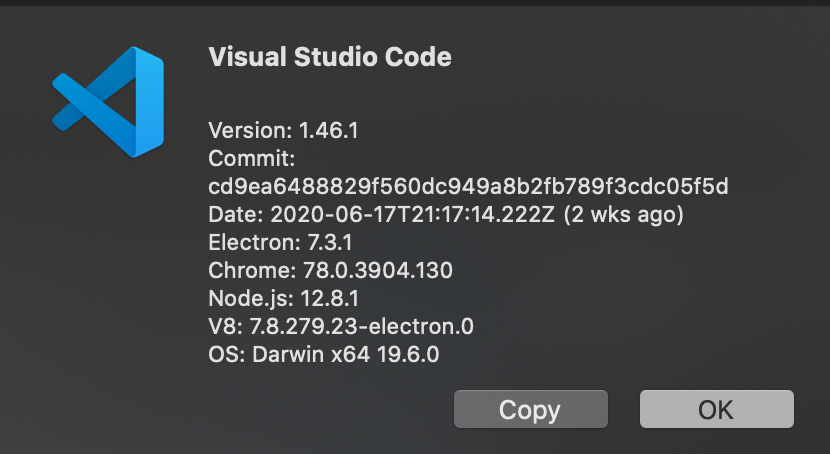
Same as reported. My version details:
Version: 1.46.1
Commit: cd9ea6488829f560dc949a8b2fb789f3cdc05f5d
Date: 2020-06-17T21:17:14.222Z (2 wks ago)
Electron: 7.3.1
Chrome: 78.0.3904.130
Node.js: 12.8.1
V8: 7.8.279.23-electron.0
OS: Darwin x64 19.4.0ms-python.python version 2020.6.91350.
 matt-parish
on 4 Jul 2020
matt-parish
on 4 Jul 2020
bad bad problem same
 jiey2
on 5 Jul 2020
jiey2
on 5 Jul 2020
Same here, it happens everyday in my life! And I want to die!
Why didn't repair such a disgusting bug...
Version: 1.46.1
Commit: cd9ea6488829f560dc949a8b2fb789f3cdc05f5d
Date: 2020-06-17T21:17:14.222Z (2 wks ago)
Electron: 7.3.1
Chrome: 78.0.3904.130
Node.js: 12.8.1
V8: 7.8.279.23-electron.0
OS: Darwin x64 19.5.0
 fisheepx
on 5 Jul 2020
fisheepx
on 5 Jul 2020
Sorry to add to your trouble but now this bug is also present in Python Interactive terminal!! No matter where I copy from it always pastes double. But this bug appeared very recently. Like in past few days. So I guess it may be related but not the same. So I'll open a new issue as well. 😉

 PrateekArya
on 5 Jul 2020
PrateekArya
on 5 Jul 2020
hi everyone, I'm sorry this has been occuring om a frequent basis. I am looking into this right now.
DonJayamanne
on 7 Jul 2020
I can also repro it:
- OS: Windows 10
- VS Code version: 1.47.0-insider
- Extension version: 2020.6.91350
- Environment: Python 3.8.3 (64 bit) -- a venv is selected in the workspace but the kernel started from the global environment
- Jupyter version:
jupyter core     : 4.6.3
jupyter-notebook : 6.0.3
qtconsole        : 4.7.4
ipython          : 7.15.0
ipykernel        : 5.3.0
jupyter client   : 6.1.3
jupyter lab      : not installed
nbconvert        : 5.6.1
ipywidgets       : 7.5.1
nbformat         : 5.0.7
traitlets        : 4.3.3
Developer tools: logjuly2020.txt
Output channel:
User belongs to experiment group 'RunByLine - experiment'
User belongs to experiment group 'ShowPlayIcon - start'
User belongs to experiment group 'DebugAdapterFactory - experiment'
User belongs to experiment group 'PtvsdWheels37 - experiment'
User belongs to experiment group 'UseTerminalToGetActivatedEnvVars - control'
User belongs to experiment group 'LocalZMQKernel - experiment'
User belongs to experiment group 'CollectLSRequestTiming - control'
User belongs to experiment group 'CollectNodeLSRequestTiming - experiment'
User belongs to experiment group 'EnableIPyWidgets - experiment'
User belongs to experiment group 'CustomEditorSupport - control'
> conda --version
> pyenv root
> python3.7 c:\Users\luabud\.vscode-insiders\extensions\ms-python.python-2020.6.91350\pythonFiles\pyvsc-run-isolated.py -c "import sys;print(sys.executable)"
> python3.6 c:\Users\luabud\.vscode-insiders\extensions\ms-python.python-2020.6.91350\pythonFiles\pyvsc-run-isolated.py -c "import sys;print(sys.executable)"
> python3 c:\Users\luabud\.vscode-insiders\extensions\ms-python.python-2020.6.91350\pythonFiles\pyvsc-run-isolated.py -c "import sys;print(sys.executable)"
> python2 c:\Users\luabud\.vscode-insiders\extensions\ms-python.python-2020.6.91350\pythonFiles\pyvsc-run-isolated.py -c "import sys;print(sys.executable)"
> python c:\Users\luabud\.vscode-insiders\extensions\ms-python.python-2020.6.91350\pythonFiles\pyvsc-run-isolated.py -c "import sys;print(sys.executable)"
> py -3.7 c:\Users\luabud\.vscode-insiders\extensions\ms-python.python-2020.6.91350\pythonFiles\pyvsc-run-isolated.py -c "import sys;print(sys.executable)"
> py -3.6 c:\Users\luabud\.vscode-insiders\extensions\ms-python.python-2020.6.91350\pythonFiles\pyvsc-run-isolated.py -c "import sys;print(sys.executable)"
> py -3 c:\Users\luabud\.vscode-insiders\extensions\ms-python.python-2020.6.91350\pythonFiles\pyvsc-run-isolated.py -c "import sys;print(sys.executable)"
> py -2 c:\Users\luabud\.vscode-insiders\extensions\ms-python.python-2020.6.91350\pythonFiles\pyvsc-run-isolated.py -c "import sys;print(sys.executable)"
> ~\OneDrive - Microsoft\feedback\venv38\Scripts\python.exe c:\Users\luabud\.vscode-insiders\extensions\ms-python.python-2020.6.91350\pythonFiles\pyvsc-run-isolated.py -c "import sys;print(sys.executable)"
> conda info --json
Python interpreter path: ~\OneDrive - Microsoft\feedback\venv38\Scripts\python.exe
Starting Pylance language server.
> ~\OneDrive - Microsoft\feedback\venv38\Scripts\python.exe c:\Users\luabud\.vscode-insiders\extensions\ms-python.python-2020.6.91350\pythonFiles\pyvsc-run-isolated.py -c "import ipykernel"
> conda --version
> ~\OneDrive - Microsoft\feedback\venv38\Scripts\python.exe c:\Users\luabud\.vscode-insiders\extensions\ms-python.python-2020.6.91350\pythonFiles\pyvsc-run-isolated.py -c "import ipykernel"
> ~\OneDrive - Microsoft\feedback\venv38\Scripts\python.exe c:\Users\luabud\.vscode-insiders\extensions\ms-python.python-2020.6.91350\pythonFiles\pyvsc-run-isolated.py -c "import ipykernel"
> c:\Users\luabud\Apps\hello\env38\Scripts\python.exe c:\Users\luabud\.vscode-insiders\extensions\ms-python.python-2020.6.91350\pythonFiles\pyvsc-run-isolated.py -c "import jupyter"
> c:\Users\luabud\Apps\hello\env38\Scripts\python.exe c:\Users\luabud\.vscode-insiders\extensions\ms-python.python-2020.6.91350\pythonFiles\pyvsc-run-isolated.py -c "import notebook"
> c:\Users\luabud\Apps\hello\env38\Scripts\python.exe c:\Users\luabud\.vscode-insiders\extensions\ms-python.python-2020.6.91350\pythonFiles\pyvsc-run-isolated.py jupyter kernelspec --version
> ~\OneDrive - Microsoft\feedback\venv38\Scripts\python.exe c:\Users\luabud\.vscode-insiders\extensions\ms-python.python-2020.6.91350\pythonFiles\pyvsc-run-isolated.py -c "import ipykernel"
> ~\OneDrive - Microsoft\feedback\venv38\Scripts\python.exe c:\Users\luabud\.vscode-insiders\extensions\ms-python.python-2020.6.91350\pythonFiles\pyvsc-run-isolated.py vscode_datascience_helpers.daemon --daemon-module=vscode_datascience_helpers.kernel_launcher_daemon -v
> c:\Users\luabud\Apps\feedback - Copy\venv38\Scripts\python.exe c:\Users\luabud\.vscode-insiders\extensions\ms-python.python-2020.6.91350\pythonFiles\pyvsc-run-isolated.py vscode_datascience_helpers.daemon --daemon-module=vscode_datascience_helpers.kernel_launcher_daemon -v
> ~\OneDrive - Microsoft\feedback\venv38\Scripts\python.exe c:\Users\luabud\.vscode-insiders\extensions\ms-python.python-2020.6.91350\pythonFiles\pyvsc-run-isolated.py vscode_datascience_helpers.daemon --daemon-module=vscode_datascience_helpers.kernel_launcher_daemon -v
> c:\Users\luabud\Apps\hello\env38\Scripts\python.exe c:\Users\luabud\.vscode-insiders\extensions\ms-python.python-2020.6.91350\pythonFiles\pyvsc-run-isolated.py vscode_datascience_helpers.daemon --daemon-module=vscode_datascience_helpers.jupyter_daemon -v
> c:\Users\luabud\Apps\hello\env38\Scripts\python.exe c:\Users\luabud\.vscode-insiders\extensions\ms-python.python-2020.6.91350\pythonFiles\pyvsc-run-isolated.py vscode_datascience_helpers.daemon --daemon-module=vscode_datascience_helpers.jupyter_daemon -v
> c:\Users\luabud\Apps\hello\env38\Scripts\python.exe c:\Users\luabud\.vscode-insiders\extensions\ms-python.python-2020.6.91350\pythonFiles\pyvsc-run-isolated.py vscode_datascience_helpers.daemon --daemon-module=vscode_datascience_helpers.jupyter_daemon -v
> ~\OneDrive - Microsoft\feedback\venv38\Scripts\python.exe c:\Users\luabud\.vscode-insiders\extensions\ms-python.python-2020.6.91350\pythonFiles\pyvsc-run-isolated.py -c "import ipykernel"
> c:\Users\luabud\Apps\feedback - Copy\venv38\Scripts\python.exe c:\Users\luabud\.vscode-insiders\extensions\ms-python.python-2020.6.91350\pythonFiles\pyvsc-run-isolated.py vscode_datascience_helpers.daemon --daemon-module=vscode_datascience_helpers.kernel_launcher_daemon -v
> ~\OneDrive - Microsoft\feedback\venv38\Scripts\python.exe c:\Users\luabud\.vscode-insiders\extensions\ms-python.python-2020.6.91350\pythonFiles\pyvsc-run-isolated.py vscode_datascience_helpers.daemon --daemon-module=vscode_datascience_helpers.kernel_launcher_daemon -v
> c:\Users\luabud\Apps\feedback - Copy\venv38\Scripts\python.exe c:\Users\luabud\.vscode-insiders\extensions\ms-python.python-2020.6.91350\pythonFiles\pyvsc-run-isolated.py pip --version
Python interpreter path: .\venv38\Scripts\python.exe
 luabud
on 7 Jul 2020
luabud
on 7 Jul 2020
@dimitry-ishenko
Thanks for the steps outlined in https://github.com/microsoft/vscode-python/issues/12731#issue-650190783
Unfortunately I'm unable to repro this issue. Are you still able to repro this consistently.
I.e. close VS Code open a notebook and check again.
Once again, thanks for the great steps, we're stuck at trying to repro this at our end.
DonJayamanne
on 7 Jul 2020
@DonJayamanne thank you and correct, I can reproduce the issue with 100% "success" rate.
Here's another demo, which includes launching vscode, creating new blank notebook, entering foo bar baz, copying (Ctrl + C) and pasting it (Ctrl + V) with resulting double-paste:

 dimitry-ishenko
on 7 Jul 2020
dimitry-ishenko
on 7 Jul 2020
@dimitry-ishenko
Thanks, I can replicate this, though its not easy.
Now I cannot replicate thsi, need to keep trying to get the timing right, there's clearly some issue with some timing.
DonJayamanne
on 7 Jul 2020
@dimitry-ishenko
Thanks, I can replicate this, though its not easy.
Now I cannot replicate thsi, need to keep trying to get the timing right, there's clearly some issue with some timing.
Interesting... I don't have to do any sort of timing "tricks" to trigger this. It happens 100% of the time.
dimitry-ishenko
on 7 Jul 2020
@dimitry-ishenko
Please could you try installing our current development/insider build of the extension.
You can do this by going into your command palette & selecting Python: Switch to Insiders Daily Channel.
This will download and install a new extension. Then go into your extensions list and you should see Python 2020.7.0-dev as the version of the extension.
YOu can always opt out of this later on by going into the settings and updating the setting Python: Insiders Channel to off
Please let met know how this goes. FYI - u will need to reload VS Code after the new extension has been installed.
DonJayamanne
on 7 Jul 2020
@DonJayamanne sadly, that didn't help:

dimitry-ishenko
on 7 Jul 2020
This is very frustrating, i can no longer replicate this.
@IanMatthewHuff @rchiodo @joyceerhl @DavidKutu Please could you check if you can replicate this.
I was able to replicate using the above video in VSC Stable & Stable extension. Now nothing.
The user can replicate this in insiders & latest insider version of extension as well.
DonJayamanne
on 7 Jul 2020
I was never able to repro this on Windows or Ubuntu, as far as I know it only happens on Mac.
DavidKutu
on 7 Jul 2020
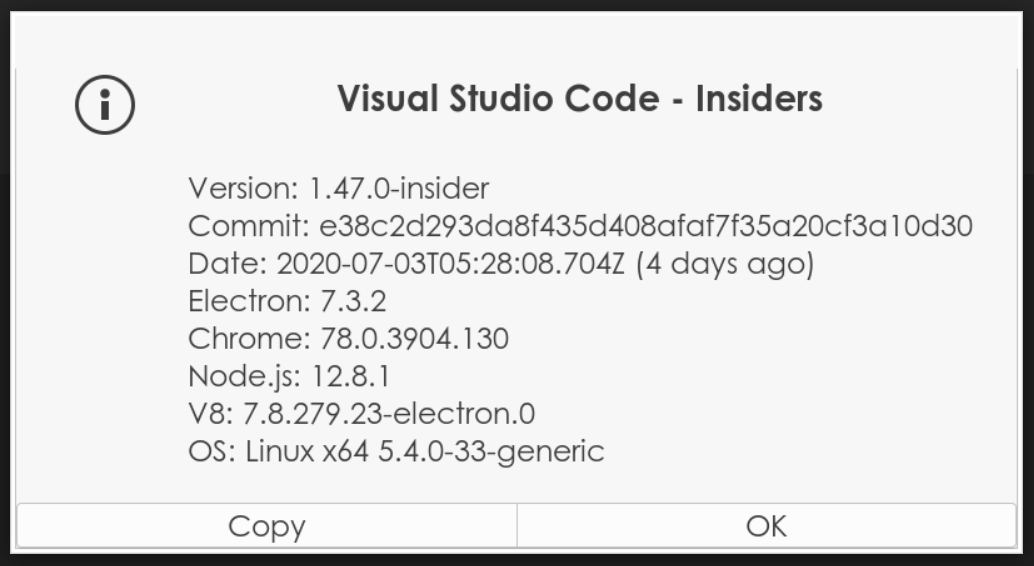
@IanMatthewHuff @rchiodo @joyceerhl @DavidKutu to spare you some reading, I am on vscode-insiders:
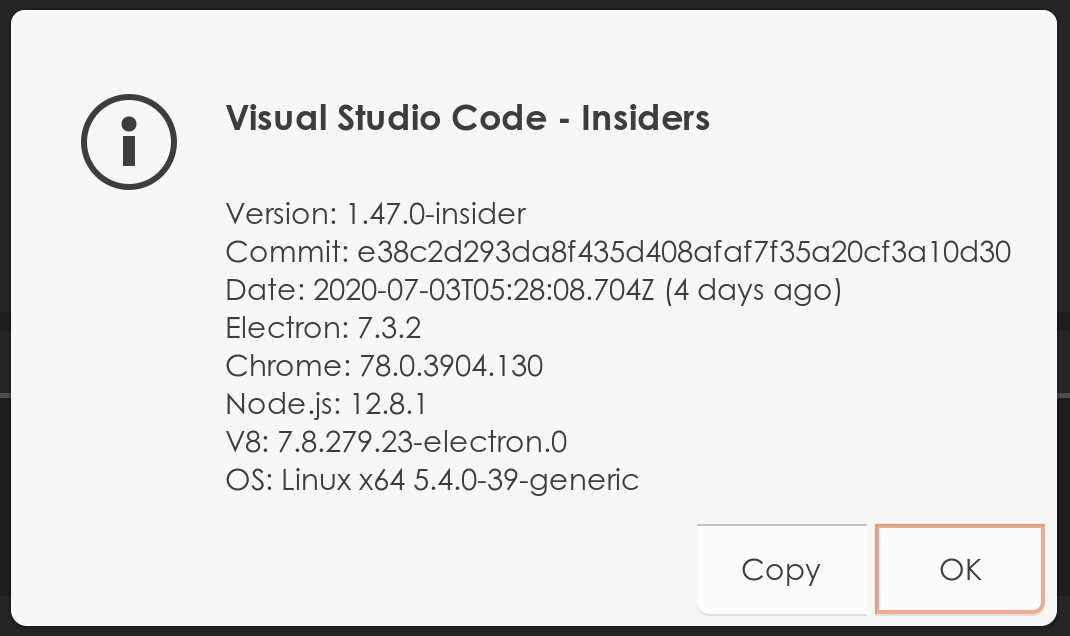
Running Ubuntu 20.04.
I am using minimal amount of extensions:
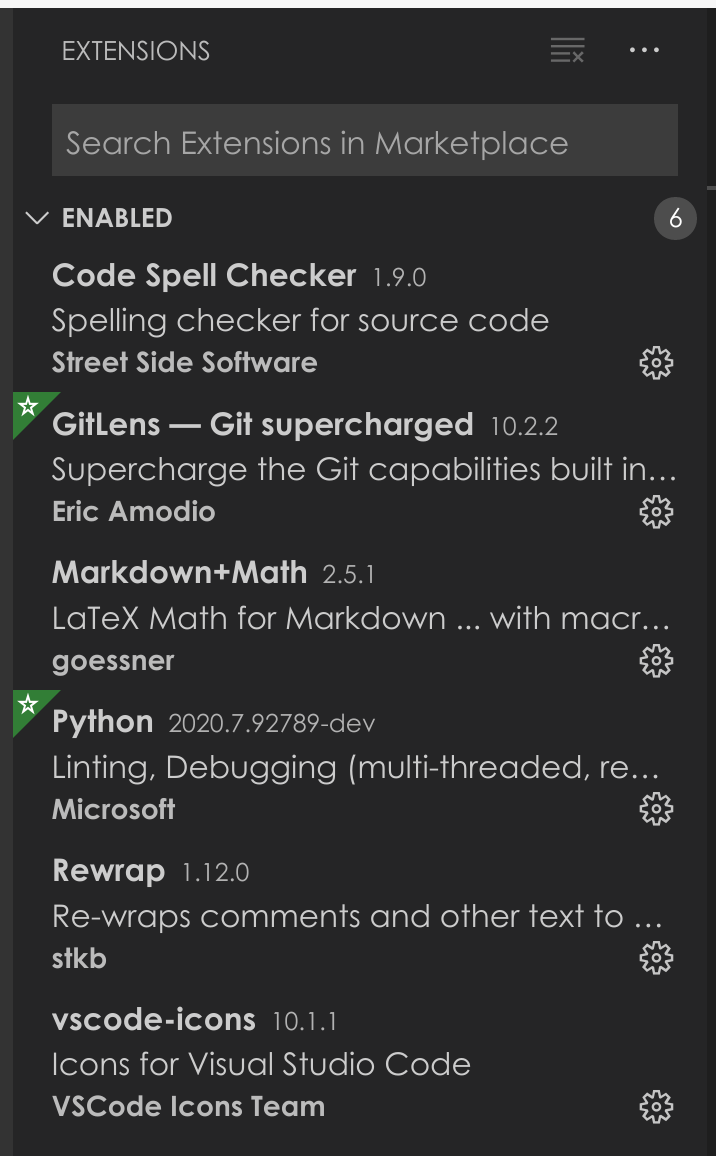
Tried disabling all extensions other than Python - didn't help.
dimitry-ishenko
on 7 Jul 2020
I don't think that I've seen it on Mac. But I have a Linux VM. Let me spin that up quick and look.
 IanMatthewHuff
on 7 Jul 2020
IanMatthewHuff
on 7 Jul 2020
I can confirm this issue on Mac OS Catalina for at least a few weeks and still ongoing. And I have the latest: Extension version: 2020.6.91350
 j450h1
on 7 Jul 2020
j450h1
on 7 Jul 2020
I am also able to reproduce this issue on another Ubuntu 20.04 box:

dimitry-ishenko
on 7 Jul 2020
I'm also reproducing it 100% of the time and I'm on Windows


luabud
on 8 Jul 2020
quick fix is to Control+Z on mac (cancel) which is gonna cancel the second paste.
arachid1
on 8 Jul 2020
@rchiodo if you are interested, I can bisect this at least on the version level to see which version this was introduced in.
dimitry-ishenko
on 8 Jul 2020
@dimitry-ishenko if you don't mind, that would help. I'm unable to determine the root cause at the moment.
 rchiodo
on 8 Jul 2020
rchiodo
on 8 Jul 2020
@DonJayamanne @rchiodo here are the results:
code-insiders/stable 1.47.0-1593754639    BAD
code-insiders/stable 1.47.0-1593668601
code-insiders/stable 1.47.0-1593582023
code-insiders/stable 1.47.0-1593508000
code-insiders/stable 1.47.0-1593495868    BAD  <----------
code-insiders/stable 1.47.0-1593413883    good <----------
code-insiders/stable 1.47.0-1593198278    good
code-insiders/stable 1.47.0-1593150187
code-insiders/stable 1.47.0-1593112599
code-insiders/stable 1.47.0-1592905677    good
code-insiders/stable 1.47.0-1592808690
code-insiders/stable 1.47.0-1592606595
code-insiders/stable 1.47.0-1592545208
code-insiders/stable 1.47.0-1592376695
code-insiders/stable 1.47.0-1592199720
code-insiders/stable 1.47.0-1591941718
code-insiders/stable 1.47.0-1591882777
code-insiders/stable 1.47.0-1591861344
code-insiders/stable 1.46.0-1591724575    good
Good version (1.47.0-1593413883) demo:
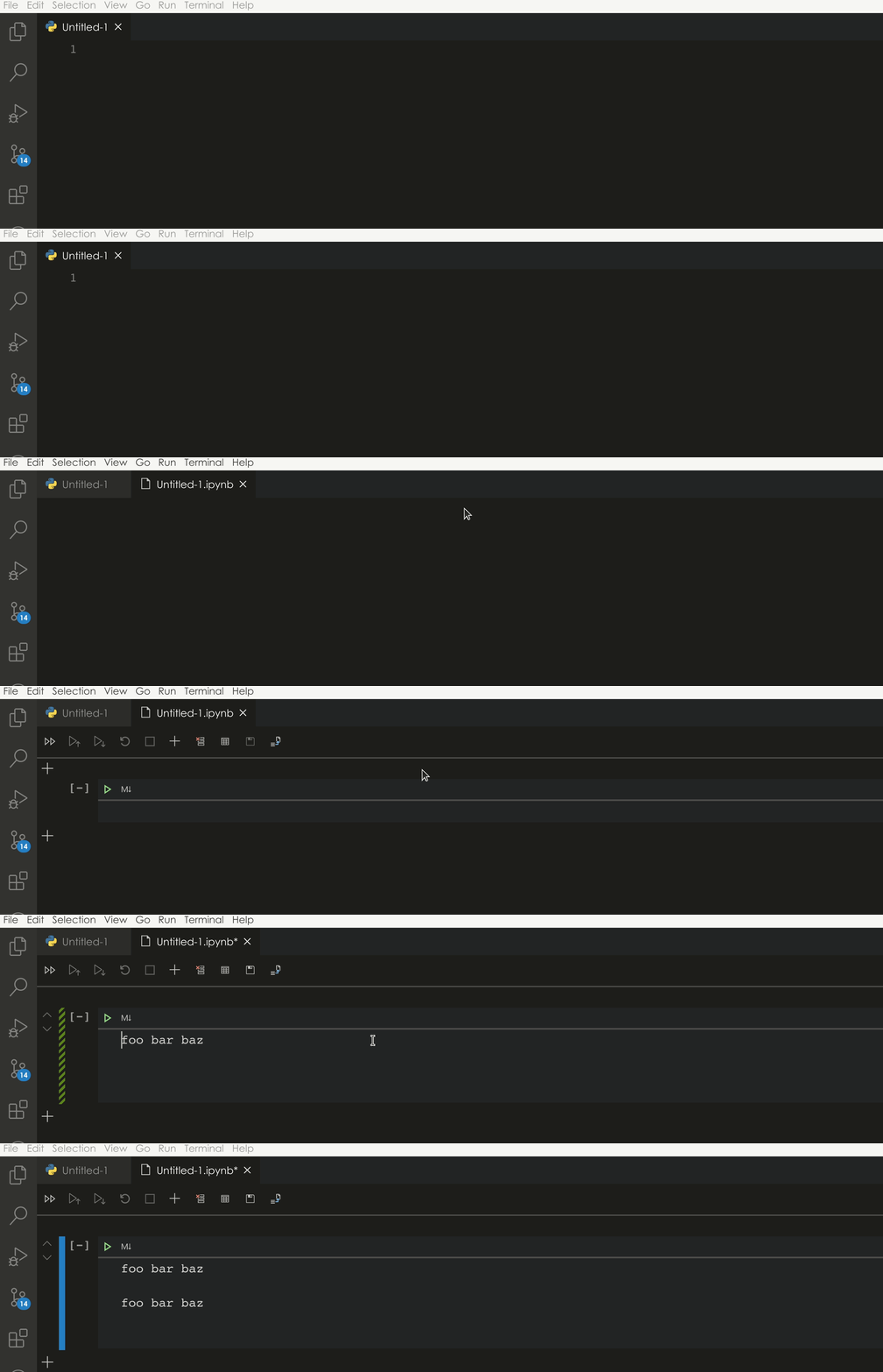
Bad version (1.47.0-1593495868) demo:
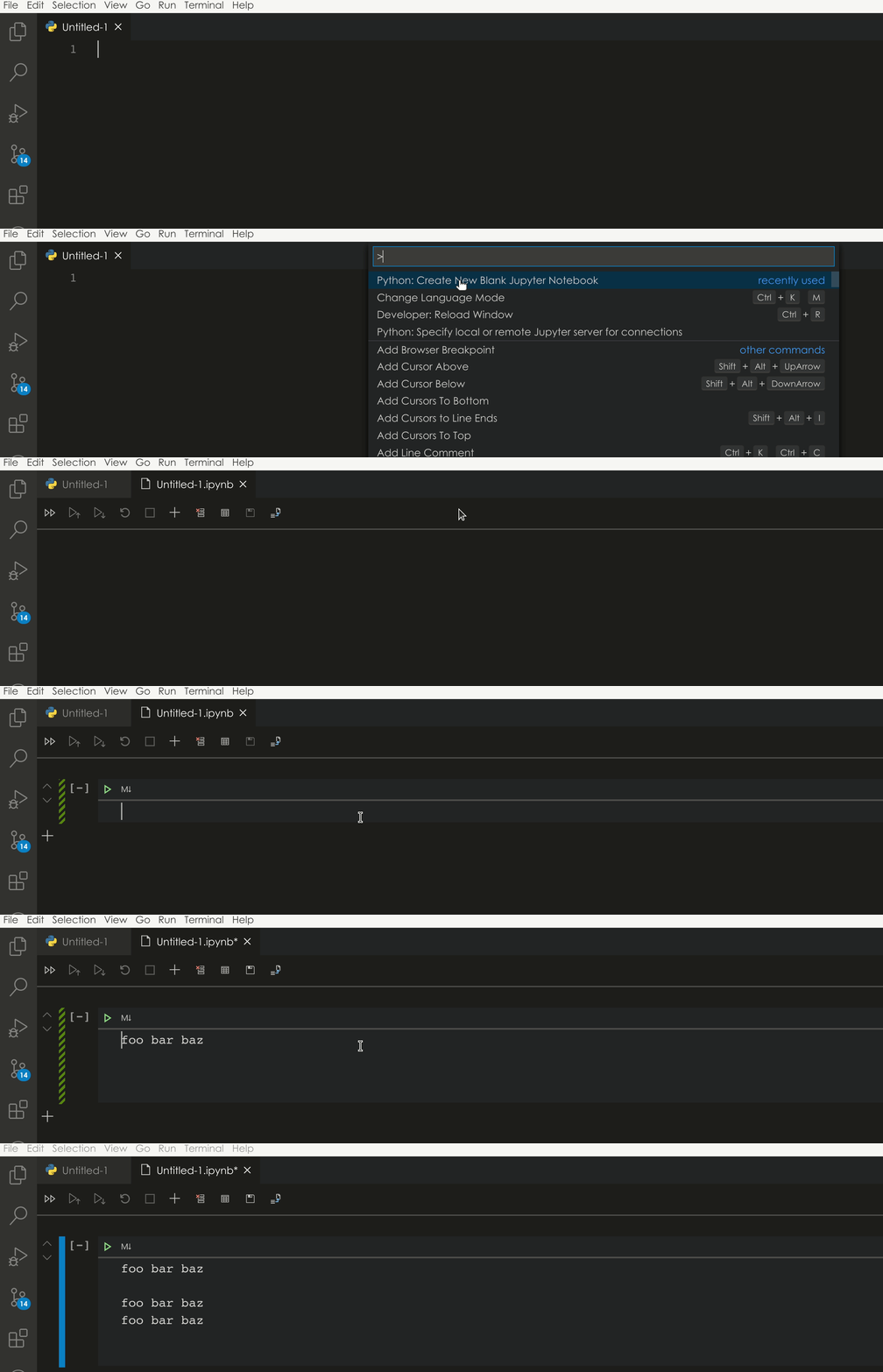
dimitry-ishenko
on 8 Jul 2020
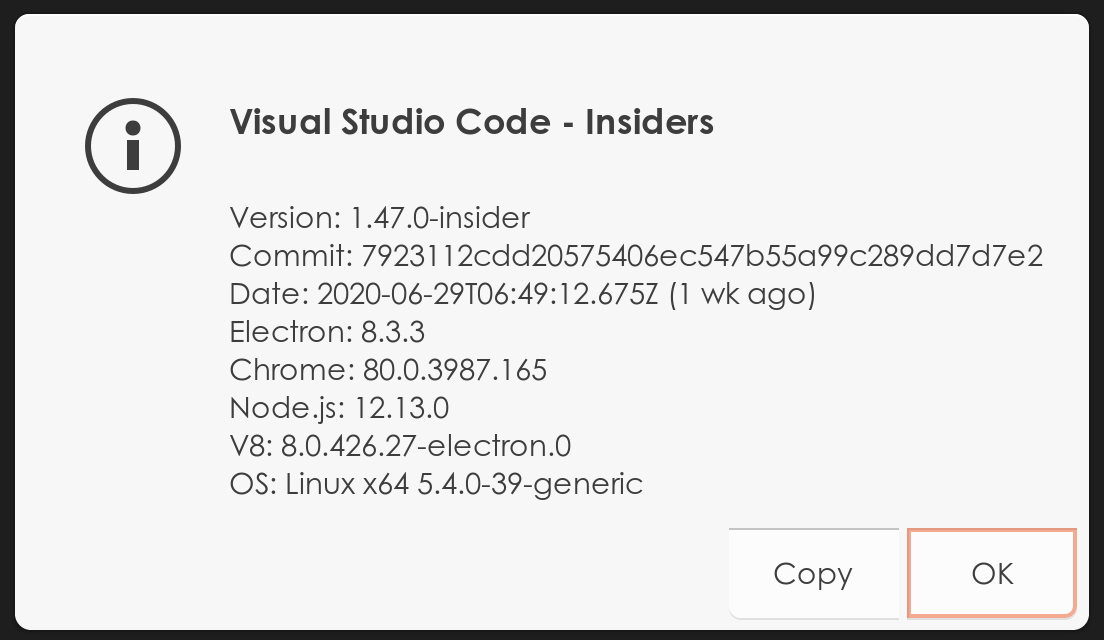
Executive summary:
- The above tests were done with python extension version
v2020.7.92789-dev - The bug seems to have been introduced by a change in vscode and not the python extension.
- Last "good" version of vscode-insiders:
1.47.0-1593413883, commit:7923112cdd20575406ec547b55a99c289dd7d7e2 - First "bad" version of vscode-insiders:
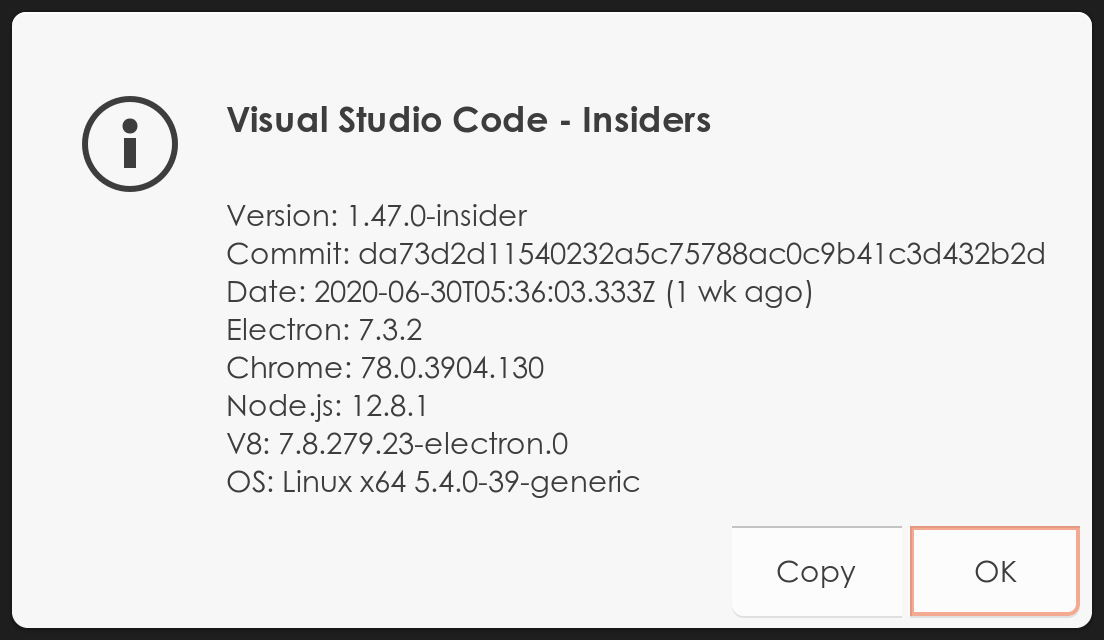
1.47.0-1593495868, commit:da73d2d11540232a5c75788ac0c9b41c3d432b2d
Unfortunately, I've torn down my docker container for building vscode (and I am too lazy to set it up again), but with the above commit IDs one should be able to bisect further and figure out where the issue was introduced.
dimitry-ishenko
on 8 Jul 2020
One thing of note is that between the good and the bad versions Electron was downgraded from 8.3.3 to 7.3.2.
This happened in commit 85402615934f3c8b97ad14d8c483383833287a82
dimitry-ishenko
on 8 Jul 2020
Thanks @dimitry-ishenko. We might be able to use that to get VS code to fix this.
In the meantime we've implemented a workaround. Can you give it a try to see if it fixes the problem for you?
https://pvsc.blob.core.windows.net/extension-builds/ms-python-insiders.vsix
Thanks
rchiodo
on 8 Jul 2020
@rchiodo thank you, it does handle the double-paste problem. :tada: However, another aspect of the problem, which I brought up in my original issue microsoft/vscode-python#12731 is still unresolved.
Watch me perform copy/paste below, which works as expected and then cut the original line:
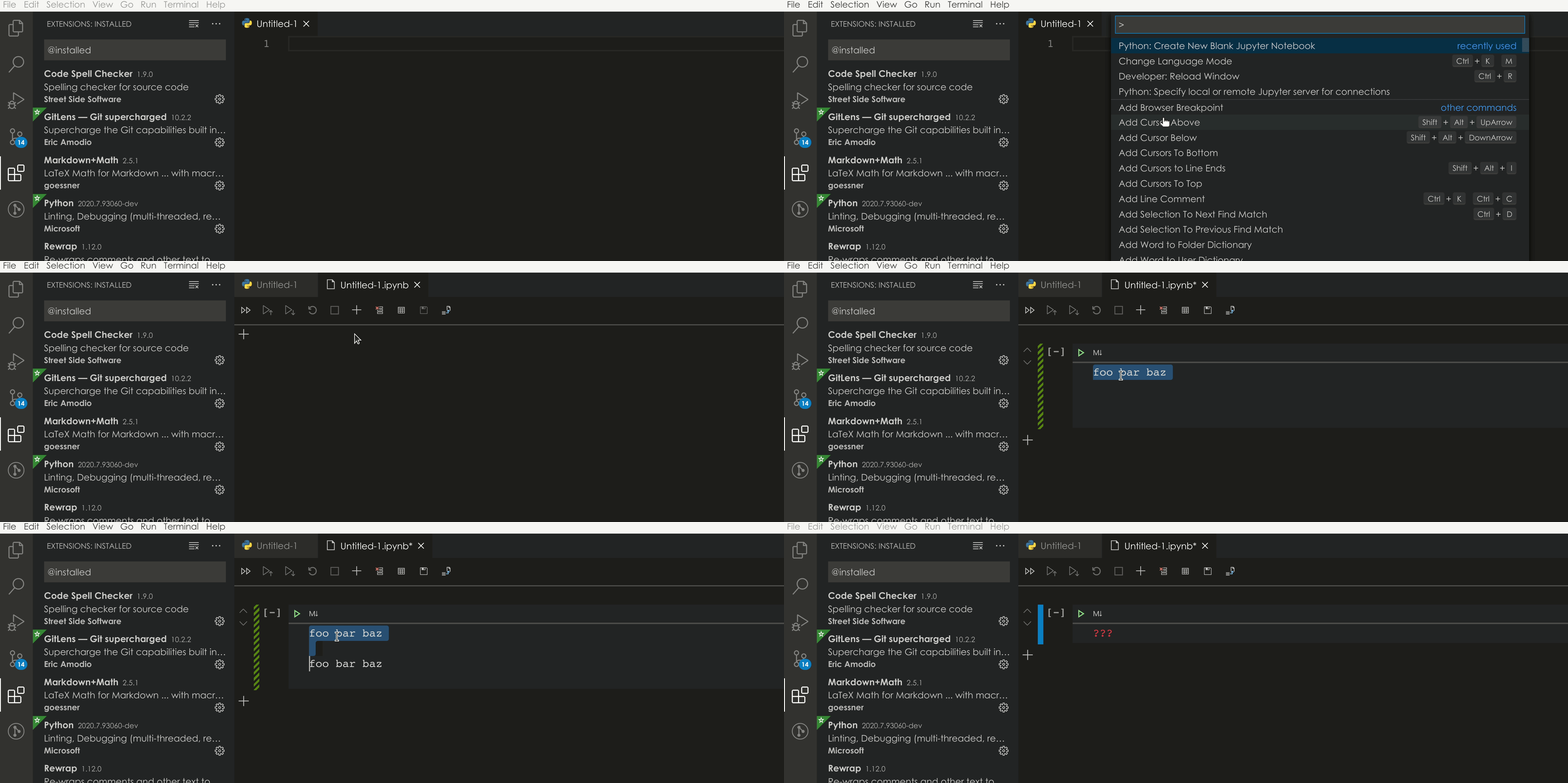
The pasted line below it falls into the abyss.
Should I open a separate issue for this? Or maybe modify and reopen my original issue?
dimitry-ishenko
on 8 Jul 2020
That looks like a similar problem for cut. It's double cutting. Blech. We should attempt to repro this with a simple example in a VS code webview (not our python one). Then we can log this on VS code and get them to fix it.
Thanks @dimitry-ishenko. Can you open another bug for the double cut? It's the same thing but we can start there and try to create a repro for VS code.
rchiodo
on 8 Jul 2020
Update: It's not resolved yet :-(
Just updated to the latest version and seems it is fixed now.
My current config:
Version: 1.47.0
Commit: d5e9aa0227e057a60c82568bf31c04730dc15dcd
Date: 2020-07-09T08:01:54.115Z
Electron: 7.3.2
Chrome: 78.0.3904.130
Node.js: 12.8.1
V8: 7.8.279.23-electron.0
OS: Darwin x64 18.7.0
getashraf
on 10 Jul 2020
same, but somehow ctrl + shift + v give me right paste
 ZZZZzzzzac
on 10 Jul 2020
ZZZZzzzzac
on 10 Jul 2020
hi,
i still have this problem on 1.47.0 version
 davins90
on 10 Jul 2020
davins90
on 10 Jul 2020
Still having this problem on Windows.
Version: 1.47.0 (user setup)
Commit: d5e9aa0227e057a60c82568bf31c04730dc15dcd
Date: 2020-07-09T08:02:06.629Z
Electron: 7.3.2
Chrome: 78.0.3904.130
Node.js: 12.8.1
V8: 7.8.279.23-electron.0
OS: Windows_NT x64 10.0.15063
 miaonima
on 10 Jul 2020
miaonima
on 10 Jul 2020
This is/was a vs code issue. They'll be fixing it in the 1.48 release:
https://github.com/microsoft/vscode/issues/101946
rchiodo
on 10 Jul 2020
I can confirm that this has been fixed in the insiders version 1.48.0-1594382675 which was released today:
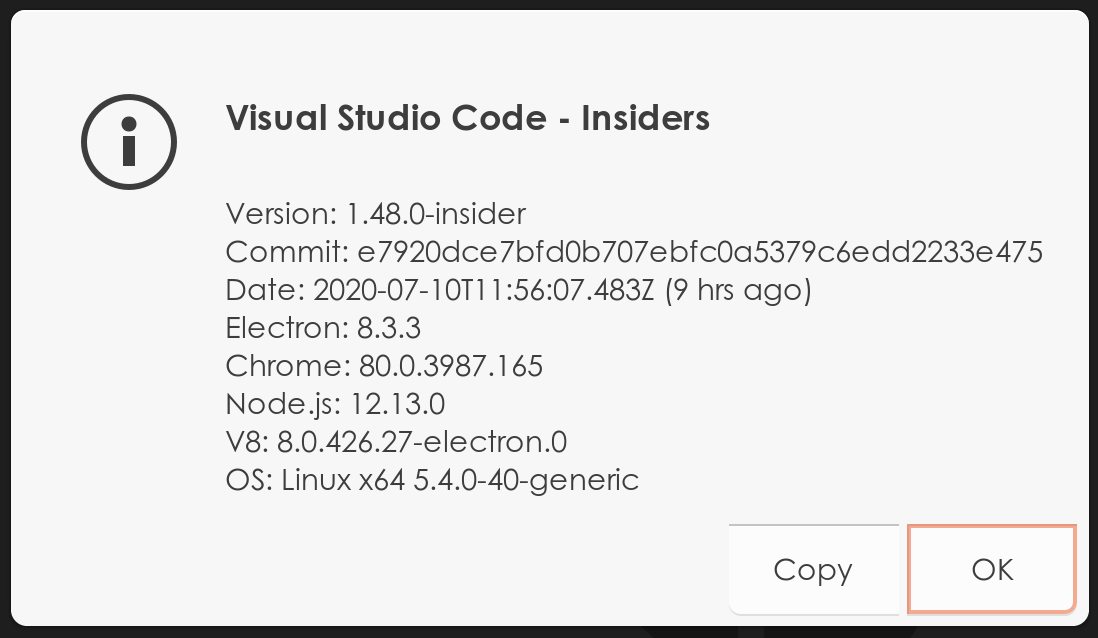
dimitry-ishenko
on 10 Jul 2020
Instead of duplicate copy/paste, in today's VSCode insider build copy/paste is now no longer working at all (CMD+C/V on Mac or CTRL+C/V on Windows respectively). 😐
Version: 1.48.0-insider
Commit: e7920dce7bfd0b707ebfc0a5379c6edd2233e475
Date: 2020-07-10T11:55:11.286Z (23 hrs ago)
Electron: 8.3.3
Chrome: 80.0.3987.165
Node.js: 12.13.0
V8: 8.0.426.27-electron.0
OS: Darwin x64 19.5.0
same, but somehow
ctrl + shift + vgive me right paste
This worked for me too for now. Started having the problem after closing the window and letting the new release to come. Good workaround until the bug is fixed.
Additionally, after doing 'Ctrl + V' and getting the double paste, doing 'Ctrl+Z' removes the duplicated element, so the paste action is somehow done twice individually.
 adpala
on 11 Jul 2020
adpala
on 11 Jul 2020
I am facing this same issue of double pasting in the JUNE 2020 update, Version: 1.47. Please have a look at this asap, its quite annoying.
 aadityakapoor06
on 11 Jul 2020
aadityakapoor06
on 11 Jul 2020
Same issue here on Windows 10 Home. This happened with the recent VS Code update.
Details:
Version: 1.47.0 (user setup)
Commit: d5e9aa0227e057a60c82568bf31c04730dc15dcd
Date: 2020-07-09T08:02:06.629Z
Electron: 7.3.2
Chrome: 78.0.3904.130
Node.js: 12.8.1
V8: 7.8.279.23-electron.0
OS: Windows_NT x64 10.0.18362
 jeandsantos
on 11 Jul 2020
jeandsantos
on 11 Jul 2020
same, but somehow
ctrl + shift + vgive me right paste
Heads up for Mac users: Pressing CMD + SHIFT + V closed my notebook and I had to reload my data. Be sure to save your work before attempting this.
visini
on 11 Jul 2020
I can confirm I have this issue as well.
 e-remington-lee
on 12 Jul 2020
e-remington-lee
on 12 Jul 2020
same here.
Version: 1.47.0 (user setup)
Commit: d5e9aa0227e057a60c82568bf31c04730dc15dcd
Date: 2020-07-09T08:02:06.629Z
Electron: 7.3.2
Chrome: 78.0.3904.130
Node.js: 12.8.1
V8: 7.8.279.23-electron.0
OS: Windows_NT x64 10.0.18363
 FrankWJW
on 12 Jul 2020
FrankWJW
on 12 Jul 2020
I faced it too.
Version: 1.47.0
Commit: d5e9aa0227e057a60c82568bf31c04730dc15dcd
Date: 2020-07-09T08:30:34.302Z
Electron: 7.3.2
Chrome: 78.0.3904.130
Node.js: 12.8.1
V8: 7.8.279.23-electron.0
OS: Linux x64 5.3.0-62-generic snap
 newmrdenis
on 12 Jul 2020
newmrdenis
on 12 Jul 2020
Double paste here as well.
Version: 1.47.0
Commit: d5e9aa0227e057a60c82568bf31c04730dc15dcd
Date: 2020-07-09T08:30:34.302Z
Electron: 7.3.2
Chrome: 78.0.3904.130
Node.js: 12.8.1
V8: 7.8.279.23-electron.0
OS: Linux x64 5.4.0-37-generic snap
 tasilva96
on 12 Jul 2020
tasilva96
on 12 Jul 2020
To re-iterate for people newly experiencing this problem: this happens because the paste command is triggered twice.
Your options are:
Press Ctrl + Z to undo the second paste.
Some users have reported that pressing Ctrl + Shft + V works well on Windows (haven't tested myself).
This has been fixed in the insiders version of vscode. You can upgrade if you feel adventurous :smile:
dimitry-ishenko
on 12 Jul 2020
Ctrl + Shft + V worked on Ubuntu. Thanks.
tasilva96
on 12 Jul 2020
3. This has been fixed in the insiders version of vscode. You can upgrade if you feel adventurous 😄
Instead of duplicate copy/paste, in today's VSCode insider build copy/paste is now no longer working at all (CMD+C/V on Mac or CTRL+C/V on Windows respectively). 😐
I've tried the insider build, but copy/pasting no longer works at all. What do you advise?
Version: 1.48.0-insider
Commit: e7920dce7bfd0b707ebfc0a5379c6edd2233e475
Date: 2020-07-10T11:55:11.286Z (23 hrs ago)
Electron: 8.3.3
Chrome: 80.0.3987.165
Node.js: 12.13.0
V8: 8.0.426.27-electron.0
OS: Darwin x64 19.5.0
@visini for now, maybe roll back to the previous version which pastes twice and use Ctrl + Z (option 1). And keep an eye on this issue.
dimitry-ishenko
on 12 Jul 2020
Same here at ubuntu environments.
Version: 1.47.0
Commit: d5e9aa0227e057a60c82568bf31c04730dc15dcd
Date: 2020-07-09T08:30:34.302Z
Electron: 7.3.2
Chrome: 78.0.3904.130
Node.js: 12.8.1
V8: 7.8.279.23-electron.0
OS: Linux x64 5.3.0-62-generic snap
 amaruak00
on 13 Jul 2020
amaruak00
on 13 Jul 2020
Same question here.
 SongshGeo
on 13 Jul 2020
SongshGeo
on 13 Jul 2020
I am facing the same issue. I am currently developing on Windows 10 for a docker container on a linux server.
 veritas9872
on 13 Jul 2020
veritas9872
on 13 Jul 2020
Same problem, make me annoyed when i'm using vscode.
 attawutn
on 13 Jul 2020
attawutn
on 13 Jul 2020
I have the same problem, it is not fixed yet. I am using the latest version on VScode
 FahadAslamCS
on 13 Jul 2020
FahadAslamCS
on 13 Jul 2020
Same here
 clone95
on 13 Jul 2020
clone95
on 13 Jul 2020
I have the same issue but also noticed that undoing after I pasted would randomly jump between cells.
 sbland
on 13 Jul 2020
sbland
on 13 Jul 2020
I have the same issue but also noticed that undoing after I pasted would randomly jump between cells.
This is an issue which I'm experiencing too. In the past few versions, I had to rewrite cells entirely due to inconsistencies in undo/redo, which randomly triggered "undos" with strange fragmented data from my clipboard history and/or from other cells "undo" state, leaving the whole cell corrupted. Extremely hard to reproduce, since it happens only once or twice every few hours, but annoying still... I too am suspecting the undo/redo bug is related to this issue.
visini
on 13 Jul 2020
I have the same issue with the latest vscode update.
 gabriel19913
on 13 Jul 2020
gabriel19913
on 13 Jul 2020
I have the same issue with the latest vscode update.
sam here
 roymartinezblanco
on 13 Jul 2020
roymartinezblanco
on 13 Jul 2020
same here on ubuntu
 zzangupenn
on 13 Jul 2020
zzangupenn
on 13 Jul 2020
Same issue!
version: 1.47.0 (user setup)
Date: 2020-07-09T08:02:06.629Z
Electron: 7.3.2
Chrome: 78.0.3904.130
Node.js: 12.8.1
V8: 7.8.279.23-electron.0
OS: Windows_NT x64 10.0.18363
 kyyky
on 13 Jul 2020
kyyky
on 13 Jul 2020
Same issue on Lubuntu, though ctrl + shift + c/v works for now. Thanks @dimitry-ishenko.
 s-kirby
on 13 Jul 2020
s-kirby
on 13 Jul 2020
Same here on ubuntu 18 and as previously mentioned I'm using ctrl+shift+v but it's a little annoying. My issue came up after an update today.
 berkott
on 13 Jul 2020
berkott
on 13 Jul 2020
Same here. I thought it was my problem using a copy & paste clipboard but apparently it is the vscode problem.
 leochoo
on 13 Jul 2020
leochoo
on 13 Jul 2020
Same issue for me on windows 10, VS code.
Version: 1.47.0 (user setup)
Date: 2020-07-09T08:02:06.629Z
Electron: 7.3.2
Chrome: 78.0.3904.130
Node.js: 12.8.1
V8: 7.8.279.23-electron.0
OS: Windows_NT x64 10.0.18362
ctrl + shift + v works though to avoid double pastes. However, ctrl + x is removing the entire lines of code instead of just selected text.
 amansani
on 13 Jul 2020
amansani
on 13 Jul 2020
same here on win10
Version: 1.47.0 (user setup)
Commit: d5e9aa0227e057a60c82568bf31c04730dc15dcd
Date: 2020-07-09T08:02:06.629Z
Electron: 7.3.2
Chrome: 78.0.3904.130
Node.js: 12.8.1
V8: 7.8.279.23-electron.0
OS: Windows_NT x64 10.0.18362
 stonerjurand
on 13 Jul 2020
stonerjurand
on 13 Jul 2020
The fix for this issue is in version 1.48 of VS code.
Although it seems there may be problems with Mac.
rchiodo
on 13 Jul 2020
waiting for the stable release of version 1.48
getashraf
on 13 Jul 2020
The fix for this issue is in version 1.48 of VS code.
Although it seems there may be problems with Mac.
How do you kow that?
 pforpicco
on 13 Jul 2020
pforpicco
on 13 Jul 2020
@pforpicco Know what? That the fix is in 1.48 of VS code. Based on this issue I logged here:
https://github.com/microsoft/vscode/issues/101946
How do I know it is having problems with Mac?
Internal testing for the insiders version has found Copy/Paste/Cut to not work at all on a Mac.
rchiodo
on 13 Jul 2020
Dealing with the same problem right now. Windows 10 v1.47.0
 iankelsey
on 13 Jul 2020
iankelsey
on 13 Jul 2020
same. Anyone got the solution? xd
Yes. It involves not being lazy and reading some of the comments above.
dimitry-ishenko
on 14 Jul 2020
I have the same issue but also noticed that undoing after I pasted would randomly jump between cells.
This is an issue which I'm experiencing too. In the past few versions, I had to rewrite cells entirely due to inconsistencies in undo/redo, which randomly triggered "undos" with strange fragmented data from my clipboard history and/or from other cells "undo" state, leaving the whole cell corrupted. Extremely hard to reproduce, since it happens only once or twice every few hours, but annoying still... I too am suspecting the undo/redo bug is related to this issue.
@visini I've seen this one as well. Agreed very confusing because it's not exactly clear where the "undo/redo" text ends up coming from. Also agree very hard to reproduce - thankfully rare. Curious to see if this fix in 1.48 will prevent it entirely or not.
jbeyer16
on 14 Jul 2020
does anyone know what the editor.action.clipboardpasteaction actually does? That seems to be the problem. It's default registered to 2 keybinds "Ctrl + V" and "Shift + Insert" both of which causes the double pasting behaviour here.
Removing the "Ctrl + V" keybinding fixes the issue for me, and I have yet to notice where the removal of this keybind causes any difference elsewhere.
 EricChen1248
on 14 Jul 2020
EricChen1248
on 14 Jul 2020
Issue Type: Bug
If I copy text from one cell and paste into another cell it double pastes.
If I cmd+z to undo it undoes one of the two pastes implying the issue is pasting. In .ipynb files, VSC double pastes.
I tried pasting in a .py file with no issue. Likewise pasting in the issue reporter has no issue, just in Jupyter Notebook cells.
I manually restarted VSC and the issue went away. After a while (12 minutes of use) the issue randomly came back when pasting between different notebooks.
The issue seems intermittent coming and going seemingly randomly.
VS Code version: Code 1.45.0 (d69a79b73808559a91206d73d7717ff5f798f23c, 2020-05-07T15:57:33.467Z)
OS version: Darwin x64 19.4.0System Info
Extensions (1)
Yes, I have the same issue.
 lixm1121
on 14 Jul 2020
lixm1121
on 14 Jul 2020
same issue here.
 anklaa
on 14 Jul 2020
anklaa
on 14 Jul 2020
@EricChen1248 Thanks, I had the same issue and that solved it. I haven't noticed anything so I'm happy it was getting really annoying. :)
 urwrstkn8mare
on 14 Jul 2020
urwrstkn8mare
on 14 Jul 2020
I can confirm that Ctrl + Shift + V is a workaround in Windows 10 too.
Context: I got this issue after I opened Python Interactive Window for the first time (although previously I worked with Jupyter notebooks in VS code smoothly, without this error).
Version: 1.47.0 (user setup)
Commit: d5e9aa0227e057a60c82568bf31c04730dc15dcd
Date: 2020-07-09T08:02:06.629Z
Electron: 7.3.2
Chrome: 78.0.3904.130
Node.js: 12.8.1
V8: 7.8.279.23-electron.0
OS: Windows_NT x64 10.0.18363
 iustinaabc
on 14 Jul 2020
iustinaabc
on 14 Jul 2020
I can confirm that
Ctrl + Shift + Vis a workaround in Windows 10 too.
Context: I got this issue after I opened Python Interactive Window for the first time (although previously I worked with Jupyter notebooks in VS code smoothly, without this error).Version: 1.47.0 (user setup)
Commit: d5e9aa0227e057a60c82568bf31c04730dc15dcd
Date: 2020-07-09T08:02:06.629Z
Electron: 7.3.2
Chrome: 78.0.3904.130
Node.js: 12.8.1
V8: 7.8.279.23-electron.0
OS: Windows_NT x64 10.0.18363
Yeah. I'm experiencing the same problem here. However, Ctrl + Shift + V works for me also.
 mahmudbnbello10
on 14 Jul 2020
mahmudbnbello10
on 14 Jul 2020
does anyone know what the
editor.action.clipboardpasteactionactually does? That seems to be the problem. It's default registered to 2 keybinds "Ctrl + V" and "Shift + Insert" both of which causes the double pasting behaviour here.Removing the "Ctrl + V" keybinding fixes the issue for me, and I have yet to notice where the removal of this keybind causes any difference elsewhere.
This works perfectly for me so far.
 RikVoorhaar
on 14 Jul 2020
RikVoorhaar
on 14 Jul 2020
does anyone know what the
editor.action.clipboardpasteactionactually does? That seems to be the problem. It's default registered to 2 keybinds "Ctrl + V" and "Shift + Insert" both of which causes the double pasting behaviour here.Removing the "Ctrl + V" keybinding fixes the issue for me, and I have yet to notice where the removal of this keybind causes any difference elsewhere.
Worked for me!
 tonibofarull
on 14 Jul 2020
tonibofarull
on 14 Jul 2020
does anyone know what the editor.action.clipboardpasteaction actually does? That seems to be the problem. It's default registered to 2 keybinds "Ctrl + V" and "Shift + Insert" both of which causes the double pasting behaviour here.
Removing the "Ctrl + V" keybinding fixes the issue for me, and I have yet to notice where the removal of this keybind causes any difference elsewhere.
This does the trick (Windows 10 here), thanks @EricChen1248
 martvl
on 14 Jul 2020
martvl
on 14 Jul 2020
I had the same issue, but using CTR+SHIFT+V instead of just CTR+V help me to overcome it. It pastes my selection just once.
 heidyloreley
on 14 Jul 2020
heidyloreley
on 14 Jul 2020
does anyone know what the
editor.action.clipboardpasteactionactually does? That seems to be the problem. It's default registered to 2 keybinds "Ctrl + V" and "Shift + Insert" both of which causes the double pasting behaviour here.
Removing the "Ctrl + V" keybinding fixes the issue for me, and I have yet to notice where the removal of this keybind causes any difference elsewhere.
This worked for me too alongside with using ctrl+shift+v
 shenpaii
on 14 Jul 2020
shenpaii
on 14 Jul 2020
Solved: remove keybinding as described in previous comments
 ceespinosa
on 15 Jul 2020
ceespinosa
on 15 Jul 2020
I can confirm that
Ctrl + Shift + Vis a workaround in Windows 10 too.
Context: I got this issue after I opened Python Interactive Window for the first time (although previously I worked with Jupyter notebooks in VS code smoothly, without this error).Version: 1.47.0 (user setup)
Commit: d5e9aa0227e057a60c82568bf31c04730dc15dcd
Date: 2020-07-09T08:02:06.629Z
Electron: 7.3.2
Chrome: 78.0.3904.130
Node.js: 12.8.1
V8: 7.8.279.23-electron.0
OS: Windows_NT x64 10.0.18363
Solved, and delete ctrl+x keybinding for editor.action.clipboardCutAction solve double cut problem too.
But I guess after devs fix this bug we need to take these keybinding back?
ZZZZzzzzac
on 15 Jul 2020
does anyone know what the
editor.action.clipboardpasteactionactually does? That seems to be the problem. It's default registered to 2 keybinds "Ctrl + V" and "Shift + Insert" both of which causes the double pasting behaviour here.Removing the "Ctrl + V" keybinding fixes the issue for me, and I have yet to notice where the removal of this keybind causes any difference elsewhere.
Solved for me as well
 lucas-hattori-costa
on 15 Jul 2020
lucas-hattori-costa
on 15 Jul 2020
Not only in insiders version, but this is also there in the stable version 1.47 as well
 akshitgupta29
on 15 Jul 2020
akshitgupta29
on 15 Jul 2020
does anyone know what the
editor.action.clipboardpasteactionactually does? That seems to be the problem. It's default registered to 2 keybinds "Ctrl + V" and "Shift + Insert" both of which causes the double pasting behaviour here.Removing the "Ctrl + V" keybinding fixes the issue for me, and I have yet to notice where the removal of this keybind causes any difference elsewhere.
This is Instant Solution about this issue.
Details:
- Go to [Keyboard Shortcut] Menu (Ctrl+K Ctrl+S)
- Search
- editor.action.clipboardCutAction
- editor.action.clipboardCopyAction
- editor.action.clipboardPasteAction
- If the actions above are bind by "Ctrl+X", "Ctrl+C", "Ctrl+V", remove that binds.
Good Luck to all :D
amaruak00
on 15 Jul 2020
does anyone know what the
editor.action.clipboardpasteactionactually does? That seems to be the problem. It's default registered to 2 keybinds "Ctrl + V" and "Shift + Insert" both of which causes the double pasting behaviour here.Removing the "Ctrl + V" keybinding fixes the issue for me, and I have yet to notice where the removal of this keybind causes any difference elsewhere.
This fixed the double paste issue but I still get an undo issue where undoing a large paste will only undo half and ends it with ellipses (...)
sbland
on 15 Jul 2020
From Keyboard Shortcuts in VScode.
search for: editor.action.clipboardPasteAction
remove the CTRL+V keybinding.
This works in Windows 10
VScode version: 1.47.1 (installed in 2020)
 dlefcoe
on 15 Jul 2020
dlefcoe
on 15 Jul 2020
does anyone know what the
editor.action.clipboardpasteactionactually does? That seems to be the problem. It's default registered to 2 keybinds "Ctrl + V" and "Shift + Insert" both of which causes the double pasting behaviour here.
Removing the "Ctrl + V" keybinding fixes the issue for me, and I have yet to notice where the removal of this keybind causes any difference elsewhere.This fixed the double paste issue but I still get an undo issue where undoing a large paste will only undo half and ends it with ellipses (...)
I also still had issues with Undo (Ctrl + Z) after removing the bindings for Ctrl + V. I simply removed the bindings for Ctrl + Z as well and that seems to have fixed it. In my case, there were two bindings of which one specific to notebooks, I removed both of them.
 joepvdbogaert
on 15 Jul 2020
joepvdbogaert
on 15 Jul 2020
I can confirm that
Ctrl + Shift + Vis a workaround in Windows 10 too.
Context: I got this issue after I opened Python Interactive Window for the first time (although previously I worked with Jupyter notebooks in VS code smoothly, without this error).Version: 1.47.0 (user setup)
Commit: d5e9aa0227e057a60c82568bf31c04730dc15dcd
Date: 2020-07-09T08:02:06.629Z
Electron: 7.3.2
Chrome: 78.0.3904.130
Node.js: 12.8.1
V8: 7.8.279.23-electron.0
OS: Windows_NT x64 10.0.18363
Good tip. Thanks!!
 luismsalazare
on 15 Jul 2020
luismsalazare
on 15 Jul 2020
I'm having this issue with other commands as well, like Ctrl+x, Shift+delete, etc. Rebinding them works, but I thought it was worth it to add it here.
 marianatuma
on 15 Jul 2020
marianatuma
on 15 Jul 2020
I'm having the same problem with both cutting and pasting. That is, Ctrl+X cuts two lines, and Ctrl+V pastes twice.
 kjohnsen
on 15 Jul 2020
kjohnsen
on 15 Jul 2020
Same problem here.
 blucifer22
on 15 Jul 2020
blucifer22
on 15 Jul 2020
Same here even for windows 10. And that only happens to a notebook
search for: editor.action.clipboardPasteAction
remove the CTRL+V keybinding.
This solution works for me too.
 haduong83
on 15 Jul 2020
haduong83
on 15 Jul 2020
@EricChen1248 I love you <3 It worked like charm!
clone95
on 16 Jul 2020
Came here to report this exact issue and found this thread - issue still exists without the workaround of removing key bindings posted above.
Using VS Code 1.47.1 on Win10 Pro
 udaykapur
on 16 Jul 2020
udaykapur
on 16 Jul 2020
does anyone know what the
editor.action.clipboardpasteactionactually does? That seems to be the problem. It's default registered to 2 keybinds "Ctrl + V" and "Shift + Insert" both of which causes the double pasting behaviour here.
Removing the "Ctrl + V" keybinding fixes the issue for me, and I have yet to notice where the removal of this keybind causes any difference elsewhere.This is Instant Solution about this issue.
Details:
1. Go to [Keyboard Shortcut] Menu (Ctrl+K Ctrl+S)

2. Search


* editor.action.clipboardCutAction

* editor.action.clipboardCopyAction

* editor.action.clipboardPasteAction


1. If the actions above are bind by "Ctrl+X", "Ctrl+C", "Ctrl+V", remove that binds.
Good Luck to all
Thank you so much for the help @amaruak00 . It worked Perfectly
 ashish735
on 16 Jul 2020
ashish735
on 16 Jul 2020
yep, removing the ctrl+v keybind on editor.action.clipboardPasteAction worked for me too. thanks @EricChen1248
 JSym
on 16 Jul 2020
JSym
on 16 Jul 2020
I have posted the same answer on stackoverflow here:
https://stackoverflow.com/questions/62933098/in-a-notebook-ipynb-file-paste-double-pastes/62933099#62933099
Please leave comments there.
dlefcoe
on 16 Jul 2020
I misunderstood this at first, so to make it clear:
For some reason removing the keybindings still leaves them functional,
it only avoids the bug.
Same here.
Python extension version: v2020.6.91350
Version: 1.47.1
Commit: 485c41f9460bdb830c4da12c102daff275415b53
Date: 2020-07-14T00:13:57.513Z
Electron: 7.3.2
Chrome: 78.0.3904.130
Node.js: 12.8.1
V8: 7.8.279.23-electron.0
OS: Linux x64 4.19.0-9-amd64
 allefeld
on 17 Jul 2020
allefeld
on 17 Jul 2020
Yes, that in the case.
On Thu, 16 Jul 2020, 23:08 Carsten Allefeld, notifications@github.com
wrote:
I misunderstood this at first, so to make it clear:
For some reason removing the keybindings still leaves them functional,it only avoids the bug.
Same here.
Python extension version: v2020.6.91350
Version: 1.47.1
Commit: 485c41f9460bdb830c4da12c102daff275415b53
Date: 2020-07-14T00:13:57.513Z
Electron: 7.3.2
Chrome: 78.0.3904.130
Node.js: 12.8.1
V8: 7.8.279.23-electron.0
OS: Linux x64 4.19.0-9-amd64—
You are receiving this because you commented.
Reply to this email directly, view it on GitHub
https://github.com/microsoft/vscode-python/issues/11796#issuecomment-659699976,
or unsubscribe
https://github.com/notifications/unsubscribe-auth/AEC7DGBTV7PJPFPB3UC7XMTR352ZTANCNFSM4NAELKXQ
.
dlefcoe
on 17 Jul 2020
Encounter same bug. Removing the ctrl+v keybind works in Mint 20, vs code 1.47.1 too.
 LyWangPX
on 17 Jul 2020
LyWangPX
on 17 Jul 2020
Suggest use Ctrl+Z after paste for this stage -_-
kyyky
on 17 Jul 2020
Unfortunately, the solution from @EricChen1248 does not work for me. Unlike others, removing the keybindings does not leave them functional, and remapping them produces the same doubled behavior for both cutting and pasting.
The oddest part of all of this is that the behavior is so intermittent. It's definitely triggered by copy/cut-pasting from one notebook to another (regardless of the kernel from what I can tell) but doesn't happen every time and will sometimes go away for a while only to come back later.
Version: 1.47.1
Commit: 485c41f9460bdb830c4da12c102daff275415b53
Date: 2020-07-13T22:43:02.577Z
Electron: 7.3.2
Chrome: 78.0.3904.130
Node.js: 12.8.1
V8: 7.8.279.23-electron.0
OS: Darwin x64 19.5.0
 marc-rauckhorst
on 17 Jul 2020
marc-rauckhorst
on 17 Jul 2020
Experiencing this as well.
Python version: 2020.7.94776
Version: 1.47.0 (user setup)
Commit: d5e9aa0227e057a60c82568bf31c04730dc15dcd
Date: 2020-07-09T08:02:06.629Z
Electron: 7.3.2
Chrome: 78.0.3904.130
Node.js: 12.8.1
V8: 7.8.279.23-electron.0
OS: Windows_NT x64 10.0.18362
 sparthib
on 19 Jul 2020
sparthib
on 19 Jul 2020
I'm not having this problem in 1.47.2.
tonibofarull
on 19 Jul 2020
Don't want to add spam here, but because someone commented above about a potentially fixed version, I feel that I need to add that I'm still having this issue on 1.47.3. I've also observed this issue intermittently with no obvious cause, so I'd have to guess that the above person simply had a lucky day.
Shortcuts affected: ctrl-x, ctrl-v
I'm not sure about ctrl-c because it's idempotent, so it doesn't really matter.
Version: 1.47.3
Commit: 91899dcef7b8110878ea59626991a18c8a6a1b3e
Date: 2020-07-23T15:51:39.791Z
Electron: 7.3.2
Chrome: 78.0.3904.130
Node.js: 12.8.1
V8: 7.8.279.23-electron.0
OS: Linux x64 5.4.0-42-generic snap
 mcmar
on 28 Jul 2020
mcmar
on 28 Jul 2020
And now ctrl+c copy word not working inside cell, also. Can' t believe how could developers use this?
 xgdgsc
on 10 Aug 2020
xgdgsc
on 10 Aug 2020
Can anyone try the latest Insiders (built yesterday) https://code.visualstudio.com/insiders/ and see if you still see such problem? It's going to be the stable release so want to confirm that the problems you are seeing here are resolved.
 rebornix
on 11 Aug 2020
rebornix
on 11 Aug 2020
Can anyone try the latest Insiders (built yesterday) https://code.visualstudio.com/insiders/ and see if you still see such problem? It's going to be the stable release so want to confirm that the problems you are seeing here are resolved.
@rebornix I tried it, seems to be working as expected.
Version: 1.48.0-insider (user setup)
Commit: db40434f562994116e5b21c24015a2e40b2504e6
Date: 2020-08-11T23:21:50.282Z
Electron: 7.3.2
Chrome: 78.0.3904.130
Node.js: 12.8.1
V8: 7.8.279.23-electron.0
OS: Windows_NT x64 10.0.18363
EricChen1248
on 13 Aug 2020
The latest version works as expected. Thank you.
Version: 1.48.0
Commit: db40434f562994116e5b21c24015a2e40b2504e6
Date: 2020-08-13T08:03:27.059Z
Electron: 7.3.2
Chrome: 78.0.3904.130
Node.js: 12.8.1
V8: 7.8.279.23-electron.0
OS: Darwin x64 18.7.0
getashraf
on 15 Aug 2020
Funny enough, in my case, I had to add editor.action.clipboardCutAction and editor.action.clipboardCopyAction key bindings as they were not set. There was no editor.action.clipboardPasteAction nor any other Paste action worked.
After these two were set, I can cut and copy texts in .ipynb files.
Use Ctrl+Shift+V for pasting (no setting needed). I'm using Python extension on coder.com's code-server
 huydhoang
on 2 Sep 2020
huydhoang
on 2 Sep 2020
I misunderstood this at first, so to make it clear:
For some reason removing the keybindings still leaves them functional,
it only avoids the bug.
The keybindings stopped being functional.
Does this mean the underlying problem has been fixed?
allefeld
on 6 Sep 2020
Closing as this hasn't been reported recently.
If the issue persists please create a new issue/
DonJayamanne
on 29 Sep 2020
Related issues
greazer
·
3Comments
 qdlmcfresh
·
3Comments
qdlmcfresh
·
3Comments
 schatt89
·
4Comments
schatt89
·
4Comments
 entron
·
4Comments
entron
·
4Comments
 SimonCrios
·
3Comments
SimonCrios
·
3Comments
Most helpful comment
does anyone know what the
editor.action.clipboardpasteactionactually does? That seems to be the problem. It's default registered to 2 keybinds "Ctrl + V" and "Shift + Insert" both of which causes the double pasting behaviour here.Removing the "Ctrl + V" keybinding fixes the issue for me, and I have yet to notice where the removal of this keybind causes any difference elsewhere.