Vscode-jupyter: Impossible to tell whether cell output has been collapsed
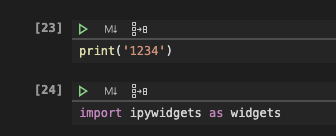
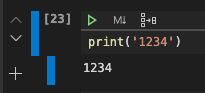
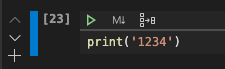
Theres no way to tell whether a cell output has been collapsed or not, or if cell execution is just not working.
I.e. if you collapse output of a cell, there's no indicator to tell whether cell output has been collapsed.
Feels wrong, I spent a few minutes trying to debug this simple thing.

 DonJayamanne
All 5 comments
Jupyter displays a little handle that one can click on the expand the output, i.e. a visual cue that something is there..

DonJayamanne
on 17 Mar 2020
Do we support collapsing?
 rchiodo
on 17 Mar 2020
rchiodo
on 17 Mar 2020
Collapsing cell output with o key.
DonJayamanne
on 17 Mar 2020
A visual indicator for this would be great! Separate from this, it would be great to have a button to collapse the output, similar to how you can in the normal jupyter interface
 EntilZha
on 2 Apr 2020
EntilZha
on 2 Apr 2020
Probably, it would be good if you would be able to click the visual indicator for collapsing/uncollapsing. Because a way to collapse using the mouse is missing as well (cf. @EntilZha)
 tbrodbeck
on 23 Jun 2020
tbrodbeck
on 23 Jun 2020
Related issues
 HenriqueAJNB
·
48Comments
HenriqueAJNB
·
48Comments
 lxlguy
·
38Comments
lxlguy
·
38Comments
 clayms
·
34Comments
clayms
·
34Comments
 collinmccarthy
·
103Comments
collinmccarthy
·
103Comments
 leonarduschen
·
61Comments
leonarduschen
·
61Comments
Most helpful comment
A visual indicator for this would be great! Separate from this, it would be great to have a button to collapse the output, similar to how you can in the normal jupyter interface