Vscode-jupyter: `shift + enter` broken again
Issue Type: Bug
reference:
https://github.com/microsoft/vscode-python/issues/3397
https://github.com/microsoft/vscode-python/issues/5621
Below is my current keyboard shortcuts json, which was working just fine prior to the most recent vscode update.
Before, when:
- the editor had focus,
- no text was selected in the editor,
- in a file with
#%%code 'cell' markers,
the entire 'cell' would run in the Python Interactive Pane and the focus would advance to the next 'cell' in the editor.
Now after the most recent vscode update and given the same conditions, only the line that the cursor is currently on is run in the Python Interactive Pane.
[
    {
        "key": "ctrl+shift+alt+enter",
        "command": "python.execSelectionInTerminal",
        "when": "editorFocus && !findInputFocussed && !python.datascience.ownsSelection && !replaceInputFocussed && editorLangId == 'python'"
    },
    {
        "key": "shift+enter",
        "command": "-python.execSelectionInTerminal",
        "when": "editorFocus && !findInputFocussed && !python.datascience.ownsSelection && !replaceInputFocussed && editorLangId == 'python'"
    },
    {
        "key": "shift+enter",
        "command": "python.datascience.execSelectionInteractive",
        "when": "editorFocus && !python.datascience.hascodecells && !findInputFocussed && !python.datascience.ownsSelection && !replaceInputFocussed && editorLangId == 'python'"
    },
    {
        "key": "shift+enter",
        "command": "python.datascience.execSelectionInteractive",
        "when": "editorFocus && python.datascience.hascodecells && !findInputFocussed && !python.datascience.ownsSelection && !replaceInputFocussed && editorLangId == 'python'"
    },
    {
        "key": "shift+enter",
        "command": "python.datascience.execSelectionInteractive",
        "when": "editorFocus && python.datascience.featureenabled && python.datascience.ownsSelection && !findInputFocussed && !replaceInputFocussed && editorLangId == 'python'"
    },
    {
        "key": "shift+enter",
        "command": "python.datascience.runcurrentcelladvance",
        "when": "editorFocus && python.datascience.featureenabled && python.datascience.hascodecells && !editorHasSelection && editorLangId == 'python'"
    }
]
Extension version: 2019.6.24221
VS Code version: Code 1.36.1 (2213894ea0415ee8c85c5eea0d0ff81ecc191529, 2019-07-08T22:59:35.033Z)
OS version: Windows_NT x64 10.0.17763
System Info
|Item|Value|
|---|---|
|CPUs|Intel(R) Core(TM) i5-6300U CPU @ 2.40GHz (4 x 2496)|
|GPU Status|2d_canvas: enabled
flash_3d: enabled
flash_stage3d: enabled
flash_stage3d_baseline: enabled
gpu_compositing: enabled
multiple_raster_threads: enabled_on
native_gpu_memory_buffers: disabled_software
oop_rasterization: disabled_off
protected_video_decode: unavailable_off
rasterization: enabled
skia_deferred_display_list: disabled_off
skia_renderer: disabled_off
surface_synchronization: enabled_on
video_decode: enabled
viz_display_compositor: disabled_off
webgl: enabled
webgl2: enabled|
|Load (avg)|undefined|
|Memory (System)|15.88GB (8.83GB free)|
|Process Argv||
|Screen Reader|no|
|VM|0%|
 clayms
All 34 comments
Restarting vscode numerous times did nothing. With absolutely no other changes, restarted vs code for the umpteenth time and now it is working. No idea what the root cause was.
clayms
on 14 Jul 2019
Started happening again. I have not figured out the exact pattern, but somehow the Python Interactive Pane loses 'prior' focus and shift + enter stops working. If I put the cursor in the code entry point at the bottom of the Python Interactive Pane, then put the cursor back into the text editor, then shift + enter works again.
Either switching windows, or using menus, or some other typical user operation causes it to fail again. So I have to keep manually putting the cursor into the bottom of the Python Interactive Pane and back into the editor repeatedly, which obviously gets tedious.
clayms
on 14 Jul 2019
I'm experiencing the Shift+Enter problem too with a fully installed VSCode (v1.36) on my Surface Pro, which is running Windows 10.
Interestingly, Shift+Enter works fine on my work machine, which is also running Windows 10 and a portable version of VSCode v1.36.1 (I used the zip installer as we don't have admin rights).
I haven't tried clayms 'putting the cursor into the bottom of the Python Interactive Pane and back into the editor' method yet.
 mpatkinson7
on 15 Jul 2019
mpatkinson7
on 15 Jul 2019
It seems that shift + enter breaks after simply editing the code in the editor.
Given that this is supposed to be an 'interactive' session, this happens very frequently.
So if I want to use the runcurrentcelladvance option, I have to manually put the cursor in the bottom of the Python Interactive Pane and back into the editor. Otherwise, I can just select the code I want to run and shift + enter will still run the selected, given the key bindings I have above.
clayms
on 15 Jul 2019
Unfortunately for me, Shift+Enter doesn't work at all.
Version: 1.36.1 (user setup)
Commit: 2213894ea0415ee8c85c5eea0d0ff81ecc191529
Date: 2019-07-08T22:59:35.033Z
Electron: 4.2.5
Chrome: 69.0.3497.128
Node.js: 10.11.0
V8: 6.9.427.31-electron.0
OS: Windows_NT x64 10.0.18362
mpatkinson7
on 15 Jul 2019
@mpatkinson7 Did you try the key bindings I have in the first post of this issue?
clayms
on 15 Jul 2019
Do either of you have the 'enableCellCodeLens' set to false? There's a bug (#5879) where if you have the code lens disabled, shift+enter stops sending output to the interactive window.
 rchiodo
on 15 Jul 2019
rchiodo
on 15 Jul 2019
Yes, the Python Data Science Code Lens is enabled! Thanks.
mpatkinson7
on 16 Jul 2019
@clayms OK. I have tried the key bindings in the first post of this issue! Yes, the Interactive Windows now works. Thanks. Being a newbie with VSCode (& Python & GitHub for that matter) I am still finding my way around.
mpatkinson7
on 16 Jul 2019
I'm coming from Atom/Hydrogen, and I'm just curious, are there any plans to get rid of the "#%%" tags to mark code cells?
When using Hydrogen a code cell is always either the current line, or whatever I have highlighted. I think it is much more intuitive. I spent 20mins googling why "Run cell and advance" hotkey in VS Code does not work just to find out that in VSCode I need to mark code cells with "#%%" :)
 juliuscrn
on 19 Jul 2019
juliuscrn
on 19 Jul 2019
The short answer, no. There's no way to say what a code cell in a python file is otherwise.
We support not using them though. On a file without #%%, shift+enter will behave like Hydrogen. If no selection, the current line is sent. If selection, the selection is sent. However you have to flip the following setting (otherwise shift+enter sends to the normal terminal)

rchiodo
on 19 Jul 2019
We believe that this issue is generally fixed. Please comment if you're finding it is not. Please provide as much detail as possible if that's the case.
 greazer
on 22 Jul 2019
greazer
on 22 Jul 2019
The short answer, no. There's no way to say what a code cell in a python file is otherwise.
But how does Hydrogen do it? Both Atom and VS Code are built on Electron, so I was hoping that its technically possible to do it. ;-)
I tried playing with the Send Selection to Interactive Window option. Without #%% tags shift+enter behaves simply as if I pressed enter. i.e. it inserts new line if no text is selected, or removes the selected text and inserts new line if anything is selected, with nothing being sent to terminal or interactive window.
juliuscrn
on 22 Jul 2019
But how does Hydrogen do it? Both Atom and VS Code are built on Electron, so I was hoping that its technically possible to do it. ;-)
Sorry I worded that wrong. You can (or at least you should be able to) send anything as a cell. With no cell markers, and Send Selection to Interactive set, it should be sending code the same way Hydrogen does.
I tried playing with the Send Selection to Interactive Window option. Without #%% tags shift+enter behaves simply as if I pressed enter. i.e. it inserts new line if no text is selected, or removes the selected text and inserts new line if anything is selected, with nothing being sent to terminal or interactive window.
That sounds like a bug. Can you try the same thing with our insider's build. I fixed some bugs around shift+enter recently.
rchiodo
on 22 Jul 2019
I installed the .vsix file, but it did not seem to change the behavior. Without "#%%" markers cells are not being sent to the interactive window.
I'll try again on another machine with fresh installation and let you know how it goes.
juliuscrn
on 23 Jul 2019
Make sure this option is set too:


rchiodo
on 23 Jul 2019
Just tried on my personal machine, with a fresh VS Code install + insider's build you linked, and the option enabled. Unfortunately the behavior is the same as I described earlier.
juliuscrn
on 23 Jul 2019
Okay let's make sure the install worked. What does this say?
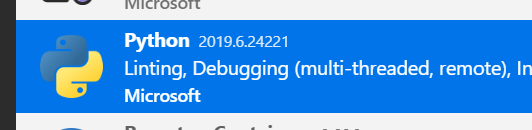
And then let's make sure the keyboard shortcut is registered.
What does this say?

rchiodo
on 23 Jul 2019


I'm posting the screenshot for Run Current Cell and Advance, as that is where my problem is.
juliuscrn
on 24 Jul 2019
Actually your problem should be with Run selection. That's what handles shift+enter when you have no cells already defined.
rchiodo
on 24 Jul 2019
The vsix for the insider's build also didn't install. The version you're showing is the last released version.
You should try uninstalling the python extension from the extensions tab, and then click on the '...' at the top of the extensions tab to install the insider's build vsix. Then reload VS Code.
rchiodo
on 24 Jul 2019
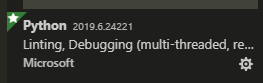
The version I _should_ see is 2019.7.26477-dev?

I uninstalled the extension, reloaded VS code, installed from .vsix, reloaded again, and this is what I see:
juliuscrn
on 24 Jul 2019
Hmm. Try typing this in the extensions tab instead:
@installed
What does that list?
And yes you should see the 2019.7.26477-dev (or whatever version you downloaded)
rchiodo
on 24 Jul 2019
I did another reinstall but now also deleted the extensions folder which is not removed during uninstallation.
Right after loading .vsix it shows the correct version:
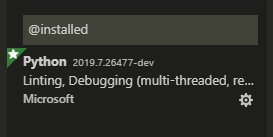
Then it asked me to reload VS Code, which I did, and right after reloading its back to the previous version:
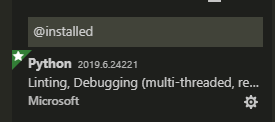
This is taking a lot of your time. I can just wait for the fix to be included in an official release, but if you need any more info I'm happy to help.
juliuscrn
on 24 Jul 2019
@karrtikr it sounds like auto update is breaking the insider's build?
rchiodo
on 24 Jul 2019
@joolius it's not a problem. I'd love to get to bottom of why shift+enter doesn't work.
rchiodo
on 24 Jul 2019
Okay seems like there's a new way to keep the insider's build. After you install the insider's vsix, you have to set this value (before you reload):

Hopefully this won't always work this way, but that's the current behavior.
rchiodo
on 26 Jul 2019
The extension is now loaded, but shift+enter does not run and advance, it just runs code in current line and the cursor stays on it.
juliuscrn
on 27 Jul 2019
But it runs it in the interactive window? That's by design right now. It's behaving like shift+enter for the terminal.
rchiodo
on 27 Jul 2019
Yes, it does. I am just a little puzzled why the command is called "run and advance", since it stays in the same line.
juliuscrn
on 27 Jul 2019
It's not. The command you're actually running is "Run Selection/Line in Interactive Window". There is actually 3 commands that map to shift+enter based on the context:

Depending upon the 'when' clause, different commands are run.
rchiodo
on 27 Jul 2019
Run current cell needs a 'cell'. At least right now. We could probably redefine it if there are no cells, just use the current line or current selection. Seems like it would be nice to just shift+enter your way through a file.
rchiodo
on 27 Jul 2019
Feel free to add a suggestion/bug to that effect.
rchiodo
on 27 Jul 2019
current line or current selection. Seems like it would be nice to just shift+enter your way through
That would be very useful, and people migrating from atom/hydrogen would feel at home ;-) Right now I have to manually move the cursor to the next line and it feels like wasted effort. I'm a statistician and my workflow is very interactive. I almost never run the entire script in one go. I run a line, then the next, then maybe go back, etc.
juliuscrn
on 27 Jul 2019
Related issues
 chrisjsewell
·
4Comments
chrisjsewell
·
4Comments
 sonulohani
·
3Comments
sonulohani
·
3Comments
 schatt89
·
4Comments
schatt89
·
4Comments
 allefeld
·
4Comments
allefeld
·
4Comments
 n-a-sz
·
3Comments
n-a-sz
·
3Comments