Vscode-jest: v4 migration failed to debug tests correctly
Environment
vscode-jest version: v4.0node -v: v14.15.npm -v: 6.14.10npm ls jest: 26.6.3- your vscode-jest settings if customized:
  "jest.pathToJest": "./node_modules/.bin/jest",
  "jest.debugCodeLens.showWhenTestStateIn": ["fail", "unknown", "pass", "skip"]
- Operating system: Windows 10
Prerequisite
- are you able to run jest test from the command line? Yes
- how do you run your tests from the command line? npm run test (which just invokes
jest)
Steps to Reproduce
In a NodeJS express Typescript project, using v3.2.0, without a modified launch.json, and with the following vscode-jest settings:
  "jest.pathToJest": "./node_modules/.bin/jest",
  "jest.debugCodeLens.showWhenTestStateIn": ["fail", "unknown", "pass", "skip"]
and the following jest.config.js:
module.exports = {
  preset: 'ts-jest',
  testEnvironment: 'node',
  testPathIgnorePatterns: ['node_modules/', 'build/', '__tests__/utils/*'],
  rootDir: 'src',
  moduleDirectories: ['node_modules', 'src'],
  collectCoverageFrom: ['**/*.{ts,tsx}', '!**/node_modules/**', '!**/vendor/**'],
}
worked. I could debug, the auto run/watch worked perfectly. After today's update to v4.0.0, I couldn't debug anymore and the Code Lens stopped working, and after about 20 minutes of messing with it to update to new settings, i gave up and reverted to v3.2.0 so I could continue working.
before:

after:

Relevant Debug Info
No error/warning output in the relevant output windows
Expected Behavior
A smooth migration between v3.2.0 settings and v4.0.0 settings
Actual Behavior
No migration happened, and debugging wouldn't work anymore
 dgoemans
All 63 comments
@dgoemans sorry about this issue. Would appreciate it if you can help us debug further:
- did you see any popup window for error/warning?
- did you see the jest status bar display and what did it say?
- is there anything showing in the jest OUTPUT channel?
- can you open the developer console and paste the "spawn" command line and any other relevant warning/error messages? (You might need to turn on the debug mode)
 connectdotz
on 10 May 2021
connectdotz
on 10 May 2021
I'm having the same problem. debug isn't being displayed correctly on v4.0.0 =/
When I open VSCode, this ? and debug are displayed.
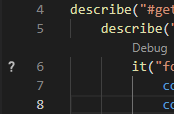
But a few moments after, debug isn't displayed anymore, and when I reopen the file, the ? disappeared too.
did you see any popup window for error/warning?
No, there is no error/warning.
did you see the jest status bar display and what did it say?
Yep.

is there anything showing in the jest OUTPUT channel?
Yep. It says that my tests ran, its result... the same as running it on the terminal.
BUT when the run ends, the output is cleaned. I don't know if it's expected.
 macabeus
on 11 May 2021
macabeus
on 11 May 2021
Was gonna update today with more info, but @macabeus beat me to it 😄
Same answers, no error/warning popup, and no extra info in the output channel, even with debug enabled.
dgoemans
on 11 May 2021
Thanks for the update, are you guys all on windows by any chance?
connectdotz
on 11 May 2021
Yeah. I'm using Windows.
macabeus
on 11 May 2021
Yup
dgoemans
on 11 May 2021
I'm on Windows and have the same issue
 obvioussean
on 11 May 2021
obvioussean
on 11 May 2021
ok, I suspect the file is not considered as a test file because we failed to match the fileNames between vscode and jest somehow... looks like @dgoemans is using WSL, is there anybody who has this problem not using WSL (just plain windows)?
I added a couple of extra logging to help diagnose the issue. I don't have the windows machine, will you guys mind testing with the vscode-jest-4.1.0-rc.1.vsix attached below (vscode Command Palette: "Extensions: Install from VSIX") and look for the following log in the developer console (vscode menu: "Help > Toggle Developer Tools"):
- in
<4.1> found xxx testFiles:, does it show non-zero number of files? If it does please expand the array and copy/paste the test file you are editing. Mainly want to see if jest found the file and how it was reported. - in
<4.1> file not found in testFiles list:, look for the one indicating the test file you are editing, again wanted to see the file path pattern vscode reported.
Thanks.
connectdotz
on 11 May 2021
I'm just using regular Windows.
obvioussean
on 11 May 2021
Using vscode-jest-4.1.0-rc.1.vsix I now see the options to debug a test.
obvioussean
on 11 May 2021
And it's now gone :(
obvioussean
on 11 May 2021
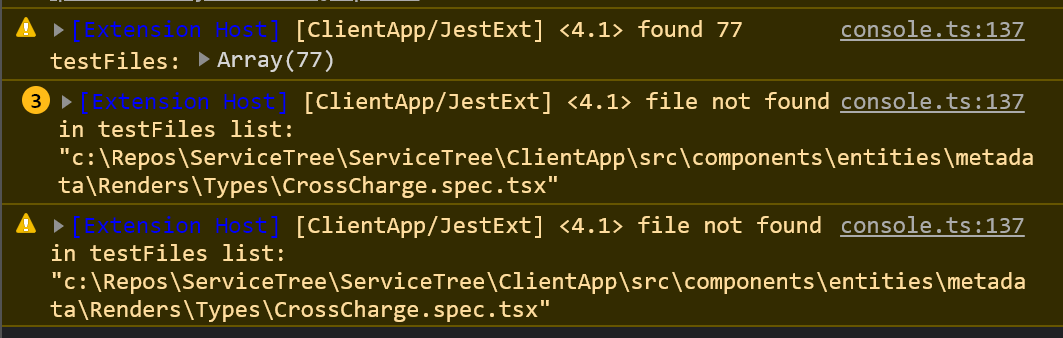
This is an example output, it can't find the file that's open:
obvioussean
on 11 May 2021
That file was in the array:

obvioussean
on 11 May 2021
great, looks like the drive letter case is different... I think I know where the problem is now
connectdotz
on 11 May 2021
Hah! I didn't even notice that. :)
obvioussean
on 11 May 2021
ok, made some code change, please try and let us know if this worked...
connectdotz
on 11 May 2021
It works!
Sent from Mailhttps://go.microsoft.com/fwlink/?LinkId=550986 for Windows 10
From: ConnectDotz @.>
Sent: Tuesday, May 11, 2021 2:28:12 PM
To: jest-community/vscode-jest *@.>
Cc: Sean Ferguson @.>; Comment @.*>
Subject: Re: [jest-community/vscode-jest] v4 migration failed to debug tests correctly (#694)
ok, made some code change, please try and let us know if this worked...
—
You are receiving this because you commented.
Reply to this email directly, view it on GitHubhttps://nam06.safelinks.protection.outlook.com/?url=https%3A%2F%2Fgithub.com%2Fjest-community%2Fvscode-jest%2Fissues%2F694%23issuecomment-839187351&data=04%7C01%7Csferg%40exchange.microsoft.com%7Cbcfa17d8a0324b9293fd08d914c3aec2%7C72f988bf86f141af91ab2d7cd011db47%7C1%7C0%7C637563652949728916%7CUnknown%7CTWFpbGZsb3d8eyJWIjoiMC4wLjAwMDAiLCJQIjoiV2luMzIiLCJBTiI6Ik1haWwiLCJXVCI6Mn0%3D%7C1000&sdata=7BHC%2BwLqaLD1Ro2Nst1acPYN8H%2BvFxcaFdPMJHhaVRs%3D&reserved=0, or unsubscribehttps://nam06.safelinks.protection.outlook.com/?url=https%3A%2F%2Fgithub.com%2Fnotifications%2Funsubscribe-auth%2FADSXPJVUYN4LDP2IN7XAQQTTNGOOZANCNFSM44RFADNQ&data=04%7C01%7Csferg%40exchange.microsoft.com%7Cbcfa17d8a0324b9293fd08d914c3aec2%7C72f988bf86f141af91ab2d7cd011db47%7C1%7C0%7C637563652949728916%7CUnknown%7CTWFpbGZsb3d8eyJWIjoiMC4wLjAwMDAiLCJQIjoiV2luMzIiLCJBTiI6Ik1haWwiLCJXVCI6Mn0%3D%7C1000&sdata=9wcUpwp6POmFcXy1MCkinwHXyTS2jxBNmuqEqJeZ0Q4%3D&reserved=0.
obvioussean
on 11 May 2021
great, thanks @obvioussean
We should also make sure it works for the WSL use case... @dgoemans (I assume you are using WSL?) or anybody using WSL, appreciate it if you can also give it a try...
connectdotz
on 11 May 2021
I'm not using WSL btw... just / paths work in Windows 7 and newer, so i always use them (we have multi-platform teams and old Linux habits die hard 😄).
I think i do have a WSL instance somewhere tho that i was using for a project, i'll give it a spin there
dgoemans
on 12 May 2021
Appears to be working in both WSL and vanilla Windows 10. 🎉
Thanks for the fast turnaround!
dgoemans
on 12 May 2021
Doesn't seem to be fixed for me (Win10, node 14.4.0, npm 6.14.5, jest 26.6.0). Both official 4.0.1 and 4.1 rc posted here (which I assume is basically the same version).
While test status now appears correctly (for most, some each cases still end with unknown) and debug option is there, using it finds no tests (note that I've replaced user and project names).
& 'C:\Users\<user>\Desktop\<project>/node_modules/.bin/react-scripts.CMD' 'test' '--runInBand' 'c:\Users\<user>\Desktop\<project>\src\components\template\ResourcesEditor.test.js' '--testNamePattern' 'loads template on mount'
Debugger attached.
Debugger attached.
No tests found, exiting with code 1
Run with `--passWithNoTests` to exit with code 0
In C:\Users\<user>\Desktop\<project>
  151 files checked.
  testMatch: C:/Users/<user>/Desktop/<project>/src/**/__tests__/**/*.{js,jsx,ts,tsx}, C:/Users/<user>/Desktop/<project>/src/**/*.{spec,test}.{js,jsx,ts,tsx} - 41 matches
  testPathIgnorePatterns: \\node_modules\\ - 151 matches
  testRegex:  - 0 matches
Pattern: c:\Users\<user>\Desktop\<project>\src\components\template\ResourcesEditor.test.js - 0 matches
For pattern to work it should be c:\\users\\<user>\\desktop\\<project>\\src\\components\\template\\ResourcesEditor\.test\.js in watch mode while it is c:\Users\<user>\Desktop\<project>\src\components\template\ResourcesEditor.test.js (note that even dots aren't escaped and it might lead to issues for some specific file names). It seems that passing a path using forward slashes instead of backslashes converts them to escaped backslashes in jest.
That's for tests launched directly through react-scripts (CRA project). When launched through npx react-scripts it debugs test successfully but that just runs all files (npx doesn't pass parameters properly?) so is barely usable.
 Agalin
on 13 May 2021
Agalin
on 13 May 2021
darn, I think this might be a reverse problem...
could you do me a favor try to run jest CLI in a terminal with the following change, and let us know which one works:
- only change the drive letter "c" to upper case "C"
- escape the file separator as you have suggested
- do both 1 and 2
thanks
connectdotz
on 13 May 2021
I’m out of office now, will check that tomorrow.
Agalin
on 13 May 2021
@Agalin no problem. I suspect all windows users will have this issue... @dgoemans @obvioussean @macabeus will you guys be able to confirm and help to narrow down the issue if you got a few minutes?
connectdotz
on 13 May 2021
adding a couple more use case to check:
- replace the file separators with "/"
- do both 1 and 4
connectdotz
on 13 May 2021
@connectdotz Same issue here. I tried manually running it with the escaped file separators and the test was found correctly, with either case drive letter. Forward slashes also work.
23:26:03 ❯ node '.\node_modules\jest\bin\jest' '--runInBand' '--config' './jest.json' 'e:\src\boolean.transform.spec.ts' '--testNamePattern' 'ToBoolean should transform true to true'
No tests found, exiting with code 1
23:29:36 ❯ node '.\node_modules\jest\bin\jest' '--runInBand' '--config' './jest.json' 'e:\\src\\boolean.transform.spec.ts' '--testNamePattern' 'ToBoolean should transform true to true'
FAIL src/boolean.transform.spec.ts
 dsbert
on 14 May 2021
dsbert
on 14 May 2021
- Doesn't work.
- Works.
- Works (irrelevant due to 2).
- Works.
- Works (irrelevant due to 4).
Also can confirm that dots should be escaped as well. It's very rare to have files named in a way that would lead to issues but still possible. Should just pass the whole path through regexp escape of some kind as other special characters would lead to issues as well.
For example if you for some reason have both Component.test.js and ComponentsTestsIJS.test.js then both will be selected. I can imagine naming like this being used for some test result viewer...
Just escaping dots with \ fixes this case.
It gets even worse if for some bizarre reason you have other regex-specific characters. I don't think that it would be possible to select a test with $ or ^ in it.
BTW fix for this part (regexp escape) would also fix the main issue (incorrectly escaped \) as it currently generates a regexp string with every \<character> being interpreted as a part of regexp's special syntax.
So just put the file path through some regexp escape function and it should work.
Agalin
on 14 May 2021
thanks, this is very helpful!
Since we are passing the exact file path and not a regexp pattern, we could avoid the more expensive regex route. I think escaping the windows file path is probably the most efficient/intuitive approach to resolve this issue. By specifying the '--runTestsByPathor--findRelatedTests` jest will treat the argument as a file path, not a regex, so hopefully we don't need to worry about escaping all possible regex special characters...
I will post a test version shortly so we can verify...
connectdotz
on 14 May 2021
appreciate it if any window users can try the vsix attached below, mainly to see
- if you can debug the specific test now
- if you can run the file-based test in the interactive mode, temporarily set
"jest.autoRun": "off", then in your file editor, use context menuJest: Run Related Testsor "cltr-t" to trigger jest run for the specific file.
Thanks!
connectdotz
on 15 May 2021
I can check it tomorrow in the afternoon especially that I'm mostly using "jest.autoRun": "off" and Run Related Tests.
BTW could it be mapped by default to something else? ctrl+t is by default bound to Go to Symbol in Workspace (on macOS it's Transpose letters). I'm currently using ctrl+alt+t as it's free on both Windows and macOS (option for Mac of course). Not sure if ctrl->command conversion for macOS is automatic or manual. If manual then there would be no conflicts as ctrl+option+t is unused (while command+option+t is in use). Note that there might be better shortcuts available. VSCode seems to avoid ctrl+alt+letter shortcuts - probably due to it messing with some keyboard layouts where ctrl+alt is equal to AltGr (right alt) and can be used to type diacritics.
Agalin
on 15 May 2021
@Agalin
I can check it tomorrow
thanks!
I like your keybinding suggestion, so ctrl+alt+t for windows, ctrl+option+t for mac. I think whichever binding we pick, it is probably not going to be 100% conflict-free. "The less conflict the better" is all we can strive for... Hey, want to get your feet wet and make this change yourself? I think all you need to do is to update the "keybindings" section in the package.json file, and maybe README.md...
connectdotz
on 15 May 2021
Ok. Tested it.
Doesn't work with current implementation due to c: casing. Switching to capital C makes it work.
Run Related Tests seems to work fine.
Agalin
on 15 May 2021
one more try:
vscode-jest-4.0.2-rc.2.vsix.zip
appreciate it if you can try it and let us know if it works
connectdotz
on 18 May 2021
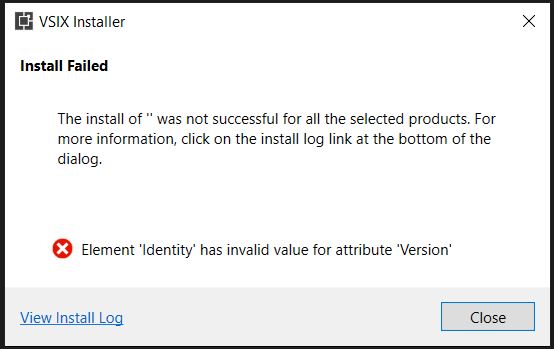
@connectdotz I am trying to install above vsix vscode-jest-4.0.2-rc.2.vsix.zip in windows but its giving me error..
Let me know wen we are planning to release this officially or suggest any workaround to install temp vsix which I can use.
 sachin-agarwal-by
on 18 May 2021
sachin-agarwal-by
on 18 May 2021
@sachin-agarwal-by For me installation works fine. 😕 Maybe you could chare the log?
@connectdotz Further more, debugging is now possible again! The latest fix does the trick for me and my Windows.
 mil7
on 18 May 2021
mil7
on 18 May 2021
@mil7 attached log for reference. if you can help so that I can continue with same trick :)
5/18/2021 11:33:25 AM - Microsoft VSIX Installer
5/18/2021 11:33:25 AM - -------------------------------------------
5/18/2021 11:33:25 AM - vsixinstaller.exe version:
5/18/2021 11:33:25 AM - 16.9.1050
5/18/2021 11:33:25 AM - -------------------------------------------
5/18/2021 11:33:25 AM - Command line parameters:
5/18/2021 11:33:25 AM - C:\Program Files (x86)\Microsoft Visual Studio\Installer\resources\app\ServiceHub\Services\Microsoft.VisualStudio.Setup.Service\VSIXInstaller.exe,C:\Users\test\Downloads\vscode-jest-4.0.2-rc.2.vsix\vscode-jest-4.0.2-rc.2.vsix
5/18/2021 11:33:25 AM - -------------------------------------------
5/18/2021 11:33:25 AM - Microsoft VSIX Installer
5/18/2021 11:33:25 AM - -------------------------------------------
5/18/2021 11:33:27 AM - Initializing Install...
5/18/2021 11:33:28 AM - Microsoft.VisualStudio.ExtensionManager.InvalidExtensionManifestException: Element 'Identity' has invalid value for attribute 'Version' ---> System.FormatException: Input string was not in a correct format.
at System.Version.VersionResult.SetFailure(ParseFailureKind failure, String argument)
at System.Version.TryParseComponent(String component, String componentName, VersionResult& result, Int32& parsedComponent)
at System.Version.TryParseVersion(String version, VersionResult& result)
at System.Version.Parse(String input)
at System.Version..ctor(String version)
at Microsoft.VisualStudio.ExtensionManager.ExtensionImpl.<>c.
at Microsoft.VisualStudio.ExtensionManager.ExtensionImpl.VerifyStringValueT
at Microsoft.VisualStudio.ExtensionManager.ExtensionImpl.ExtractManifestData(PackageManifest manifest)
at Microsoft.VisualStudio.ExtensionManager.ExtensionImpl.ReadPackageManifest(XmlReader reader)
at Microsoft.VisualStudio.ExtensionManager.ExtensionImpl.ReadManifest(Stream manifestStream)
at Microsoft.VisualStudio.ExtensionManager.InstallableExtensionImpl.ReadVSIXManifestFromPackage(Stream stream, CultureInfo preferredCulture)
at Microsoft.VisualStudio.ExtensionManager.InstallableExtensionImpl..ctor(String path, CultureInfo preferredCulture)
at Microsoft.VisualStudio.ExtensionManager.ExtensionEngineImpl.CreateInstallableExtension(String extensionPath, CultureInfo preferredCulture)
at Microsoft.VisualStudio.ExtensionManager.ExtensionEngineImpl.CreateInstallableExtension(String extensionPath)
at VSIXInstaller.ExtensionService.GetInstallableData(String vsixPath, String extensionPackParentName, Boolean isRepairSupported, IStateData stateData, IEnumerable1& skuData)
at VSIXInstaller.ExtensionPackService.IsExtensionPack(IStateData stateData, Boolean isRepairSupported)
at VSIXInstaller.ExtensionPackService.ExpandExtensionPackToInstall(IStateData stateData, Boolean isRepairSupported)
at VSIXInstaller.App.Initialize(Boolean isRepairSupported)
at VSIXInstaller.App.Initialize()
at System.Threading.Tasks.Task1.InnerInvoke()
at System.Threading.Tasks.Task.Execute()
sachin-agarwal-by
on 18 May 2021
Yeah seems fine on my machine as well. Debugging works (even in those cases with strangely named files as dots no longer match as regex).
Run Related Tests also works fine.
Agalin
on 18 May 2021
@Agalin can you let me know how did u installed the vsix ? I am getting above error , do we have any specific steps?
sachin-agarwal-by
on 18 May 2021
@sachin-agarwal-by, your logfile suggests you use the VSIXInstaller from Visual Studio instead of the one from VS Code. Did you double-click on the vsix file or did you install the file through the VS Code Command Palette as explained earlier in this thread?
mil7
on 18 May 2021
@mil7 ohhh sorry I used as double click will follow steps and let u know.
sachin-agarwal-by
on 18 May 2021
@mil7 @connectdotz below is vscode config I have..I am using create-react-app template for application
```
"jest.debugCodeLens.showWhenTestStateIn": ["fail", "pass"],
"jest.showCoverageOnLoad": true,
"jest.coverageColors": { "uncovered": "rgba(255,99,71, 0.2)", "partially-covered": "rgba(255,215,0, 0.2)" },
"jest.coverageFormatter": "GutterFormatter" #
after applying the suggested vsix fix , I have tried clicking on Debug lens for the test case but still its giving me below error..

 C:; cd 'C:\Users\test\Documents\sa-web-app'; ${env:CI}='vscode-jest-tests'; ${env:NODE_OPTIONS}='--require "c:/Users/test/AppData/Local/Programs/Microsoft VS Code/resources/app/extensions/ms-vscode.js-debug/src/bootloader.bundle.js" --inspect-publish-uid=http'; ${env:VSCODE_INSPECTOR_OPTIONS}='{"inspectorIpc":"\\\\.\\pipe\\node-cdp.15140-3.sock","deferredMode":false,"waitForDebugger":"","execPath":"C:\\Program Files\\nodejs\\node.exe","onlyEntrypoint":false,"autoAttachMode":"always","fileCallback":"C:\\Users\\test\\AppData\\Local\\Temp\\node-debug-callback-9061c63a9788836e"}'; & 'C:\Users\test\Documents\sa-web-app/node_modules/.bin/react-scripts.CMD' 'test' '--env=jsdom' '--runInBand' '--no-cache' '--watchAll=false' '--testNamePattern' 'Running Tests for Test' '--findRelatedTests' 'c:\Users\test\Documents\src\index.test.js'
Debugger attached.
Debugger attached.
No tests found, exiting with code 1
Run with `--passWithNoTests` to exit with code 0
No files found in C:\Users\test\Documents\src.
Make sure Jest's configuration does not exclude this directory.
To set up Jest, make sure a package.json file exists.
Jest Documentation: facebook.github.io/jest/docs/configuration.html
Pattern: c:\Users\test\Documents\src\index.test.js - 0 matches
Waiting for the debugger to disconnect...
Waiting for the debugger to disconnect...

Below is the code for launch.json.
{
"name": "vscode-jest-tests",
"type": "node",
"request": "launch",
"runtimeExecutable": "${workspaceFolder}/node_modules/.bin/react-scripts",
"args": [
"test",
"--env=jsdom",
"--runInBand",
"--no-cache",
"--watchAll=false"
],
"cwd": "${workspaceFolder}",
"console": "integratedTerminal",
"protocol": "inspector",
"internalConsoleOptions": "neverOpen",
"disableOptimisticBPs": true
}
```
sachin-agarwal-by
on 18 May 2021
@sachin-agarwal-by I can indeed reproduce your use case... sighed, looks like CRA overrides the jest config (TestMatch) that would require the drive letter to be upper-case even though jest itself can handle it either way... ok, I guess it is best to just convert the drive letter after all...
connectdotz
on 18 May 2021
Strange. I'm using CRA as well and it seemed to work fine for me. Will compare this launch.json with mine tomorrow.
Agalin
on 18 May 2021
@Agalin that's interesting... what is your jest/react-script version?
I was able to reproduce @sachin-agarwal-by with [email protected], [email protected]... hm... pretty old jest, we should be running at least [email protected] for this extension
connectdotz
on 19 May 2021
@connectdotz I didnot get that how we convert the drive letter .. Do you mean I should go and rename my Local drive from C to c ? because I don't have control to rename .PLease suggest workaround to continue debug?
sachin-agarwal-by
on 19 May 2021
@sachin-agarwal-by
Do you mean I should go and rename my Local drive from C to c ?
no, I was talking about the extension logic. No need to rename your drive.
Actually I just created a new CRA project ([email protected], [email protected]) and it seems to work fine with rc2... so the problem could be the older jest/react-script has some issue... what is your react-script/jest version?
connectdotz
on 19 May 2021
I am using
read-scripts : "version": "3.4.3"
Jest : "version": "24.9.0"
let me try to upgrade and test.
sachin-agarwal-by
on 19 May 2021
Yeah. That would be it as I'm on react-scripts 4.0.2 with Jest 26.6.0. BtW on react-scripts<4.0.0 you probably want to use --env=jsdom-fourteen instead of jsdom as it has quite a lot of additional features implemented (and works better with es6 modules IIRC).
Agalin
on 19 May 2021
@Agalin can you please confirm are u sing react 16 or 17 version ? because I cant move from react 16 to 17 but still can we upgrade react-script from 3.4.3 to 4.0.2 ?
sachin-agarwal-by
on 19 May 2021
Still on 16. react-scripts 4.0.0 adds support for new React transforms but it doesn't require 17.
Agalin
on 19 May 2021
In order to support a wider range of jest versions, decided to just go ahead and convert the drive-letter case in the extension, here is the updated version, hopefully, the last one for this issue...:
vscode-jest-4.0.2-rc.3.vsix.zip
thanks for your patient, and appreciate it if you guys can verify if it works.
connectdotz
on 19 May 2021
Works for me.
Agalin
on 19 May 2021
Didn't think to test it earlier. Is it expected to work with it.each tests? Because it doesn't. 😞 More than that: it takes wrong test name (previous test in my case) for both string and array-based each. Shouldn't block this fix but one more is needed.
Also I wonder if it would be possible to narrow test name pattern for tests in describe blocks? It seems that just prepending a describe block`s name and a space to test name does the trick.
Agalin
on 19 May 2021
@Agalin yeah this fix should have nothing to do with it.each; and yes it should work otherwise a bug... let's open a new issue to track that, and please open the developer console to see if any warning messages there that could be helpful. A sample repo or repro step will be even better if not too time-consuming...
Also I wonder if it would be possible to narrow test name pattern for tests in describe blocks?
it should already do that when debugging with the debug codelens... if it is not doing that and the parameterized tests also seem messed up, chances are the jest test generated some unexpected result... developer console might shed some light
connectdotz
on 19 May 2021
@Agalin turns out the it.each will not work for windows because the bug fix ( (facebook/jest#10413) merged with [email protected] is only for non-windows systems. The windows fix (facebook/jest#10871) will only be available in jest@27... I don't know how I could have missed this post, but that is what it stated...
I will update the release note and migration guide, maybe think about a workaround to help windows users with parameterized tests...
thanks for bringing this to our attention!
connectdotz
on 20 May 2021
it should already do that when debugging with the debug codelens...
Ok. Checked it and it seems to add describe block but only if there are at least two blocks.
- This will run only one (expected) test -
'Foo bar'as a test pattern.
describe("Foo", () => {
    it("bar", () => {
    })
})

describe("Baz", () => {
    it("bar", () => {
        throw new Error("Wrong test")
    })
})

/*
  Foo
    √ bar (8 ms)
  Baz
    ○ skipped bar

Test Suites: 1 passed, 1 total
Tests:       1 skipped, 1 passed, 2 total
*/
- This will run both tests.
describe("Foo", () => {
    it("bar", () => {
    })
})

it("bar", () => {
    throw new Error("Wrong test")
})

/*
Test Suites: 1 failed, 1 total
Tests:       1 failed, 1 passed, 2 total
*/
In this case it passes just 'bar' as test pattern while it should be 'Foo bar' for the first test and '\^bar' for the second... but I'm unable to make a caret character preserved., It's an escape char in cmd and for some reason even multiple carets are removed.
That's a minor issue tho and should probably be treated separately.
Agalin
on 20 May 2021
@Agalin excellent detective work, now it all makes sense...
the extension always sends "fullName", i.e. describe-block + test name as the --testNamePattern regex, so it escape all regex control character from the the fullName string. When you debug the "bar" within block "Foo" it sent "Foo bar" as the pattern and only 1 test will match that. But if you try to debug the "bar" on the top level without any describe block, it will search for any test with "bar" thus both tests will match and run.
What we could improve is probably always bound the fullName (with "^" and "$" for example) as the regex string for --testNamePattern. Another simple change if you want to give it a try, see here.
connectdotz
on 20 May 2021
As said earlier - it seems to only pass bar even for Foo bar test when there is only one describe block.
And ^ seems to be dropped by shell for some strange reason regardless of how many ^ I add as escapes...
Unfortunately can't do that now, need to return to a few python projects first. 😄 Maybe in a week or two.
Agalin
on 20 May 2021
@connectdotz I have tested rc3 vsix and its working perfectly, when we are releasing these fixes officially ?
sachin-agarwal-by
on 21 May 2021
just released 4.0.2 this morning.
connectdotz
on 21 May 2021
@Agalin
it seems to only pass bar even for Foo bar test when there is only one describe block
I thought you were debugging that's why it is "skipping". If for a regular test run (watch or related-test), it should run all tests as we are not passing any test name pattern. Maybe I misunderstood your use case?
And ^ seems to be dropped by shell for some strange reason regardless of how many ^ I add as escapes...
Yes, the extension is removing the regex control character before sending to shell execution, see here
Unfortunately can't do that now, need to return to a few python projects first. 😄 Maybe in a week or two.
no problem. I understand we all have many hats, hope to see you soon...
connectdotz
on 21 May 2021
I thought you were debugging that's why it is "skipping". If for a regular test run (watch or related-test), it should run all tests as we are not passing any test name pattern. Maybe I misunderstood your use case?
It's in debugging. When using debug option for Foo bar when there is no other describe block (but there are other tests outside that describe block) it passes only bar as the pattern.
Yes, the extension is removing the regex control character before sending to shell execution, see here
I mean that it happens when I try to manually start jest with the pattern, not through extension.
Like either of those lines drop all ^ but it's not extensions fault but either jest's or shell's.
& 'C:\Users\<user>\Desktop\<project>/node_modules/.bin/react-scripts.CMD' 'test' '--runInBand' '--testNamePattern' '^bar'
& 'C:\Users\<user>\Desktop\<project>/node_modules/.bin/react-scripts.CMD' 'test' '--runInBand' '--testNamePattern' '\^bar'
& 'C:\Users\<user>\Desktop\<project>/node_modules/.bin/react-scripts.CMD' 'test' '--runInBand' '--testNamePattern' '^^bar'
& 'C:\Users\<user>\Desktop\<project>/node_modules/.bin/react-scripts.CMD' 'test' '--runInBand' '--testNamePattern' '\\^bar'
So there might be no easy way to pass it to jest from extension either.
Agalin
on 21 May 2021
@Agalin turns out the it.each will not work for windows because the bug fix ( (facebook/jest#10413) merged with [email protected] is only for non-windows systems.
For windows users who suffered from this issue, we found a work-around: in the up-coming version you can wrap the it.each in a 1-1 literally named describe-block to see the status and debug normally. Please feel free to try it with the rc below and let us know if it works for you.
connectdotz
on 6 Jun 2021
Related issues
 Drakota
·
16Comments
connectdotz
·
37Comments
Drakota
·
16Comments
connectdotz
·
37Comments
 luisrudge
·
27Comments
luisrudge
·
27Comments
 ngauthier
·
37Comments
ngauthier
·
37Comments
 fwielstra
·
29Comments
fwielstra
·
29Comments