Vscode-jest: Not seeing test coverage overlay
Environment
node -v: v8.9.1npm -v: 5.5.1yarn -v: 1.3.2npm ls react-scripts(if you haven’t ejected): emptyOperating system: Windows 10
Steps to Reproduce
Demo app: https://github.com/ngauthier/jest-vscode-bug-demo
- Open VSCode
- Open app/javascript/foo.jsx and test/javascript/foo.test.js and make changes and save
Expected Behavior
See test coverage on my code.
Actual Behavior
I don't see any test coverage on my code or my tests.
Notes
Perhaps it's something to do with how I changed jests's directories?
Thank you for your time and this plugin, it is awesome!
 ngauthier
All 37 comments
Thanks for the repo to reproduce the issue. It made it really easy to step through the coverage overlay to see that the coverage map is AOK when Jest runs all tests for the first time. In the subsequent run in watch mode, there are no changes and no coverage. :cry:
I've got a PR in progress to fix this one. I'd love some help testing #214 and getting this one resolved.
 seanpoulter
on 16 Jan 2018
seanpoulter
on 16 Jan 2018
Interesting.
So, I tried making a change that reduced coverage so I should have some red lines in my source. Then I reloaded the vscode window, jest ran, and I still didn't see red lines. Is that expected?
ngauthier
on 16 Jan 2018
Because most of the time what I am doing is writing tests and code together, and some is uncovered, and I'm working on covering it. But I have never seen the coverage overlay show up.
ngauthier
on 16 Jan 2018
Sadly, that's sort of expected right now.
To show the coverage overlay when coverage is collected, you'll have to run the Jest: Toggle Coverage Overlay command or use the "jest.showCoverageOnLoad": true setting. There's also an open issue documenting that the visible documents won't show the overlay when you run the command. Right now you need to change the active document for it to refresh. For more, see #177.
If you're keen to try the fix for #177, you can run the extension from my issue-177 branch. I'd love your feedback and would appreciate a second set of eyes on the PR (#229).
Note: The branch is now rebased from master and I've opened the PR. :balloon:
seanpoulter
on 18 Jan 2018
I can't get coverage to show up under any circumstances. I've added uncovered functions, verified that running jest reports them as uncovered, made changes to get the jest runner to fire, toggled active document back and forth, toggled coverage overlay, then toggled active document again. I've never been able to see the overlay.
Also, I am quite new to react and jest, so please let me know all the obvious things I should be doing. I'm assuming I don't need istanbul, that this works using jest's built-in coverage system right?
ngauthier
on 18 Jan 2018
this works using jest's built-in coverage system right?
Yep, Jest does the work if coverage is configured to be collected using the CLI or configuration files.
It sounds like you're doing everything right. Let's try a sample repo, and then escalate to debugging the extension. Here's a repo I've been using to demo a coverage issue. If you open the folder in VS Code, open index.js, then reload the window with the Reload Window command in the Command Palette you should get the same results as the GIF that follows. The coverage will appear after the first test run. When the results from watch mode return with "no changes since last commit" there is no coverage data. This isn't removed from the file, but switching documents causes the overlay to be redrawn with the updated coverage map and clears it (until we finish PR #214).
git clone https://github.com/seanpoulter/vscode-jest-181 with-coverage
cd with-coverage
yarn
code .

seanpoulter
on 18 Jan 2018
OK. I didn't get coverage following your instructions. I did get an error:
command 'io.orta.jest.coverage.toggle' not found
When I tried toggling it on to be sure.
Also, I did have to run yarn install to be able to use jest on that repo (I don't have it installed globally). The jest runner is working properly for the repo and running tests. I'm just not getting coverage.
ngauthier
on 18 Jan 2018
command 'io.orta.jest.coverage.toggle' not found
How fascinating! What version of the extension do you have running?
Also, I did have to run
yarn install
My bad for glossing over that. Sorry.
seanpoulter
on 18 Jan 2018
2.5.8
No worries on the yarn install, just letting you know.
ngauthier
on 18 Jan 2018
Are you setting that command error from the regular extension or running the branch in development? I seem to reproduce the issue from either Linux or Windows PCs.
seanpoulter
on 18 Jan 2018
I only saw the error the first time before running yarn.
I'm running the regular extension on Windows.
On Thu, Jan 18, 2018 at 3:41 PM, Sean Poulter notifications@github.com
wrote:
Are you setting that command error from the regular extension or running
the branch in development? I seem to reproduce the issue from either Linux
or Windows PCs.—
You are receiving this because you authored the thread.
Reply to this email directly, view it on GitHub
https://github.com/jest-community/vscode-jest/issues/227#issuecomment-358775166,
or mute the thread
https://github.com/notifications/unsubscribe-auth/AAA1Vv7Po0CkcMQbzZYTYaPs47E-bVYcks5tL6x9gaJpZM4RgWKw
.
ngauthier
on 18 Jan 2018
I only saw the error the first time before running yarn.
Got it. I'll open an issue to see if we can make that more useful.
Well, if you still don't have coverage I'd suggest we debug the extension to figure out what's going on. Clone this repo, open it in VS Code, and run the "Launch Extension" debugging configuration. From there it'll open a new window running the cloned extension.
I'd suggest setting a breakpoints at the start of updateWithData() and in triggerUpdateDecorations() in JestExt.ts. From there you'll be able to check if the coverage is being collected -- data.coverageMap will have data in updateWithData. We can also check if the coverage data is found in the call to getCoverageForFile in showCoverageOverlay in overlay.ts.
If you want a second set up eyes I'm happy to remote pair.
seanpoulter
on 18 Jan 2018
OK, I don't know what the bug is, but I know I can recreate it on the with-coverage repo by upgrading jest to 22.1.4. Can you take it from here?
ngauthier
on 19 Jan 2018
Thanks Nick. That reproduces the problem on my Windows box but is OK from Linux. :thinking:
seanpoulter
on 19 Jan 2018
Hashtag computers
On Jan 19, 2018 11:00 AM, "Sean Poulter" notifications@github.com wrote:
Thanks Nick. That reproduces the problem on my Windows box but is OK from
Linux. 🤔—
You are receiving this because you authored the thread.
Reply to this email directly, view it on GitHub
https://github.com/jest-community/vscode-jest/issues/227#issuecomment-359008301,
or mute the thread
https://github.com/notifications/unsubscribe-auth/AAA1VvqHvDWbSDa0ViCxlntEipF_d5s7ks5tMLwngaJpZM4RgWKw
.
ngauthier
on 19 Jan 2018
Yea, of course it's an intermittent issue. :fist_oncoming:

seanpoulter
on 19 Jan 2018
Because your mac is case-insensitive, you didn't see the issue there 😉
ngauthier
on 19 Jan 2018
Exactly. We run into the issue because Visual Studio Code enforces the standard of lowercase drive letters in URIs. That carries over into the document file path.
The good news is that we had already encountered the issue in the TestResultProvider. I've put together a PR with a fix for the test results and the code coverage. If you've got some time, I'd appreciate some help reviewing it. Things always get a second set of eyes before they're merged.
seanpoulter
on 20 Jan 2018
When I launch the extension from your pr, I get this error:
Activating extension `Orta.vscode-jest` failed: Cannot find module 'c:\Users\ngaut\Documents\GitHub\vscode-jest\out\src\extension'.
Looks like it is looking for the extension with a lowercase c for the drive name, but that should be upper?
ngauthier
on 22 Jan 2018
Did I forget the npm/yarn install in the steps again? That might cause it to not build the out\ dir?
Clone the repo, checkout the branch, npm/yarn install, start debugging. If you've done that and you're getting that error, there's likely a problem with the build. :cry:
seanpoulter
on 22 Jan 2018
Ah, I did forget that. I swapped PCs :)
Not getting the error any more.
I am seeing coverage lines on the with-coverage app. But I am not seeing coverage on my app. Interestingly, I do see the summary at the top of the file, but I don't see line-by-line coverage.
ngauthier
on 22 Jan 2018
Any chance your app is the demo repo you shared @ngauthier?
seanpoulter
on 24 Jan 2018
yep

ngauthier
on 24 Jan 2018
I can reproduce the coverage issue on my Windows box. Guess it's back to debugging the extension ...
seanpoulter
on 25 Jan 2018
You've got the coverage CodeLens at the top of foo.jsx in the snapshot @ngauthier which means we've successfully parsed coverage data from the Jest results.
On my machine the overlay shows up if I change the initial visibility by setting "jest.showCoverageOnLoad": true in .vscode\settings.json. It was set in the example repo we had called "with-coverage" earlier (seanpoulter/vscode-jest-181). The setting's easier than rushing to toggle it, or getting caught up by the empty coverage when we get the "no changes" message (more above).
Does it appear when you set the initial value?
seanpoulter
on 26 Jan 2018
yes, that did it on my demo repo!
ngauthier
on 26 Jan 2018
Also for my actual repo. Thanks so much! LMK when the extension is released and I will test the final version too.
ngauthier
on 26 Jan 2018
Will do Nick. I've made a reminder on the Kanban board I'm using to keep track of priorities.
I've got a bit of a favor to ask of you @ngauthier. Since it sounds like you're trying to use code coverage in your workflow, can you keep the conversation going for how we can improve things? It seems like you and @smith are pretty keen to dial things in. I'm happy to keep working at it, and I'd love to keep in touch!
seanpoulter
on 28 Jan 2018
Yeah. I can definitely let you know. Or you can email me as well if that is preferable. Gmail is same as github. I'll give more feedback soon because so far I haven't been able to use jest coverage in my workflow. But here is my workflow in my other primary languages (Ruby and Go):
I work in one of two flows, depending on whether I know what I want ahead of time or I'm doing "exploratory" development.
I know what I want:
- Write tests covering the use case I need in the code
- Run one test at a time, implementing as I go to pass the tests
- Observe coverage of my code to see if I added some code that was clearly needed (e.g. error handling) but I didn't have a test for, and coverage showed it as uncovered, so I write a test
- When I'm done, ensure I've covered everything and remove anything unneeded.
Or, I am exploring a solution and don't know enough to write the test first:
- I write the code, usually running it in development mode as I go
- I finish the solution and it seems to work well in dev mode
- I write tests while observing coverage and keep testing until I am covered.
In both situations, visual coverage info is super helpful because every dev-loop cycle I am comparing coverage to my code and tests, so digging through the tree in an html file or text output would be very painful.
In Go, I use the official Go extension, which provides coverage info: https://github.com/Microsoft/vscode-go
ngauthier
on 28 Jan 2018
That sounds similar to how I'd like to work with the extension as well. :+1:
The vscode-go docs don't seem to have screenshots of their code coverage :disappointed:. So far I've worked with the Wallaby.js, Istanbul HTML report, and Coveralls.io overlays. Since it seems like folks would like to work with what they know, PR #229 adds an AbstractFormatter that can be extended for whatever format.
I'll send you an email so we can rant off-thread. :wink:
seanpoulter
on 28 Jan 2018
Orta shipped the PR with 2.6.0. 🎉
seanpoulter
on 29 Jan 2018
Using a typescript project here. Still not seeing code's coverage. Even with the latest version on windows . :/
 rrousselGit
on 5 Feb 2018
rrousselGit
on 5 Feb 2018
i'm not able to see test coverage with latest version.. using typescript too. please reopen the issue.
 phra
on 2 May 2018
phra
on 2 May 2018
@phra, we fixed the bug that was described in this Issue. I don't plan to re-open it.
I'm happy to help you troubleshoot your problem. Open a new issue and share as much info as you can so we can reproduce the issue, and maybe CC @rrousselGit to see if Remi's had any luck lately. There's already an example repo with code coverage from a past issue you can use as a starting point: https://github.com/seanpoulter/vscode-jest-181.
seanpoulter
on 2 May 2018
@seanpoulter the issue is the same one reported by the OP... should i open an identical ticket for the same issue?
My problem is:
I don't see any test coverage on my code or my tests.

i'm using the latest version of vscode and your extension on a linux based system.
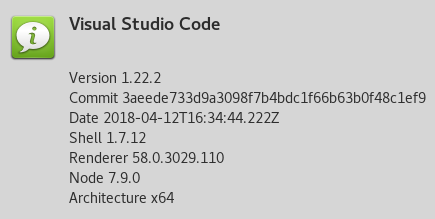
/CC @rrousselGit
phra
on 2 May 2018
The symptoms may be the same but the root cause of your problem is new. This closed issue was caused by mixed path separators on a Windows system. This is a new issue and can be reproduced on a Mac using the repo I suggested.
You didn't read all the comments above or you'd know all this. That's the other reason for creating a new issue. When we ask someone in the community to try fixing your problem it gives them a neat and tidy bug report to start from.
seanpoulter
on 2 May 2018
i will open a dedicated issue.
phra
on 3 May 2018
Related issues
 zeroEvidence
·
28Comments
zeroEvidence
·
28Comments
 Drakota
·
16Comments
Drakota
·
16Comments
 connectdotz
·
24Comments
connectdotz
·
24Comments
 kartheektrilochan
·
28Comments
kartheektrilochan
·
28Comments
 jackfranklin
·
19Comments
jackfranklin
·
19Comments