Vscode-gitlens: Compare file differences between branches
Since the new version (v11) I can't seem to just compare differences between files on different branches, rather than the behind/ahead in the new sidebar. Is there any way to get this comparison back?
An example of the functionality I'm missing is seen in this screenshot; the "1 file changed" bit.

 kayrunm
All 13 comments
I have the same issue. I have a project in which I have two branches that diverged from one another some time ago and will never come back together, but in which I need to be able to see the differences. Before the update I was able to see a list of 20 or so files that were different between branches - now when I compare the branches I see dozens of commits in "Ahead" and Behind" but no file differences. I was utterly reliant on this functionality to manage my project and need to go looking now for a way to downgrade the extension until I can come up with another way of doing things.
 wwarby
on 16 Nov 2020
wwarby
on 16 Nov 2020
Yup, largely in the same boat. Looking at merging three repos for what is largely the same codebase into one, so commits are never going to be the same.
@wwarby thankfully if you go to the Extensions sidebar on VS Code you should be able to click the cog icon for GitLens and then select Install Another Version... — I just downgraded to the most recent version before v11.
kayrunm
on 16 Nov 2020
That's @kayrunm I found that option just after I posted. At least that turned out to be an easy fix and I'll still with version 10.x until I have a viable alternative. Never occurred to me how vitally important that feature is to my workflow until it disappeared!
wwarby
on 16 Nov 2020
Related #1157
 Celeborn2BeAlive
on 17 Nov 2020
Celeborn2BeAlive
on 17 Nov 2020
Same situation here, I chose to roll back to 10.2.3 to get the old "Compare Commits" comparing to branches of my choice focusing on differences between files instead of commits history.
 BRaimbault
on 17 Nov 2020
BRaimbault
on 17 Nov 2020
I am a little surprised at how few people are in commenting on this haha. This is the only thing that I use Git Lens for. I am chuckling about it now that I installed the previous version but I was swearing like a sailor just about 10 minutes ago. :facepalm:
 justin-databased
on 17 Nov 2020
justin-databased
on 17 Nov 2020
I have this issue too when comparing a branch to master, but it seems to be caused by the branch having been squash-merged to master, then the merge commit reverted; the changes made on the branch _before_ the merge+revert on master are the ones not showing in the GitLens reference comparison, although the files themselves are showing as changed, it's just the diff doesn't show any changes. An equivalent file comparison or PR in Github correctly shows all the changes.
 aramando
on 17 Nov 2020
aramando
on 17 Nov 2020
I don't mind the Behind/Ahead view and I can imagine it being occasionally useful, but we definitely need a diff view back too. When I'm comparing my local branch to origin, the compare view basically duplicates the new Changes to push/pull section now.
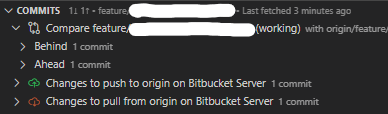
I will probably be downgrading to v10 to get this feature back, which is a shame because overall v11 seems really nice!
 finn-wa
on 17 Nov 2020
finn-wa
on 17 Nov 2020
Same here, I use to do most of my code review using this feature. I had to install 10.x for now.
 Zmaon
on 19 Nov 2020
Zmaon
on 19 Nov 2020
I have same issue, and would love if we have by default file diff between branches rather than Behind / Ahead.
For those struggling with this, a workaround I found (hopefully temporary) is creating a separate branch and squashing all commits, so all differences are shown on that commit (inside Ahead).
 mfornet
on 19 Nov 2020
mfornet
on 19 Nov 2020
Sorry for unintentionally removing this feature 🤦♂️. In v11.0.4 I've added back the ability to compare file changes between the references (regardless of ahead/behind).
 eamodio
on 23 Nov 2020
eamodio
on 23 Nov 2020
The files are back, but the "new" and "old" sides of the compare are backwards compared to differences in the "Ahead" commits.
Edit: Backwards compared to the previous implementation.
 Psithief
on 23 Nov 2020
Psithief
on 23 Nov 2020
@Psithief Damn it -- that's what I get for rushing it out without thorough testing. A fix is coming shortly.
eamodio
on 23 Nov 2020
Related issues
 theseion
·
33Comments
theseion
·
33Comments
 zmoazeni
·
23Comments
zmoazeni
·
23Comments
 appinteractive
·
36Comments
appinteractive
·
36Comments
 rotwurstesser
·
23Comments
rotwurstesser
·
23Comments
 TomaTomoe
·
35Comments
TomaTomoe
·
35Comments
Most helpful comment
Sorry for unintentionally removing this feature 🤦♂️. In v11.0.4 I've added back the ability to compare file changes between the references (regardless of ahead/behind).