Vscode-gitlens: command "gitlens.XXX" not found
Hello, i already deleted the extension in the folder after deinstalling the extension, and even restarted my mac after manually deleting the plugin in the folder. Sadly this didn't fix anything, i still can't call any commands nor do i get blame annotations inside my VSCode. If i can help in any way to fix it please let me now! I really miss my Lens ! Thanks for the great tool 💙
- GitLens Version: 9.6.3
- VSCode Version: 1.33.1
- OS Version: macOS Mojave 10.14.4
 rotwurstesser
All 23 comments
@rotwurstesser Can you enabled output logging and post the output?
 eamodio
on 1 May 2019
eamodio
on 1 May 2019
I apologize If i didn't understand this correctly : i need to set "gitlens.outputLevel": "verbose" in my Settings.json then i should see errors in the "Output" (which is next to the integrated terminal) as soon as i run any gitlens commands ? I don't get any output ....
rotwurstesser
on 1 May 2019
Yeah, make sure you reload vscode after setting gitlens.outputLevel and you should see the output here:

eamodio
on 1 May 2019
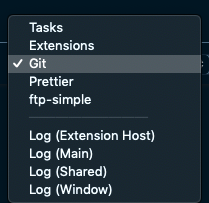
It doesn't show it =( are there any other settings i might need to do?
rotwurstesser
on 1 May 2019
@rotwurstesser does this issue still happen with GitLens 9.7 or later?
eamodio
on 11 May 2019
Yes, 'gitLens.showsettingsPage' (or any commands) not found with version 9.7.3
rotwurstesser
on 13 May 2019
@rotwurstesser Do you possibly have GitLens disabled or something? I don't understand what could be happening
eamodio
on 13 May 2019
It is active, a difference i did notice since the upgrade to 9.7.3 though: the folder of gitlens in my extensions now has content...
rotwurstesser
on 13 May 2019
So is it working now? If not, are there any logs now?
eamodio
on 13 May 2019
Sadly no... but i found a plugin thats working for my needs atm, not as good as Lens but will do ... =) i will check the updates for gitlens from now on and notify you when it works again, thanks for your time !
rotwurstesser
on 13 May 2019
The only other thing I can think of is that there is anti-virus that is getting in the way (there were some issues with false positives and av software nuking GitLens files). Can you check inside the dist folder inside the GitLens folder and let me know what files are in there?
eamodio
on 13 May 2019
sure!
This is the content:
- extension.js
- extension.js.map
- webviews
rotwurstesser
on 14 May 2019
@rotwurstesser does the extension.js have a valid size ~798 KB?
eamodio
on 15 May 2019
it has 827kb
rotwurstesser
on 21 May 2019
I had the same problem - what eventually fixed it was deleting all gitlens settings from my settings.json.
 joelw
on 6 Jun 2019
joelw
on 6 Jun 2019
@eamodio as @joelw said (thanks! 🙏) this solves it, i cleared everything and did a clean install, glad to use gitlens again =)
rotwurstesser
on 14 Jun 2019
Unfortunatly I got the same issue, but a clean install didn't fix it so far. Opening the debugger gives me some "Unexpected token" errors on ~/.vscode/extensions/eamodio.gitlens-9.9.3/dist/extension.js, which addresses the spread operators like in renderOptions:{before:{...i}}.
I am using:
- GitLens Version: 9.9.3
- VSCode Version: 1.36.1
- OS Version: macOS Mojave 10.14.6
 dsturm
on 7 Aug 2019
dsturm
on 7 Aug 2019
... even on GitLens Version 10.0.1 the error occurs. I tried the uninstall -> delete folder -> install from marketplace and from .vsix procedure a dozen of times with the same results: The debugger shows
[Extension Host] Activating extension `eamodio.gitlens` failed: ~/.vscode/extensions/eamodio.gitlens-10.0.1/dist/extension.js: Unexpected token (1:35585)
I do not have any GitLens settings in the settings.json. Any hints how to resolve this?
dsturm
on 30 Sep 2019
Had the same issue.
My problem was that i had "git.enabled": false in my settings.json
My Solution:
- change "git.enabled": true
- reload VScode
if still not work:
- Unistalled gitLens,
- Deleted gitLens folder in .vscode/extensions,
- Clear all gitLens related settings from your settings,json
- reload VSCode
- install gitLens again
 holtzilya2008
on 21 Nov 2019
holtzilya2008
on 21 Nov 2019
Yeaaas, finally I found the breaking point: For me it was the extension vscode babel transform
. After disabling it, gitLens finally works as expected (and missed long time).
dsturm
on 21 Nov 2019
Yeaaas, finally I found the breaking point: For me it was the extension vscode babel transform . After disabling it, gitLens finally works as expected (and missed long time).
Confirmed. Same thing was somehow blocking GitLens for me.
 ShaoMonkSn
on 20 Aug 2020
ShaoMonkSn
on 20 Aug 2020
My problem was Git Graph v1.26.0, just uninstall and reload VSCode.
Error code: (command 'gitlens.showSettingsPage' not found)
 csolisKG
on 14 Sep 2020
csolisKG
on 14 Sep 2020
This issue has been automatically locked since there has not been any recent activity after it was closed. Please open a new issue for related bugs.
![github-actions[bot] picture](https://avatars2.githubusercontent.com/in/15368?v=4&s=40) github-actions[bot]
on 25 Nov 2020
github-actions[bot]
on 25 Nov 2020
Related issues
 miluoshi
·
27Comments
miluoshi
·
27Comments
 waiholiu
·
28Comments
waiholiu
·
28Comments
 thiagoh
·
35Comments
thiagoh
·
35Comments
 lindskogen
·
20Comments
lindskogen
·
20Comments
 captain-yossarian
·
28Comments
captain-yossarian
·
28Comments