Vscode-gitlens: Is it possible to make these icons invisible for small screen
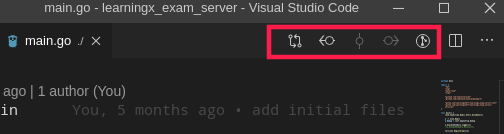
On some small screens, if too many tabs opened, these icons occupy too much space. Is it possible to make them disappear?
Thank you for your help!
question
 VictorSu000
All 4 comments
You can change GitLens' menu/toolbar contributions via the GitLens interactive settings editor from the command palette run GitLens: Open Settings
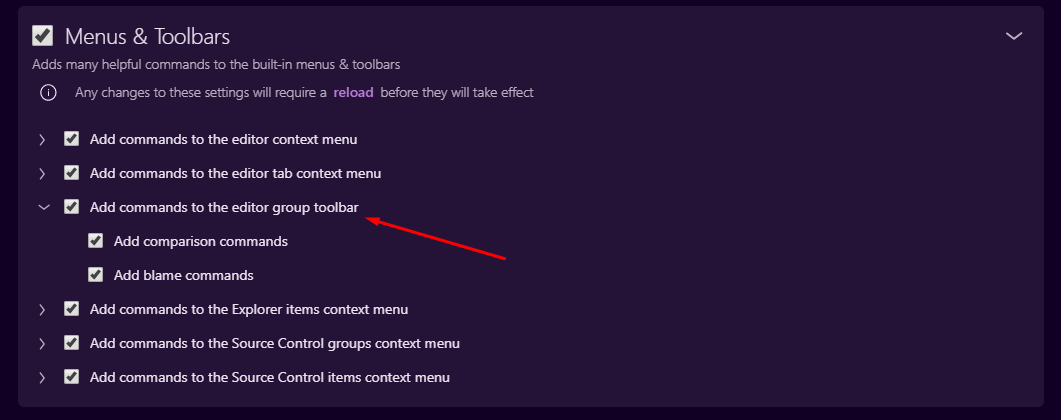
Hope that helps!
 eamodio
on 11 Nov 2019
eamodio
on 11 Nov 2019
👍2
First button of the area marked in red rectangle by op is still visible after disabling "Add commands to the editor group toolbar"
 exse2
on 4 Mar 2020
exse2
on 4 Mar 2020
@exse2 The first button is _Open Changes_ and is part of VS Code itself, not GitLens.
eamodio
on 23 Mar 2020
This issue has been automatically locked since there has not been any recent activity after it was closed. Please open a new issue for related bugs.
![github-actions[bot] picture](https://avatars2.githubusercontent.com/in/15368?v=4&s=40) github-actions[bot]
on 26 Nov 2020
github-actions[bot]
on 26 Nov 2020
Was this page helpful?
0 / 5 - 0 ratings
Related issues
 batjko
·
4Comments
batjko
·
4Comments
 obrejla
·
3Comments
obrejla
·
3Comments
 JP-Ellis
·
3Comments
JP-Ellis
·
3Comments
 mindpivot
·
4Comments
mindpivot
·
4Comments
 rfgamaral
·
3Comments
rfgamaral
·
3Comments
Most helpful comment
You can change GitLens' menu/toolbar contributions via the GitLens interactive settings editor from the command palette run
GitLens: Open SettingsHope that helps!