Vscode-gitlens: Line blame annotation not shown
As per subject. Here a screenshot.
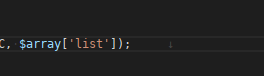
- GitLens Version: 9.4.1
- VSCode Version: 1.30.2
- OS Version: Debian 9
Thanks for your work!
 meden
meden
All 8 comments
Same for me.
- Gitlens version: 9.4.1
- VSCode version: 1.30.2
- OS version: Mac OSX High Sierra 10.13.6
Weirdly the annotations show in a new file if I create one and stage the changes, but then they stop showing if I then close the application and reopen it.
 Toddish
on 24 Jan 2019
Toddish
on 24 Jan 2019
Can you both provide more details on this? Did this stop working recently? Did GitLens work before, and then you upgraded? You upgraded vscode? You installed a new extension? etc?
Also can you both please enable output channel logging by setting "gitlens.outputLevel": "debug" in your settings.json. This will enable logging to the GitLens channel in the Output pane. Once enabled, please reproduce the issue (if possible) and attach the log lines from the GitLens channel.
@meden from your screenshot it looks like there is some character to the right of the selected line -- is that just whitespace or something?
 eamodio
on 24 Jan 2019
eamodio
on 24 Jan 2019
Not sure when this started happening. Actually, I had the feature disabled on my previous machine (Mac OS), but it was definitely working (that's why I disabled it... :smile:). Then I switched to Linux (at last), and I wanted to try the feature again, but with no luck.
@meden from your screenshot it looks like there is some character to the right of the selected line -- is that just whitespace or something?
Indeed there is an empty annotation when the feature is enabled, which disappears on disabling it. Hovering on this empty annotation triggers the commit detail popup as it should (I set "gitlens.hovers.annotations.over": "annotation").
meden
on 25 Jan 2019
I found the culprit: it is an incompatibility with the extension code-eol.
I got it because I was looking to a file with no last-line line ending, and there was the git blame annotation.
Disabling the code-eol extension got back the GitLens blame annotations.
meden
on 25 Jan 2019
After enabling debug, it looks like mine is a folder case issue.
I lowercased my root project folder, and the uppercased is still referenced in the debug log.
If I rename the root folder to something entirely different, and re-open vscode, the blames appear again.
Toddish
on 28 Jan 2019
@Toddish this sounds like another case of https://github.com/Microsoft/vscode/issues/12448. The casing of the folder on disk needs to exactly match the casing of the folder opened in vscode
eamodio
on 28 Jan 2019
Yeah, definitely.
Consider my issue resolved. Renaming the directory works fine for me and gitlens is working as expected 👍
Toddish
on 28 Jan 2019
This issue has been automatically locked since there has not been any recent activity after it was closed. Please open a new issue for related bugs.
![github-actions[bot] picture](https://avatars2.githubusercontent.com/in/15368?v=4&s=40) github-actions[bot]
on 4 Dec 2020
github-actions[bot]
on 4 Dec 2020
Related issues
 mindpivot
·
4Comments
mindpivot
·
4Comments
 JP-Ellis
·
3Comments
JP-Ellis
·
3Comments
 vgrafe
·
3Comments
vgrafe
·
3Comments
 carlleeswanson
·
3Comments
eamodio
·
3Comments
carlleeswanson
·
3Comments
eamodio
·
3Comments
Most helpful comment
I found the culprit: it is an incompatibility with the extension code-eol.
I got it because I was looking to a file with no last-line line ending, and there was the git blame annotation.
Disabling the
code-eolextension got back the GitLens blame annotations.