Vscode-gitlens: Restore deleted line?
If I accidentally delete a line, is there a way to restore it with GitLens?
Here is an example:

I would like to restore line 145, which has been deleted as an uncommitted change. However, I can't select the deleted line with the mouse, I can only select the actual lines in the file that are currently present.
Surely I shouldn't have to revert to select and copy / restore the deleted line right? Is there any solution to this? Otherwise consider this a feature request 🙂
 gandalfsaxe
All 13 comments
You can just using the built in git extension -- if you aren't in diff view, you will see a little red arrow at the point where you deleted the line. If you hover over it, it will expand to a red rectangle that you can click on and it will open a peek view with the change which you can undo.
Hope that helps.
 eamodio
on 13 Dec 2018
eamodio
on 13 Dec 2018
Actually it doesn't help me because it's an all-or-nothing feature: I can only discard ALL changes in the block. If I'm only interested in restoring a single line, it's not possible in this pop-up view you speak of to select text here either. Thus I'm forced to go to the web interface of GitHub.com to find the line I'm looking to restore.
gandalfsaxe
on 13 Dec 2018
If you open the diff view (click the Open Changes button in the editor toolbar) then you should be able to see the contents of the deleted line on the left and copy it to the right.
eamodio
on 13 Dec 2018
The Open Changes view doesn't allow me to select any of the deleted lines either:

gandalfsaxe
on 13 Dec 2018
I have the same question. If one could at least copy text of deleted lines, it would be really helpful, but at the moment, its just as @GandalfSaxe said... you can restore the whole chunk or nothing.
Is there any chance to rethink this feature request or add the ability for selecting deleted lines?
 nikopavlica
on 30 Jan 2019
nikopavlica
on 30 Jan 2019
As others have pointed out, it would be of immense help it could be possible to select and copy some content of _red blocks_.
 pmilic021
on 5 Mar 2019
pmilic021
on 5 Mar 2019
@pmilic021 Unfortunately that isn't something GitLens can fix -- that is an issue with vscode itself. I would recommend opening an issue with the vscode repo -- if there isn't one already (in which case upvote it).
eamodio
on 8 Mar 2019
Alright, never would have guessed
pmilic021
on 9 Mar 2019
Use side-by-side View to copy content.
 meetai
on 4 Sep 2019
meetai
on 4 Sep 2019
If you open the diff view (click the Open Changes button in the editor toolbar) then you should be able to see the contents of the deleted line on the left and copy it to the right.
@eamodio can Git Lens provide a way to do this without having to copy + paste? Useful if you're doing this for multiple (but not all) lines throughout a file. e.g. select the deleted lines in left view, right click and select 'discard lines'/'discard changes'?
edit: I think the interface is managed by vscode but gitlens can manage the right click options
 penx
on 3 Apr 2020
penx
on 3 Apr 2020
I've also opened a feature request for vscode that should help with this https://github.com/microsoft/vscode/issues/94365
penx
on 3 Apr 2020
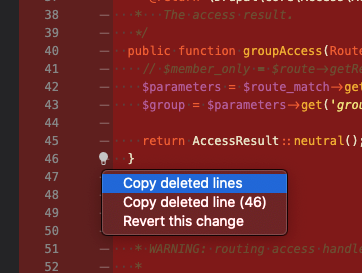
 amaisano
on 30 Jul 2020
amaisano
on 30 Jul 2020
This issue has been automatically locked since there has not been any recent activity after it was closed. Please open a new issue for related bugs.
![github-actions[bot] picture](https://avatars2.githubusercontent.com/in/15368?v=4&s=40) github-actions[bot]
on 25 Nov 2020
github-actions[bot]
on 25 Nov 2020
Related issues
 batjko
·
4Comments
batjko
·
4Comments
 isaacwashere
·
3Comments
isaacwashere
·
3Comments
 tiansin
·
4Comments
tiansin
·
4Comments
 derrickstolee
·
3Comments
derrickstolee
·
3Comments
 ahhmarr
·
3Comments
ahhmarr
·
3Comments
Most helpful comment
I have the same question. If one could at least copy text of deleted lines, it would be really helpful, but at the moment, its just as @GandalfSaxe said... you can restore the whole chunk or nothing.
Is there any chance to rethink this feature request or add the ability for selecting deleted lines?