Vscode-gitlens: How to remove top-right icons
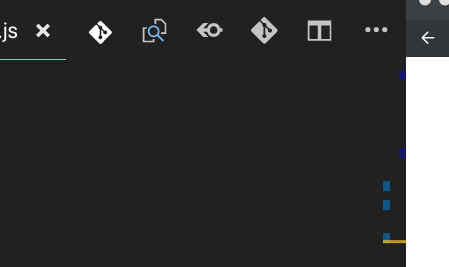
I read the extensions Details page, but didn't see anything about how to remove these icons at the top-right of the screen?
 lorensr
All 6 comments
Update: first icon is from Git History, removed by "gitHistory.showEditorTitleMenuBarIcons": false,
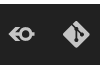
Second and last are not from this extension, but these two appear to be:
lorensr
on 17 Oct 2018
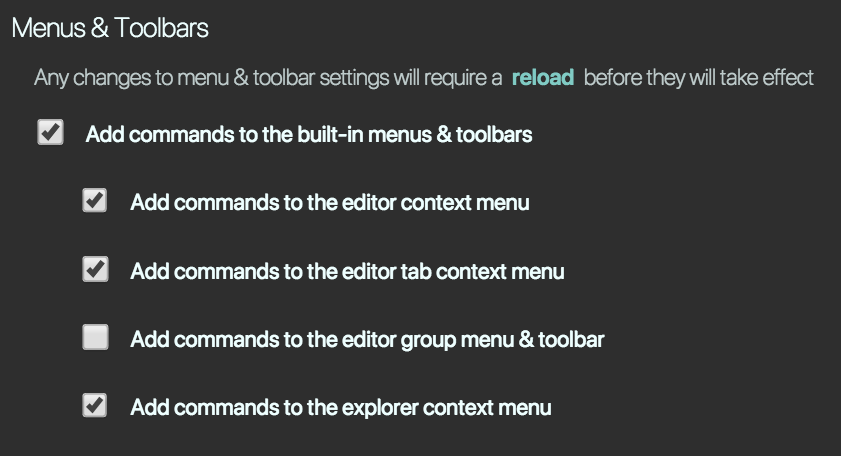
You can customize them using the gitlens.menus setting -- or you can also use the GitLens interactive settings editor from the command palette run GitLens: Open Settings. See the Menus & Toolbars section of the General group
Hope that helps!
 eamodio
on 17 Oct 2018
eamodio
on 17 Oct 2018
Thanks, it was the second-to-last item, and required a Reload Window to take effect:
lorensr
on 17 Oct 2018
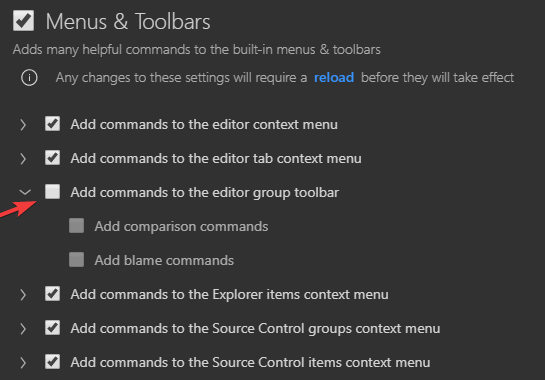
In 2020, this is now achieved by deselecting 'Add commands to the editor group toolbar' and still requires a reload to take affect:
 Vardi
on 9 Jun 2020
Vardi
on 9 Jun 2020
Could you make an option so the "editorGroup"->"compare" buttons only show up when viewing a revision?
I mean these guys:

As in, I would:
- run "open changes with previous revision" in command palette
- then the 3 buttons show up
- I close the revision window
- 3 buttons disappear
The buttons are extremely useful, but they take up such a huge space that I sometimes can't see more than one tab in a split window title
 MuhsinFatih
on 26 Jun 2020
MuhsinFatih
on 26 Jun 2020
This issue has been automatically locked since there has not been any recent activity after it was closed. Please open a new issue for related bugs.
![github-actions[bot] picture](https://avatars2.githubusercontent.com/in/15368?v=4&s=40) github-actions[bot]
on 25 Nov 2020
github-actions[bot]
on 25 Nov 2020
Related issues
 thiagoh
·
35Comments
thiagoh
·
35Comments
 miluoshi
·
27Comments
miluoshi
·
27Comments
 rotwurstesser
·
23Comments
rotwurstesser
·
23Comments
 captain-yossarian
·
28Comments
captain-yossarian
·
28Comments
 jletey
·
39Comments
jletey
·
39Comments
Most helpful comment
Thanks, it was the second-to-last item, and required a
Reload Windowto take effect: