Vscode-gitlens: Show commits of current branch
Use case: I want to see a list of commits in my current branch, and just those. Both Show Current Branch History and the branch view in the sidebar list all commits reachable from HEAD which is technically correct but I'm often interested only in "my commits".
The Git command that produces the desired output is
git log $(git merge-base master HEAD)..HEAD
(Most commonly, it can be just git log master..HEAD.)
In the UI, I think this could be another top-level node in the sidebar, something like Current branch.
BTW, it could also be useful for content comparison as there are some usability issues with it current, see e.g. _"Compare selected ancestor with working tree" needs "select for compare"_ #279.
So the sidebar could look like this:
- Current branch
    - Diff
       - ... here is a file tree, introduced in #240 ...
    - Commits
       - [avatar] My second commit
       - [avatar] My first commit
- Branches
- Remotes
- Stashes
- Tags
 borekb
All 13 comments
Ah interesting, I think the biggest challenge here, is picking the branch that is the base -- here you are always using master, but that isn't always the case.
 eamodio
on 22 Feb 2018
eamodio
on 22 Feb 2018
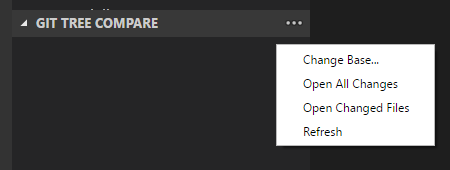
You're right. git-tree-compare deals with that using Change Base...:
borekb
on 22 Feb 2018
For reference, the "commits behind master" view that Bitbucket gives is helpful, and I believe this feature would essentially be the equivalent.
 jabacchetta
on 1 Feb 2019
jabacchetta
on 1 Feb 2019
@borekb I've added a new experimental new _Compare "gitlens.insiders": true before it will show up.
Could you try it out and let me know if this will solve this issue for you? Thanks!
eamodio
on 16 May 2019
Thanks, I like the contents of that node but I'd prefer if this was just directly under the branch. Here's how I see it:
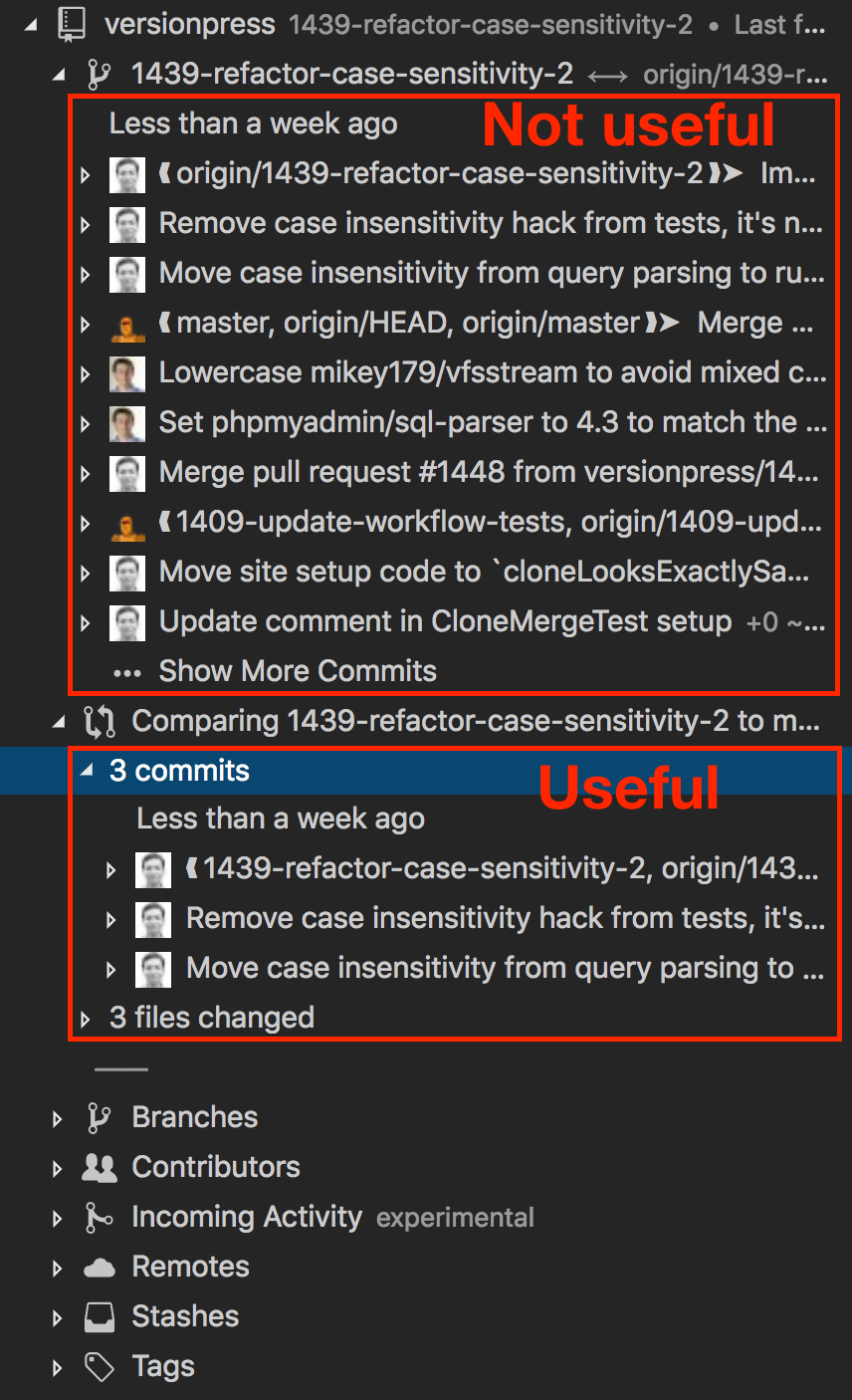
I understand the challenge with the "base branch" but still think this can be a global setting as per https://github.com/eamodio/vscode-gitlens/issues/293#issuecomment-367846197.
borekb
on 16 May 2019
While I see what you are saying, I find the branch history regularly quite valuable. In 9.8 I've add the new comparison node similar to the above. Hopefully that meets your need closely enough.
eamodio
on 22 May 2019
There seems to be many good changes around this in v9.9:

The number of commits (12) in case of a two-dot mode is correct, however, the files are not correct: there's not 28 of them but 13 – Git Tree Compare & GitHub Pull Requests extensions show that correctly. Is that a bug or is this feature supposed to work differently?
borekb
on 22 Jul 2019
I just spot the same behavior. It looks like the files changed are always diff with the 2 dot approach.
 Morikko
on 22 Jul 2019
Morikko
on 22 Jul 2019
@borekb @Morikko sorry, that is a bug -- can you pls open a new issue for this?
eamodio
on 22 Jul 2019
👍 , done that in #797.
borekb
on 22 Jul 2019
I'm totally on board with borekb's request. This is SO confusing to me to read. I don't understand what's going on, even though I now know this is happening. I just want my commits to show up like they do when I'm viewing a branch in a repo online. This should be an option to make it the main view in Repositories, and probably the default behavior as well.
 AndrewDavis
on 7 May 2020
AndrewDavis
on 7 May 2020
Also it's showing me commits from a different branch in the other branch I'm currently viewing...? Like what the heck.
It looks okay in the Remotes view...
AndrewDavis
on 7 May 2020
This issue has been automatically locked since there has not been any recent activity after it was closed. Please open a new issue for related bugs.
![github-actions[bot] picture](https://avatars2.githubusercontent.com/in/15368?v=4&s=40) github-actions[bot]
on 25 Nov 2020
github-actions[bot]
on 25 Nov 2020
Related issues
 mindpivot
·
4Comments
mindpivot
·
4Comments
 carlleeswanson
·
3Comments
carlleeswanson
·
3Comments
 rfgamaral
·
3Comments
rfgamaral
·
3Comments
 ahhmarr
·
3Comments
ahhmarr
·
3Comments
 susiwen8
·
3Comments
susiwen8
·
3Comments
Most helpful comment
Thanks, I like the contents of that node but I'd prefer if this was just directly under the branch. Here's how I see it:
I understand the challenge with the "base branch" but still think this can be a global setting as per https://github.com/eamodio/vscode-gitlens/issues/293#issuecomment-367846197.