Vscode-extension-for-zowe: VSCode startup - prompting for credentials
When I startup a new VSCode instance or new VSCode window, I am being prompted many times for keychain access by Zowe Explorer. I have >10 CLI profiles defined from the command line, and recently updated them all to use SCS. I assume that I am being prompted at least once for every profile on the system, maybe twice (once for username, once for password). Would it be possible to consolidate prompts so I only have to enter credentials once?
Prompt (x15):
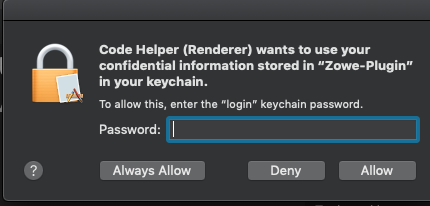
Environment Info:
Mac: 10.14.6 Mojave
VSCode: 1.44.2
Zowe Explorer: 1.5.0
Zowe CLI: 6.11.0
Zowe SCS: 4.0.4
 MarkAckert
All 9 comments
@MarkAckert Interesting. I don't know what this is. I am being prompted of my credentials whenever I try to use a profile but never on a start up. this one is new. Is it specific on Mac? Can I re-create it on Windows?
 jellypuno
on 4 May 2020
jellypuno
on 4 May 2020
I'm not sure if it the issue can be recreated on other platforms..."keychain" is the Mac credential store that keytar uses. Its possible keychain behaves differently compared to Windows Vault...but I don't know.
MarkAckert
on 4 May 2020
@MarkAckert Specific to Mac, Have you typed in your credentials and pressed Always Allow and tested it if it keeps prompting you for your credentials? Not sure about Windows either...
 Pranay154
on 5 May 2020
Pranay154
on 5 May 2020
Always Allow behavior - This appears to be tied to individual prompts, rather than the group of prompts. If I select Always Allow on every prompt, I won't see them again on future VSCode startups. If I Always Allow just one prompt, I'll see one less prompt on future startups.
IMO this is workable, but I'd rather be prompted (once) on every VSCode window startup. Always Allow is only appealing because of the spam :)
MarkAckert
on 5 May 2020
I also have this issue on Mac. The prompt keeps popping up forever...
 zimlu02
on 14 May 2020
zimlu02
on 14 May 2020
@zdmullen @zFernand0 I am not really sure how to handle this issue. Any thoughts?
jellypuno
on 4 Jun 2020
Yes, that is why I stopped using the secure credentials plugin immediately after trying it as I had around 20 profiles or so and it prompts you twice for each one. Even if you select Always Allow you have to go through it at least once.
 phaumer
on 4 Jun 2020
phaumer
on 4 Jun 2020
The cause is in the way our refreshProfiles() is implemented. One solution could be refining the Imperative Profiles code to load unsecured properties separate from the secured ones. Then apps like Zowe Explorer could use the former to populate tree browsers top-level elements with the unsecured name property and only when users start expanding a profile for the first time with their first query it would load the secured pieces prompting you only for that one profile and not all the profiles you have.
phaumer
on 4 Jun 2020
Even in the Always Allow case it is required to answer the question for each profile property that gets stored in the key chain. I.e. if a profile stores username and password then you get prompted twice. If a loadAll() method is called as in Zowe Explorer then it will do that for all the user's profiles leaving users with "n-profiles times n-secure-properties" prompt messages.
One solution could be to store all the profiles for one user as one blob in the key store and retrieve them all at once.
phaumer
on 13 Oct 2020
Related issues
 jelaplan
·
4Comments
jelaplan
·
4Comments
 AHumanFromCA
·
3Comments
jellypuno
·
5Comments
jellypuno
·
5Comments
AHumanFromCA
·
3Comments
jellypuno
·
5Comments
jellypuno
·
5Comments
 t1m0thyj
·
3Comments
t1m0thyj
·
3Comments
Most helpful comment
Always Allowbehavior - This appears to be tied to individual prompts, rather than the group of prompts. If I selectAlways Allowon every prompt, I won't see them again on future VSCode startups. If IAlways Allowjust one prompt, I'll see one less prompt on future startups.IMO this is workable, but I'd rather be prompted (once) on every VSCode window startup.
Always Allowis only appealing because of the spam :)