Vscode-extension-for-zowe: Append Filter when Adding a new Dataset
When creating a data set, it would be great to append a filter so that it shows up in the list and the user can begin working with it immediately. Otherwise, the user gets no feedback other than no error that the data set was created successfully. If the user wants to immediately begin working on that data set, she has to rerun the filter.
The system supports appending filters with a comma when creating filters. My idea is to take the current filter and append another filer and rerun it so that both the current filter contents appear and the new data set.
 jelaplan
All 4 comments
I call it!
So right now I have the new data set showing up in the list. But after creating the data set, the profile is refreshed, and the existing filters are erased from the list.
And I will work on this Monday.
 katelynienaber
on 13 Dec 2019
katelynienaber
on 13 Dec 2019
Quick question...should we add the new dataset to the current filter? Or just replace the old filter and only show the new dataset?
Because the newly-added dataset will not automatically appear at the top of the list...for example if I create Z40641.NEW.PDS.TEST8, it appears in the middle of the list.
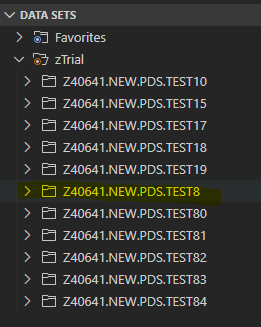
In a large list of datasets, it might not be obvious that the new set was already in the list...
katelynienaber
on 16 Dec 2019
In my opinion it should be created as you've done above and then "selected".
(and thanks to this post I did not realise you could add more than 1 statement to a filter)
 Morridt
on 16 Dec 2019
Morridt
on 16 Dec 2019
Closed in pull request #429
katelynienaber
on 6 Jan 2020
Related issues
 AHumanFromCA
·
3Comments
AHumanFromCA
·
3Comments
 Colin-Stone
·
4Comments
Colin-Stone
·
4Comments
 zFernand0
·
3Comments
zFernand0
·
3Comments
 jellypuno
·
5Comments
katelynienaber
·
3Comments
jellypuno
·
5Comments
katelynienaber
·
3Comments
Most helpful comment
In my opinion it should be created as you've done above and then "selected".
(and thanks to this post I did not realise you could add more than 1 statement to a filter)