Vscode-extension-for-zowe: Provide a CLI profiles manager view
Current we can only add a new zosmf profile, but not edit or change it. The picker dialogs to create the profile are hard to use, there is no way to get back and if you accidentally click in the wrong place you loose all your edits and have to start over. MS VS Code is a mostly dialog free editor that appeals to users who are keyboard centric and want to write code and data files and not use dialogs. (See https://github.com/microsoft/vscode/wiki/%5BWIP%5D-Design-Principles). Its main way of adding UIs is providing explorer like views in activity groups on the left.
I propose to add a Zowe CLI management explorer that would appear similarly to the NPM Scripts explorer in VS Code as a new tree view. It would show all the profiles available by type (for supporting Issue #279 ) and would allow to add, remove update profiles via right-click ops and action icons. It could even be used to install and remove plugins. When editing it would just open the corresponding yaml file, the user would edit the yaml and saves it. For creating new profiles we can provide code templates that pre-populate the yaml and offer code completion. You can then drag the profile tree items into the other explorers to add a view using that profile or use the + button to add them to one of the three explorer trees by their names.
This is how I edit all my different profiles in my daily work with the Zowe CLI. I just use my trusted Pathfinder explorer window. If I want to change the default profile I open the yaml file and edit it in the simple editor on the right (this would be the VS Code editor instead). If I want to add a new profile I just copy an existing profile and modify the contents. I do not have to look up the complicated syntax of the CLI commands and as a developer I can stick to writing config files as I always do. I want an editor like that for my Zowe CLI.

Another role-model could be the NPM Explorer. It is always there, even if package.json file is closed. A Zowe CLI explorer would always looks for profiles in the users home dir's .zowe folder and always show them for management.

 phaumer
All 23 comments
I tend to agree that editing config files is a better VS Code user experience than navigating dialogs/forms when many parameters need to be supplied. In general, creating profiles is a difficult task and I think your suggestion of providing code templates that pre-populate the yaml and offer code completion would be beneficial.
Deleting (#332) and Editing (#319) profiles via the Zowe Explorer are relatively high priority items in our current backlog.
You can then drag the profile tree items into the other explorers to add a view using that profile or use the + button to add them to one of the three explorer trees by their names.
I would also allow the user to add a profile to all applicable trees. As you mentioned, if #279 is implemented, a profile may not be applicable to all trees.
Also, I would leave the ability to add profiles to a tree from the tree view itself in. I could see folks hiding the profile management tree during typical use to save screen space and may want a means to quickly add a profile to their view.
Another consideration is the use of keytar and storing creds securely. In your example, I'm guessing that you are storing username and password in plain text in the yaml file. Broadcom is contributing the Secure Credential Store Plug-in for Zowe CLI and we are looking to make use of keytar directly in the extension (#318). The profile management facility would need to offer a means to update passwords so that user input is masked and stored securely.
If we decide to pursue this issue, I would recommend UX mockups be created and shared/validated with the squad/community before implementation.
 MikeBauerCA
on 18 Dec 2019
MikeBauerCA
on 18 Dec 2019
For password handling we implemented functionality like this before in which the user would enter the password in the yaml file and when she saves that during the save event handling the password would be encrypted/obfuscated and replaced in the yaml file and open editor with the encrypted version before the users eyes. We would use square brackets to distinguish encrypted from unencrypted string. For example, the user enters
user: user1
password: mypassword
then after pressing save the editor would be updated to
user: user1
password: "[NIGde+6ruSYKXIVLyFs+RA==]"
We could do the same with keytar: the user would enter the password here and the yaml file would be replaced with a keytar key instead
user: user1
password: "#keytar"
or something similar to that.
phaumer
on 18 Dec 2019
Users can edit the yaml files today with VS Code. They can use the built in file explorer to navigate to the files or the Mac Finder / Windows Explorer as is shown in the screenshot. The crux of the proposal appears to be to add a panel to list the yaml files in the .zowe folder.
Adding some capability to directly edit the yaml files has some appeal. I’d prefer it as an alternative rather than a replacement for the dialog wizard. I have edited the yaml files directly and am not an engineer so I’m not surprised that Peter has used that approach. I’ve tried to encourage our doc people to write about this approach with little success. So, one way to make this more common is to document it so the users are more aware of the .zowe folder.
I have mixed feelings about the proposed profiles explorer. On one hand, it would provide a ready navigation to the contents of the .zowe folder and let people find the yaml files. But, the idea to add profiles in one explorer and drag those to other panels to create a connection is a complicated and abstract workflow. It also exposes the machine model as the user model. Today, Zowe Explorer users don’t need to be aware of the existence of profiles, understand the concept of profiles, or how they are stored on the files system. They just create connections to the Mainframe which is ultimately what they need. I see abstracting away profiles and their technical details as a major advantage of the Zowe Explorer over the CLI where we have seen a lot of users struggle to understand the purpose of profiles and how to work with them. We added command line options to try and help users understand the CLI and make it easier to learn. I expect that some users would like the edit-yaml approach and find it attractive for the power it brings but others would be confused.
I agree that using the dialog wizard presents some challenges, like being unforgiving of typing mistakes, not going back, etc. A GUI way around this is to create a form where a user can enter the details and press enter after filling it out. VS Code supports this type of form. I don’t miss the point that editing a text file has a special appeal but I think a form would also address many of the shortcomings of the current dialog wizard and it would be easier for less advanced users. I'm not suggesting this instead but if we want to solve a problem, we should consider alternatives. Here is a screenshot of the connection details for a 3270 emulator.
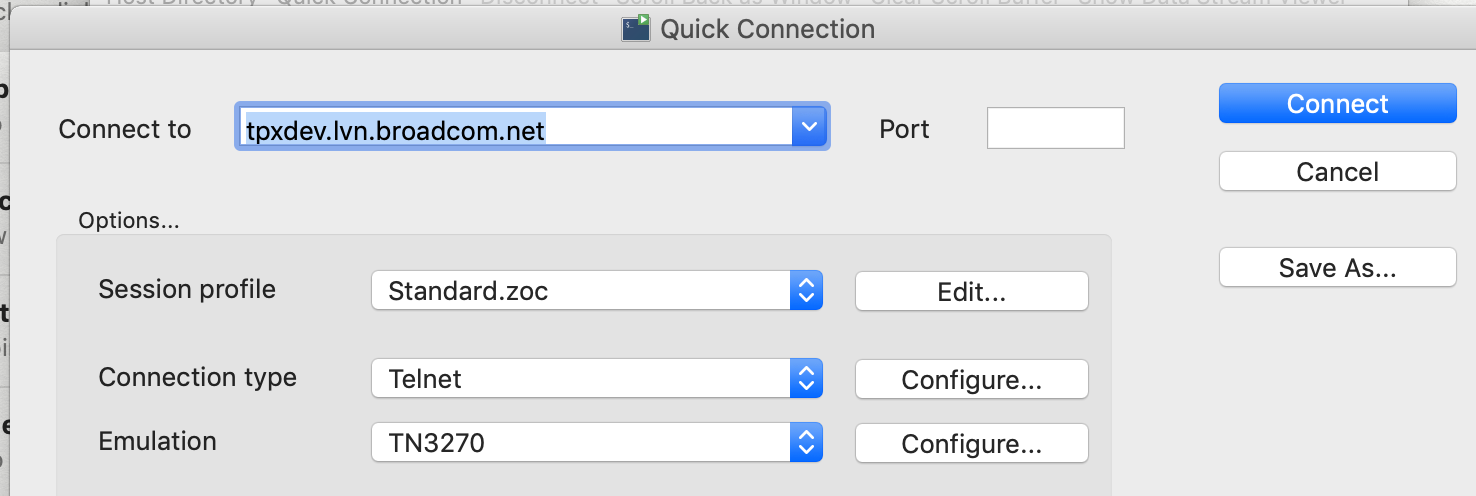
I enjoyed reading the design principles document. It had a lot of ego and good ideas. To the point that VS Code is a mostly dialog free editor that appeals to users who are keyboard centric and want to write code and data files and not use dialogs, I think the more important point is less about dialogs and more that people want to avoid using a mouse. The dialog wizard can easily be used without a mouse but the the context menus and icon buttons require the user to use a mouse. I wrote a story (313) about adding shortcuts to the menus which is squarely in the spirit of the design principles.
I'm wondering about the viability of this approach for a Che and Theia IDE. Do we expose the file system to those users?
WRT the encryption, the square brackets approach is clever and nimble. But, it is also a not-so-obvious thing that would require some learning and easy to mistakenly leave out thus exposing credentials in plain text. I'd hope there could be a more reliable and easy to learn approach.
 jelaplan
on 18 Dec 2019
jelaplan
on 18 Dec 2019
I agree that there are alternative means to address many of the shortcomings of the current dialog wizard. I also agree with adding the capability to directly edit the yaml files as an alternative rather than a replacement for the dialog wizard for the reasons you highlighted. Thanks for weighing in @jelaplan.
MikeBauerCA
on 18 Dec 2019
We could follow a similar approach as VS Code did with Settings. For the first couple of years(?) they only had json files with dynamic json-schema support for docs and code completion. Then they probably had to bow to market pressure of mouse people and added the capability to generate a UI dynamically from the json-schema for Settings. I never use it and directly open the json files, but I can see the potential appeal.
We could reuse their code to generate the UI out of json schemas (they can be used for yaml as well) for the different profile types and show a UI that looks very similar. Then people can switch back and forth to and from the yaml source.
phaumer
on 18 Dec 2019
I feel like profiles are simply enablers to using the Explorer. For me, in the longer term, it makes more sense to abstract and automate profiles as much as possible to allow users to quickly move on from this step and get to the core tasks they want to accomplish. I do agree that the current picker dialogues are sub-optimal and appreciate the thought given to solving this problem from Peter, John and others.
Personally, in the near term, i would prioritize a more lightweight VSC forms approach as this would address the difficulties in using the picker dialogue and would allow us to more easily allow editing and deleting.
 jalel01
on 19 Dec 2019
jalel01
on 19 Dec 2019
Note https://github.com/zowe/vscode-extension-for-zowe/issues/667 is a story for adding a back button to the Quick Pick.
jelaplan
on 7 Apr 2020
When editing it would just open the corresponding yaml file, the user would edit the yaml and saves it.
Just a comment regarding this. If we edit the yaml file and folks have SCS plugin on their system, the profile will not work. #574 has a goal of making ZE SCS as default so let's just take that into consideration.
 jellypuno
on 9 Apr 2020
jellypuno
on 9 Apr 2020
Agreed. Passwords need to be handled differently in any case.
phaumer
on 9 Apr 2020
Idea:
We can implement a Profiles WebView similar to the image below? This is the profile management of zOSConnect VSC Extension. What we could do for Zowe Explorer is to
- Allow the user to select the type of profile that he/she wants to create/edit.
- Depending on the selection, we will extract the schema of the profile and then create the webView form
- If they are using SCS, we can handle it inside the extension and display the real value of the credentials
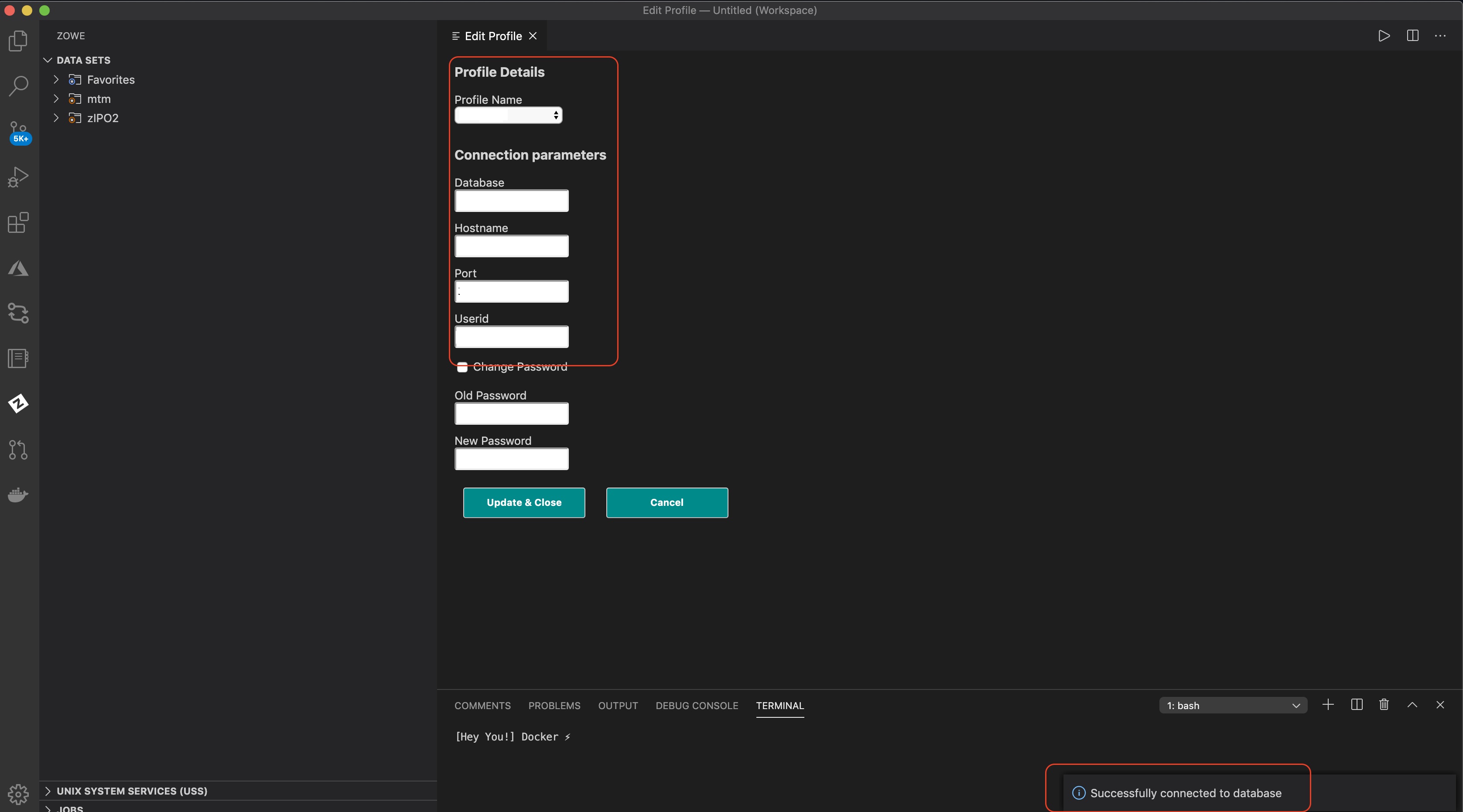
We will have more and more profiles to manage in the future and I feel like dialog boxes are not enough anymore. But, personally, I do not like the idea of having a separate extension or tree for the profiles. And a WebView form makes more sense to me.
jellypuno
on 4 Jun 2020
I personally would prefer doing this with a special tree browser for profiles and yaml files for editing (with special handling for entering passwords) as VS Code is a text editor and not a IDE with forms or dialogs. As a developer I want to quickly edit a file with the info and not mouse/tab through fields.
The other reason I am skeptical with webviews is that they are adding another dimension of maintenance to Zowe Explorer as they could cause problems running them in Theia and Che.
phaumer
on 4 Jun 2020
Fair enough! Tagging @zdmullen @stepanzharychevbroadcom just for awareness about webview on theia and che
jellypuno
on 4 Jun 2020
I'm going to take a look at this!
 kristinochka
on 31 Jul 2020
kristinochka
on 31 Jul 2020
@kristinochka, can you post the screenshots here as we discussed yesterday? Thank you!
 zdmullen
on 5 Aug 2020
zdmullen
on 5 Aug 2020
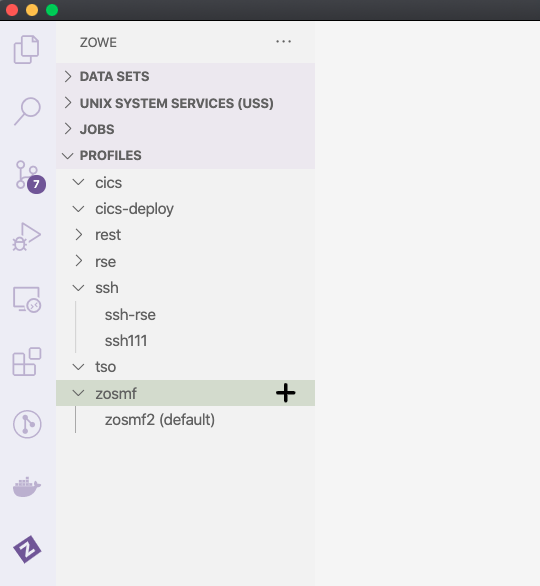
Here's what I have so far, sorry for the delay! I was trying to polish this a bit more.
kristinochka
on 5 Aug 2020
Update: Added a few more things to the prototype. The new profile is populated with empty values:

I will push the branch for this soon into my fork.
kristinochka
on 7 Aug 2020
Is it the case that wth the profiles panel, we have a second, alternative interface for creating and managing profiles? So, people can manage profiles the traditional way or this alternative, text editor based approach? Is the profile panel part of something that a user has to install in addition to Zowe Explorer or is it part of the core extension?
jelaplan
on 8 Aug 2020
Is the profile panel part of something that a user has to install in addition to Zowe Explorer or is it part of the core extension?
@jelaplan The profiles explorer would be part of the core extension.
Is it the case that wth the profiles panel, we have a second, alternative interface for creating and managing profiles? So, people can manage profiles the traditional way or this alternative, text editor based approach?
That's a good question. By traditional way, I assume you mean editing/creating profiles using VS Code popups.
I think at first we could have both ways of editing/creating a profile. Eventually, we should converge on one common experience for editing a profile anywhere in Zowe explorer.
I think allowing users to see the entire profile and quickly fix any errors would make it less intimidating managing profiles.
kristinochka
on 10 Aug 2020
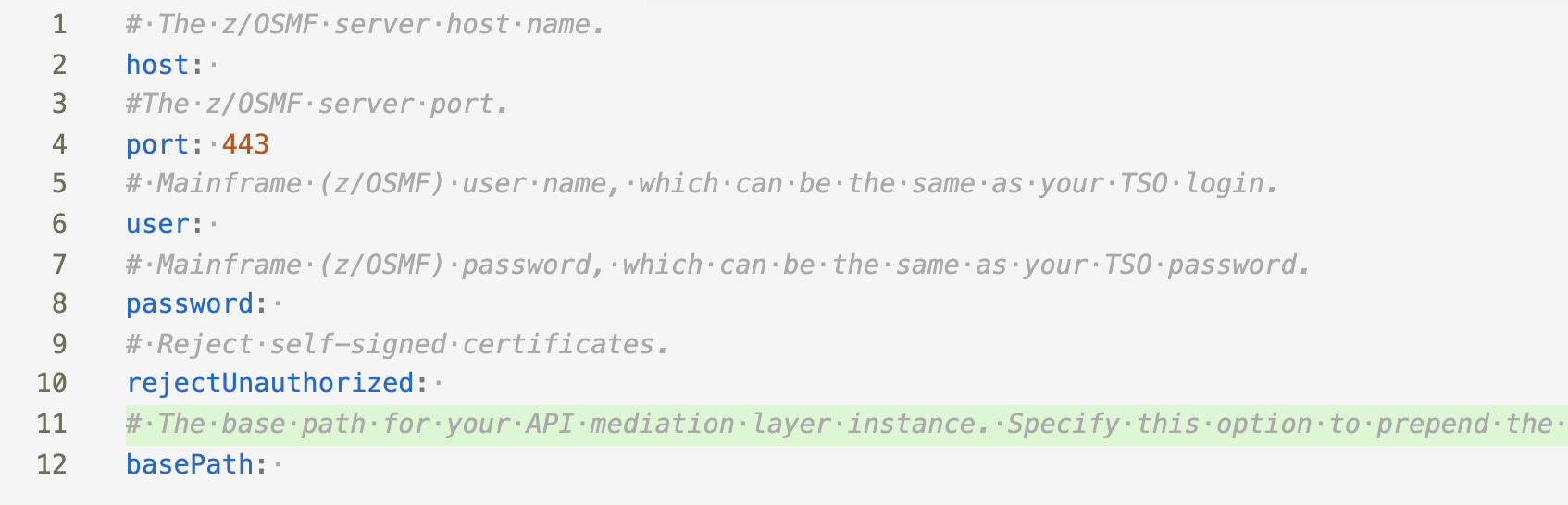
Another thing we can do to make profile creation easier is to add schema description above every value when new profile template is opened. And also fill in default values. For example:
kristinochka
on 10 Aug 2020
In my opinion, If we are going to implement the above example, I would consider the design that @katelynienaber introduce for allocate like. We need to consider handling of Optional Profiles and SSO in this implementation.
jellypuno
on 10 Aug 2020
Can you elaborate on handling of Optional Profiles and SSO?
kristinochka
on 10 Aug 2020
@kristinochka, recently Zowe CLI has been enhanced to support MFA & SSO via the Zowe API Mediation Layer.
In order to support this, all fields of a profile became optional and the concept of a base profile was introduced. A base profile is another layer in the order of precedence behind service profiles. This has benefits even without the use of MFA, SSO or the APIML. Consider the case where you are interacting with two services, let's say Endevor and z/OSMF, that are on the same LPAR and require the same creds. In that case, you could store username, password, and host in the base-profile and only need to specify the port of the services in the service profiles.
MFA & SSO are supported by logging into the APIML to retrieve a token and then leveraging that token for subsequent requests. This eliminates the need to store creds.
For greater detail, please review this blog
MikeBauerCA
on 10 Aug 2020
Here's the branch with the prototype I demoed. There is no support for SSO or base profiles yet.
https://github.com/kristinochka/vscode-extension-for-zowe/tree/profiles-tree-navigator
@katelynienaber @jellypuno FYI
kristinochka
on 1 Sep 2020
Related issues
 t1m0thyj
·
3Comments
zdmullen
·
3Comments
jelaplan
·
3Comments
t1m0thyj
·
3Comments
zdmullen
·
3Comments
jelaplan
·
3Comments
 travatine
·
4Comments
jelaplan
·
4Comments
travatine
·
4Comments
jelaplan
·
4Comments
Most helpful comment
In my opinion, If we are going to implement the above example, I would consider the design that @katelynienaber introduce for allocate like. We need to consider handling of Optional Profiles and SSO in this implementation.