Vrtk: Drastic framerate drop when holding objects in VRTK 4 beta
Environment
VRTK v4 beta
master commit hash: 089b121 (May 24th)
Unity 2019.1
WMR Headset (Acer AH101)
Intel Core I7 2.8Ghz, 16GB Ram, Geforce GTX 1070
Steps to reproduce
- Create a clean VRTK 4 project
- Play the example scene
- Make sure you test with Unity's "maximize on play" togle on, to make sure the framerate drop described below is not due to Unity's Editor payload
- Note your average starting FrameRate (mine is about 120 FPS at start)
- Go to the Warehouse, grab and hold one of the saws in your hand
- Note an important framerate drop (mine goes from 120 to about 70 FPS)
- While keeping the first saw, try grabbing another saw in your second hand
- Note the framerate drops again (mine goes from 70 to about 10 FPS) which is too low to play
- Release the saws, and notice your framerate goes back to its initial value
Current behavior
A very important framerate drop, when holding objects.
No warnings or errors in the console
Expected behavior
A lesser framerate drop when holding objects
Comment
Hello guys, I started facing this issue today when re-testing the farm demo scene. I think it used to run rather smoothly when I tested a few weeks ago, so I guess the issue appeared in a recent commit...
Thanks in advance if you can fix it, and don't hesitate to tell me if you need additional infos or tests.
Vrtk 4 is otherwise an awesome product, keep on the good job !
 DesperateHouseDev
All 12 comments
Try disabling the VRTK Prefabs -> AvatarPointers -> ForceGrabPointers and see if it improves the frame rate. I have a feeling there's an issue with how they're working.
 thestonefox
on 24 May 2019
thestonefox
on 24 May 2019
There is a perf issue with the collision notification, there seems to be some sort of cyclical reference going on when both interactors are touching/grabbing something and then touch each other.
This isn't something that has been recently introduced as I went back a fair way in the commits (to commit b7381d2) and this is the outcome...
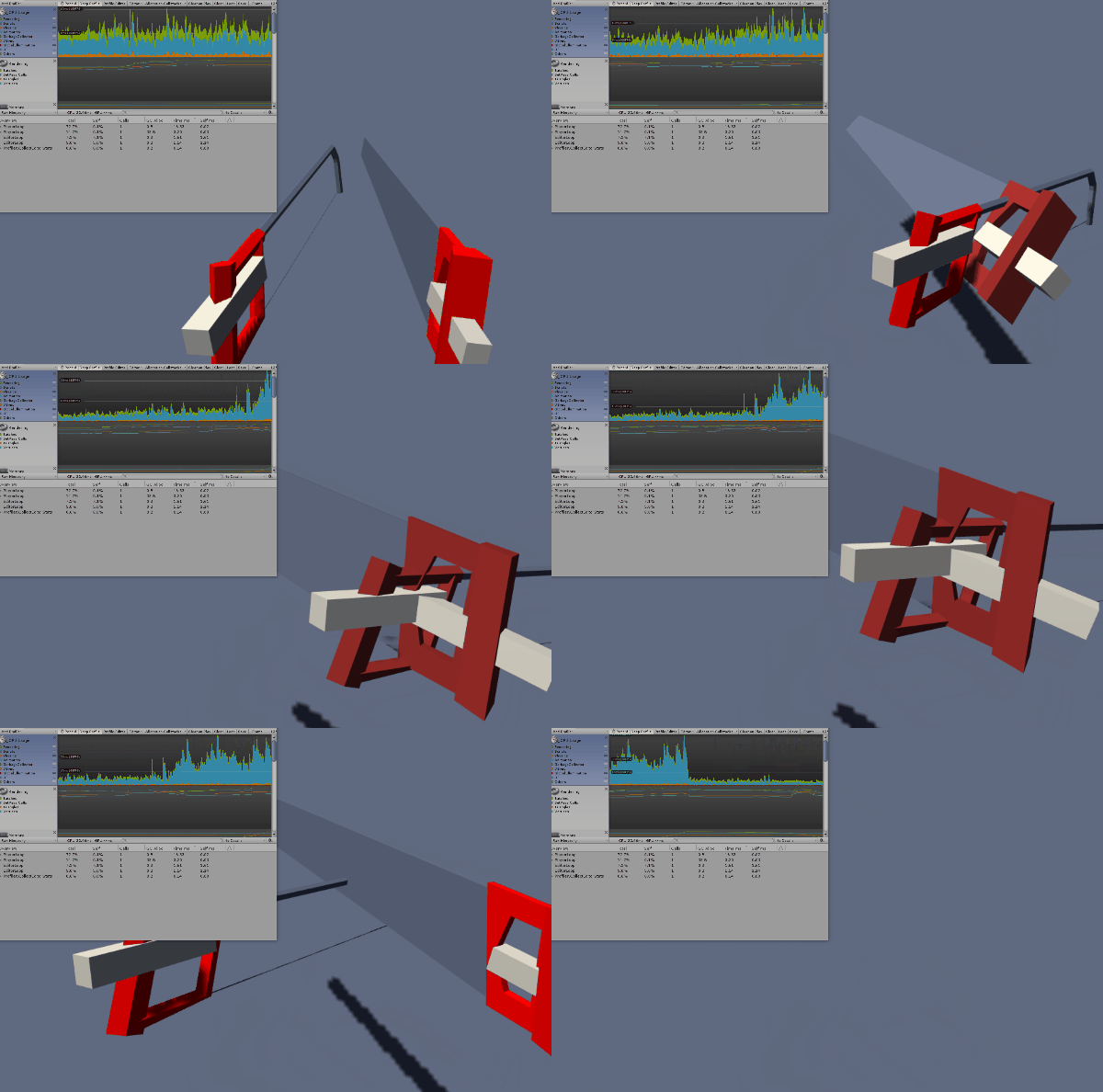
It's as if the left and right interactor get stuck trying to reference each other's objects causing a large chunk of on trigger stays to get called.
This needs investigating further.
thestonefox
on 25 May 2019
I'm not going to get chance to look into this for at least a week, I'm not sure if @bddckr has any time to look into what's going on. If not, the unless someone else gets chance to investigate this is just going to have to sit open until I am able to get round to looking at it.
thestonefox
on 25 May 2019
Thank you for such a quick answer !
Yes ! Disabling the ForceGrabPointers gameobject did the trick ! In this case, I don't get any more noticeable framerate drop now when holding objects, although the profiler indeed indicates a small increase in "script CPU usage" when the two interactors collide, the way you did.
As far as I'm concerned this is a largely sufficient workaround, since I don't need any distant/force grab feature in my game for now.
I would myself need time and a better understanding of how VRTK and Zinnia work before being able to help you guys, but feel free to ask if I can be of any use in running additional tests or so.
Thanks again for your help !
DesperateHouseDev
on 25 May 2019
The ForceGrabPointer issue is an easy enough fix. it's basically a config issue where the pointers can still get turned on when grabbing something if an untouch event occurs, which would cause the pointer to reactivate.
So the fix for this is to nest the Pointer GameObjects in another GameObject that is enabled/disabled when the Interactor is performing a Grab/Ungrab. This will ensure the pointers can't come back on even in the event of an untouch whilst grabbing.
The second issue is far more problematic.
What I believe is happening is due to the way CollisionNotifiers work, they basically, for every frame (in an OnTriggerStay method) look up all other CollisionNotifiers on any object being touched (using a GetComponentsInChildren call).
When both of the interactors are grabbing something and touch it basically just starts spamming this GetComponentsInChildren for every frame due to the Stay call and it does it for each interactor touching each other interactor and for each interactable touching each other interactable and for each interactor touching each interactable. which results in a lot of OnTriggerStay calls doing a GetComponentsInChildren per frame.
So now for some potential solutions....
The purpose of the OnXXStay methods is to ensure you know the exact position of the collision every frame so the grab functionality can occur at the correct collision position and more importantly on the correct object (e.g. the nearest origin to the interactor)
But, when an object is being grabbed, then is there any need to continue doing this OnTriggerStay check every frame? The data is used for touching to enable the grabbing function, but if you're already grabbing then that doesn't matter.
So one solution is when an interactor starts grabbing something, simply disable the CollisionTracker CollisionChanged method on the Interactor so it won't do the OnTriggerStay call (and subsequent GetComponentsInChildren) every frame for that Interactor.
This has a potential issue though of now, once something is grabbed, that interactor can no longer check for changes in objects being touched, which isn't a problem for the existing grabbed item, but if there was ever a way of doing multiple item grabbing, then I can see this causing an issue of once one item is grabbed then you now can't track the updatable collisions in any other item that could potentially be grabbed.
I feel understanding the actual root cause of the many GetComponentsInChildren may yield a better fix.
thestonefox
on 25 May 2019
This commit should be taking one back to before the perf issue was introduced: ec844cb9d4e0ad9e8193bbeb25e2bbba0215caba
 bddckr
on 27 May 2019
bddckr
on 27 May 2019
As far as I can tell, this commit : 8bc2551 (disable force grab pointers on grab) fixes the first issue: I get no more drastic framerate drop when objects are simply held (whether they were grabbed using the force grab pointer, or by touch-grabbing them).
The second issue that Thestonefox noticed still exists (a small framerate drop when held objects are intersecting each other), but as far as I'm concerned, this is a very minor performance drop: the script execution time per frame goes form about 3ms (with peaks at 4 ms), to about 4 ms (with peaks at 8 ms) :
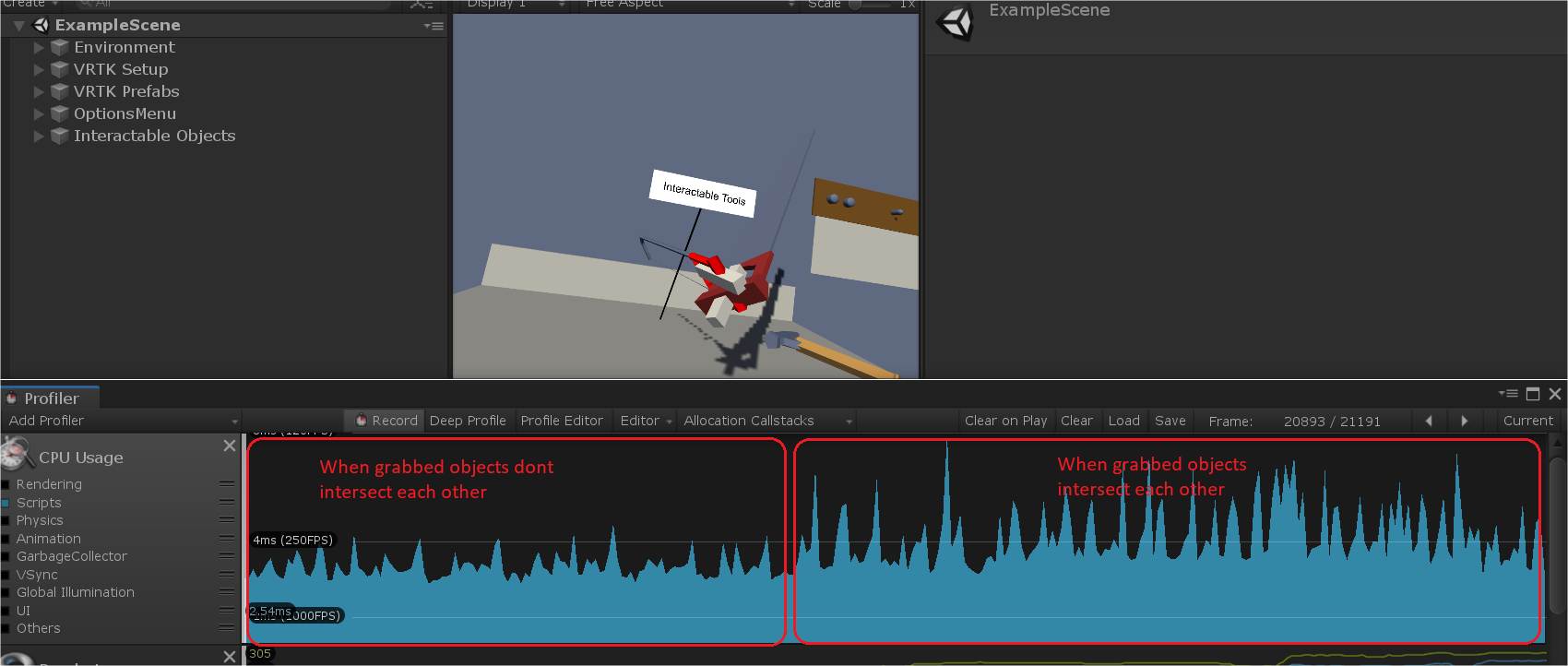
So, as far as I'm concerned, this issue can be closed...
Thanks again for your work !
DesperateHouseDev
on 3 Jun 2019
This issue can't be closed yet, the actual fundamental issue will cause a major compounding issue due to the way we are now tracking every single collider in a compound collider setup.
We need to track collisions at the collider level but active collisions at the containing transform level.
thestonefox
on 3 Jun 2019
Hi,
I'm experiencing similar effects when just "moving" the controllers (without grabbing anything) near the tools drawers in the example scene.
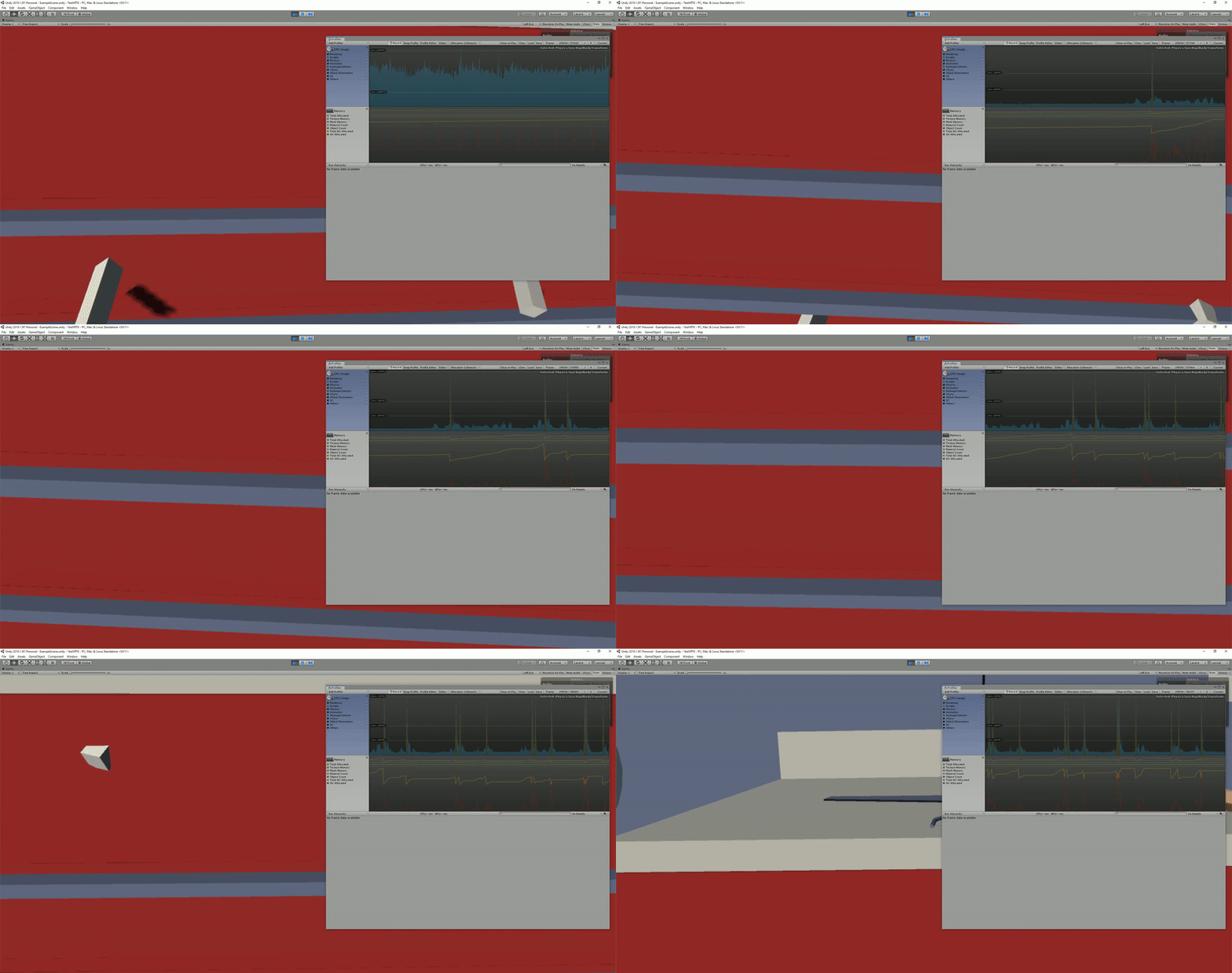
I am not very familiar with VRTK yet, but I assume it may be related with this "fundamental issue" with colliders you are talking about. In my case the CPU spikes seems to be caused by the GC and not the script CPU usage.
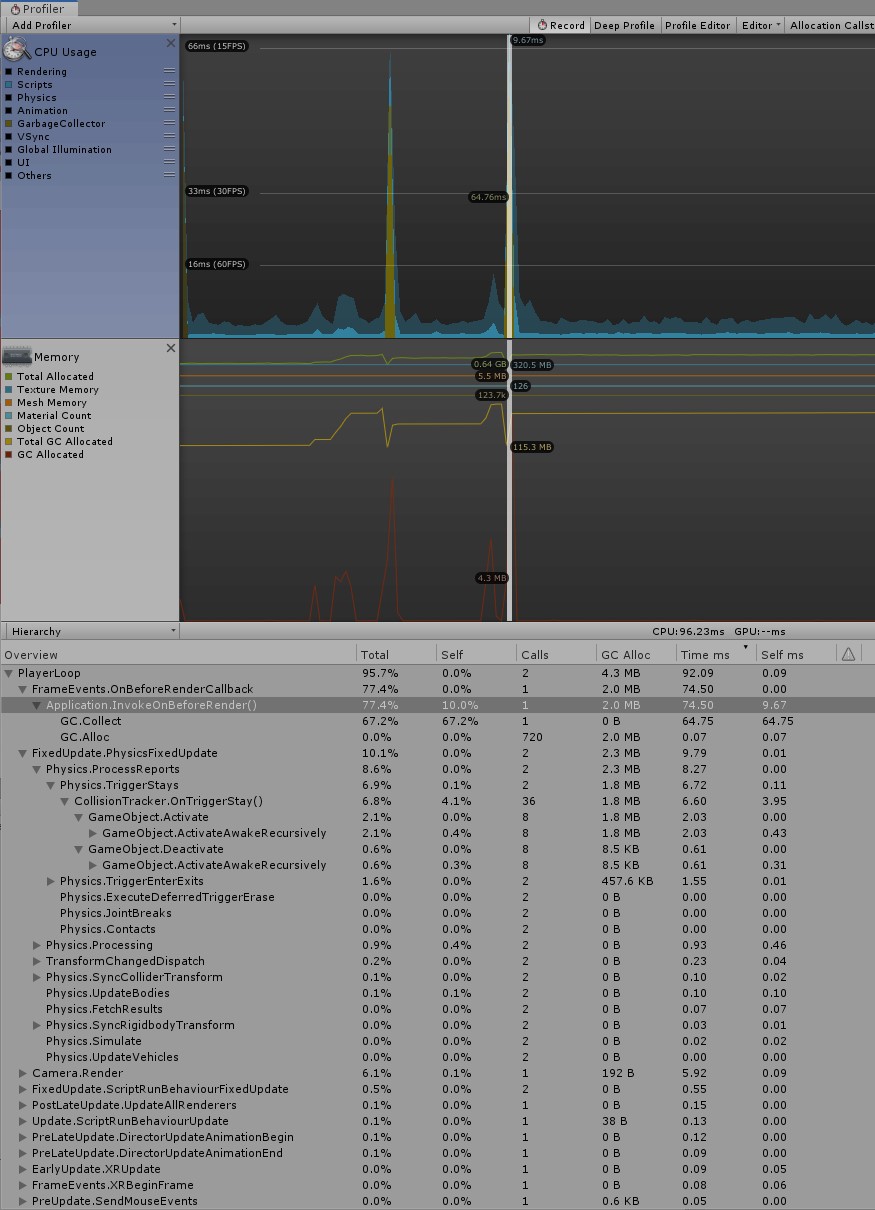
I hope this can help a bit.
Environment
- Source of VRTK: Github
- Version of VRTK: v4 Github master (12df6d9)
- Version of the Unity software: 2019.1.3f1
- Hardware used: Oculus Rift
- SDK used: UnityXR
 davelopez
on 3 Jun 2019
davelopez
on 3 Jun 2019
You're just seeing the problem I've mentioned about compound touching. This is why the bug needs fixing
thestonefox
on 3 Jun 2019
Here's a PR in Zinnia that should resolve the performance issue.
thestonefox
on 4 Jun 2019
Final VRTK PR with (hopeful) fix
thestonefox
on 6 Jun 2019
Related issues
thestonefox
·
7Comments
 broehl
·
8Comments
broehl
·
8Comments
 JWNJWN
·
4Comments
JWNJWN
·
4Comments
 dantman
·
4Comments
dantman
·
4Comments
 AzzyDude24601
·
6Comments
AzzyDude24601
·
6Comments