Vrtk: Rigidbody Tracked Interactables lag way behind Axis Movement
Environment
- Source of VRTK: GitHub master
- Version of VRTK: v4 beta
- Version of the Unity software: 2019.1
- Hardware used: Oculus
- SDK used: UnityXR
Steps to reproduce
- in the example scene change the hammer follow type to
FollowRigidbody - start the scene and switch to axis control
- grab the hammer and move with axis control
Expected behavior
The hammer should follow the controller without any lag
(see v3.3 functionality)

Current behavior
The hammer lags behind the controller considerably

 thestonefox
All 7 comments
Investigation
The AxisToVector3 Moment Processing is by default in the Update moment so the axis is changing at a different rate to the rigidbody being moved (which is in fixed update).
Moving the moment to FixedUpdate does help a bit
(see here)
But it still has a fundamental initial lag.
I thought this may be due to the Unity 1D Axis Action performing it's check in a simple Update but even manually changing it to FixedUpdate doesn't remove the lag.
Even with a simple script that just does a position update of a GameObject in a fixed update doesn't remove this lag so my assumption is something is up with the object follow perhaps?
thestonefox
on 26 Apr 2019
The issue is a race condition in the fixed update routine.
If the Rigidbody Follow FixedUpdate processes before the AxesToVector3 FixedUpdate (via their respective MomentProcessors) then the issue occurs.
However, if the AxesToVector3 processes before the RigidbodyFollow then it works fine.
This can be confirmed by disabling the moment processor on the RigidbodyFollow and adding the MomentProcess from the RigidbodyFollow to the AxesToVector3 MomentProcessor List (in the second element slot).
This ensures the FixedUpdate processes the axis movement before processing the rigidbody follow and removes the issue.
The reason it worked in v3.3 was pure fluke of how the components in the example scene were saved so the race condition didn't occur. but it is possible to recreate the issue in v3.3
thestonefox
on 26 Apr 2019
Also due to the way the tracked alias following works, if it's set to PreRender then there's additional lag because the tracked object follows the alias which follows the actual controller so everything seems to need to be put onto FixedUpdate and processed via the same MomentProcessor to get around any race conditions.
thestonefox
on 27 Apr 2019
Moving all of the relevant follow processes to fixed update and in the correct sequence does work (but is a clunky workaround)

This is all in the AxesToVector3 moment processor:
- Do AxesToVector3 movement first
- Then move play area to follow alias
- Then move controller alias to follow tracked controller
- Finally move tracked object to follow controller alias

thestonefox
on 27 Apr 2019
Not a bug, just needs things reconfiguring to work correctly (will cover in a future tutorial on the Academy)
thestonefox
on 12 May 2019
Did you ever get around covering it? I would love to know more.
 HugoCortell
on 6 Oct 2020
HugoCortell
on 6 Oct 2020
It appears a lot has changed since.
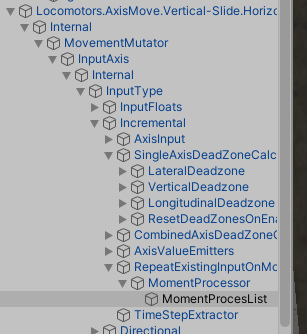
For starters AxesToVector3 moment processor does not exist and it appears that moment processors cannot be changed like on the image above either.
Below is the only moment processor I was able to locate within axis move.
I went ahead and set up the necessary components as far as I am aware
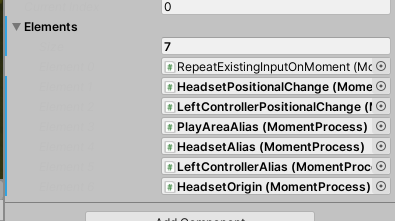
Surprisingly, it actually runs in-engine so I had slightly-higher-than-no hope for the build.
And it indeed worked!
The only issue is that I don't know what to do with this information. I don't know how VRTK works and as such, I find it unsafe to attempt to implement a solution without verifying things with you first.
I would like to know if there's any way to automate the re-assignment of moment processors, I have several levels each with many interactable game objects, as such it would probably take me weeks to do it manually. I know VRTK already automates some of the script assignment, so it should be possible to do it for this too.
I will be trying to do this myself but I doubt I will find any form of success.
Edit: I can just edit the prefab. I think.
The other thing I would like to know is what is the due process for this, do I disable the original moment processor once reassigned? What about the observer? What about processors that are linked to each other? What do I disable/remove and what do I leave be? I dont have any way of knowing.
HugoCortell
on 6 Oct 2020
Related issues
thestonefox
·
5Comments
 wheatgrinder
·
7Comments
wheatgrinder
·
7Comments
 broehl
·
8Comments
thestonefox
·
3Comments
broehl
·
8Comments
thestonefox
·
3Comments
 dotcommer
·
5Comments
dotcommer
·
5Comments