Steps to reproduce
- Issued command: sudo bash /var/scripts/update.sh
- Slow internet connectivity resulted in longer than normal download.
- Update was left to continue, and on return, the update had failed.
Expected behaviour
Removal of old Nextcloud instance and installation of new instance.
Actual behaviour
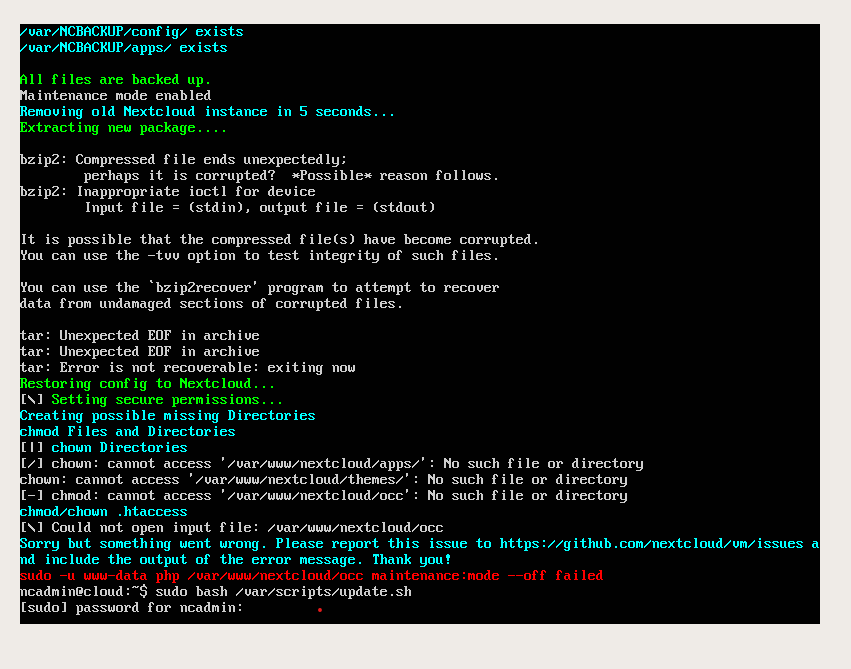
Old instance was removed, but it seems that the newly downloaded instance had either not downloaded correctly, or was corrupted, possibly due to slow internet connectivity.
Image attached showing what was on screen.
Nextcloud server version: Was in process of upgrading from 17.? to 18.0
Server OS: Ubuntu 18.04
How did you install the VM? Released Version
Network
Do you use DHCP? Yes. Static Lease set in Router
Is port 80 and/or 443 open? Yes
Logs / Screenshots
 ChuckNozzle
All 17 comments
@szaimen could you please have a look? I'm abroad and right now without a laptop, and this seems quite urgent.
Thanks!
 enoch85
on 18 Jan 2020
enoch85
on 18 Jan 2020
@enoch85 I would like to but I don't know if I am skilled enough for that.
BTW it seems like the download was corrupted, so are you comparing the checksums of the downloaded tar file against the original file in the update script? This should prevent such problems.
@ChuckNozzle do you have an external backup from you instance and can restore it in the meantime?
 szaimen
on 18 Jan 2020
szaimen
on 18 Jan 2020
I don’t have a backup for the VM, but I have been considering deploying a fresh VM for a while now.
If I can transfer the database and apps etc, then I am happy to do that, I just need to know what I need to transfer to the new VM.
The main reason for reporting this was the fact that the update didn’t pick up the corruption, and then to find out how to migrate to a new VM.
ChuckNozzle
on 18 Jan 2020
@ChuckNozzle concerning the backup&restore/migration: the only thing I can currently guide you to is https://github.com/nextcloud/vm/issues/999
For everything else, @enoch85 should answer, or you ask in the help forum: https://help.nextcloud.com/c/support/appliances-docker-snappy-vm
szaimen
on 18 Jan 2020
Had a look, and that seems to be the info I need.
Thanks!
ChuckNozzle
on 18 Jan 2020
It sure seems like the slow link caused a corruption. Probably due to heavy load on the Nextcloud servers, in combination with the slow link.
I made a PR to at least try to avoid it. Please test if it works @szaimen
enoch85
on 18 Jan 2020
i am getting very similar behavior (i get somewhat different error output). I always snapshot the vm before updating it so i have reproduced it 3 times now. i could capture the console output to a file if it would help...
 dieterarn
on 19 Jan 2020
dieterarn
on 19 Jan 2020
i am getting very similar behavior (i get somewhat different error output). I always snapshot the vm before updating it so i have reproduced it 3 times now. i could capture the console output to a file if it would help...
Of course, that would be really helpful! Please post it as a new comment here afterwards.
szaimen
on 19 Jan 2020
here it is:
dpkg-query: no packages found matching mysql-common
dpkg-query: no packages found matching php7.3-common
Reading package lists... Done
Building dependency tree
Reading state information... Done
Calculating upgrade... Done
The following package was automatically installed and is no longer required:
libllvm8
Use 'sudo apt autoremove' to remove it.
0 upgraded, 0 newly installed, 0 to remove and 0 not upgraded.
dpkg-query: no packages found matching mysql-common
Trying to upgrade the Redis PECL extension...
Updating channel "pecl.php.net"
Channel "pecl.php.net" is up to date
Nothing to upgrade
Trying to upgrade igbinary and APCu...
Reading package lists... Done
Building dependency tree
Reading state information... Done
The following packages will be REMOVED:
libllvm8
0 upgraded, 0 newly installed, 1 to remove and 0 not upgraded.
After this operation, 62.9 MB disk space will be freed.
(Reading database ... 173127 files and directories currently installed.)
Removing libllvm8:amd64 (1:8-3~ubuntu18.04.2) ...
Processing triggers for libc-bin (2.27-3ubuntu1) ...
Reading package lists... Done
Building dependency tree
Reading state information... Done
Sourcing file /etc/default/grub'
Sourcing file/etc/default/grub.d/50-curtin-settings.cfg'
Generating grub configuration file ...
Found linux image: /boot/vmlinuz-4.15.0-74-generic
Found initrd image: /boot/initrd.img-4.15.0-74-generic
Found linux image: /boot/vmlinuz-4.15.0-72-generic
Found initrd image: /boot/initrd.img-4.15.0-72-generic
done
Maintenance mode already disabled
Trying to automatically update all Nextcloud apps...
apporder new version available: 0.9.0
apporder updated
news new version available: 14.1.2
news updated
calendar new version available: 2.0.0
Error: Lost connection to LDAP server.
calendar updated
notes new version available: 3.1.1
notes updated
audioplayer new version available: 2.9.0
audioplayer updated
issuetemplate new version available: 0.6.0
issuetemplate updated
deck new version available: 0.8.0
Error: LDAP Operations error
deck updated
twofactor_u2f new version available: 5.0.2
twofactor_u2f updated
user_external new version available: 0.8.0
user_external updated
cookbook new version available: 0.5.7
cookbook updated
passwords new version available: 2020.1.0
passwords updated
carnet new version available: 0.19.2
carnet updated
music new version available: 0.12.1
music updated
cospend new version available: 0.3.0
cospend updated
onlyoffice new version available: 4.1.1
onlyoffice updated
Posting notification to users that are admins, this might take a while...
Posting 'You've got app updates!' to: ncadmin
Nextcloud or one of the apps require upgrade - only a limited number of commands are available
You may use your browser or the occ upgrade command to do the upgrade
There are no commands defined in the "notification" namespace.
Sorry but something went wrong. Please report this issue to https://github.com/nextcloud/vm/issues and include the output of the error message. Thank you!
sudo -u www-data php /var/www/nextcloud/occ notification:generate -l apporder new version available: 0.9.0
apporder updated
news new version available: 14.1.2
news updated
calendar new version available: 2.0.0
Error: Lost connection to LDAP server.
calendar updated
notes new version available: 3.1.1
notes updated
audioplayer new version available: 2.9.0
audioplayer updated
issuetemplate new version available: 0.6.0
issuetemplate updated
deck new version available: 0.8.0
Error: LDAP Operations error
deck updated
twofactor_u2f new version available: 5.0.2
twofactor_u2f updated
user_external new version available: 0.8.0
user_external updated
cookbook new version available: 0.5.7
cookbook updated
passwords new version available: 2020.1.0
passwords updated
carnet new version available: 0.19.2
carnet updated
music new version available: 0.12.1
music updated
cospend new version available: 0.3.0
cospend updated
onlyoffice new version available: 4.1.1
onlyoffice updated ncadmin You've got app updates! failed
dieterarn
on 19 Jan 2020
@dieterarn thanks for your logs! They are quite helpful!
@enoch85 actually I don't know what is causing this but maybe we could prevent such errors by subsituting occ_command in the notify_admin_gui as well? (Like in app:update --all)
szaimen
on 19 Jan 2020
@szaimen Let's revert the PR. This is the second issue reported to me regarding that after we merged.
This makes the update script unstable, a big no no.
enoch85
on 19 Jan 2020
enoch85
on 19 Jan 2020
subsituting occ_command
Yes, we can do that. But let's wait until the storm is over with all NC 18 updates.
enoch85
on 19 Jan 2020
@dieterarn Your issue should be fixed now. Please try again. Sorry for causing this!
enoch85
on 19 Jan 2020
OK, so the fix is now release. Now we check:
- If the download was OK
- If network is OK before downloading
- SHA256SUM of the downloaded file
- GPG Integrety of the downloaded file.
- Aborts if the extraction fails.
We can't do it more robust than it is right now.
Hope it works!
enoch85
on 19 Jan 2020
Thanks guys! Hopefully this helps others not have this issue.
Just so you know, it does seem to have been the outage on the WACS and SAT3 undersea cables that caused the corruption of the download in the first place, as I tried to download the current .ova image from HanssonIT, and it also got corrupted.
Now I just have to wait for the WACS and SAT3 cables to be fixed so that I can get a decent download from Europe!
ChuckNozzle
on 19 Jan 2020
@enoch85 I think the error reported by @dieterarn was due to a disabled notification app. So this be solved by checking for the notification app.
szaimen
on 23 Jan 2020
Related issues
 smartens
·
6Comments
szaimen
·
6Comments
smartens
·
6Comments
szaimen
·
6Comments
 silverdr
·
6Comments
silverdr
·
6Comments
 wouterVE
·
4Comments
wouterVE
·
4Comments
 thejohnha
·
8Comments
thejohnha
·
8Comments
Most helpful comment
Thanks guys! Hopefully this helps others not have this issue.
Just so you know, it does seem to have been the outage on the WACS and SAT3 undersea cables that caused the corruption of the download in the first place, as I tried to download the current .ova image from HanssonIT, and it also got corrupted.
Now I just have to wait for the WACS and SAT3 cables to be fixed so that I can get a decent download from Europe!