Vm: Use a Reverse Proxy for Bitwarden and generate certs with our function
Hey,
The standard bitwarden implementation is quite heavy on ressources.
Do you think it is feasable to add an option to install bitwarden_rs as alternative to the normal installation or as an additional option?
If we could add a vhost and proxy the request like in the the collabora script, it would then also be possible to install it on a subdomain while using the normal ports 80 and 443.
Do you think it makes sense and would you accept a pull-request?
If yes, I would like to work on it.
BTW: where did you get all the information that is needed to make a virtualhost like this: https://github.com/nextcloud/vm/blob/master/old/onlyoffice.sh#L126-L164
It is much more complicated than the short apache examples in the bitwarden_rs wiki:
https://github.com/dani-garcia/bitwarden_rs/wiki/Proxy-examples
Do you think it would be possible to create a working proxy host template here, too?
for later: this is a guide for nginx: https://dennisnotes.com/note/20181112-bitwarden-server/
https://github.com/bitwarden/server/issues/314
 szaimen
All 6 comments
Hey,
I'm totally fine with making a Proxy instead of using another port - I've actually planned for that but never came to it since I'm limited on time. So please go ahead and do that. :+1:
Regarding using another repo, I'd say no. It's a matter of trust, and who do you trust more, Dani Garcia or Bitwqrden themselves? If you want Bitwarden, then get more server resources (if needed), we don't want to make it the "unofficial way". It might confuse users as well.
Bitwarden runs totally fine on 1 GB RAM standalone, so I see no reason to change anything.
 enoch85
on 29 Jul 2020
enoch85
on 29 Jul 2020
@szaimen Would be great if you had time to work on this! <3
enoch85
on 10 Aug 2020
I'll see what I can do 👍
szaimen
on 10 Aug 2020
Hm... so I investigated a bit and to make it work the user needs to enter everything in a correct order like this:
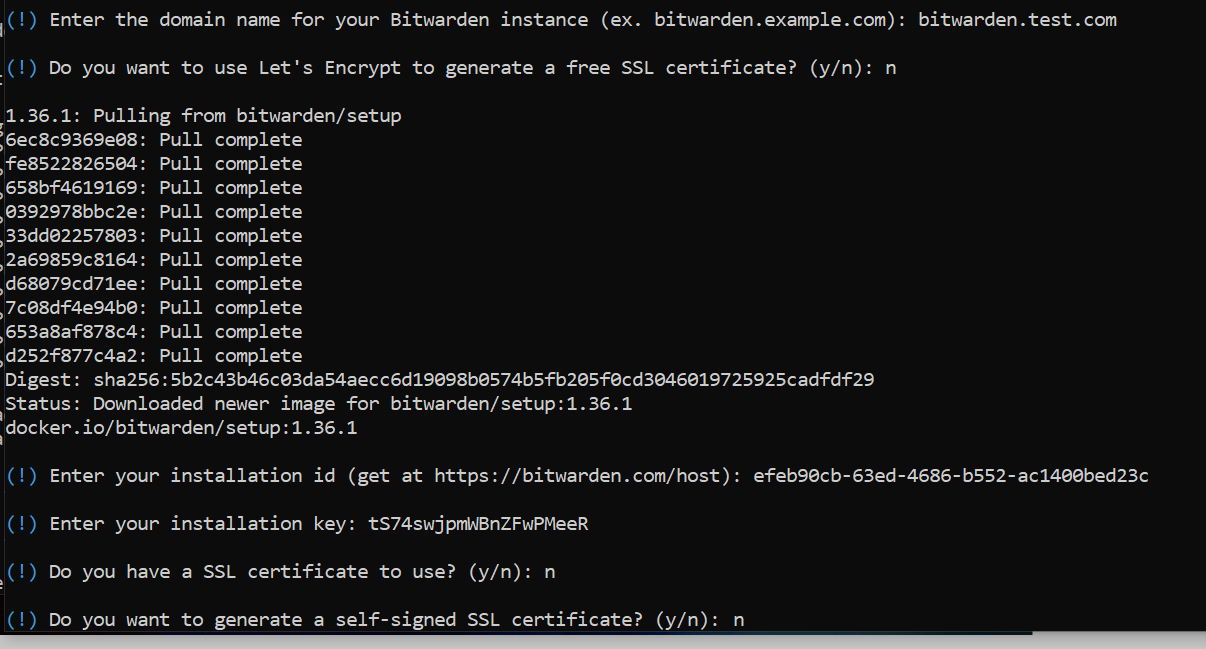
Do you think this is feasable? I mean I can provide instructions before this setup but they need to enter all answers correctly. There is no way around this when using the official bitwarden.sh script.
Additionally, they have to enter the domain that they want to use here and once more for our script - I mean we could export this from the bitwarden config.yml file which would examine the need to enter it twice...
szaimen
on 11 Aug 2020
no way around this when using the official bitwarden.sh script.
No, correct.
I was thinking that we can generate the cert before the Bitwarden setup and then let the user enter the https://address and answer no to the Let's Encrypt question in the Bitwarden setup.
So basically, prepare everything before the bitwarden script is run, and base the bitwarden script (their) on what we prepared.
Does that make sense?
enoch85
on 11 Aug 2020
I've started the first attempt and done it the other way around. So that we can retrieve the subdomain from bitwarden and do our configuration afterwards. Please have a look.
szaimen
on 11 Aug 2020
Related issues
 rakekniven
·
7Comments
enoch85
·
5Comments
rakekniven
·
7Comments
enoch85
·
5Comments
 mxschmitt
·
9Comments
enoch85
·
5Comments
mxschmitt
·
9Comments
enoch85
·
5Comments
 EmilyLove26
·
6Comments
EmilyLove26
·
6Comments