Visualstudio: GitHub Extension broken with VS 15.7.6
- GitHub Extension for Visual Studio version: 2.5.4.3349
- Visual Studio version: 15.7.6
__What happened__ (with steps, logs and screenshots, if possible)
After updating to VS 15.7.6 I started getting an error every time I open VS
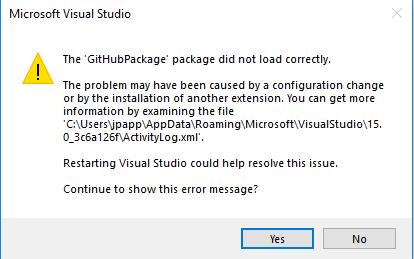
In the GitHub pane I see this error:
System.InvalidOperationException: Could not locate any instances of contract GitHub.Services.ITeamExplorerServiceHolder.
   at GitHub.VisualStudio.GitHubServiceProvider.GetService(Type serviceType) in C:\projects\visualstudio\src\GitHub.VisualStudio\Services\GitHubServiceProvider.cs:line 147
   at GitHub.VisualStudio.GitHubServiceProvider.GetService[T]() in C:\projects\visualstudio\src\GitHub.VisualStudio\Services\GitHubServiceProvider.cs:line 153
   at GitHub.VisualStudio.UI.GitHubPane.<InitializeAsync>d__12.MoveNext() in C:\projects\visualstudio\src\GitHub.VisualStudio\UI\GitHubPane.cs:line 98
 jeffpapp
All 15 comments
I have this error too with VS 15.7.5
 JeffreyAReyes
on 4 Aug 2018
JeffreyAReyes
on 4 Aug 2018
@jeffpapp thanks fro the report. I have a PR with a possible workaround #1831.
Could you try installing this version (simply open the .vsix file):
https://ci.appveyor.com/api/buildjobs/9hh231frn2euc7be/artifacts/2.5.5.3553%2FGitHub.VisualStudio.vsix
Please let me know if this improves things.
 jcansdale
on 7 Aug 2018
jcansdale
on 7 Aug 2018
@jcansdale I installed that and it looks like it fixed it. The GitHub extension pane is working again and no error when opening VS.
I should be good to keep that version installed and then I should pick up the next official update when it comes out right?
jeffpapp
on 7 Aug 2018
Hi @jeffpapp,
Any chance you could install the following build from #1839:
https://ci.appveyor.com/api/buildjobs/i44gyu8roh16cm2n/artifacts/2.5.5.3618%2FGitHub.VisualStudio.vsix
The build that you installed included two commits and I need to isolate which one actually fixed it! I'm pretty sure that it's the one included in this build, but I need to make sure. This is a strange issue that appears to bite very old and very new versions of Visual Studio 2017. My current theory is that Microsoft forgot to update their binding redirects in recent versions.
Let me know how you get on. 😄
jcansdale
on 7 Aug 2018
@jcansdale,
I just installed GitHub.VisualStudio 2.5.5.3618 and everything is still looking good. Hopefully this helps you narrow down the issue. Let me know if you need me to test anything else.
Thanks for your help on this!
jeffpapp
on 7 Aug 2018
@jeffpapp,
If you were up for following the instructions https://github.com/github/VisualStudio/issues/1810#issuecomment-411218967, that would help us get to the bottom of what's going wrong. I'm still not sure what exactly is going on!
jcansdale
on 8 Aug 2018
@jeffpapp,
If you were up for following the instructions here, that would help us get to the bottom of what's going wrong:
1810 (comment)
I'm still not sure what exactly is going on!
Here's my output. Hope this helps
------ Test started: Assembly: ClassLibrary1.dll ------

Microsoft.VisualStudio.Threading, Version=15.6.0.0, Culture=neutral, PublicKeyToken=b03f5f7f11d50a3a
<assemblyIdentity name="Microsoft.VisualStudio.Threading" publicKeyToken="b03f5f7f11d50a3a" culture="neutral"/>
<bindingRedirect oldVersion="12.0.0.0-15.6.0.0" newVersion="15.6.0.0"/>

1 passed, 0 failed, 0 skipped, took 0.09 seconds (Ghost).
@jeffpapp thanks for the output. Alas, still no smoking gun. 😕
I'm hoping someone from Microsoft will be able to shed some light on what's going on.
jcansdale
on 8 Aug 2018
@jeffpapp,
I've started having doubts about this fix and am wondering if simply reinstalling the extension is what "fixed" it. 😢
To be sure, I'd need someone who was experiencing this issue to reinstall the original version and confirm whether or not the issue comes back.
Any chance you could do the following:
- Uninstall GitHub for Visual Studio via
Extensions and Updates... - Close Visual Studio and allow the VSIX Installer to complete the uninstall
- Open the original VSIX and allow it to install
https://github.com/github/VisualStudio/releases/download/v2.5.4.3349/GitHub.VisualStudio.vsix - See if the
package did not load correctlyissue comes back
I'm really hoping that it does, because if not I'm back to square one. 😨
I know it's a pain uninstalling/reinstalling extensions and appreciate your patience with this!
jcansdale
on 8 Aug 2018
@jcansdale, here ya go. This fixes the problem for me.
Visual Studio Professional v15.7.6
- VS Installer : Uninstall Git & GitHub Extension for Visual Studio
- Launch Visual Studio
- Close Visual Studio
- VS Installer : Install Git & GitHub Extension for Visual Studio
- Launch Visual Studio
- Verified that Git works by opening, changing, and commiting
- Upgrade GitHub Extension for Visual Studio v2.2.0.10 => 2.5.4.3349
- Close Visual Studio
- Let VSIX Installer update GitHub Extension for Visual Studio
- Launch Visual Studio
- Verified that Git works by opening, changing, and commiting
 smbworkify
on 9 Aug 2018
smbworkify
on 9 Aug 2018
@smbworkify thanks for confirming this. That's good to know, if a bit depressing. 😢 I was hoping we had a fix and this wouldn't continue randomly biting us.
jcansdale
on 9 Aug 2018
@jcansdale, It seems to me that the connection between VS v15.7.6 and Git is corrupted and not the GitHub Extension for Visual Studio. I cannot test this because my environment is working now. If you know someone using Git with VSTS, that would tell you for sure.
smbworkify
on 9 Aug 2018
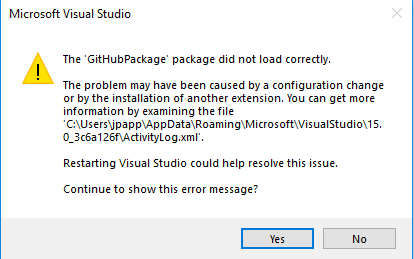
@smbworkify just to double check, were you seeing a dialog similar to this when you reinstalled?
jcansdale
on 9 Aug 2018
I was getting that dialog box on Monday. Today, I ran through the steps I outlined previously. After which the GitHub Extension tools are working again and I am no longer receiving the dialog box.
smbworkify
on 9 Aug 2018
Hello, same error with extension v2.5.4.3349 and visual studio 15.8.0
<entry>
<record>890</record>
<time>2018/08/20 16:32:46.108</time>
<type>Information</type>
<source>VisualStudio</source>
<description>Begin package load [GitHubPackage]</description>
<guid>{C3D3DC68-C977-411F-B3E8-03B0DCCF7DFC}</guid>
</entry>
<entry>
<record>891</record>
<time>2018/08/20 16:32:46.248</time>
<type>Error</type>
<source>VisualStudio</source>
<description>SetSite failed for package [GitHubPackage]Source: 'System.ComponentModel.Composition' Description: No exports were found that match the constraint: 
	ContractName	GitHub.Commands.IOpenFromUrlCommand
	RequiredTypeIdentity	GitHub.Commands.IOpenFromUrlCommand
</description>
<guid>{C3D3DC68-C977-411F-B3E8-03B0DCCF7DFC}</guid>
<hr>80131500</hr>
<errorinfo></errorinfo>
</entry>
<entry>
<record>892</record>
<time>2018/08/20 16:32:46.262</time>
<type>Error</type>
<source>VisualStudio</source>
<description>End package load [GitHubPackage]</description>
<guid>{C3D3DC68-C977-411F-B3E8-03B0DCCF7DFC}</guid>
<hr>80131500</hr>
<errorinfo></errorinfo>
</entry>
Upgrade to VS 15.8.1, same error, so i fix it deleting the cache files:
%USERPROFILE%\AppData\Local\Microsoft\VisualStudio\15.0_xxxxxxxx*.cache
Open VS, close, and open again, and the extension is now showing in Team Explorer.
 JavierCanon
on 20 Aug 2018
JavierCanon
on 20 Aug 2018
Related issues
jcansdale
·
4Comments
jcansdale
·
10Comments
 laurentkempe
·
4Comments
laurentkempe
·
4Comments
 jharris1993
·
5Comments
jharris1993
·
5Comments
 nk111
·
9Comments
nk111
·
9Comments
Most helpful comment
@jeffpapp thanks fro the report. I have a PR with a possible workaround #1831.
Could you try installing this version (simply open the .vsix file):
https://ci.appveyor.com/api/buildjobs/9hh231frn2euc7be/artifacts/2.5.5.3553%2FGitHub.VisualStudio.vsix
Please let me know if this improves things.