Visualstudio: Cannot click on Github Enterprise on Sign in prompt
Hi!
I have a problem similar to https://github.com/github/VisualStudio/issues/12 but reversed.
I cannot click on GitHub Enterprise both on VS2015 and VS2017.
Any ideas?
 AmbroiseCouissin
All 10 comments
Hi @AmbroiseCouissin, thanks for writing in. Unfortunately, I'm unable to reproduce this myself, but another user recently reported the same issue as you.
Did this problem just start happening out of the blue, or did you recently update your extension?
Also, what version of the extension are you using?
 meaghanlewis
on 2 Oct 2017
meaghanlewis
on 2 Oct 2017
Hi @meaghanlewis,
It was the first time I use the extension. Right after downloading VS 2015 and VS 2017 on a new computer.
The version is: 2.3.3.38
Cheers!
AmbroiseCouissin
on 3 Oct 2017
I'm still currently unable to reproduce this issue myself, but am trying to! Can you tell me what version of Visual Studio you are using?
Also, just to confirm, when you go to Team Explorer - Connect, does your tab look like this?

meaghanlewis
on 4 Oct 2017
Thank you Meaghan!
See below picts regards my NB status.
Thanks once again!
Miller
[image: Imagem inline 1]
[image: Imagem inline 2]
[image: Imagem inline 3]
2017-10-03 19:43 GMT-03:00 Meaghan Lewis notifications@github.com:
I'm still currently unable to reproduce this issue myself, but am trying
to! Can you tell me what version of Visual Studio you are using?Also, just to confirm, when you go to Team Explorer - Connect, does your
tab look like this?[image: screen shot 2017-10-03 at 3 42 59 pm]
https://user-images.githubusercontent.com/10103121/31152558-9480c3f8-a851-11e7-95d2-4ac2d98cd5bf.png—
You are receiving this because you are subscribed to this thread.
Reply to this email directly, view it on GitHub
https://github.com/github/VisualStudio/issues/1242#issuecomment-334000441,
or mute the thread
https://github.com/notifications/unsubscribe-auth/Ae--e0Uu96q7YMjlTVhTqvMRgNauQukqks5sorikgaJpZM4PoJ2E
.
 Cliff-Miller
on 4 Oct 2017
Cliff-Miller
on 4 Oct 2017
Hi @meaghanlewis ,
Yes, my tab looks like your picture.
The version of visual studio I am using are:
- Microsoft Visual Studio Enterprise 2017 Version 15.3.5
- Microsoft Visual Studio Enterprise 2015 Version 14.0.25431.01 Update 3
Cheers
AmbroiseCouissin
on 4 Oct 2017
@AmbroiseCouissin,
Does your login prompt look like this, except with GitHub underlined?
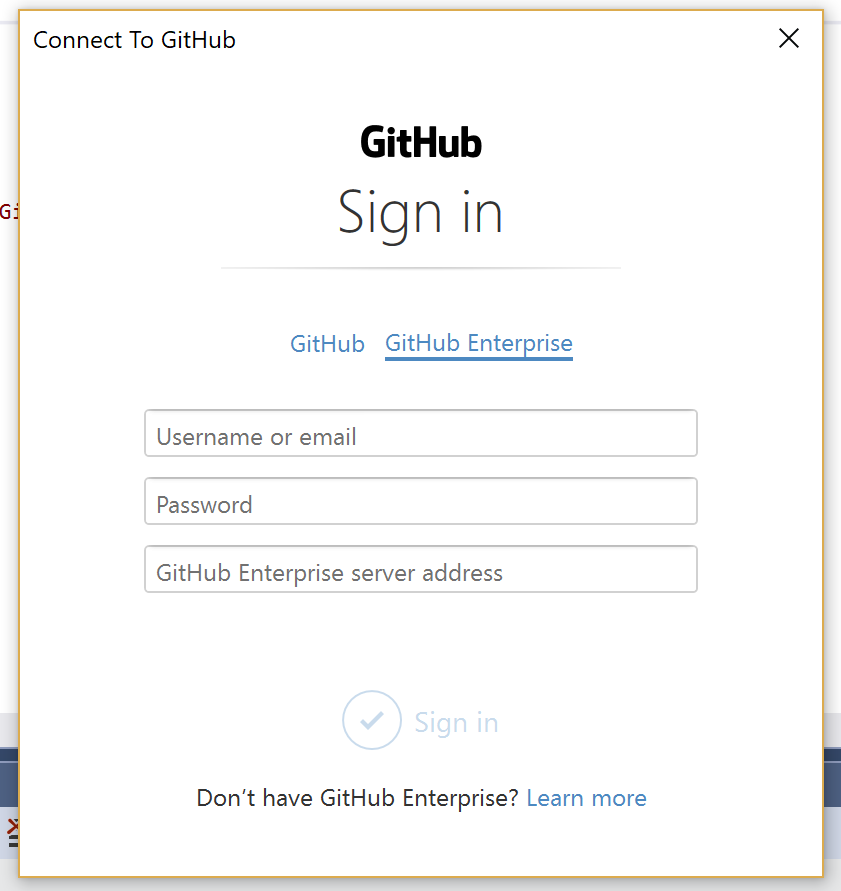
When I'm logged into GitHub, the prompt doesn't let me click on the GitHub option. I wonder if it's the same for you, except it thinks you're already logged into Enterprise. 😕
 jcansdale
on 4 Oct 2017
jcansdale
on 4 Oct 2017
@AmbroiseCouissin,
We think it might be related to this issue https://github.com/github/VisualStudio/issues/1094.
Could you try the following:
- Open
Credential Managerfrom the Windows Start Menu - Click on
Windows Credentials - Select the credentials related to your Enterprise server
- Click on
Remove
Now try to sign in using GitHub for Visual Studio.
jcansdale
on 4 Oct 2017
@AmbroiseCouissin Just FYI, another user with this same issue had success with the above steps. 🤞 it will work for you as well.
jcansdale
on 5 Oct 2017
@jcansdale It worked!
Thanks!
AmbroiseCouissin
on 6 Oct 2017
This should have been fixed in #1277 and will be shipped in the next minor version.
 grokys
on 11 Dec 2017
grokys
on 11 Dec 2017
Related issues
 diryboy
·
9Comments
diryboy
·
9Comments
 jharris1993
·
5Comments
jcansdale
·
4Comments
jharris1993
·
5Comments
jcansdale
·
4Comments
 jnm2
·
8Comments
grokys
·
7Comments
jnm2
·
8Comments
grokys
·
7Comments
Most helpful comment
@AmbroiseCouissin,
We think it might be related to this issue https://github.com/github/VisualStudio/issues/1094.
Could you try the following:
Credential Managerfrom the Windows Start MenuWindows CredentialsRemoveNow try to sign in using GitHub for Visual Studio.